ArkInventory
ArkInventory (for The War Within)
:boom: Please ensure you are using the latest alpha version if you have the War Within client.
ArkInventory (for Retail, Classic, and Cataclysm)
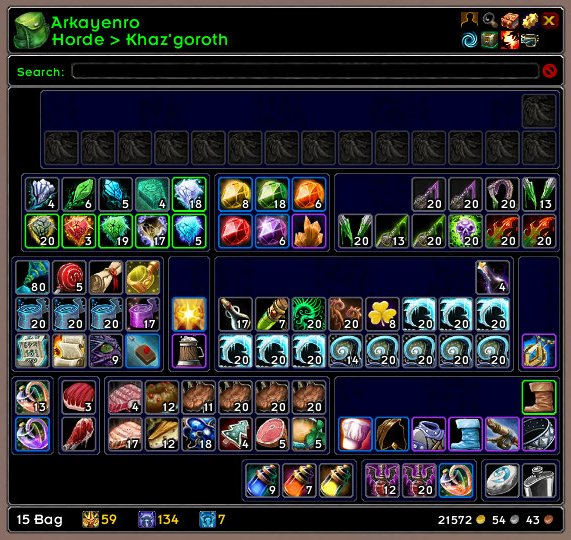
ArkInventory's display windows are built from "virtual bars", you assign categories to bars so that items in that category are displayed on the specific bars you want. There is no limit to the number of bars you can have inside a window but obviously you only have so much screen real estate before it becomes "too many".
ArkInventory uses several methods to assign a default category to an item such as what professions you have, tooltip scanning, basic type/subtype and PeriodicTable. You then assign those categories to a virtual bar.
You can also over-ride the default category by creating a rule that matches either a single or multiple items.
Overview:
- user configurable window width and height
- separate keybindings for each location for easy viewing
- assign items to a category of your choice (overrides the default assignment)
- assign categories to the bar of your choice
- unlimited number of bars (there are practical limits though before your screen becomes full)
- sort each bar differently if required
- user configurable bars per row
- sell junk items automatically or manually (delete available via a keybinding or right clicking when at a vendor)
- random pet and mount summons. can also assign a group of them to select from
Key Bindings:
- Press ESCAPE to bring up the blizzard menu
- click on Key Bindings
- scroll down to AddOns > ArkInventory
- bind the keys you want to use
Need Help?
:memo: Wiki
:memo: Frequently Asked Questions
:memo: Sorting
:memo: Rules
:memo: If you are having an issue the first step is to disable all other mods and test with only ArkInventory loaded
:memo: If the issue is still there, please check for an existing issue and create a new issue if required.
:memo: If the issue is gone, re-enable your other mods one by one until the issue comes back, then note the last mod you enabled in your issue as well as notifying the author of the other mod
See ChangeHistory.md for changes to the latest version. See VersionHistory.md for all previous changes.
:boom: The NoLib variant
it seems quite a few people are somehow getting the NoLib variant from their download client when they didn't specifically ask for it, instead of the full variant, and its causing issues as they don't have the required libraries installed separately. Please ensure you are downloading the full. if you see nolib in the filename then its the wrong variant, unless you are actually installing all of the required libraries separately as well. If you have to you can manually download the full variant from CurseForge, WoWInterface, or Wago.
:boom: Junk Sell getting blocked
While auto-destroy remains blocked, From 30960 onwards you can setup a Key Binding to manually sell and destroy your items. Note that blizzard require one keypress per item deletion, so if you have multiple items that need to be deleted you will need to press the Key Binding multiple times. A message will be output if you have remaining items that can still be deleted.
:warning: Ensure you have backup copies of your saved variables file
Sometimes you cannot revert back to a previous version without a backup, especially alpha or beta versions, so before upgrading please make sure you have made a backup of your saved variables file
Your saved variables file is normally located at ...\World of Warcraft\_client_\WTF\Account\yourwowaccountname\SavedVariables\ArkInventory.lua
It is your responsibility to ensure you have adequate backups of your saved variables file. You dont have to do them frequently, just after you've made major changes to your config is probably fine for most people, but you should get into the habit of making backups because when it does corrupt you wont have to reconfigure everything from scratch.
If you have your download client set to automatically download alpha/beta versions you should definitely have backups.
A simple way to back up the saved variables file is to just do a copy and paste then rename the new file (using the version number of ArkInventory or the date is a good idea), eg ArkInventory-30900.lua, or ArkInventory-20191228.lua
Comments

-

Arkayenro Owner
-
View User Profile
-
Send Message
Posted Aug 22, 2013i cant duplicate this at all
the only blue tint is potentially from the background covering up the items - simple to check, change your background colour and see if it changes.the tint changes in combat
or you can also check the config, under display > bug fixes, make sure the framelevel option is enabled
if you could also test this without any other mods loaded it would be appreciated (just use one of the level 8-10 mobs outside of a major city, mount up, get into combat and then do a /reload, once back in open the bag, when done fly up out of range)
my bags take less than 10 seconds to open in combat and i dont get the blue tint
-
View User Profile
-
Send Message
Posted Aug 22, 2013Sorry, I cross posted my edit with your reply :)
I did as you suggested, changed the colour background, chacked all the settings you mentioned - all it did was change the colour of the "film" and still could not see any items. Clicked off all my other addons, reloaded and set my pet to attack a target dummy and it was still the same. As my pet was attacking the dummy, I opened bags, got the blue, it cleared, closed bags, re-opened, blue etc for several times whilst pet was in combat, unfortunately the same thing happened every time.
Edit - just did what you suggested about low level mobs and /reloads etc with no other addons, same thing happened. It seems to be happening every time you open bags whichever way you are in combat.
-
View User Profile
-
Send Message
Posted Aug 22, 2013if its changing colour with your background then it sounds like the background coming up on top again - which was always a pain as i could never duplicate that issue normally
any chance you could try it with only ai loaded?
or rename this file ...\World of Warcraft\WTF\Account\ACCOUNTNAME\REALM-NAME\PLAYER-NAME\layout-cache.txt to .old and reload to see what happens, also if you could let me know the framelevel it has for ARKINV_Frame1
-
View User Profile
-
Send Message
Posted Aug 22, 2013the delay is due to the new blizzard combat timers, mod code can only run for so long in combat or it gets forcibly aborted, that why the bags load so slowly if you open them for the first time while you are in combat, nothing has been built yet and thats the most intensive part of showing the bags, the lag isnt actually lag its the build code purposely yielding (so it doesnt get aborted), then getting resumed after 0.02 seconds.
does the blue tint go away once the bags are completely built and positioned correctly?
-
View User Profile
-
Send Message
Posted Aug 22, 2013Thanks for the quick replies Just to let you know I am in no way any kind of techie person and I am not sure of what you mean by AI, is it an abbreviation of ArkInv? If it is, then I have already tried disabling all other addons etc and it still does the blue thing.
I cannot seem to locate that file you referred to - I have one in that folder called layout-total.txt, but not layout-cache.txt. Is it the same thing? If so, what exactly is it you would like to try renaming it to, just " .old"? If it is, I have just tried it and unfortunately it is still happening.
-
View User Profile
-
Send Message
Posted Aug 19, 2013I really hate how my whole bag turns blue in combat. Really hate. One of my irrational hatreds of addons is the typical, 'you're in combat so we'll add a childproof setting cos we presume you don't want to do anything in combat.'
Maybe this has nothing to do with being in combat. But as much as I love all the little things of this addon, that upto 30second wait you force me to do just because I'm in combat pisses me off ridiculously.
I'll not be using this addon anymore.
good luck with the project, no hard feelings.
Bloodpurge
xox
PS. Guild Bank stills fucks up too, can't view money ledger etc.
-
View User Profile
-
Send Message
Posted Aug 19, 2013there is no childproof in combat code, theres now slowness due to the new combat timers that have to be accounted for, but hey youve moved on so no idea why im bothering
-
View User Profile
-
Send Message
Posted Aug 19, 2013i have no idea where its coming from because im not able to reproduce it - and yes, sitting in front of a level 2 scorpion outside org and reloading is a simple way to load while in combat, and yet my bag builds and loads without and issues (yes, its slower and is a big messy pile of items until its built, but it gets there in under 10 seconds, i dont see a blue screen, and all the items are usable, movable, it works fine for me)
-
View User Profile
-
Send Message
Posted Aug 17, 2013theres an alpha version (r406) that might (or might not) fix the in combat display issue, it may result in script running too long errors (its a tradeoff to either erroring or taking longer to display)
you may have to click on the project site link and download it from there. or change the preferred release type in the curse client for arkinventory to download alpha versions.
by blue do people mean purple? if you mouseover a "blue" tinted item does its tooltip say its tainted and cant be used or do you get a normal tooltip?
btw, im presuming the in combat display lag is only until the bags are fully displayed, then it no longer happens?
-
View User Profile
-
Send Message
Posted Aug 19, 2013When you open the bag in combat everything is displayed for a short moment and then it starts "loading" all the items again. it might be that thats causing the display lag.
-
View User Profile
-
Send Message
Posted Aug 20, 2013tried to delete \SavedVariables\ArkInventory.lua that didnt solve it ether.
It took under 2 sec before the update. Im not sure why its supposed to be fine in "less than 10 sec" thats a long time when you need some "stupid" item that you forgot to add to your bars
Realy hope this gets solved as i love your addon.
-
View User Profile
-
Send Message
Posted Aug 16, 2013the latest update can also make the bag contents also dissapear and go blue and may take several reload ui's to recover from this. also when receiving loot from bosses in lfr the maynot appear the bags sometimes (even though it's there) due to the addon
-
View User Profile
-
Send Message
Posted Aug 17, 2013Same problem.
-
View User Profile
-
Send Message
Posted Aug 17, 2013Same problem here!, has anyone tried to open up a chat with the creator? or report this?
-
View User Profile
-
Send Message
Posted Aug 19, 2013perhaps the blue screen is the old framelevel issue where the blue background stays on top - perhaps people could change their background colour and see if thats the issue?
ie, there is no code for a blue tint, only purple, and that should only show up for bags with more than 50 slots (of which there are none), so its doubtful youve ended up with the tainted item slots and its something else
eg, have you disabled the framelevel bug fix in your options?
-
View User Profile
-
Send Message
Posted Aug 14, 2013same problem.
-
View User Profile
-
Send Message
Posted Aug 15, 2013I am also having the same issue.
-
View User Profile
-
Send Message
Posted Aug 11, 2013Since latest update yesterday, opening a bag in combat lags miserably. bag contents dont show up for 10 seconds
-
View User Profile
-
Send Message
Posted Aug 12, 2013got the same issue
-
View User Profile
-
Send Message
Posted Aug 19, 2013if you can think of any way to run a script longer than the blizzard script combat timer allows for then please let me know. until then im stuck with yielding and resuming the code as fast as i can.
btw, whats in your bags that you need in the first 10 seconds of loading into combat for the very first time? could it not be placed onto an action bar?
as far as im aware if the bag is built then entering combat doesnt make any difference, this issue is only a one off when entering into combat without the bag having been previously opened (eg when you first log into the game and go straight into combat?)