ArkInventory
ArkInventory (for The War Within)
:boom: Please ensure you are using the latest alpha version if you have the War Within client.
ArkInventory (for Retail, Classic, and Cataclysm)
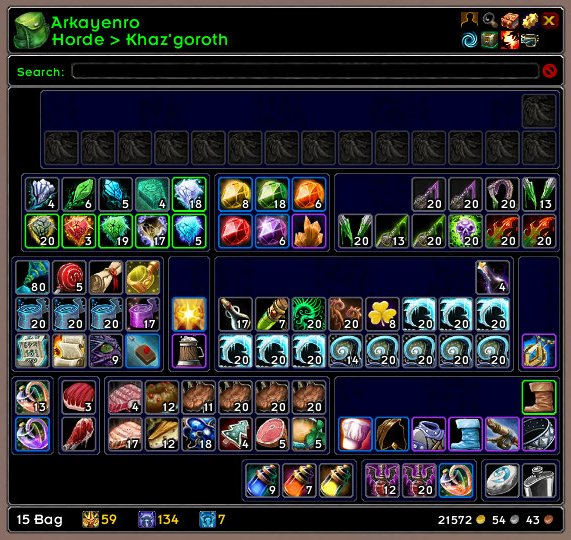
ArkInventory's display windows are built from "virtual bars", you assign categories to bars so that items in that category are displayed on the specific bars you want. There is no limit to the number of bars you can have inside a window but obviously you only have so much screen real estate before it becomes "too many".
ArkInventory uses several methods to assign a default category to an item such as what professions you have, tooltip scanning, basic type/subtype and PeriodicTable. You then assign those categories to a virtual bar.
You can also over-ride the default category by creating a rule that matches either a single or multiple items.
Overview:
- user configurable window width and height
- separate keybindings for each location for easy viewing
- assign items to a category of your choice (overrides the default assignment)
- assign categories to the bar of your choice
- unlimited number of bars (there are practical limits though before your screen becomes full)
- sort each bar differently if required
- user configurable bars per row
- sell junk items automatically or manually (delete available via a keybinding or right clicking when at a vendor)
- random pet and mount summons. can also assign a group of them to select from
Key Bindings:
- Press ESCAPE to bring up the blizzard menu
- click on Key Bindings
- scroll down to AddOns > ArkInventory
- bind the keys you want to use
Need Help?
:memo: Wiki
:memo: Frequently Asked Questions
:memo: Sorting
:memo: Rules
:memo: If you are having an issue the first step is to disable all other mods and test with only ArkInventory loaded
:memo: If the issue is still there, please check for an existing issue and create a new issue if required.
:memo: If the issue is gone, re-enable your other mods one by one until the issue comes back, then note the last mod you enabled in your issue as well as notifying the author of the other mod
See ChangeHistory.md for changes to the latest version. See VersionHistory.md for all previous changes.
:boom: The NoLib variant
it seems quite a few people are somehow getting the NoLib variant from their download client when they didn't specifically ask for it, instead of the full variant, and its causing issues as they don't have the required libraries installed separately. Please ensure you are downloading the full. if you see nolib in the filename then its the wrong variant, unless you are actually installing all of the required libraries separately as well. If you have to you can manually download the full variant from CurseForge, WoWInterface, or Wago.
:boom: Junk Sell getting blocked
While auto-destroy remains blocked, From 30960 onwards you can setup a Key Binding to manually sell and destroy your items. Note that blizzard require one keypress per item deletion, so if you have multiple items that need to be deleted you will need to press the Key Binding multiple times. A message will be output if you have remaining items that can still be deleted.
:warning: Ensure you have backup copies of your saved variables file
Sometimes you cannot revert back to a previous version without a backup, especially alpha or beta versions, so before upgrading please make sure you have made a backup of your saved variables file
Your saved variables file is normally located at ...\World of Warcraft\_client_\WTF\Account\yourwowaccountname\SavedVariables\ArkInventory.lua
It is your responsibility to ensure you have adequate backups of your saved variables file. You dont have to do them frequently, just after you've made major changes to your config is probably fine for most people, but you should get into the habit of making backups because when it does corrupt you wont have to reconfigure everything from scratch.
If you have your download client set to automatically download alpha/beta versions you should definitely have backups.
A simple way to back up the saved variables file is to just do a copy and paste then rename the new file (using the version number of ArkInventory or the date is a good idea), eg ArkInventory-30900.lua, or ArkInventory-20191228.lua
Comments

-

Arkayenro Owner
-
View User Profile
-
Send Message
Posted Sep 26, 2012even easier, just redownload 3.03.10, overwrite .11 and uncheck auto install updates in curse client.
-
View User Profile
-
Send Message
Posted Sep 24, 2012So it seems the lag comes from any sort of queue building up for your inventory. I have lag in the following situations and no lag if I disable the addon.

1. Clicking Multiple Items in the Bank or Guild Bank (you know where they go grey and then all pop in your bag at the same time)
2. Getting my mail
3. Crafting Multiple Items that finish quickly like smelting...my machine literally slows to a crawl on smelting.
My computer is Ivy Bridge with a Geforce 670 so I don't think its my computer. Don't know if you can do anything about this at all but it didn't start until after the 5.0.4 dropped.
Thank you for your great work with this addon and I hope some of this info is helpful
-
View User Profile
-
Send Message
Posted Sep 23, 2012Can someone explain to me what the ArkInventoryRulesExample addon is, exactly?
-
View User Profile
-
Send Message
Posted Sep 23, 2012A example rule. To write your own Extensions for ArkInv.
-
View User Profile
-
Send Message
Posted Sep 23, 2012My outfitter bug isn't go away... sometimes it shows on login:
[14:19] AddonLoader: Loading ArkInventoryRules
[14:19] ArkInventory: outfitter was not ready, hook and wait
[14:19] ArkInventory: enabling ReagentRestocker support
[14:19] ArkInventory: Regeln eingeschaltet
but the ready-msg doesn't appear (I activated the debug messages) and after a reloadui all seems to be ok -.-
If you have time, look into it. I modified my source so it everytime thinks outfitter is enabled. This works for me, but not for other people.
-
View User Profile
-
Send Message
Posted Sep 22, 2012Something i would like to see in this addon is the ability to turn off the sorting when checking the Guild Bank. I like to see it sorted when i am getting something from it but when depositing I dont want to just place items in random slots and turn it into a mess.
Do you think it is possible?
Thanks for all your work on this great addon!
-
View User Profile
-
Send Message
Posted Sep 24, 2012You can disable Ark for the guild bank. How:
-
View User Profile
-
Send Message
Posted Sep 20, 2012I was wondering if you were able to find what could be wrong in my case? I still have the same problem with every version above the 3.03.06 version...
-
View User Profile
-
Send Message
Posted Sep 20, 2012if you have notepad++ or another editor that has syntax support for lua you can just collapse everything and look for the [Realm] key, expand that and find the server, expand that and youll have all toons and vaults on that server, delete the entire section belonging to the vault you want gone.
if youre still a member of that guild then the vault gold will come back
-
View User Profile
-
Send Message
Posted Sep 19, 2012Hi, i am having problems deleting old data from old guilds i used to be in. I read the FAQ but when i go to guild bank those guilds are not listed there so i can not delete them.
Is there another way to delete that data? Maybe directly from the ArkInventory.lua file?
Its really annoying, please help
Regards
-
View User Profile
-
Send Message
Posted Sep 19, 2012I installed the latest version through the Curse Client. I also tried manual installs. I checked the lua-file and this is what line 2888 tells me: function ArkInventory.CategoryLocationGet( loc_id, cat_id )
I'm still having these problems. Only one or two bars per line, only 9 bars at most. If it would happen on all characters I'd say it's something I have done wrong. The problem is that only 4 or 5 have this problem, all the others are fine....
With the 3.03.06 version, non had the problem. With every version above the 3.03.06 version, there were problems...
-
View User Profile
-
Send Message
Posted Sep 18, 2012I don't know if this problem has been described here before. I went through the first few pages but than I gave up looking for it. This only happens on one character by the way, I haven't found a second one so far with the same problem.
Not all the bars are showing in Edit mode. I also only get two bars per row, and only 7 bars in total. As you can see HERE. When I copy a profile of which I am sure it works on the other character, it gives the same result. The settings are set to showing 5 bars per row.
When I do a reset of the current profile, you can see the result HERE. Any idea why this is happening, and only on one character?
EDIT: I am now also getting criitical errors and wow shuts down, if I spend too much time in the Edit mode or config mode. This also doesn't happen on any other character.
EDIT 2: Deleting the WTF files didn't help either, the problem is still there.
-
View User Profile
-
Send Message
Posted Sep 18, 2012i think you have an item that has been delted off the servers, the fishing book is one example. disable AI and open each bag and mouse over every slot, even empty ones, see if the game crashes or generates a tooltip for an empty slot.
if it does try and delete the item, or sell it, or something. if it wont go away lodge a ticket with a GM and see if they will delete it.
-
View User Profile
-
Send Message
Posted Sep 18, 2012I just tried it, nothing came up. And when I enable AI again, I only get one single bar and no possibility to add more. I just noticed that when my brother logs into his account on my computer, he has the same problem on one character. Maybe a wrong install when I updated it with Curse client yesterday. I am going to try a clean install and see how that will work.
EDIT: I managed to get a Lua error. You can find it HERE
EDIT 2: After a clean install I get following error: CLICK
EDIT 3: I tried clean intalls with previous versions. Right now I have the 3.03.06 version installed and so far I am not running into any problems. I will look into it a bit more (test more characters) and I'll let you know
-
View User Profile
-
Send Message
Posted Sep 18, 2012both errors show that you cant find an internal function, and the most likely cause of that is source file corruption, either the download is corrupt or its corrupting when you install.
open the arkinventory.lua file and goto line 2888 (version 3.3.10, should be near there for previous versions) and see if the function exists or if its garbage - it should have function ArkInventory.CategoryLocationGet( loc_id, cat_id )
-
View User Profile
-
Send Message
Posted Sep 16, 2012Ello Ark first i want to say thank you for the awesome Mod...WoW life would not be the same without it. Second i am having issues with vanity pets. I saw a previous post about it and i followed the directions you gave but that did not help.....mine still only sees the pets i have learned since 5.0.4 went live and i can not summon ANY pets on ANY toons from the Arkinventory menu all i get is an error saying "you dont have a pet" regardless of how i try to summon him...with the broker button or opening the menu and selecting a pet and then selecting the option to summon that pet. Since the mounts still work perfectly is there a way to correct the vanity pets to also work?
-
View User Profile
-
Send Message
Posted Sep 16, 2012i havent gotten around to fixing pets yet so theyre still effectively disabled
-
View User Profile
-
Send Message
Posted Sep 17, 2012OH Sweet!!!!....Thank you that means it is not me :)!!! thank you for the prompt response i will patiently look forward to it being repaired.
-
View User Profile
-
Send Message
Posted Sep 16, 2012Do you look into the Outfitter bug (531)? It's very annoying.
Thanks for this great addon :)
-
View User Profile
-
Send Message
Posted Sep 16, 2012i couldnt find any obvious issues, outfitter (5.5.2) is tagging my items as being in a set and ai is putting them into the correct bars.
can you go into edit mode and check the assignment for the item?