ArkInventory
ArkInventory (for The War Within)
:boom: Please ensure you are using the latest alpha version if you have the War Within client.
ArkInventory (for Retail, Classic, and Cataclysm)
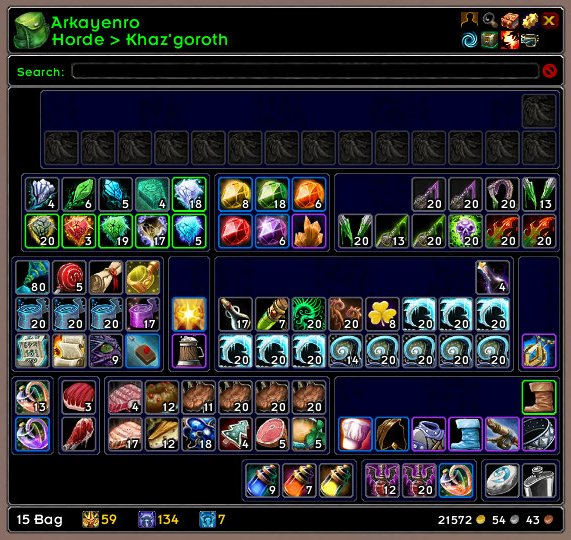
ArkInventory's display windows are built from "virtual bars", you assign categories to bars so that items in that category are displayed on the specific bars you want. There is no limit to the number of bars you can have inside a window but obviously you only have so much screen real estate before it becomes "too many".
ArkInventory uses several methods to assign a default category to an item such as what professions you have, tooltip scanning, basic type/subtype and PeriodicTable. You then assign those categories to a virtual bar.
You can also over-ride the default category by creating a rule that matches either a single or multiple items.
Overview:
- user configurable window width and height
- separate keybindings for each location for easy viewing
- assign items to a category of your choice (overrides the default assignment)
- assign categories to the bar of your choice
- unlimited number of bars (there are practical limits though before your screen becomes full)
- sort each bar differently if required
- user configurable bars per row
- sell junk items automatically or manually (delete available via a keybinding or right clicking when at a vendor)
- random pet and mount summons. can also assign a group of them to select from
Key Bindings:
- Press ESCAPE to bring up the blizzard menu
- click on Key Bindings
- scroll down to AddOns > ArkInventory
- bind the keys you want to use
Need Help?
:memo: Wiki
:memo: Frequently Asked Questions
:memo: Sorting
:memo: Rules
:memo: If you are having an issue the first step is to disable all other mods and test with only ArkInventory loaded
:memo: If the issue is still there, please check for an existing issue and create a new issue if required.
:memo: If the issue is gone, re-enable your other mods one by one until the issue comes back, then note the last mod you enabled in your issue as well as notifying the author of the other mod
See ChangeHistory.md for changes to the latest version. See VersionHistory.md for all previous changes.
:boom: The NoLib variant
it seems quite a few people are somehow getting the NoLib variant from their download client when they didn't specifically ask for it, instead of the full variant, and its causing issues as they don't have the required libraries installed separately. Please ensure you are downloading the full. if you see nolib in the filename then its the wrong variant, unless you are actually installing all of the required libraries separately as well. If you have to you can manually download the full variant from CurseForge, WoWInterface, or Wago.
:boom: Junk Sell getting blocked
While auto-destroy remains blocked, From 30960 onwards you can setup a Key Binding to manually sell and destroy your items. Note that blizzard require one keypress per item deletion, so if you have multiple items that need to be deleted you will need to press the Key Binding multiple times. A message will be output if you have remaining items that can still be deleted.
:warning: Ensure you have backup copies of your saved variables file
Sometimes you cannot revert back to a previous version without a backup, especially alpha or beta versions, so before upgrading please make sure you have made a backup of your saved variables file
Your saved variables file is normally located at ...\World of Warcraft\_client_\WTF\Account\yourwowaccountname\SavedVariables\ArkInventory.lua
It is your responsibility to ensure you have adequate backups of your saved variables file. You dont have to do them frequently, just after you've made major changes to your config is probably fine for most people, but you should get into the habit of making backups because when it does corrupt you wont have to reconfigure everything from scratch.
If you have your download client set to automatically download alpha/beta versions you should definitely have backups.
A simple way to back up the saved variables file is to just do a copy and paste then rename the new file (using the version number of ArkInventory or the date is a good idea), eg ArkInventory-30900.lua, or ArkInventory-20191228.lua
Comments

-

Arkayenro Owner
-
View User Profile
-
Send Message
Posted Nov 15, 2007Please fix the compress and restack. It will stack the items but it leaves holes in the inventory and that makes it hard to find stuff.
-
View User Profile
-
Send Message
Posted Nov 15, 2007FIX FOR GUILD BANK REMOVAL
Ok, so I agreed with you guys, and HATE the way Ark takes over guild bank. So I did this. Go to ArkInventory.lua and skip down to the line that starts with:
self:RegisterEvent( "GUILDBANKFRAME_OPENED", "EVENT_WOW_GUILDBANKFRAME_OPENED" )
It should be line 1316, comment it out by putting -- infront of the line. Do it for the next 3 lines as well.
Next, skip down to this line:
function ArkInventory.EVENT_WOW_GUILDBANKFRAME_OPENED()
It should be around line 1563. Put -- in front of all the lines of code down to line 1628 where it says "end", which should be right before this line:
function ArkInventory.Frame_Container_Toggle( loc_id )
And last of all, skip down to line 7336 and comment out ("--") so it looks like:
--UIParent:UnregisterEvent( "GUILDBANKFRAME_OPENED" )
--UIParent:UnregisterEvent( "GUILDBANKFRAME_CLOSED" )
--GuildBankFrame:UnregisterEvent( "GUILDBANKBAGSLOTS_CHANGED" )
--GuildBankFrame:UnregisterEvent( "GUILDBANK_ITEM_LOCK_CHANGED" )
--GuildBankFrame:UnregisterEvent( "GUILDBANK_UPDATE_TABS" )
--GuildBankFrame:UnregisterEvent( "GUILDBANK_UPDATE_MONEY" )
--GuildBankFrame:UnregisterEvent( "GUILD_ROSTER_UPDATE" )
--GuildBankFrame:UnregisterEvent( "GUILDBANKLOG_UPDATE" )
--GuildBankFrame:UnregisterEvent( "GUILDTABARD_UPDATE" )
and down to 7356 so it looks like:
--UIParent:RegisterEvent( "GUILDBANKFRAME_OPENED" )
--UIParent:RegisterEvent( "GUILDBANKFRAME_CLOSED" )
--GuildBankFrame:RegisterEvent( "GUILDBANKBAGSLOTS_CHANGED" )
--GuildBankFrame:RegisterEvent( "GUILDBANK_ITEM_LOCK_CHANGED" )
--GuildBankFrame:RegisterEvent( "GUILDBANK_UPDATE_TABS" )
--GuildBankFrame:RegisterEvent( "GUILDBANK_UPDATE_MONEY" )
--GuildBankFrame:RegisterEvent( "GUILD_ROSTER_UPDATE" )
--GuildBankFrame:RegisterEvent( "GUILDBANKLOG_UPDATE" )
--GuildBankFrame:RegisterEvent( "GUILDTABARD_UPDATE" )
I did this and it removed the guildbank portion of the mod. I'm assuming the author will listen to our requests though.
-
View User Profile
-
Send Message
Posted Nov 15, 2007Thanks for the work around but I don't have the program needed to open the ArkInventory.lua. Can you help me?
-
View User Profile
-
Send Message
Posted Nov 15, 2007Right click the file, then select 'Open with...' and choose notepad.
If the 'Open with...' item doesn't appear, you might have to hold the Shift or Control key while right-clicking to get it to appear.
-
View User Profile
-
Send Message
Posted Nov 15, 2007I liked this addon til I updated it this morning, now I can see my bag contents but do nothing with them. They're all shaded, tried disabling various addons including tooltips etc to no avail.
=(
-
View User Profile
-
Send Message
Posted Nov 15, 2007Please revert this mod not to take over the guild bank. I had a version where it worked fine without touching the Guild Bank but updated today and it screwed everything up. The original GUI Blizzard implemented for GBs is fine. At least give us the option to override the GB portion.
-
View User Profile
-
Send Message
Posted Nov 15, 2007Please fix the part of Arkinventory that affects guild banks. I am not even given the option to purchase a tab. It appears to be treating it as a bag that is empty with only my personal monies. I have become dependent on this addon I love it please fix. Thank you for your time
-
View User Profile
-
Send Message
Posted Nov 15, 2007I have to agree
There is no way with this mod to organize the guild bank. If i want to do any moving/depositing/organizing i have to disable this mod. Cannot view logs, cannot reassign items to the right tabs.
This is by far the best bag mod ive ever used. But I'd really love if you come up with a way to disable the need to use it when viewing the guild bank.
-
View User Profile
-
Send Message
Posted Nov 15, 2007How can I make the latest version NOT format the guild bank? I love Arkinventory, but I don't want it to do anything to the guild bank. That system works much better when I can see tabs and the money thats in the guild bank. Right now it's showing my own money at the bottom of the guild bank... what sense does that make? Plus it is no longer organized properly.
If you have not made an option for Arkinventory to totally leave the Guild Bank alone. Please do so. I have a feeling most people are going to want it that way.
-
View User Profile
-
Send Message
Posted Nov 14, 2007Wow. This has got to be, hands down, the best addon ever made for WoW. I have dreamed of an addon like this for months, all the while struggling with vBagnon and suggesting to the author that he might add this feature, or that feature. And here's an addon with all the features I wanted, and it is so elegant. Fantastic job Arkayenro. Job well done. Thank you!
And rudygetsplenty - http://www.wowace.com/wiki/ArkInventory/Rules#Matching_based_on_type
There's some example rules on that page.
-
View User Profile
-
Send Message
Posted Nov 13, 2007I love this addon, but am very ignorant of how it works. I've got down the basic sorting functions, but if somebody could direct me to a place that will explain how to write rules for it, I would greatly appreciate it.
-
View User Profile
-
Send Message
Posted Nov 1, 2007Swapping a set with itemrack i got this arkinventory error:
[2007/11/01 09:40:54-5-x5]: ArkInventory-2.10f\ArkInventory.lua:1796: unknown bag id
<in C code>: ?
<in C code>: in function `PickupInventoryItem'
ItemRack\ItemRack.lua:4636: in function `IterateSwapQueue'
ItemRack\ItemRack.lua:4750: in function `OnItemLockChanged'
ItemRack\ItemRack.lua:3931: in function `OnEvent'
<string>:"*:OnEvent":1: in function <[string "*:OnEvent"]:1>
---
-
View User Profile
-
Send Message
Posted Oct 30, 2007TY TY TY!
This is the best bag addon bar none.
The dynamic sorting functionality based on rules is out of this world.
My herb bank alt is so organized now.
Questing everything I do in the game is so much more efficient just from the bags being so organized.
Please make more mods!
-
View User Profile
-
Send Message
Posted Oct 27, 2007Hello, I have been getting the same bug as reported earlier, where items are moved around or sold but do not change their position in the bag. The sale or move works, they just don't appear to.
I have noticed that this problem occurs anytime that I port or enter an instance (presumably changing a server). Hearthing, going into a BG, the honor hall, etc. all of these actions cause the error. /reloadui fixes the problem. I have enabled debugging but the debugger displays the same information when the bug is occurring as when it isn't.
If there was one thing that I would request, it would be a search feature. I used to have some mod, though I can't remember what it was, that had a search bar to search across all characters bags and banks.
I'm a big fan of the mod, you have done an excellent job. I don't know how I'd play the game without it.
Thanks a bunch, keep up the good work!
-
View User Profile
-
Send Message
Posted Oct 24, 2007I just want to say that this is a very nice addon. Everything works fine so far.
This is the best and most goodlooking bag addon I've seen.
I hope to see more Addons from you :D
Keep up the good work and thanks
-
View User Profile
-
Send Message
Posted Oct 23, 2007Yes this would be great!
Also an issue with equiping bags in new Bank Slots - the purchase button is great but you can only equip soulbound bags into the slots without turning off the addon first - or, annoyingly, having move all your stuff around to equip a new bag in a normal bag slot and then swap them round so it is soulbound before you pop it in the new bank slot.
Cheers,
Wordie
-
View User Profile
-
Send Message
Posted Nov 2, 2007You can drop a bigger bag on a smaller bag containing items and Blizzard moves the items for you.
-
View User Profile
-
Send Message
Posted Oct 19, 2007Hi, very nice addon but it still missing some important features and I have some other proposition of improvements that I hope you will find usefull.
By order of importance:
- possibility to show/hide a bag or a bar with one clic icons.
This is very important and make me still hesitate to use your addon compare to bagnon (which unfortunately becomes crappy).
I play a warlock and if I have to much soulshards I like to throw one away but I can only hide or show all the soulshards, seing them all the time is useless and take a big part of my screen but hiding them all the time preventing me to manage my bags. Same remarks for a mining bag or a munition bag.
- add weapon/armor/trinket in the sub-categories.
- why does items are label new just by moving them from one slot of a bag to another, bug? Unfortunately, this makes this feature useless.
- grab and drop items from one sub-category to another without editing items.
- search bar to find items in bank/bag/alts
With at least the 2 first features implemented your addon will RULE THE WORLD!!!
-
View User Profile
-
Send Message
Posted Oct 23, 2007Hi Papy - this isn't my mod but if you show the bags on your arkinventory you can click them to show or not show the contents of that bag. Obviously you'd have to have a dedicated soulshard bag to show or not show shards only. Not sure if that helps.
^_^
-
View User Profile
-
Send Message
Posted Oct 17, 2007And now for something completely different - 100% positive feedback (who would have thought).
I would like to say I LOVE this mod, and wouldn't want to play WoW w/o it.
Arkayenro tries very hard to accomodate the requests of others, but please realize you can't appease 100% of the people 100% of the time. That being said this is the single best bag mod ever written, and I am glad I dont' have to spend hours re-organizing my "big bag" any more.
Thanks Arkayenro!