ArcHUD3
Midnight Changes: I have created a version of ArcHUD3 that is compatible with Midnight!! With the API changes in 12.0, it is no longer possible to create the exact smooth arcs used here, but I've made the closest approximation I could. There is some polish that is no longer possible for arcs that rely on secret values (health, power, etc), like the spark, smooth animations, angled tips, etc. If you notice any issues (there are likely several), feel free to open an issue on GitHub.
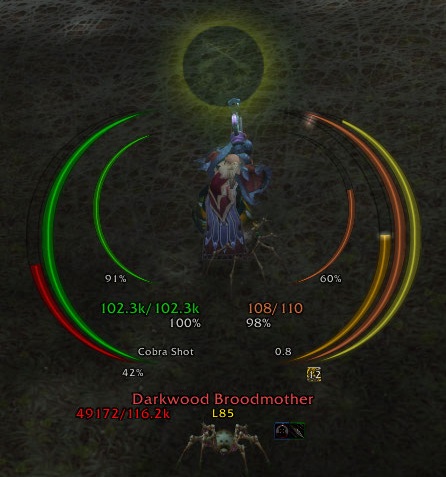
ArcHUD displays smooth arcs around your character in the middle of the screen to inform you about the health and power (mana, rage, ...) of you, your pet, and your target. In addition, it shows casts, combo points, holy power, soul shards, and a couple of other things. It discretely fades when you are out of combat and at full health/power.
This is a continuation of ArcHUD2 which managed to survive various patches... until the Cataclysm. Thanks to Nenie, the original author of ArcHUD2, for supporting me with this new version.
Please report any bugs or feature requests via the ticket system.
These arcs are currently supported:
- Health and power (mana, rage, focus, energy, runic power) for player, pet, target, and focus target
- Player's secondary power (Holy Power, Soul Shards, Chi etc.)
- Casting/channelling progress for player, target, and focus target
- Fatigue/breath (mirror timer)
- Combo points (including unconsumed combo points on previous target, e.g. on dead corpses)
- Custom (de)buff arcs: Ever wanted to keep track of the stacks and/or remaining times of some specific (de)buffs such as Evangelism, Savage Roar, Beacon of Light, Weakened Soul, etc? Then just create your own custom (de)buff arc for it!
In addition, some additional target information is displayed:
- Current target (name, class, guild, 3D model)
- Current (de)buffs on target
- Target-of-target and target-of-target-of-target
Small warning: Using this addon apparently bears a high risk of getting addicted to it, as these user comments suggest. I received those after taking over the development of ArcHUD when the Cataclysm happened:
- "...nothing ever quite matched the smooth, clean simplicity of ArcHUD's graceful rings."
- "Great job!! I've used this addon for years! None of the other HUDs come close to the functionality and elegance of ArcHUD."
- "Thanks for the work on it so far, much more lightweight than IceHud!"
- "Was staring at the various icehud/metahud alternatives with discomfort and sadness right after the patch [4.0]."
- "Awesome! Thank you so much for that miracle!"
- "Thank you so much for continuing this fantastic addon."
- "...nothing could compare to ArcHUD..."
- "For a whole 4years I had this mod and I missed it so much in the passed few weeks. I tried other HUD mods but they were too in my face >.< . Best HUD mod IMO! Thanks for resurrecting an old friend :D"
- "Loving the new ArcHUD my favorite HUD by far :)"
- "I don't think I could play wow without this addon :)"
- "I've actually grown kind of dependent on it because I'll occasionally run out of Mana/ die without this."
- "Hey mate, just came to thank You again for taking over this beauty, awesome job!"
- "THAT addon! So long I have been searching for a replacement when the development stopped, thanks for bringing it back to live!"
So use it at your own risk ;)
Frequently Asked Questions
- How do I add a arc for a specific buff/debuff (remaining time & stacks)?
- Where is my Combo Point/Soul Shard Numeric Indicator?


-
View User Profile
-
Send Message
Posted Aug 1, 2016;-) I hope I can do so with Legion, at least sporadically. Let's hope for the best!
-
View User Profile
-
Send Message
Posted Jul 31, 2016My Gods! Thanks so so very much for putting your time and energy into this. I felt lost without my arcs! The work and care is very much appreciated. Go work for Blizzard! :-D
-
View User Profile
-
Send Message
Posted Jul 30, 20162x ArcHUD3\Rings\Runes-Runes.lua:257: attempt to call global 'GetRuneType' (a nil value)
ArcHUD3\Rings\Runes-Runes.lua:257: in function `UpdateRunes'
ArcHUD3\Rings\Runes-Runes.lua:252: in function `UpdateRunes'
ArcHUD3\Rings\Runes-Runes.lua:242: in function `OnModuleEnable'
ArcHUD3\ModuleCore.lua:123: in function <ArcHUD3\ModuleCore.lua:102>
(tail call): ?
[C]: ?
[string "safecall Dispatcher[1]"]:9: in function <[string "safecall Dispatcher[1]"]:5>
(tail call): ?
Ace3\AceAddon-3.0\AceAddon-3.0-12.lua:558: in function <Ace3\AceAddon-3.0\AceAddon-3.0.lua:551>
(tail call): ?
ArcHUD3\ModuleCore.lua:174: in function `?'
...Ons\Ace3\CallbackHandler-1.0\CallbackHandler-1.0-6.lua:145: in function <...Ons\Ace3\CallbackHandler-1.0\CallbackHandler-1.0.lua:145>
...
[string "safecall Dispatcher[1]"]:9: in function <[string "safecall Dispatcher[1]"]:5>
(tail call): ?
Ace3\AceAddon-3.0\AceAddon-3.0-12.lua:558: in function `EnableAddon'
Ace3\AceAddon-3.0\AceAddon-3.0-12.lua:651: in function <Ace3\AceAddon-3.0\AceAddon-3.0.lua:636>
[C]: ?
[C]: ?
[C]: in function `LoadAddOn'
FrameXML\UIParent.lua:391: in function `UIParentLoadAddOn'
FrameXML\UIParent.lua:482: in function `TimeManager_LoadUI'
FrameXML\UIParent.lua:993: in function <FrameXML\UIParent.lua:891>
Locals:
nil
-
View User Profile
-
Send Message
Posted Jul 30, 2016I love you! I do not expect more than this addon ! I remember you still like ArcHUD2, I just love you as a legend !
-
View User Profile
-
Send Message
Posted Jul 30, 2016Preliminary fix uploaded for the rings (thanks to jasonolive), unit tapping and the alpha animation.
Please report and discuss further issues in a ticket on the project side (link is in the addon description). You can use the same account as here.
-
View User Profile
-
Send Message
Posted Jul 30, 2016Thanks, nyyr! We all appreciate your help and the work you've done.
-
View User Profile
-
Send Message
Posted Jul 30, 2016Guys, Need Swapped "%energy with %health" As on screenshot.
-
View User Profile
-
Send Message
Posted Jul 29, 2016i had fixed both the animation issues and the combopoints arc and number. I managed to fix the left rings also when full but for some reason they default to the wrong rotation when initialised or when not full.
I will download jasonolive's code and will try to add his fix to mine see if that fixes things on my end, and i will post a dropbox or google drive link here for nyyr to post a fix.
cheers and good luck to anyone else trying to fix this wonderful addon :)
-
View User Profile
-
Send Message
Posted Jul 28, 2016@nyyr
Thanks, Nyyr. And thanks to Jasonollve over on the Curse boards, we have a fix! ArcHUD is back, Baby... yeaaaahhhh! :-D https://dl.dropboxusercontent.com/u/4479488/ArcHUD3.zip
-
View User Profile
-
Send Message
Posted Jul 28, 2016I've managed to fix the rings. Somehow the left ring quadrants got flipped and rotated so the DoQuadrant function needed to call the texture subset mapping function in reversed order. So far I'm running HFC and haven't had any errors 4 bosses in. I'm not too sure what a "chip" or "slice" is but there are little artifacts at the end of the arc if its above 45% (only a slight cosmetic issue)
https://dl.dropboxusercontent.com/u/4479488/ArcHUD3.zip
-
View User Profile
-
Send Message
Posted Jul 28, 2016OMG... my arcs are back! :-D Thanks SOOOOO much for your time on taking care of this. It feels good to see my HUD again!
-
View User Profile
-
Send Message
Posted Jul 29, 2016Thank you so much for your hard work on ArcHUD! With all the new abilities they are throwing around to play with (which is pretty fun for an outlaw rogue), its great to have something back I've grown use to over the years and feel completely lost without. ArcHUD is such a great hud, and even though IceHUD is alright too, I just love ArcHUD.
The only issue I am finding at the moment is that I can't seem to get the combo point text to show. I'm an outlaw rogue (previously combat) and I've all ways preferred the larger number at the bottom of the hud to see my combo points. Regardless, I am very grateful to have what I can at the moment and understand a fix may not be so easy.
-
View User Profile
-
Send Message
Posted Jul 29, 2016Thanks for letting me know. I've been so focused with mastering my guardian druid, I have neglected my rogue. I'll see what's going on.
-
View User Profile
-
Send Message
Posted Jul 29, 2016thanks for the update
-
View User Profile
-
Send Message
Posted Jul 29, 2016I just tested this on my lvl 100 outlaw rogue alt on a dummy and it only refreshes itself when I change a target (or un-target the dummy and target it again). It doesn't seem to 'see' changes as long as I keep targeting the same thing. Hope this helps.
-
View User Profile
-
Send Message
Posted Jul 29, 2016mine seems to be working good but there is a update date now. so I am sure they got it working
-
View User Profile
-
Send Message
Posted Jul 30, 2016What I meant was, when I use an ability that awards or spend a combo point, the bar doesn't react, unless I changes target or re-target.
-
View User Profile
-
Send Message
Posted Jul 29, 2016good work
-
View User Profile
-
Send Message
Posted Jul 29, 2016Need fix this
-
View User Profile
-
Send Message
Posted Jul 29, 2016I think he means that they overlap, yeah. I was planning on figuring out how to move the ArcHUD text there and keeping both, but turning off is probably the best option since it's redundant. Is there a way to move that text lower? I forget
Edit:
Oh. No I just noticed, energy and health are swapped sides, at least numbers wise.