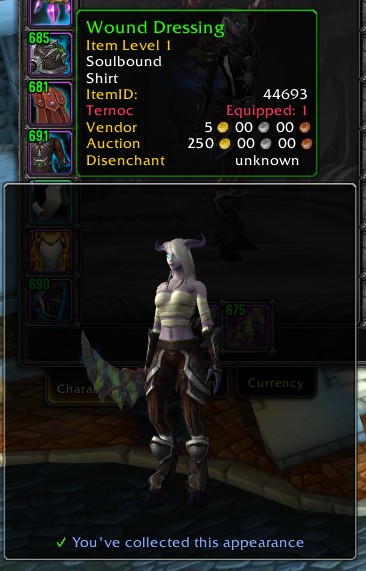
AppearanceTooltip
AppearanceTooltip shows you the appearance of items that you see, to help you know whether you actually want to obtain their delicious appearances for your collection. It does this by attaching a Model frame to the item tooltip, showing your character wearing the item.
It can also show an icon in various places to let you know whether you know this appearance or not. These places are:
- Bags (including various bag addons)
- Loot window
- Encounter Journal
- Merchants
The icon will be violet if you can learn the appearance on the current character, blue if you know the appearance but from a different item, and yellow if you don't know it but it's for another class.
The previews and item-icons will also appear for mounts, pets, and decor.
Set token items will show some information about what they'll turn into, and how many of those possible appearances you've collected.
Less importantly, it also improves the default UI so that the "You don't know this appearance" messages will appear on items which don't apply directly to your class! This means you'll be able to log into your Warrior, and tell that your Priest doesn't yet know this cool BoE appearance that just dropped.
It will also make alert popups appear when you learn a new appearance.
Config is in the Interface Options, or type /aptip
You can choose whether to:
- Show your character with your current outfit, or naked apart from your previewed item (how lewd)
- Zoom in on the item you're previewing
- Strategically remove some items from your character to show the previewed item (e.g. for shirts, remove your chest and tabard)
- Only show for items your current character can actually transmog to
- Spin the model / move it with the mousewheel
Addons integrated with:
- SilverDragon
- Inventorian
- Baganator (via its API, so you'll need to tell it to use it)
- Butsu
- Bagnon
- Baggins
- AdiBags - showing icons and offering a filter for unknown appearances
Comments


-

Kemayo Owner
-
View User Profile
-
Send Message
Posted Jul 10, 2026Similar problems to others; really hoping this gets updated, one of my favorite addons for many years! Thanks for all the hard work.
-
View User Profile
-
Send Message
Posted Apr 25, 2026Still hoping we get a fix for this.
-
View User Profile
-
Send Message
Posted Apr 3, 2026I have the same problem.
-
View User Profile
-
Send Message
Posted Mar 31, 2026how do you zoom in and out with it?
-
View User Profile
-
Send Message
Posted Mar 18, 2026I'd love to see this addon fixed, the moment I enter the combat for the first time, I can't check what any of my items looks like until I reset the game.
-
View User Profile
-
Send Message
Posted Apr 16, 2026In reply to Crescent_Witch: Same. No lua error or anything. Just stops working and sometime you see a small flash of your character at the edge of the screen before it disappears.
-
View User Profile
-
Send Message
Posted Feb 16, 2026Something seems to have gotten broken. I don't see any images when I mouse over items unless I turn off and then reload the addon every time I log in.
-
View User Profile
-
Send Message
Posted Feb 19, 2026In reply to cybercatart: Same here, it constantly breaks as of a few days ago.
-
View User Profile
-
Send Message
Posted Mar 2, 2026In reply to cybercatart: Same here, too.
-
View User Profile
-
Send Message
Posted Feb 13, 2026Another 'secret value' found:
13x AppearanceTooltip/addon.lua:339: attempt to perform arithmetic on a secret number value (tainted by 'AppearanceTooltip')
[AppearanceTooltip/addon.lua]:339: in function 'ComputeTooltipAnchors'
[AppearanceTooltip/addon.lua]:269: in function <AppearanceTooltip/addon.lua:262>
Locals:
self = <table> {
CLASSIC = false
SLOT_OFFHAND = 17
always_remove = <table> {
}
SLOT_FEET = 8
SLOT_SHOULDER = 3
SLOT_ROBE = -99
slot_held = <table> {
}
SLOT_TABARD = 19
SLOT_MAINHAND = 16
db = <table> {
}
CLASSICERA = false
slot_removals = <table> {
}
SLOT_HANDS = 10
SLOT_WAIST = 6
overlayFrames = <table> {
}
slot_facings = <table> {
}
modifiers = <table> {
}
SLOT_CHEST = 5
SLOT_SHIRT = 4
}
owner = GameTooltip {
ItemTooltip = Frame {
}
BottomOverlay = Texture {
}
NineSlice = Frame {
}
suppressAutomaticCompareItem = false
textLeft1Font = "GameTooltipHeaderText"
hasMoney = 1
TopOverlay = Texture {
}
TextLeft1 = GameTooltipTextLeft1 {
}
processingInfo = <table> {
}
infoList = <table> {
}
numMoneyFrames = 1
supportsItemComparison = true
supportsDataRefresh = true
shouldRefreshData = false
waitingForData = false
shoppingTooltips = <table> {
}
updateTooltipTimer = 0.039000
StatusBar = GameTooltipStatusBar {
}
TextRight1 = GameTooltipTextRight1 {
}
caerdonProcessing = false
textLeft2Font = "GameTooltipText"
layoutType = "TooltipDefaultLayout"
textRight1Font = "GameTooltipHeaderText"
textRight2Font = "GameTooltipText"
TextRight2 = GameTooltipTextRight2 {
}
TextLeft2 = GameTooltipTextLeft2 {
}
}
anchor = "vertical"
originalOwner = GameTooltip {
ItemTooltip = Frame {
}
BottomOverlay = Texture {
}
NineSlice = Frame {
}
suppressAutomaticCompareItem = false
textLeft1Font = "GameTooltipHeaderText"
hasMoney = 1
TopOverlay = Texture {
}
TextLeft1 = GameTooltipTextLeft1 {
}
processingInfo = <table> {
}
infoList = <table> {
}
numMoneyFrames = 1
supportsItemComparison = true
supportsDataRefresh = true
shouldRefreshData = false
waitingForData = false
shoppingTooltips = <table> {
}
updateTooltipTimer = 0.039000
StatusBar = GameTooltipStatusBar {
}
TextRight1 = GameTooltipTextRight1 {
}
caerdonProcessing = false
textLeft2Font = "GameTooltipText"
layoutType = "TooltipDefaultLayout"
textRight1Font = "GameTooltipHeaderText"
textRight2Font = "GameTooltipText"
TextRight2 = GameTooltipTextRight2 {
}
TextLeft2 = GameTooltipTextLeft2 {
}
}
x = 151.551993
y = 807.128967
biasLeft = false
biasDown = true
outermostComparisonShown = ShoppingTooltip1 {
shownMoneyFrames = 1
processingInfo = <table> {
}
infoList = <table> {
}
caerdonProcessing = false
hasMoney = 1
numMoneyFrames = 1
BottomOverlay = Texture {
}
NineSlice = Frame {
}
updateTooltipTimer = 0.200000
CompareHeader = Frame {
}
textRight2Font = "GameTooltipText"
TextRight1 = ShoppingTooltip1TextRight1 {
}
textLeft1Font = "GameTooltipHeaderText"
TopOverlay = Texture {
}
layoutType = "TooltipDefaultLayout"
TextLeft1 = ShoppingTooltip1TextLeft1 {
}
textRight1Font = "GameTooltipHeaderText"
TextRight2 = ShoppingTooltip1TextRight2 {
}
TextLeft2 = ShoppingTooltip1TextLeft2 {
}
textLeft2Font = "GameTooltipText"
}
comparisonTooltip1 = ShoppingTooltip1 {
shownMoneyFrames = 1
processingInfo = <table> {
}
infoList = <table> {
}
caerdonProcessing = false
hasMoney = 1
numMoneyFrames = 1
BottomOverlay = Texture {
}
NineSlice = Frame {
}
updateTooltipTimer = 0.200000
CompareHeader = Frame {
}
textRight2Font = "GameTooltipText"
TextRight1 = ShoppingTooltip1TextRight1 {
}
textLeft1Font = "GameTooltipHeaderText"
TopOverlay = Texture {
}
layoutType = "TooltipDefaultLayout"
TextLeft1 = ShoppingTooltip1TextLeft1 {
}
textRight1Font = "GameTooltipHeaderText"
TextRight2 = ShoppingTooltip1TextRight2 {
}
TextLeft2 = ShoppingTooltip1TextLeft2 {
}
textLeft2Font = "GameTooltipText"
}
comparisonTooltip2 = ShoppingTooltip2 {
caerdonProcessing = false
hasMoney = 1
numMoneyFrames = 1
BottomOverlay = Texture {
}
NineSlice = Frame {
}
updateTooltipTimer = 0.200000
CompareHeader = Frame {
}
textRight2Font = "GameTooltipText"
TextRight1 = ShoppingTooltip2TextRight1 {
}
textLeft1Font = "GameTooltipHeaderText"
TopOverlay = Texture {
}
layoutType = "TooltipDefaultLayout"
TextLeft1 = ShoppingTooltip2TextLeft1 {
}
textRight1Font = "GameTooltipHeaderText"
TextRig
-
View User Profile
-
Send Message
Posted Feb 7, 2026Found another 'secret value', in Torghast:
11x AppearanceTooltip/addon.lua:339: attempt to perform arithmetic on a secret value
[AppearanceTooltip/addon.lua]:339: in function 'ComputeTooltipAnchors'
[AppearanceTooltip/addon.lua]:269: in function <AppearanceTooltip/addon.lua:262>
Locals:
self = <table> {
CLASSIC = false
SLOT_OFFHAND = 17
always_remove = <table> {
}
SLOT_FEET = 8
SLOT_SHOULDER = 3
SLOT_ROBE = -99
slot_held = <table> {
}
SLOT_TABARD = 19
SLOT_MAINHAND = 16
db = <table> {
}
CLASSICERA = false
slot_removals = <table> {
}
SLOT_HANDS = 10
SLOT_WAIST = 6
overlayFrames = <table> {
}
slot_facings = <table> {
}
modifiers = <table> {
}
SLOT_CHEST = 5
SLOT_SHIRT = 4
}
owner = GameTooltip {
ItemTooltip = Frame {
}
BottomOverlay = Texture {
}
NineSlice = Frame {
}
suppressAutomaticCompareItem = false
textLeft1Font = "GameTooltipHeaderText"
hasMoney = 1
textRight2Font = "GameTooltipText"
TopOverlay = Texture {
}
shoppingTooltips = <table> {
}
StatusBar = GameTooltipStatusBar {
}
numMoneyFrames = 1
supportsDataRefresh = true
processingInfo = <table> {
}
infoList = <table> {
}
updateTooltipTimer = 0.200000
TextLeft1 = GameTooltipTextLeft1 {
}
TextRight1 = GameTooltipTextRight1 {
}
caerdonProcessing = false
layoutType = "TooltipDefaultLayout"
supportsItemComparison = true
textRight1Font = "GameTooltipHeaderText"
waitingForData = false
TextRight2 = GameTooltipTextRight2 {
}
TextLeft2 = GameTooltipTextLeft2 {
}
textLeft2Font = "GameTooltipText"
}
anchor = "vertical"
originalOwner = GameTooltip {
ItemTooltip = Frame {
}
BottomOverlay = Texture {
}
NineSlice = Frame {
}
suppressAutomaticCompareItem = false
textLeft1Font = "GameTooltipHeaderText"
hasMoney = 1
textRight2Font = "GameTooltipText"
TopOverlay = Texture {
}
shoppingTooltips = <table> {
}
StatusBar = GameTooltipStatusBar {
}
numMoneyFrames = 1
supportsDataRefresh = true
processingInfo = <table> {
}
infoList = <table> {
}
updateTooltipTimer = 0.200000
TextLeft1 = GameTooltipTextLeft1 {
}
TextRight1 = GameTooltipTextRight1 {
}
caerdonProcessing = false
layoutType = "TooltipDefaultLayout"
supportsItemComparison = true
textRight1Font = "GameTooltipHeaderText"
waitingForData = false
TextRight2 = GameTooltipTextRight2 {
}
TextLeft2 = GameTooltipTextLeft2 {
}
textLeft2Font = "GameTooltipText"
}
x = 283.551985
y = 703.129028
biasLeft = false
biasDown = true
outermostComparisonShown = ShoppingTooltip1 {
shownMoneyFrames = 1
processingInfo = <table> {
}
infoList = <table> {
}
caerdonProcessing = false
hasMoney = 1
numMoneyFrames = 1
updateTooltipTimer = 0.200000
CompareHeader = Frame {
}
textRight2Font = "GameTooltipText"
TextRight1 = ShoppingTooltip1TextRight1 {
}
BottomOverlay = Texture {
}
NineSlice = Frame {
}
textLeft1Font = "GameTooltipHeaderText"
TopOverlay = Texture {
}
layoutType = "TooltipDefaultLayout"
TextLeft1 = ShoppingTooltip1TextLeft1 {
}
textRight1Font = "GameTooltipHeaderText"
textLeft2Font = "GameTooltipText"
TextRight2 = ShoppingTooltip1TextRight2 {
}
TextLeft2 = ShoppingTooltip1TextLeft2 {
}
}
comparisonTooltip1 = ShoppingTooltip1 {
shownMoneyFrames = 1
processingInfo = <table> {
}
infoList = <table> {
}
caerdonProcessing = false
hasMoney = 1
numMoneyFrames = 1
updateTooltipTimer = 0.200000
CompareHeader = Frame {
}
textRight2Font = "GameTooltipText"
TextRight1 = ShoppingTooltip1TextRight1 {
}
BottomOverlay = Texture {
}
NineSlice = Frame {
}
textLeft1Font = "GameTooltipHeaderText"
TopOverlay = Texture {
}
layoutType = "TooltipDefaultLayout"
TextLeft1 = ShoppingTooltip1TextLeft1 {
}
textRight1Font = "GameTooltipHeaderText"
textLeft2Font = "GameTooltipText"
TextRight2 = ShoppingTooltip1TextRight2 {
}
TextLeft2 = ShoppingTooltip1TextLeft2 {
}
}
comparisonTooltip2 = ShoppingTooltip2 {
updateTooltipTimer = 0.200000
CompareHeader = Frame {
}
textRight2Font = "GameTooltipText"
TextRight1 = ShoppingTooltip2TextRight1 {
}
BottomOverlay = Texture {
}
NineSlice = Frame {
}
textLeft1Font = "GameTooltipHeaderText"
TopOverlay = Texture {
}
layoutType = "TooltipDefaultLayout"
TextLeft1 = ShoppingTooltip2TextLeft1 {
}
textRight1Font = "GameTooltipHeaderText"
textLeft2Font = "GameTooltipText"
TextRight2 = ShoppingTooltip2TextRight2 {
}
TextLeft2 = ShoppingTooltip2TextLeft2 {
-
View User Profile
-
Send Message
Posted Jan 31, 2026this causes the trading post to zoom in for me leaving parts of the Ui off screen. I have to disable it to use trading post.
-
View User Profile
-
Send Message
Posted Jan 31, 2026Thank you for making this great addon! I got an error just now (sorry, I don't remember what I was doing at the time):
51x AppearanceTooltip/addon.lua:338: attempt to perform arithmetic on a secret value
[AppearanceTooltip/addon.lua]:338: in function 'ComputeTooltipAnchors'
[AppearanceTooltip/addon.lua]:269: in function <AppearanceTooltip/addon.lua:262>
Locals:
self = <table> {
CLASSIC = false
SLOT_OFFHAND = 17
always_remove = <table> {
}
SLOT_FEET = 8
SLOT_SHOULDER = 3
SLOT_ROBE = -99
slot_held = <table> {
}
SLOT_TABARD = 19
SLOT_MAINHAND = 16
db = <table> {
}
CLASSICERA = false
slot_removals = <table> {
}
SLOT_HANDS = 10
SLOT_WAIST = 6
overlayFrames = <table> {
}
slot_facings = <table> {
}
modifiers = <table> {
}
SLOT_CHEST = 5
SLOT_SHIRT = 4
}
owner = GameTooltip {
ItemTooltip = Frame {
}
BottomOverlay = Texture {
}
NineSlice = Frame {
}
processingInfo = <table> {
}
infoList = <table> {
}
suppressAutomaticCompareItem = false
textLeft1Font = "GameTooltipHeaderText"
hasMoney = 1
TopOverlay = Texture {
}
TextLeft1 = GameTooltipTextLeft1 {
}
shouldRefreshData = false
waitingForData = false
numMoneyFrames = 1
supportsItemComparison = true
supportsDataRefresh = true
progressBarPool = <table> {
}
shoppingTooltips = <table> {
}
updateTooltipTimer = 0.200000
StatusBar = GameTooltipStatusBar {
}
TextRight1 = GameTooltipTextRight1 {
}
caerdonProcessing = false
textLeft2Font = "GameTooltipText"
layoutType = "TooltipDefaultLayout"
textRight1Font = "GameTooltipHeaderText"
textRight2Font = "GameTooltipText"
TextRight2 = GameTooltipTextRight2 {
}
TextLeft2 = GameTooltipTextLeft2 {
}
}
anchor = "vertical"
originalOwner = GameTooltip {
ItemTooltip = Frame {
}
BottomOverlay = Texture {
}
NineSlice = Frame {
}
processingInfo = <table> {
}
infoList = <table> {
}
suppressAutomaticCompareItem = false
textLeft1Font = "GameTooltipHeaderText"
hasMoney = 1
TopOverlay = Texture {
}
TextLeft1 = GameTooltipTextLeft1 {
}
shouldRefreshData = false
waitingForData = false
numMoneyFrames = 1
supportsItemComparison = true
supportsDataRefresh = true
progressBarPool = <table> {
}
shoppingTooltips = <table> {
}
updateTooltipTimer = 0.200000
StatusBar = GameTooltipStatusBar {
}
TextRight1 = GameTooltipTextRight1 {
}
caerdonProcessing = false
textLeft2Font = "GameTooltipText"
layoutType = "TooltipDefaultLayout"
textRight1Font = "GameTooltipHeaderText"
textRight2Font = "GameTooltipText"
TextRight2 = GameTooltipTextRight2 {
}
TextLeft2 = GameTooltipTextLeft2 {
}
}
x = 273.169808
y = 829.537781
biasLeft = false
biasDown = true
outermostComparisonShown = ShoppingTooltip1 {
shownMoneyFrames = 1
processingInfo = <table> {
}
infoList = <table> {
}
caerdonProcessing = false
hasMoney = 1
numMoneyFrames = 1
BottomOverlay = Texture {
}
NineSlice = Frame {
}
updateTooltipTimer = 0.200000
CompareHeader = Frame {
}
textRight2Font = "GameTooltipText"
TextRight1 = ShoppingTooltip1TextRight1 {
}
textLeft1Font = "GameTooltipHeaderText"
TopOverlay = Texture {
}
layoutType = "TooltipDefaultLayout"
TextLeft1 = ShoppingTooltip1TextLeft1 {
}
textRight1Font = "GameTooltipHeaderText"
TextRight2 = ShoppingTooltip1TextRight2 {
}
TextLeft2 = ShoppingTooltip1TextLeft2 {
}
textLeft2Font = "GameTooltipText"
}
comparisonTooltip1 = ShoppingTooltip1 {
shownMoneyFrames = 1
processingInfo = <table> {
}
infoList = <table> {
}
caerdonProcessing = false
hasMoney = 1
numMoneyFrames = 1
BottomOverlay = Texture {
}
NineSlice = Frame {
}
updateTooltipTimer = 0.200000
CompareHeader = Frame {
}
textRight2Font = "GameTooltipText"
TextRight1 = ShoppingTooltip1TextRight1 {
}
textLeft1Font = "GameTooltipHeaderText"
TopOverlay = Texture {
}
layoutType = "TooltipDefaultLayout"
TextLeft1 = ShoppingTooltip1TextLeft1 {
}
textRight1Font = "GameTooltipHeaderText"
TextRight2 = ShoppingTooltip1TextRight2 {
}
TextLeft2 = ShoppingTooltip1TextLeft2 {
}
textLeft2Font = "GameTooltipText"
}
comparisonTooltip2 = ShoppingTooltip2 {
caerdonProcessing = false
hasMoney = 1
numMoneyFrames = 1
updateTooltipTimer = 0.200000
CompareHeader = Frame {
}
textRight2Font = "GameTooltipText"
TextRight1 = ShoppingTooltip2TextRight1 {
}
BottomOverlay = Texture {
}
NineSlice = Frame {
}
textLeft1Font = "GameTooltipHeaderText"
TopOverlay = Texture {
}
layoutType = "TooltipDefaultLayout"
TextLeft1 = ShoppingTooltip2T
-
View User Profile
-
Send Message
Posted Jan 30, 2026I have trouble with the zoom feature either held or worn item - when I hover over an item sometimes it zoomed too far in I can only see a quarter or half the item. I constantly have to enable/disable zoom. This is especially true hovering over anything in All the Things list. It has always had this problem since i started using it in DF. Wish there was a way to zoom in and out or just grab it and center it in the window. Great addon otherwise!
-
View User Profile
-
Send Message
Posted Jan 28, 2026Keep getting lua error when I hover over any armour item that is a part of a multi item set.
-
View User Profile
-
Send Message
Posted Jan 24, 20261x Couldn't open AppearanceTooltip/Bindings.xml
I'm getting this error on load. Any Ideas? Everything appears to be working. Just get that error.
-
View User Profile
-
Send Message
Posted Jan 24, 2026In reply to Warlock____: It's working without the error now after deleting everything and reinstalling. Thanks for this addon. Much appreciated.
-
View User Profile
-
Send Message
Posted Dec 2, 2025Would you consider making this work for housing decor, please?
*Edit: Thanks so much for adding it! <3
-
View User Profile
-
Send Message
Posted Aug 21, 2025So, All The Things just showed me something really really REALLY annoying with Appearance Tooltip. Several items have now shown me "You have collected this appearance" which is both true and false. There are quite a number of items that have an appearance for different armor types or weapon types. Example being an appearance that exists for both Plate and Mail or the SoD weapons from the Classic Timewalking Vendor there is a Sword that comes in a 1h and a 2h version, collecting one will make it say the other is collected even when its not.
Looking in the options I see no way to fix it so it does not incorrectly tell me I have collected an appearance when I actually have not.
A good example is that "Battered Leather Bracers" (Item ID:2374) a leather set of bracers share an appearance with "Tranquillien Ranger's Cuffs" (Item ID:131243) a mail set of bracers. Unlocking the Leather or Mail appearance does not unlock the other HOWEVER Appearance Tooltip will say "You've collected this appearance, but not from this item" Currently AppearanceTooltip does not differentiate appearance collection between armor types and collecting the appearance type on one armor type does not collect it on another.
That statement of "You've collected this appearance, but not from this item" is fine and dandy for items of the same armor type, example being "Battered Leather Bracers" (Item ID:2374) leather wrists and "Feral Bindings" (Item ID:15306) leather wrists share a model. That is totally fine, because that statement is true, I have collected that appearance with another item. But having collected the Mail one does not in fact mean I have collected the Leather One.
In the different armor or weapon type situations as outlined the message should instead clearly state "You have not collected this appearance" or even "You have not collected this appearance for this armor/weapon type" instead because this information is incredibly missleading. Had I not had All The Things to point this out and show me the armor types and weapon types were different I would not have known.
Please consider looking into fixing this so that the mod does not incorrectly tell you that you have unlocked an appearance when in reality you have not.
-
View User Profile
-
Send Message
Posted Jul 22, 2025Could you please create a plugin to work with the Baganator addon?