AppearanceTooltip
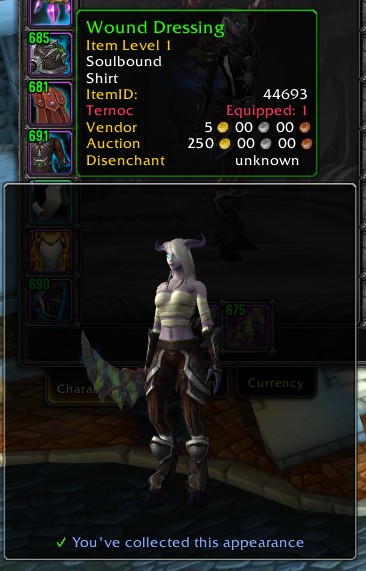
AppearanceTooltip shows you the appearance of items that you see, to help you know whether you actually want to obtain their delicious appearances for your collection. It does this by attaching a Model frame to the item tooltip, showing your character wearing the item.
It can also show an icon in various places to let you know whether you know this appearance or not. These places are:
- Bags (including various bag addons)
- Loot window
- Encounter Journal
- Merchants
The icon will be violet if you can learn the appearance on the current character, blue if you know the appearance but from a different item, and yellow if you don't know it but it's for another class.
The previews and item-icons will also appear for mounts, pets, and decor.
Set token items will show some information about what they'll turn into, and how many of those possible appearances you've collected.
Less importantly, it also improves the default UI so that the "You don't know this appearance" messages will appear on items which don't apply directly to your class! This means you'll be able to log into your Warrior, and tell that your Priest doesn't yet know this cool BoE appearance that just dropped.
It will also make alert popups appear when you learn a new appearance.
Config is in the Interface Options, or type /aptip
You can choose whether to:
- Show your character with your current outfit, or naked apart from your previewed item (how lewd)
- Zoom in on the item you're previewing
- Strategically remove some items from your character to show the previewed item (e.g. for shirts, remove your chest and tabard)
- Only show for items your current character can actually transmog to
- Spin the model / move it with the mousewheel
Addons integrated with:
- SilverDragon
- Inventorian
- Baganator (via its API, so you'll need to tell it to use it)
- Butsu
- Bagnon
- Baggins
- AdiBags - showing icons and offering a filter for unknown appearances
Comments


-

Kemayo Owner
-
View User Profile
-
Send Message
Posted Apr 12, 2017The zooming is actually sort of a pain -- I'm using the same camera stuff as the transmog wardrobe does, and that means that every single item type is actually displayed via different set of prepackaged settings, which differ for every race/gender combination.
Which is to say, adding some zoom config is on my todo list, but it'll take enough testing and fiddling that I keep putting it off.
-
View User Profile
-
Send Message
Posted Dec 28, 2016Thank you for this! Since Blizz added the appearance tab, the tooltip preview was the only reason I still had MogIt installed.
-
View User Profile
-
Send Message
Posted Oct 29, 2016Lovely addon! Would it be possible to make a keybinding to zoom in? I'd like to have the character zoomed out, and be able to press a key when I want to zoom in.
-
View User Profile
-
Send Message
Posted Sep 30, 2016could you please add an option to not preview tokens (the "item purshased" line)? it usually doesnt work for me, doesnt show anything at all and the "item cannot be equiped" message is kinda annoying.
I use the addon since the release and really like it but not this option.
-
View User Profile
-
Send Message
Posted Apr 12, 2017I didn't say anything, but I added this in December. :D
-
View User Profile
-
Send Message
Posted Sep 17, 2016I deleted this thinking from all the complaints that it was causing problems I had, it was not. I played a few transmog runs and realized how much better life is with this addon. Took me a while to remember the name / find it but never deleting it again. One of the essencial mods on my list now.
-
View User Profile
-
Send Message
Posted Aug 27, 2016thanks for nice addon, but when I mouse-over items from transmog run, with many items in bag not for my class, this addon starts spamming warning "I can't equip that, I can't equip that, I can't equip that ...." and it's really annoying to hear it 30x in a minute.Well, I am only mouse-overing item, not trying equip that.Please add a option to turn this warning off.
-
View User Profile
-
Send Message
Posted Aug 28, 2016Similarly, gear tokens have the same issue. It's actually so annoying I've decided to turn off the addon until it's fixed :(
-
View User Profile
-
Send Message
Posted Sep 30, 2016Have the same issues. Really annoying :s
-
View User Profile
-
Send Message
Posted Apr 12, 2017This one was fixed last year, I just didn't reply to you to say it...
-
View User Profile
-
Send Message
Posted Aug 26, 2016First of all, thanks a lot for the work you put into this. This could very well exchange MogIt for me since i only primarily used it for these tooltips... and the MogIt links buuut I think i can deal with that, maybe? Still good work!
I will provide one suggestion though and that is... could we mayhaps have a zoom Slider specifically? :o Modifier maybe included, otherwise no? I mostly ask cus sometimes, there is a few items that while zoomed in are a bit too close... but if not zoomed, its a bit hard to get the detail. So a little bit of a slider would be nice! Specially since i do like the zoom in "set up", but distance adjustment would be pleasant. Thanks again for your work!
-
View User Profile
-
Send Message
Posted Aug 24, 2016The last update just broke the addon for me - even with no other addons loaded. Nothing comes up and the settings don't even appear to be loaded.
1x AppearanceTooltip\addon.lua:10: attempt to call global 'LibStub' (a nil value)
AppearanceTooltip\addon.lua:10: in main chunk
Locals:
myname = "AppearanceTooltip"
ns = <table> {
}
myfullname = "AppearanceTooltip"
GetScreenWidth = <function> defined =[C]:-1
GetScreenHeight = <function> defined =[C]:-1
IsDressableItem = <function> defined =[C]:-1
setDefaults = nil
db = nil
(*temporary) = nil
(*temporary) = "LibArmorToken-1.0"
(*temporary) = "attempt to call global 'LibStub' (a nil value)"
-
View User Profile
-
Send Message
Posted Aug 26, 2016Did you restart WoW after updating the addon? New files were added in the update, and a game restart is needed.
If you did... could you send me the FrameXML.log file from your WoW "Log" directory?
-
View User Profile
-
Send Message
Posted Aug 29, 2016It's working beautifully now. Thank you!
-
View User Profile
-
Send Message
Posted Aug 17, 2016doesnt work for me if i already know the item but from another appearance, it just says unlearned still until i send it to the correct character
-
View User Profile
-
Send Message
Posted Aug 23, 2016So, this is a tricky issue! I'm relying on data that the Blizzard API provides, and it's a bit spotty when it comes to items that can't be transmogged by your current character.
Barring the API improving, the major thing I could do to improve this is memorize the known appearances whenever you're logged in on a character. This would be a trade-off of me writing a bunch more code to maintain that list, and it still being unreliable if you ever played from another computer, or your game crashed and so it didn't save properly.
-
View User Profile
-
Send Message
Posted Aug 14, 2016Thanks for the addon.
Is there a way you can make it so the character model is larger and fills more of the overlay when using the setting that shows the gear centred on your character and not the item?
-
View User Profile
-
Send Message
Posted Aug 23, 2016Arguably, yes. The main pain there is that I have to go through every race/gender combo and work out a decent zoom level for each one. (Tauren and gnomes: slightly different.)
-
View User Profile
-
Send Message
Posted Aug 5, 2016Thank you very much for this great addon!!
Very good job :)
-
View User Profile
-
Send Message
Posted Aug 4, 2016Thanks to both of you. ( Note this is being Posted in 2 add ons' threads. )
Up until Tuesday's reset Legion Wardrobe and AppearanceTooltip were working flawlessly together. Since then, Legion wardrobe won't show me sources unless I roll back to version 2.4. And AppearanceTooltip shows some ( and only some ) items as not being collected if I'm on a alt... i.e. I'm on my mage, and it says this piece on mail hasn't been collected, I send to my hunter, log the hunter, and it says this has been collected...
I'm very thankful for the work you guys do....