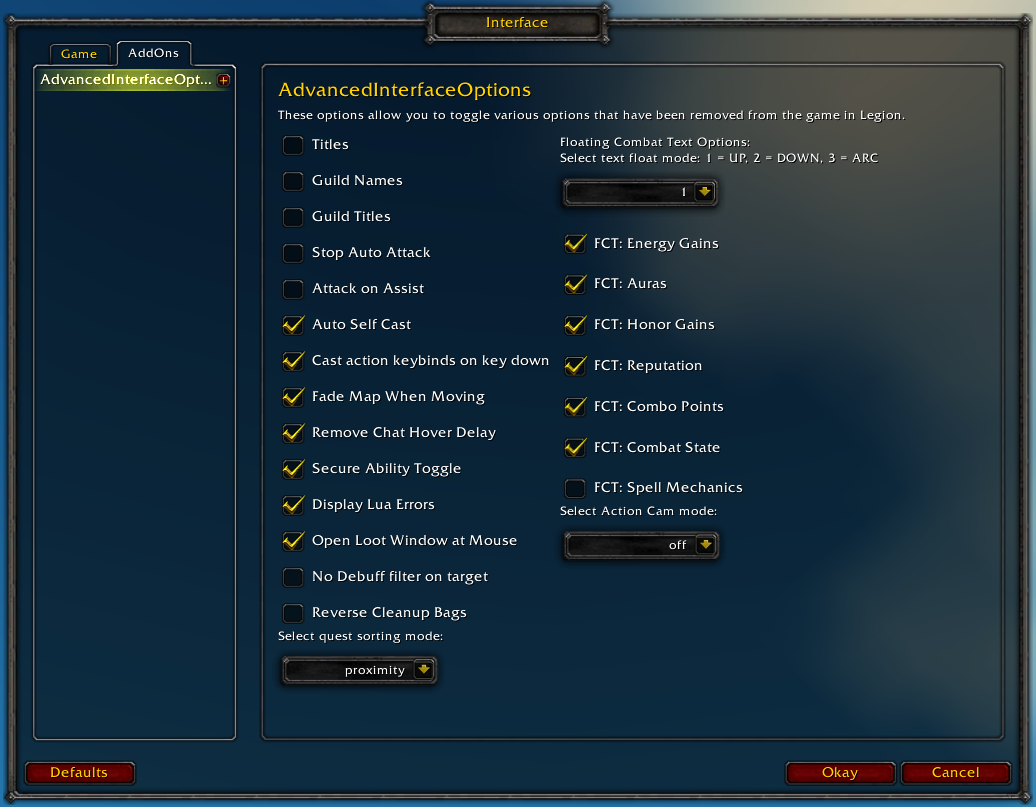
Restores access to hidden interface options and provides a way to browse every CVar setting in the game!
General
Player Titles
Guild Names
Guild Titles
Stop Auto Attack
Attack on Assist
Cast action keybinds on key down
Fade Map when Moving
Secure Ability Toggle
Display Lua Errors
No Debuff Filter on Target
Reverse Cleanup Bags
Quest sorting mode (top vs proximity)
Select Action Cam mode
Chat
Remove Chat Hover Delay
Enable Mouse Wheel Scrolling
Floating Combat Text
Float mode (up/down/arc)
Energy Gains
Auras
Honor Gains
Reputation
Combo Points
Combat State (Entering/Leaving Combat)
Spell Mechanics
Healing
Absorb (Self and Target)
Directional Scale (brings back the classic, only upwards moving text)
Low HP/Mana
Plus many other options available through the built-in CVar browser, including some that have never been exposed by Blizzard, such as "violence level" and "nameplate distance"!
Type /aio for the main menu or /cvar to open the CVar browser directly
It should be telling you what addon last modified the cvar in the tooltip when you hover over it in the cvar browser, but it doesn't always catch it, particularly if the addon loaded before AIO does.
I made the change you indicated to the basicOptions.lua while out of the game, logged in and tried using your mod to make the change, this is with all my usual addons installed.
There was unfortunately no error message and the value would not change.
I'll go through at some point and try and see which one is causing the conflict.
Check if you can use /run SetCVar("alwaysCompareItems", 1) instead of the console command; if you can't, an addon probably hooked this function and there may be a simple way to find out which one it was by making a small addon that hooks it even earlier in the loading process and catching it.
When I do that there is no indication of anything happen, no confirmation, response, error, nothing, checking with /dump GetCVar('alwaysCompareItems') results in 0 so it wasn't changed.
*Update: The addon blocking the changes was ElvUI, if I turn that off and leave everything else on your addon can make changed to the value in the cVar browser.
I guess you have/had the same problem as i did, but i got no response :P (comment #515)
I did find out that there is a native feature that fixes this inside Shadow & light plugin for Elvui. It is located in Shadow & Light > Modules > Tooltip > checkmark on top "Always Compare Items".
Thanks, I did find that option in the S&L config panel yesteray, lots of stuff in there, everywhere, and not always where you'd expect it, its kind of an adventure, finding new things all the time, lol.
Cheers for posting, will help somebody else out, have a good one!
Thats exactly the reason it took me so long to find it, cause i knew it had to be in there somewhere.... everything is so well hidden in the settings :P
For future reference, when you hover over the cvar in the cvar browser, it tells you what Last Modified the cvar in the tooltip next to the text "Last Modified By".
I just installed elvui to check why it wasn't displaying this (I mentioned it in one of my previous messages) and it would appear to be functioning correctly.
Addons that do nonsense like repeatedly forcing a variable to be set to something even when the user manually changes it somewhere else are exactly why I added this feature.
If it is NOT displaying this text for you, I need to know so I can figure out why.
It looks like you set the cvar manually through the chat frame before checking the browser which would have overwritten whatever had modified it previously.
I might change it to keep a list of recent changes so it can track more than a single entry, but I'm not sure that it's worth the trouble.
This addon is causing other addons to be "tainted". Which is effectively breaking tooltips in-game. discovered this by receiving errors which was indirect with which addon was causing it and why. Started to disable some addons until I've disabled this one and the issue has since stopped. Seems to only happen in raids or dungeons. Only information i know.
Forget this, turns out it wasn't this addon, it seemed like it.
I am trying to change "alwaysCompareItems" value in the CVar Browser from 0 to 1, but every time I try, it just keeps resetting to 0.
I tried adding this line in "config-cache.wtf": SET alwaysCompareItems "1", but that does not work either.
I just want the compare items on mouse hover to always be enabled without having to press shift every time, or have to type "/console SET alwaysCompareItems 1" after every reload/char change.
1x [ADDON_ACTION_BLOCKED] AddOn 'AdvancedInterfaceOptions' tried to call the protected function 'PartyMemberFrame3PetFrame:Hide()'.
!BugGrabber\BugGrabber.lua:573: in function <!BugGrabber\BugGrabber.lua:573>
[C]: in function `Hide'
FrameXML\PartyMemberFrame.lua:619: in function `PartyMemberFrame_UpdateOnlineStatus'
FrameXML\PartyMemberFrame.lua:403: in function `PartyMemberFrame_OnEvent'
[string "*:OnEvent"]:1: in function `OnEvent'
FrameXML\UnitFrame.lua:921: in function <FrameXML\UnitFrame.lua:919>

Locals:
InCombatSkipped
If you're having trouble setting a specific cvar through the browser, or performing a specific function, please describe what the problem is (and of course disable your other addons to make sure they aren't interfering with it).
I've only fiddled with the floating combat text CVars in the browser, and not one of them changes when I change it. Only thing that works is the Floating Combat Text tab and changing things there, but that doesn't really represent that much and there are plenty of things I want to change that I can't there. But none of the floating combat text settings changes when I attempt to in the CVar browser.
Since I know the addon works, the first thing we need to do is establish why it isn't working for your particular setup.
Start by disabling all of your other addons. This is an extremely important step, don't bother trying to debug this with any other addons enabled.
Log in and type /cvar to open the cvar browser.
Find "scriptErrors" in the browser and set it to 1 if it isn't already. Toggle it to 0 and back to 1 to make sure you can actually set any cvars correctly.
Find "guildMemberNotify", double click the entry, type 0 into the box and hit enter. If it remains as "1", hit escape to deselect the search box, open up your chat and type "/console guildMemberNotify 0" with the cvar browser still open.
If the value does not change, type "/dump GetCVar('guildMemberNotify')" to verify that the cvar is still set to "1".
Let me know how that goes and we can figure it out from there.
Rollback Post to RevisionRollBack
To post a comment, please login or register a new account.


-
View User Profile
-
Send Message
Posted Apr 12, 2018In reply to zasy999:
-
View User Profile
-
Send Message
Posted Apr 12, 2018In reply to Semlar:
-
View User Profile
-
Send Message
Posted Apr 12, 2018In reply to zasy999:
-
View User Profile
-
Send Message
Posted Apr 13, 2018In reply to Semlar:
-
View User Profile
-
Send Message
Posted Apr 21, 2018In reply to zasy999:
I did find out that there is a native feature that fixes this inside Shadow & light plugin for Elvui. It is located in Shadow & Light > Modules > Tooltip > checkmark on top "Always Compare Items".
-
View User Profile
-
Send Message
Posted Apr 22, 2018In reply to Forge_User_02435634:
-
View User Profile
-
Send Message
Posted Apr 22, 2018In reply to zasy999:
-
View User Profile
-
Send Message
Posted Apr 23, 2018In reply to Forge_User_02435634:
-
View User Profile
-
Send Message
Posted Apr 24, 2018In reply to Semlar:
-
View User Profile
-
Send Message
Posted Apr 24, 2018In reply to Forge_User_02435634:
-
View User Profile
-
Send Message
Posted Apr 24, 2018In reply to Semlar:
-
View User Profile
-
Send Message
Posted Apr 8, 2018This addon is causing other addons to be "tainted". Which is effectively breaking tooltips in-game. discovered this by receiving errors which was indirect with which addon was causing it and why. Started to disable some addons until I've disabled this one and the issue has since stopped. Seems to only happen in raids or dungeons. Only information i know.Forget this, turns out it wasn't this addon, it seemed like it.
-
View User Profile
-
Send Message
Posted Mar 21, 2018I am trying to change "alwaysCompareItems" value in the CVar Browser from 0 to 1, but every time I try, it just keeps resetting to 0.
I tried adding this line in "config-cache.wtf": SET alwaysCompareItems "1", but that does not work either.
I just want the compare items on mouse hover to always be enabled without having to press shift every time, or have to type "/console SET alwaysCompareItems 1" after every reload/char change.
Any ideas?
-
View User Profile
-
Send Message
Posted Mar 4, 2018-
View User Profile
-
Send Message
Posted Mar 1, 2018Outdated, dead addon. CVar settings don't really work whatsoever as mentioned in previous comments. Addon = g o n e
-
View User Profile
-
Send Message
Posted Mar 1, 2018In reply to Forge_User_32861715:
-
View User Profile
-
Send Message
Posted Mar 2, 2018In reply to semlar99035:
-
View User Profile
-
Send Message
Posted Mar 2, 2018In reply to Forge_User_32861715:
-
View User Profile
-
Send Message
Posted Mar 4, 2018In reply to semlar99035:
-
View User Profile
-
Send Message
Posted Mar 4, 2018In reply to painstorm: