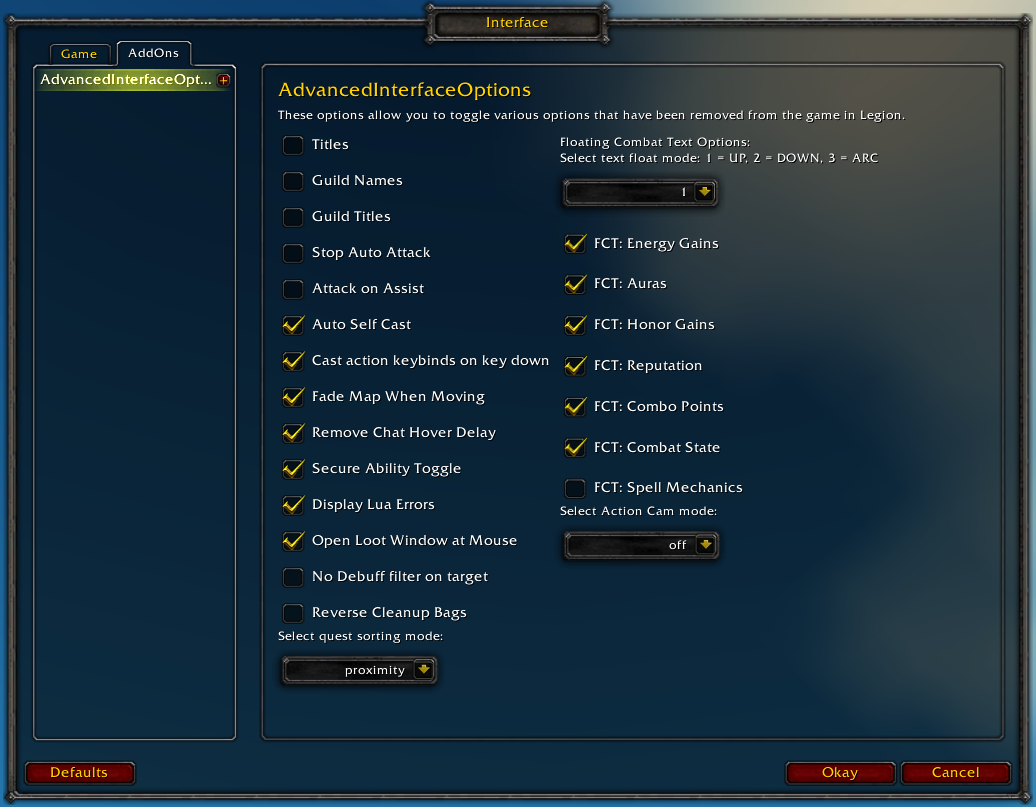
Restores access to hidden interface options and provides a way to browse every CVar setting in the game!
General
Player Titles
Guild Names
Guild Titles
Stop Auto Attack
Attack on Assist
Cast action keybinds on key down
Fade Map when Moving
Secure Ability Toggle
Display Lua Errors
No Debuff Filter on Target
Reverse Cleanup Bags
Quest sorting mode (top vs proximity)
Select Action Cam mode
Chat
Remove Chat Hover Delay
Enable Mouse Wheel Scrolling
Floating Combat Text
Float mode (up/down/arc)
Energy Gains
Auras
Honor Gains
Reputation
Combo Points
Combat State (Entering/Leaving Combat)
Spell Mechanics
Healing
Absorb (Self and Target)
Directional Scale (brings back the classic, only upwards moving text)
Low HP/Mana
Plus many other options available through the built-in CVar browser, including some that have never been exposed by Blizzard, such as "violence level" and "nameplate distance"!
Type /aio for the main menu or /cvar to open the CVar browser directly
don't believe so, blizz seems to have removed it from the game :'( , i know it's shitty i preferred dedicated fullscreen myself, i'm just happy they added the gamme slider in "windowed Fullscreen" because i would have lost my shit playing in always dark mode
Any possibility to add an option to turn off healing text on self?
Currently I'm using this macro if it helps.
/run local t=COMBAT_TEXT_TYPE_INFO;t.HEAL.show=nil;t.HEAL_CRIT.show=nil;t.PERIODIC_HEAL.show=nil;t.DAMAGE=nil;t.DAMAGE_CRIT=nil;t.SPELL_DAMAGE=nil;t.SPELL_DAMAGE_CRIT=nil;t.PERIODIC_HEAL_CRIT.show=nil
It keeps popping up with "snared" or "rooted" on my screen even though i have it turned off. Ive tried disabling other addons, but it still keeps happening. What can i do to change this?
floating combat text works for a bit but then it disables itself again. this usually occurs when reloading or going in and out of dungeons/restarting the game. i can always go back and check it and it works again, but once a reload happens, it just disables itself again. this happens whether i have this as the only addon installed or not.
Hi, same issue here, its Floating Combat Text - Floating Combat Text on target - Damage. Other settings are fine. Also I'm using xct addon enabled for showing mitigation, effects procs and inc heavy damage.
EDIT: I just found out in xct you can enable cvar bypass and it help with my issue. Now everything works)
If you're running ElvUI, their addon myopically attempts to override any cvar changes you make outside of their own control panel.
The original post claims they aren't running any other addons, but this isn't something I can replicate with AIO itself.
If you type "floatingCombatTextCombatDamage" into the CVar Browser filter and hover over it, the tooltip should display the last thing that modified the variable at the bottom in red. You can try checking that after it resets itself.
i did a fresh install but i did have elvui previously. maybe something got left behind, i dunno but i did a fresh install again and now it seems to be working. thx
as soon as i installed elvui, it mucked it up again tho. so whatever elvui is doing it's screwing up the blizzard floating combat text. i even skipped the cvars install and it still bugged it out. i don't like a bunch of addons but i guess i can't use elvui with the floating combat text no matter what. lame.
Can you try disabling all of your other addons and seeing if you still can't set this cvar?
Another option you can try:
Open up basicOptions.lua; at the top of the file is a function that looks like this:
local SetCVar = function(...) -- Suppress errors trying to set read-only cvars
	-- Not ideal, but the api doesn't give us this information
	local status, err = pcall(function(...) return _SetCVar(...) end, ...)
	return status
end
replace all of that with this:
local SetCVar = function(...) -- Suppress errors trying to set read-only cvars
	-- Not ideal, but the api doesn't give us this information
	local status, err = pcall(function(...) return _SetCVar(...) end, ...)
	if err then print(err) end
	return status
end
save the file, /reload your ui and see if something gets printed to the chat when you try to change that cvar.
I should have tried it on its own before reporting, seems to be a conflict with another addon as on its own I was able to modify "alwaysCompareItems" and it saved.
Now starts the fun part of finding out which one, I have a few installed :)
When / if I do find the conflicting one I will report back here.
Cheers!
Rollback Post to RevisionRollBack
To post a comment, please login or register a new account.


-
View User Profile
-
Send Message
Posted Jul 18, 2018Any way to sort the Steelseries WoW mouse issues? Say it can't be found so option doesn't appear to work.
-
View User Profile
-
Send Message
Posted Jul 18, 2018is there a way to add back fullscreen option?
-
View User Profile
-
Send Message
Posted Jul 18, 2018In reply to raykai:
-
View User Profile
-
Send Message
Posted Jul 11, 2018Any possibility to add an option to turn off healing text on self?
Currently I'm using this macro if it helps.
/run local t=COMBAT_TEXT_TYPE_INFO;t.HEAL.show=nil;t.HEAL_CRIT.show=nil;t.PERIODIC_HEAL.show=nil;t.DAMAGE=nil;t.DAMAGE_CRIT=nil;t.SPELL_DAMAGE=nil;t.SPELL_DAMAGE_CRIT=nil;t.PERIODIC_HEAL_CRIT.show=nil
-
View User Profile
-
Send Message
Posted Jun 29, 2018It keeps popping up with "snared" or "rooted" on my screen even though i have it turned off. Ive tried disabling other addons, but it still keeps happening. What can i do to change this?
-
View User Profile
-
Send Message
Posted Jul 9, 2018In reply to Forge_User_46845224:
-
View User Profile
-
Send Message
Posted Jun 24, 2018floating combat text works for a bit but then it disables itself again. this usually occurs when reloading or going in and out of dungeons/restarting the game. i can always go back and check it and it works again, but once a reload happens, it just disables itself again. this happens whether i have this as the only addon installed or not.
is there anything that can fix this?
-
View User Profile
-
Send Message
Posted Jun 24, 2018In reply to Felwhisper:
-
View User Profile
-
Send Message
Posted Jun 24, 2018In reply to Semlar:
-
View User Profile
-
Send Message
Posted Jun 24, 2018In reply to StMrAuditor:
-
View User Profile
-
Send Message
Posted Jun 27, 2018In reply to Semlar:
-
View User Profile
-
Send Message
Posted Jun 14, 2018☠️
-
View User Profile
-
Send Message
Posted May 19, 2018can u add
This changes the floating text size over your character. thanks in advance :)
-
View User Profile
-
Send Message
Posted May 14, 2018Error message upon trying to clear and set focus on a target.
Message: Error: AddOn AdvancedInterfaceOptions attempted to call a forbidden function (ClearFocus()) from a tainted execution path.
Debug:
[C]: ClearFocus()
..\FrameXML\UnitPopup.lua:1691: func()
..\FrameXML\UIDropDownMenu.lua:791: UIDropDownMenuButton_OnClick()
[string "*:OnClick"]:1:
[string "*:OnClick"]:1
-
View User Profile
-
Send Message
Posted Apr 30, 2018loot to leftmost bag keeps resetting when i relog
-
View User Profile
-
Send Message
Posted Apr 11, 2018Am using this addon to try and set some cvar values but while some will change others won't.
One that doesn't work is "alwaysCompareItems".
I can set it with the /console command but your addon cvar browser won't make the change.
I am verifying using the /dump command, changing via chat command works, changing via your cvar browser does not.
-
View User Profile
-
Send Message
Posted Apr 12, 2018In reply to zasy999:
-
View User Profile
-
Send Message
Posted Apr 12, 2018In reply to Semlar:
[03:05] Dump: value=GetAddOnMetadata("advancedinterfaceoptions", "version")
[03:05] [1]="1.2.2"
-
View User Profile
-
Send Message
Posted Apr 12, 2018In reply to zasy999:
replace all of that with this:
save the file, /reload your ui and see if something gets printed to the chat when you try to change that cvar.
-
View User Profile
-
Send Message
Posted Apr 12, 2018In reply to Semlar: