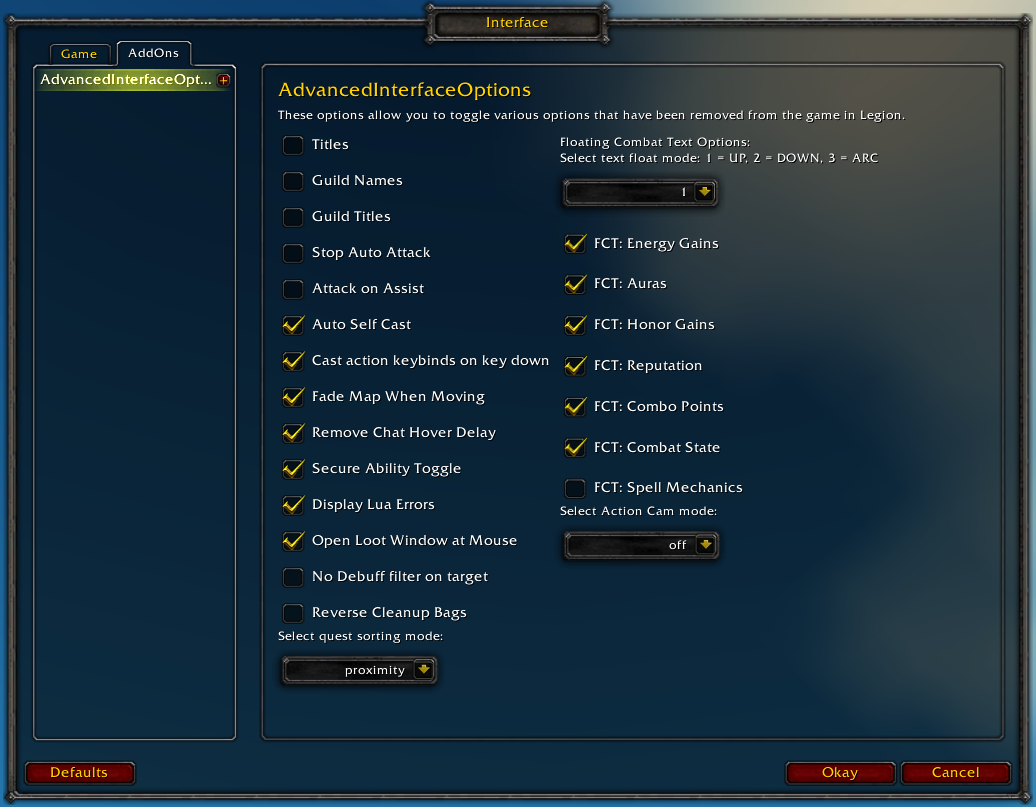
Restores access to hidden interface options and provides a way to browse every CVar setting in the game!
General
Player Titles
Guild Names
Guild Titles
Stop Auto Attack
Attack on Assist
Cast action keybinds on key down
Fade Map when Moving
Secure Ability Toggle
Display Lua Errors
No Debuff Filter on Target
Reverse Cleanup Bags
Quest sorting mode (top vs proximity)
Select Action Cam mode
Chat
Remove Chat Hover Delay
Enable Mouse Wheel Scrolling
Floating Combat Text
Float mode (up/down/arc)
Energy Gains
Auras
Honor Gains
Reputation
Combo Points
Combat State (Entering/Leaving Combat)
Spell Mechanics
Healing
Absorb (Self and Target)
Directional Scale (brings back the classic, only upwards moving text)
Low HP/Mana
Plus many other options available through the built-in CVar browser, including some that have never been exposed by Blizzard, such as "violence level" and "nameplate distance"!
Type /aio for the main menu or /cvar to open the CVar browser directly
That could indeed be from the status text settings. Can you also try testing the "Load Defaults" button to see if that prevents the taint errors after it happens again?
For status text, I have "Status Text" checked with "Both" as the option and then "Target" checked. I have everything else disabled in that section.
I am also not logging in or reloading while in combat. I went ahead and loaded all defaults as Ketho suggested. If that doesn't fix it, then I will start enabling addons one by one to try and find the conflict.
EDIT: I just noticed that even with most of the status text options disabled they were still appearing on the bars. I had to enable them and then disable them again to get them to actually stop showing. I wonder if this was the issue? So far so good.
I think enabling the status text is the most likely candidate here because it's not technically a cvar and we had to modify the interface to support toggling the separate options.
However, as far as I know it never interfered with anything before, so I'm not sure what changed.
We may be able to rewrite it a different way when someone gets the chance.
This happened a few times, not always: When I attempted to queue for Random Battlegrounds WoW gives me an error saying AdvancedInterfaceOptions tried to do something only the WoW UI can do.
4x [ADDON_ACTION_BLOCKED] AddOn 'AdvancedInterfaceOptions' tried to call the protected function 'PartyMemberFrame1:Show()'.
!BugGrabber\BugGrabber.lua:573: in function <!BugGrabber\BugGrabber.lua:573>
[C]: in function `Show'
FrameXML\PartyMemberFrame.lua:139: in function `PartyMemberFrame_UpdateMember'
FrameXML\PartyMemberFrame.lua:336: in function `PartyMemberFrame_OnEvent'
[string "*:OnEvent"]:1: in function `OnEvent'
FrameXML\UnitFrame.lua:921: in function <FrameXML\UnitFrame.lua:919>

Locals:
It looks like the code path is somehow being tainted. It shouldn't be happening, but it can be pretty hard to figure out what's causing something like this.
Does this happen often, or under any specific circumstances that you've noticed?
This is probably a dumb question, but is this addon character agnostic? For example, if I have the "force settings" option on and log into a different character, all CVars should be synced with the first character?
I knew the savedvariables were global, just making sure there isn't a character switch hidden somewhere. I made a code snippet of my own to capture and set cvars, but then I remembered I had this installed. Thanks for the reply.
Rollback Post to RevisionRollBack
To post a comment, please login or register a new account.


-
View User Profile
-
Send Message
Posted Aug 13, 2017Are you by chance using the status text settings to display health or power values on the bars?
And I want to make sure you aren't doing something like logging in or reloading your interface in combat.
-
View User Profile
-
Send Message
Posted Aug 13, 2017That could indeed be from the status text settings. Can you also try testing the "Load Defaults" button to see if that prevents the taint errors after it happens again?
-
View User Profile
-
Send Message
Posted Aug 14, 2017For status text, I have "Status Text" checked with "Both" as the option and then "Target" checked. I have everything else disabled in that section.
I am also not logging in or reloading while in combat. I went ahead and loaded all defaults as Ketho suggested. If that doesn't fix it, then I will start enabling addons one by one to try and find the conflict.
EDIT: I just noticed that even with most of the status text options disabled they were still appearing on the bars. I had to enable them and then disable them again to get them to actually stop showing. I wonder if this was the issue? So far so good.
-
View User Profile
-
Send Message
Posted Aug 14, 2017I think enabling the status text is the most likely candidate here because it's not technically a cvar and we had to modify the interface to support toggling the separate options.
However, as far as I know it never interfered with anything before, so I'm not sure what changed.
We may be able to rewrite it a different way when someone gets the chance.
-
View User Profile
-
Send Message
Posted Aug 14, 2017-
View User Profile
-
Send Message
Posted Aug 12, 2017Hi, thank you for a nice addon. Is there any way to change the map transparency level? (i. e. how "much" transparent the map will be).
Thank you.
-
View User Profile
-
Send Message
Posted Aug 12, 2017You mean when your character is moving? This can be controlled with mapAnimMinAlpha and then /reload or relogging
When not moving: there also is worldMapOpacity but it doesn't seem to do anything anymore, then you'd have to use an addon http://addon.bool.no/
-
View User Profile
-
Send Message
Posted Aug 14, 2017Hi, thanks for the reply. MapAnimMinAlpha does the thing :). Exactly what i needed.
Superb addon!
-
View User Profile
-
Send Message
Posted Aug 1, 2017hi, i have a question. is there a macro for changing from smaller nameplates to larger nameplates or larger to smaller?
-
View User Profile
-
Send Message
Posted Aug 1, 2017-
View User Profile
-
Send Message
Posted Aug 1, 2017it works, thanks very much!
-
View User Profile
-
Send Message
Posted Jul 20, 2017love your addon finaly my quest options are back <3
-
View User Profile
-
Send Message
Posted Jul 19, 2017I have Stop Autoattack selected but I am still autoattacking.. what gives?
-
View User Profile
-
Send Message
Posted Jul 18, 2017This happened a few times, not always: When I attempted to queue for Random Battlegrounds WoW gives me an error saying AdvancedInterfaceOptions tried to do something only the WoW UI can do.
-
View User Profile
-
Send Message
Posted Jul 18, 2017Does this only happen after having changed a setting in AIO during that game session, or does it happen even when you haven't modified anything?
Has it only started recently?
-
View User Profile
-
Send Message
Posted Jul 17, 2017Catched a bug:
-
View User Profile
-
Send Message
Posted Jul 18, 2017It looks like the code path is somehow being tainted. It shouldn't be happening, but it can be pretty hard to figure out what's causing something like this.
Does this happen often, or under any specific circumstances that you've noticed?
When was the first time you noticed this happen?
-
View User Profile
-
Send Message
Posted Jul 11, 2017This is probably a dumb question, but is this addon character agnostic? For example, if I have the "force settings" option on and log into a different character, all CVars should be synced with the first character?
-
View User Profile
-
Send Message
Posted Jul 12, 2017Settings are stored globally, so if you enable that option it should apply them to any character that you log into.
-
View User Profile
-
Send Message
Posted Jul 12, 2017I knew the savedvariables were global, just making sure there isn't a character switch hidden somewhere. I made a code snippet of my own to capture and set cvars, but then I remembered I had this installed. Thanks for the reply.