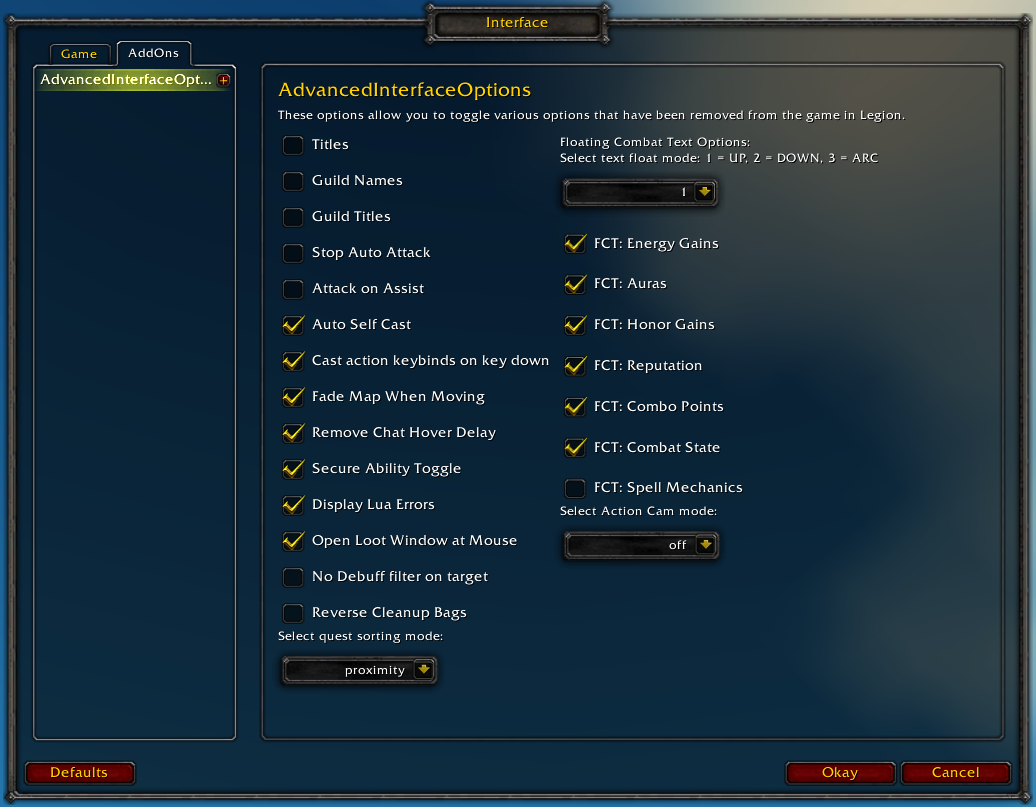
Restores access to hidden interface options and provides a way to browse every CVar setting in the game!
General
Player Titles
Guild Names
Guild Titles
Stop Auto Attack
Attack on Assist
Cast action keybinds on key down
Fade Map when Moving
Secure Ability Toggle
Display Lua Errors
No Debuff Filter on Target
Reverse Cleanup Bags
Quest sorting mode (top vs proximity)
Select Action Cam mode
Chat
Remove Chat Hover Delay
Enable Mouse Wheel Scrolling
Floating Combat Text
Float mode (up/down/arc)
Energy Gains
Auras
Honor Gains
Reputation
Combo Points
Combat State (Entering/Leaving Combat)
Spell Mechanics
Healing
Absorb (Self and Target)
Directional Scale (brings back the classic, only upwards moving text)
Low HP/Mana
Plus many other options available through the built-in CVar browser, including some that have never been exposed by Blizzard, such as "violence level" and "nameplate distance"!
Type /aio for the main menu or /cvar to open the CVar browser directly
I've used AIO ever since Blizzard thought it ideal to not show us when we enter/leave combat (how stupid are their devs rly^^). So ofc that's one of my biggest reasons for using AIO. That said it's worked perfect for several months and it still does. That said, yesterday Saturday 18th, it was also working perfect, letting me know when I Enter Combat and Leave Combat.
Today however when I logged on, and was running too close on some mobs that aggroed I was surprised to see that carbonite showed me that I was in combat by flashing the map user arrow red (as it should), but I hadn't gotten any notice on screen in red letters telling me "Enter Combat" which my AIO is set to do.
I went to AIO interface as that's the only addon that I have that has the ability. As that didn't get me further, I manually checked every single setting of all my addons (which is a fair few to say the least) and came up with nothing.
The CVar Browser typing in "Leave" brought up 2 options where the needed in this scenario is: floatingCombatTextCombatState > Shows a message when you enter or leave combat > value 1. I tried setting it to 0, did a reload, set it to 1 again, did another reload. Still nothing. Tried a relog and nothing.
So I checked AIO again, thinking that the solution had to be in the 1 addon of mine that has the sole option that led me to the addon in the first place.
Hold and be told: It did. ./go figure...
For some reason I am unable to explain, AIO had by it self, turned of Floating Combat Text For Self under Floating Combat Text.
Checking Floating Combat Text For Self on and a /reload did the trick.
I've no idea how or why, as around 2am last night (server time) it worked fine, no updates today around noon and this happens at the first sign of combat for me today...
I also have both Bugsack and Buggrabber running on all toons and no notice of any bugs appeared for anything.
If this is not suppose to happen, is it possible to make a fix for it so it doesn't just turn it self off?
Cheers
Ps. Sorry for the wall of text, I just thought it important to get all the details in there too. Also incase someone else encounters the same issue and comes here to look.
There are some addons like MSBT that disable this option, did you check enableFloatingCombatText in the cvar browser if it was maybe set by any other addons?
Ohh and the enableFloatingCombatText is set to 1 where when you mouse over it, it says: Default value 0 as well as that it's not controlled by any other addons.
floatingCombatTextCombatState is also set to 1 and it's Default value is 0 and is also not controlled by any other addons.
The reason for my return to this particular part of AIO's comment section is that I tonight encountered AIO turning it off by it self (again) and I knew that I'd fixed it before and then saw your reply, so sorry for the very late response
This is great for replacing what they took from us but today it started displaying my lua error box again i checked to make sure it was unchecked and it still is.
So i dont know what happened is it bugged or am i doing something wrong. ?
Sounds like you could have another addon displaying lua errors (like bugsack). You can type /fstack and hover over it to get the name of the frame, and check the cvar browser to make sure scriptErrors is set to 0.
Does stopAutoAttackOnTargetChange show as "1" in the cvar browser? Note that this cvar is character-specific, you'd have to enable it on each of your toons
Went through all the characters to make sure that they have "stop auto attack" enabled, and they do, but it's still happening. Maybe it's something else?
Went through all the characters to make sure that they have "stop auto attack" enabled, and they do, but it's still happening. Maybe it's something else?
When you enable experience bar text (xpBarText) it will also enable artifact status bar text to be always on after a /reload or relog. It's a bit strange behavior
The latest version has an experimental feature that tracks when another addon modifies a cvar and attempts to identify it in the tooltip when you hover over it in the cvar browser, so if you think something is interfering with a setting and you know what the cvar is called you can check that next time.


-
View User Profile
-
Send Message
Posted Feb 20, 2017It means it's not the default value :)
It was either changed by you or another add-on.
-
View User Profile
-
Send Message
Posted Feb 19, 2017Hi.
I've used AIO ever since Blizzard thought it ideal to not show us when we enter/leave combat (how stupid are their devs rly^^). So ofc that's one of my biggest reasons for using AIO. That said it's worked perfect for several months and it still does. That said, yesterday Saturday 18th, it was also working perfect, letting me know when I Enter Combat and Leave Combat.
Today however when I logged on, and was running too close on some mobs that aggroed I was surprised to see that carbonite showed me that I was in combat by flashing the map user arrow red (as it should), but I hadn't gotten any notice on screen in red letters telling me "Enter Combat" which my AIO is set to do.
I went to AIO interface as that's the only addon that I have that has the ability. As that didn't get me further, I manually checked every single setting of all my addons (which is a fair few to say the least) and came up with nothing.
The CVar Browser typing in "Leave" brought up 2 options where the needed in this scenario is: floatingCombatTextCombatState > Shows a message when you enter or leave combat > value 1. I tried setting it to 0, did a reload, set it to 1 again, did another reload. Still nothing. Tried a relog and nothing.
So I checked AIO again, thinking that the solution had to be in the 1 addon of mine that has the sole option that led me to the addon in the first place.
Hold and be told: It did. ./go figure...
For some reason I am unable to explain, AIO had by it self, turned of Floating Combat Text For Self under Floating Combat Text.
Checking Floating Combat Text For Self on and a /reload did the trick.
I've no idea how or why, as around 2am last night (server time) it worked fine, no updates today around noon and this happens at the first sign of combat for me today...
I also have both Bugsack and Buggrabber running on all toons and no notice of any bugs appeared for anything.
If this is not suppose to happen, is it possible to make a fix for it so it doesn't just turn it self off?
Cheers
Ps. Sorry for the wall of text, I just thought it important to get all the details in there too. Also incase someone else encounters the same issue and comes here to look.
-
View User Profile
-
Send Message
Posted Feb 20, 2017There are some addons like MSBT that disable this option, did you check enableFloatingCombatText in the cvar browser if it was maybe set by any other addons?
-
View User Profile
-
Send Message
Posted May 12, 2017I've never used MSBT, as AIO has what I need.
Ohh and the enableFloatingCombatText is set to 1 where when you mouse over it, it says: Default value 0 as well as that it's not controlled by any other addons.
floatingCombatTextCombatState is also set to 1 and it's Default value is 0 and is also not controlled by any other addons.
The reason for my return to this particular part of AIO's comment section is that I tonight encountered AIO turning it off by it self (again) and I knew that I'd fixed it before and then saw your reply, so sorry for the very late response
//Jag.
-
View User Profile
-
Send Message
Posted Feb 21, 2017I have the same problem...
-
View User Profile
-
Send Message
Posted Feb 17, 2017This is great for replacing what they took from us but today it started displaying my lua error box again i checked to make sure it was unchecked and it still is.
So i dont know what happened is it bugged or am i doing something wrong. ?
-
View User Profile
-
Send Message
Posted Feb 17, 2017Sounds like you could have another addon displaying lua errors (like bugsack). You can type /fstack and hover over it to get the name of the frame, and check the cvar browser to make sure scriptErrors is set to 0.
-
View User Profile
-
Send Message
Posted Feb 15, 2017Hey, is there any way to remove energy gains from the combat text but keep combo points? Thanks for the addon
-
View User Profile
-
Send Message
Posted Feb 20, 2017In 7.0 Blizzard streamlined combo points into energy gains (floatingCombatTextEnergyGains) afaik
I don't think it'll work but otherwise try setting these cvars and /reload or relog afterwards
-
View User Profile
-
Send Message
Posted Feb 14, 2017The 'Stop Auto Attack" option doesn't seem to be working for me. I don't know if that's a bug or something I may be doing.
-
View User Profile
-
Send Message
Posted Feb 20, 2017Does stopAutoAttackOnTargetChange show as "1" in the cvar browser? Note that this cvar is character-specific, you'd have to enable it on each of your toons
-
View User Profile
-
Send Message
Posted Feb 22, 2017Yes, it shows as a "1", but i'll have to check if its enabled on all of the characters. Thanks for the answer!
-
View User Profile
-
Send Message
Posted Feb 23, 2017Went through all the characters to make sure that they have "stop auto attack" enabled, and they do, but it's still happening. Maybe it's something else?
-
View User Profile
-
Send Message
Posted Feb 24, 2017-
View User Profile
-
Send Message
Posted Feb 11, 2017Is there any way to enable artifact status bar text to be always on the same as experience bar?
-
View User Profile
-
Send Message
Posted Feb 13, 2017When you enable experience bar text (xpBarText) it will also enable artifact status bar text to be always on after a /reload or relog. It's a bit strange behavior
-
View User Profile
-
Send Message
Posted Feb 4, 2017I've encountered an issue with nameplates. Every time I try to change nameplate distance it instantly resets itself back to 40.
Edit: Disregard, turns out another addon (specifically ElvUI) was interfering.
-
View User Profile
-
Send Message
Posted Feb 4, 2017The latest version has an experimental feature that tracks when another addon modifies a cvar and attempts to identify it in the tooltip when you hover over it in the cvar browser, so if you think something is interfering with a setting and you know what the cvar is called you can check that next time.
-
View User Profile
-
Send Message
Posted Feb 13, 2017Yes, ElvUI has an option "Load Distance" for that (which overrides AIO)
-
View User Profile
-
Send Message
Posted Feb 4, 2017is there an option for auto quest tracking and if so how do I access it to do this?