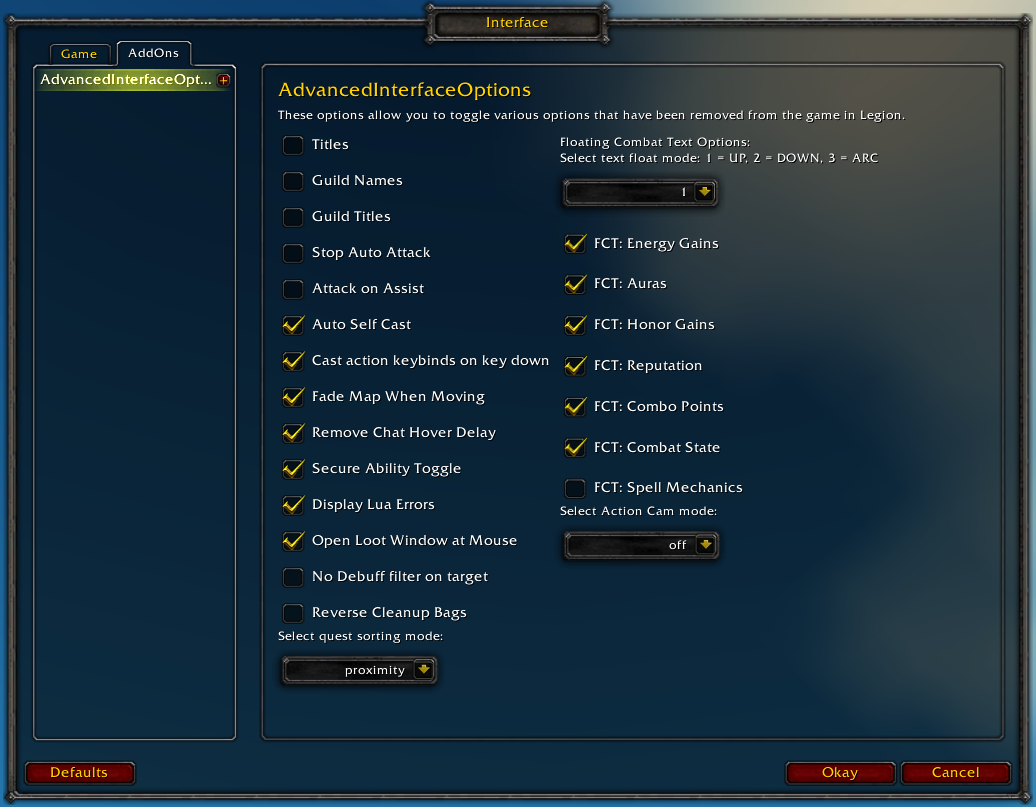
Restores access to hidden interface options and provides a way to browse every CVar setting in the game!
General
Player Titles
Guild Names
Guild Titles
Stop Auto Attack
Attack on Assist
Cast action keybinds on key down
Fade Map when Moving
Secure Ability Toggle
Display Lua Errors
No Debuff Filter on Target
Reverse Cleanup Bags
Quest sorting mode (top vs proximity)
Select Action Cam mode
Chat
Remove Chat Hover Delay
Enable Mouse Wheel Scrolling
Floating Combat Text
Float mode (up/down/arc)
Energy Gains
Auras
Honor Gains
Reputation
Combo Points
Combat State (Entering/Leaving Combat)
Spell Mechanics
Healing
Absorb (Self and Target)
Directional Scale (brings back the classic, only upwards moving text)
Low HP/Mana
Plus many other options available through the built-in CVar browser, including some that have never been exposed by Blizzard, such as "violence level" and "nameplate distance"!
Type /aio for the main menu or /cvar to open the CVar browser directly
Question: Wow used to have a counter that showed the number of quests we have in our quest log, but this was removed along with many of the other useful features that we now need add ons for.
My LUA errors keep getting turned on even after unchecking the box, using a script, and changing the Cvar to 0. I read in the comments about typing /fstack and hovering over the Cvar browser but it didn't tell me what addon is enabling it. Any ideas? This is getting annoying.
Page says "Updated 4 days ago", latest version to download is from March 29th. Is this still the old bug that popped up a few months ago with new versions not showing up?
Or is this some new behavior where you make minor changes within the latest version without making a new one? Which would still be weird, since that version should at least still update to the latest date changes were made to it.
Or alternatively, is Updated status not related to releases at all? Which would be kinda misleading.
It's counting alpha versions which haven't been marked for "release" yet, but can be downloaded by clicking on the "Project Site" link at the top of the page and going to the Files tab directly, or configuring the curse client to download alpha projects.
Personally I'd just upload everything as a release and fix it when people start complaining that I broke something, but maybe that's why I'm not in charge of the release cycle.
Does anyone know if there is a CVar setting to disable the appearance of the "Mission Complete" toasts that pop up every time you zone while having a completed order hall mission? (See ScreenShot)
Is there a list somewhere of useful/interesting CVars that folks feel everyone should consider? Personally, this addon is 100% worth it for the variable "autoQuestWatch" (which I prefer to be FALSE.)
Could you clarify what are the differences between cvar "minimapShowQuestBlobs" and cvar "minimapShowArchBlobs", please? Both of their descriptions say "Stores whether to show the quest blobs on the minimap.".
I searched both cvars on Google and the only relevant result is AdvancedInterfaceOptions' github page.
I clicked on "Display Lua Errors" to debug some addons, and now it won't let me disable it again. I untick the checkbox, but on any reload the box it checked again and I get the occassional lua errors window when there's an addon problem.
The Cvar shows the setting as "0", even though it's still clearly on.
Hey, I really enjoy using this addon. Especially the ability to easily toggle settings like
/console ActionCam full
/console noBuffDebuffFilterOnTarget 1
I was just wondering could you add to the actioncam and add a drop down menu for (/CONSOLE ACTIONCAM *)
heavyHeadMove - heavy head movement
noHeadMove - disable head movement
lowHeadMove - enable head movement
headMove - enable head movement
Also I was wondering if you could add a toggle for buff durations. {I am not sure atm but i think the command is "/run SetCVar("buffDurations", 0) }
Does the addon have this toggle, I literally just remembered it off the top of my head? It probably does and i forget while writing this.
/console ShowClassColorInNameplate 1
I don't know if you guys know of any commands, but I would like to remove the yellow circle beneath quest targets, and for some reason their health bars show up out of combat even though I have it set to only show the health bar of combatants.
PS> More BLOOD for the BLOOD GOD. "/console violenceLevel *" By default blizz put this wondrous setting at 2, crank it up to 5. The "Bloodiest. Highest violence level. A lot of gore."
I am probably an idiot, but I have no idea how to use the CVar browser. Is there something I could do with it that would eliminate screen shake? If so, what and how?
Rollback Post to RevisionRollBack
To post a comment, please login or register a new account.


-
View User Profile
-
Send Message
Posted Apr 24, 2017Question: Wow used to have a counter that showed the number of quests we have in our quest log, but this was removed along with many of the other useful features that we now need add ons for.
Is there any way to put this quest counter back?
-
View User Profile
-
Send Message
Posted Apr 24, 2017There is no cvar to put the quest counter back, but there are addons
-
View User Profile
-
Send Message
Posted Apr 20, 2017My LUA errors keep getting turned on even after unchecking the box, using a script, and changing the Cvar to 0. I read in the comments about typing /fstack and hovering over the Cvar browser but it didn't tell me what addon is enabling it. Any ideas? This is getting annoying.
-
View User Profile
-
Send Message
Posted Apr 20, 2017Please try disabling all of your other addons and seeing if you still can't disable lua errors so we can try and identify what's causing this.
If you're running an alpha version of weak auras, it's turning your errors back on.
-
View User Profile
-
Send Message
Posted Apr 20, 2017That could be it. I have my Curse client set for alpha releases.
-
View User Profile
-
Send Message
Posted Apr 17, 2017Question:
Page says "Updated 4 days ago", latest version to download is from March 29th. Is this still the old bug that popped up a few months ago with new versions not showing up?
Or is this some new behavior where you make minor changes within the latest version without making a new one? Which would still be weird, since that version should at least still update to the latest date changes were made to it.
Or alternatively, is Updated status not related to releases at all? Which would be kinda misleading.
-
View User Profile
-
Send Message
Posted Apr 17, 2017It's counting alpha versions which haven't been marked for "release" yet, but can be downloaded by clicking on the "Project Site" link at the top of the page and going to the Files tab directly, or configuring the curse client to download alpha projects.
Personally I'd just upload everything as a release and fix it when people start complaining that I broke something, but maybe that's why I'm not in charge of the release cycle.
-
View User Profile
-
Send Message
Posted Apr 14, 2017Two Questions:
Thanks!
-
View User Profile
-
Send Message
Posted Apr 14, 2017You can go to http://addon.bool.no and paste this into it to have it make an addon for you
AlertFrame:UnregisterEvent("GARRISON_MISSION_FINISHED")If you don't want any toasts from that system you can use this instead
-
View User Profile
-
Send Message
Posted Apr 14, 2017Thanks -- great suggestion!
-
View User Profile
-
Send Message
Posted Apr 13, 2017Could you clarify what are the differences between cvar "minimapShowQuestBlobs" and cvar "minimapShowArchBlobs", please? Both of their descriptions say "Stores whether to show the quest blobs on the minimap.".
I searched both cvars on Google and the only relevant result is AdvancedInterfaceOptions' github page.
Thank you,
Serenus
-
View User Profile
-
Send Message
Posted Apr 13, 2017minimapShowArchBlobs is for toggling the display of archaeology digsites.
-
View User Profile
-
Send Message
Posted May 7, 2017Thank you! I am sorry for the late reply. Curse did not notify me of your reply.
-
View User Profile
-
Send Message
Posted Apr 12, 2017Problem:
I clicked on "Display Lua Errors" to debug some addons, and now it won't let me disable it again. I untick the checkbox, but on any reload the box it checked again and I get the occassional lua errors window when there's an addon problem.
The Cvar shows the setting as "0", even though it's still clearly on.
Anything I can do to fix this?
-
View User Profile
-
Send Message
Posted Apr 12, 2017If the scriptErrors cvar is set to 0, then the "lua error window" that you're seeing is from one of your addons.
You can type /fstack and mouse over it to see if it has a name that you can identify.
If the cvar is getting set back to 1, then if you hover over it in the cvar browser it should tell you what addon is enabling it.
-
View User Profile
-
Send Message
Posted Apr 13, 2017After enabling each addon in turn, I've found that Weak Auras is causing it :(
-
View User Profile
-
Send Message
Posted Apr 20, 2017Apparently the alpha releases for weak auras turn script errors on.
-
View User Profile
-
Send Message
Posted Apr 14, 2017whats the reason for this setting? idea is to desable all lua erros or did i miss something?
i unchecked this bos and after reload its checked again
thats not correct from my point of view
-
View User Profile
-
Send Message
Posted Apr 12, 2017Hey, I really enjoy using this addon. Especially the ability to easily toggle settings like
I was just wondering could you add to the actioncam and add a drop down menu for (/CONSOLE ACTIONCAM *)
Also I was wondering if you could add a toggle for buff durations. {I am not sure atm but i think the command is "/run SetCVar("buffDurations", 0) }
Does the addon have this toggle, I literally just remembered it off the top of my head? It probably does and i forget while writing this.
I don't know if you guys know of any commands, but I would like to remove the yellow circle beneath quest targets, and for some reason their health bars show up out of combat even though I have it set to only show the health bar of combatants.
PS> More BLOOD for the BLOOD GOD. "/console violenceLevel *" By default blizz put this wondrous setting at 2, crank it up to 5. The "Bloodiest. Highest violence level. A lot of gore."
-
View User Profile
-
Send Message
Posted Apr 11, 2017I am probably an idiot, but I have no idea how to use the CVar browser. Is there something I could do with it that would eliminate screen shake? If so, what and how?