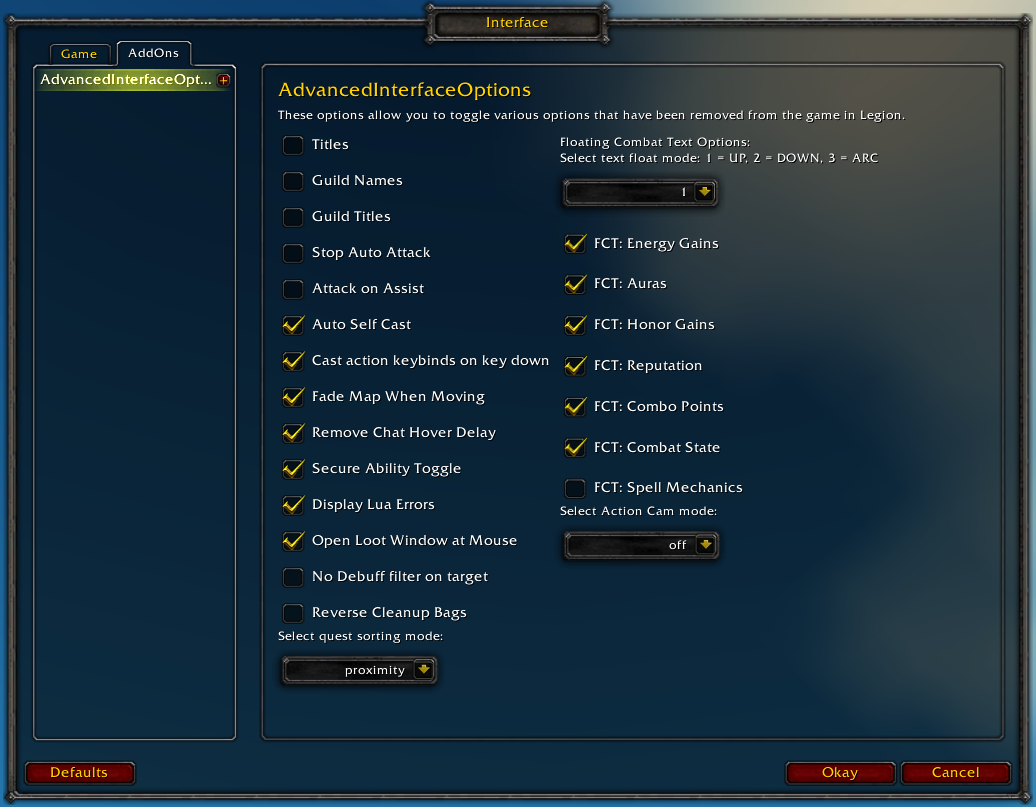
Restores access to hidden interface options and provides a way to browse every CVar setting in the game!
General
Player Titles
Guild Names
Guild Titles
Stop Auto Attack
Attack on Assist
Cast action keybinds on key down
Fade Map when Moving
Secure Ability Toggle
Display Lua Errors
No Debuff Filter on Target
Reverse Cleanup Bags
Quest sorting mode (top vs proximity)
Select Action Cam mode
Chat
Remove Chat Hover Delay
Enable Mouse Wheel Scrolling
Floating Combat Text
Float mode (up/down/arc)
Energy Gains
Auras
Honor Gains
Reputation
Combo Points
Combat State (Entering/Leaving Combat)
Spell Mechanics
Healing
Absorb (Self and Target)
Directional Scale (brings back the classic, only upwards moving text)
Low HP/Mana
Plus many other options available through the built-in CVar browser, including some that have never been exposed by Blizzard, such as "violence level" and "nameplate distance"!
Type /aio for the main menu or /cvar to open the CVar browser directly
Yes. Looks like that works for a little bit, but as soon as I mount or open a menu the glow around the character turns a light blue instead of the pale yellow.
I don't know what menu you're opening, but even restarting the game doesn't get rid of the outline for me. Mounting temporarily removes it, and a number of things change it from yellow to blue.
This option doesn't appear to be meant to be used, but here's a horrible solution that should keep your outline mode set regardless of what you do:
If you're running that script I wrote and you still don't have a yellow outline on yourself at all times, something is interfering with it. What you're describing doesn't sound like the script is running at all.
Either another addon is doing something or one of your settings is affecting how it behaves.
You can try disabling all of your addons and running the script from the chat box, if it still doesn't work then it has something to do with your specific setup and I have no idea what that would be.
Hello , is there no way to revert the change since 7.2 of opposite factions names being "orange" coloured ? , it really reminds me to much of unfriendly factions .... and ofc was better before lol.
Oh my god, thank you for this addon! I have been using it since Legion launched and it has come in fairly handy, but today it became extraordinary! I was having trouble with my Tidy Plates nameplates "disappearing" when leaving combat. I was able to find a CVar that was being edited by another addon going little haywire and all I can say is THANK YOU SO MUCH for adding the line 'Last edited by.' It was being messed with by an addon I would of never thought of and that one line fixed hours worth of headaches.
With the 7.2 update, I can't adjust my Custom Lag Tolerance, and I'm getting Lua errors when I go to the Interface>Addons>AdvancedInterfaceOptions
Message: ...ace\AddOns\AdvancedInterfaceOptions\basicOptions.lua:190: Usage: AIOSliderMaxSpellStartRecoveryOffset:SetValue(value, [treatAsMouseEvent]) Time: 03/28/17 16:00:46 Count: 1 Stack: [C]: ? [C]: in function `SetValue' ...ace\AddOns\AdvancedInterfaceOptions\basicOptions.lua:190: in function <...ace\AddOns\AdvancedInterfaceOptions\basicOptions.lua:190> [C]: in function `Show' Interface\FrameXML\InterfaceOptionsFrame.lua:28: in function `InterfaceOptionsList_DisplayPanel' Interface\FrameXML\InterfaceOptionsFrame.lua:46: in function `InterfaceOptionsListButton_OnClick' [string "*:OnClick"]:2: in function <[string "*:OnClick"]:1>
Message: ...ace\AddOns\AdvancedInterfaceOptions\basicOptions.lua:190: Usage: AIOSliderMaxSpellStartRecoveryOffset:SetValue(value, [treatAsMouseEvent]) Time: 03/28/17 16:04:31 Count: 1 Stack: [C]: ? [C]: in function `SetValue' ...ace\AddOns\AdvancedInterfaceOptions\basicOptions.lua:190: in function <...ace\AddOns\AdvancedInterfaceOptions\basicOptions.lua:190> [C]: in function `Show' Interface\FrameXML\UIParent.lua:2420: in function `SetUIPanel' Interface\FrameXML\UIParent.lua:2222: in function `ShowUIPanel' Interface\FrameXML\UIParent.lua:2132: in function <Interface\FrameXML\UIParent.lua:2128> [C]: in function `SetAttribute' Interface\FrameXML\UIParent.lua:2914: in function `ShowUIPanel' [string "*:OnClick"]:2: in function <[string "*:OnClick"]:1>
Not sure how else to report this issue. Sorry if this isn't the right place. "Report Bug" on curse redirected me here.
reducedLagTolerance and MaxSpellStartRecoveryOffset were replaced by SpellQueueWindow but I don't know the specifics about it. You can set it in the 1.1.2 release
Apparently the "enforce settings on startup" messes with the Minimap, causing it to zoom all the way in when entering a building or logging into one.
This is highly frustrating since sometimes the settings reset and mess up my bagorder (scrambling bagnon(The Addon), and or sorting loot into the left-most bag, which just annoys me to no end)
But the constant changing of the minimap is even more annoying, can you see if you can make the addon exclude said minimap resetting option?
Hello. Your addon is my only hope here. I can't get used to combo point addons.
While using the cvbrowser fix to bring back pre-legion combo point interface using AIO and specced into anticipation, the game FPS will drop to like 5 every time you gain a combo point. Also when specced anticipation the addon shows only 8 combo points but in the patch that came anticipation was changed to 10.
I really hope you can fix this in a comming update. Thanks alot for reading
combopointlocation is set to 1 yes, to make it pre-legion style. it still lags me out regardless of having other addons enabled. also a big issue is that AIO only shows 8 combo points with anticipation talent taken, when it should show 10.


-
View User Profile
-
Send Message
Posted Apr 11, 2017Screen shake is not something we have any control over as players, it's built into encounters as the designers see fit.
-
View User Profile
-
Send Message
Posted Apr 8, 2017in the CVar Browser there is the option "findYourselfMode"; 0 = circle, 1 = circle and outline....is there an option for just outline?
I basically just always the want the yellow glow around me, and not the circle around my feet...
i get that result for a bit, but soon as i open a window or mount it disappears.
-
View User Profile
-
Send Message
Posted Apr 8, 2017Have you tried setting it to 2?
-
View User Profile
-
Send Message
Posted Apr 8, 2017Yes. Looks like that works for a little bit, but as soon as I mount or open a menu the glow around the character turns a light blue instead of the pale yellow.
Also if i open any menu or mount its gone.
-
View User Profile
-
Send Message
Posted Apr 9, 2017I don't know what menu you're opening, but even restarting the game doesn't get rid of the outline for me. Mounting temporarily removes it, and a number of things change it from yellow to blue.
This option doesn't appear to be meant to be used, but here's a horrible solution that should keep your outline mode set regardless of what you do:
/run CreateFrame('frame'):SetScript('OnUpdate',function()SetCVar('findyourselfmode',0)SetCVar('findyourselfmode', 1)SetCVar('findyourselfmode',2)end)You can create an addon out of this by removing "/run" and pasting it into http://addon.bool.no/
-
View User Profile
-
Send Message
Posted Apr 9, 2017If you're running that script I wrote and you still don't have a yellow outline on yourself at all times, something is interfering with it. What you're describing doesn't sound like the script is running at all.
Either another addon is doing something or one of your settings is affecting how it behaves.
You can try disabling all of your addons and running the script from the chat box, if it still doesn't work then it has something to do with your specific setup and I have no idea what that would be.
-
View User Profile
-
Send Message
Posted Mar 29, 2017Hello , is there no way to revert the change since 7.2 of opposite factions names being "orange" coloured ? , it really reminds me to much of unfriendly factions .... and ofc was better before lol.
-
View User Profile
-
Send Message
Posted Mar 31, 2017bump :p
-
View User Profile
-
Send Message
Posted Mar 31, 2017This isn't something we have control over.
-
View User Profile
-
Send Message
Posted Mar 31, 2017too bad :( , guess all i can hope is that they revert it or add somekinda toggle for it , thank you for responding.
-
View User Profile
-
Send Message
Posted Mar 28, 2017Oh my god, thank you for this addon! I have been using it since Legion launched and it has come in fairly handy, but today it became extraordinary! I was having trouble with my Tidy Plates nameplates "disappearing" when leaving combat. I was able to find a CVar that was being edited by another addon going little haywire and all I can say is THANK YOU SO MUCH for adding the line 'Last edited by.' It was being messed with by an addon I would of never thought of and that one line fixed hours worth of headaches.
-
View User Profile
-
Send Message
Posted Mar 29, 2017That was kind of an experimental feature, I'm glad to hear someone got some use out of it!
-
View User Profile
-
Send Message
Posted Mar 28, 2017With the 7.2 update, I can't adjust my Custom Lag Tolerance, and I'm getting Lua errors when I go to the Interface>Addons>AdvancedInterfaceOptions
Message: ...ace\AddOns\AdvancedInterfaceOptions\basicOptions.lua:190: Usage: AIOSliderMaxSpellStartRecoveryOffset:SetValue(value, [treatAsMouseEvent])
Time: 03/28/17 16:00:46
Count: 1
Stack: [C]: ?
[C]: in function `SetValue'
...ace\AddOns\AdvancedInterfaceOptions\basicOptions.lua:190: in function <...ace\AddOns\AdvancedInterfaceOptions\basicOptions.lua:190>
[C]: in function `Show'
Interface\FrameXML\InterfaceOptionsFrame.lua:28: in function `InterfaceOptionsList_DisplayPanel'
Interface\FrameXML\InterfaceOptionsFrame.lua:46: in function `InterfaceOptionsListButton_OnClick'
[string "*:OnClick"]:2: in function <[string "*:OnClick"]:1>
Message: ...ace\AddOns\AdvancedInterfaceOptions\basicOptions.lua:190: Usage: AIOSliderMaxSpellStartRecoveryOffset:SetValue(value, [treatAsMouseEvent])
Time: 03/28/17 16:04:31
Count: 1
Stack: [C]: ?
[C]: in function `SetValue'
...ace\AddOns\AdvancedInterfaceOptions\basicOptions.lua:190: in function <...ace\AddOns\AdvancedInterfaceOptions\basicOptions.lua:190>
[C]: in function `Show'
Interface\FrameXML\UIParent.lua:2420: in function `SetUIPanel'
Interface\FrameXML\UIParent.lua:2222: in function `ShowUIPanel'
Interface\FrameXML\UIParent.lua:2132: in function <Interface\FrameXML\UIParent.lua:2128>
[C]: in function `SetAttribute'
Interface\FrameXML\UIParent.lua:2914: in function `ShowUIPanel'
[string "*:OnClick"]:2: in function <[string "*:OnClick"]:1>
Not sure how else to report this issue. Sorry if this isn't the right place. "Report Bug" on curse redirected me here.
-
View User Profile
-
Send Message
Posted Mar 28, 2017reducedLagTolerance and MaxSpellStartRecoveryOffset were replaced by SpellQueueWindow but I don't know the specifics about it. You can set it in the 1.1.2 release
https://twitter.com/WarcraftDevs/status/846848947444363264
-
View User Profile
-
Send Message
Posted Feb 24, 2017Apparently the "enforce settings on startup" messes with the Minimap, causing it to zoom all the way in when entering a building or logging into one.
This is highly frustrating since sometimes the settings reset and mess up my bagorder (scrambling bagnon(The Addon), and or sorting loot into the left-most bag, which just annoys me to no end)
But the constant changing of the minimap is even more annoying, can you see if you can make the addon exclude said minimap resetting option?
-
View User Profile
-
Send Message
Posted Feb 24, 2017If you open the cvar browser (/cvar) and look up minimapInsideZoom and hover over it, what addon does it say is changing the zoom level?
Does it keep the value if you set it to 0 there?
-
View User Profile
-
Send Message
Posted Feb 23, 2017Hello. Your addon is my only hope here. I can't get used to combo point addons.
While using the cvbrowser fix to bring back pre-legion combo point interface using AIO and specced into anticipation, the game FPS will drop to like 5 every time you gain a combo point. Also when specced anticipation the addon shows only 8 combo points but in the patch that came anticipation was changed to 10.
I really hope you can fix this in a comming update. Thanks alot for reading
-
View User Profile
-
Send Message
Posted Feb 24, 2017Did you change comboPointLocation ? Does it also happen with all other addons disabled? If you have BugSack you can debug any addon errors
-
View User Profile
-
Send Message
Posted Feb 24, 2017combopointlocation is set to 1 yes, to make it pre-legion style. it still lags me out regardless of having other addons enabled. also a big issue is that AIO only shows 8 combo points with anticipation talent taken, when it should show 10.
-
View User Profile
-
Send Message
Posted Feb 19, 2017In the CVar Browser, if the value is red, what does that mean compared to white, thanks.