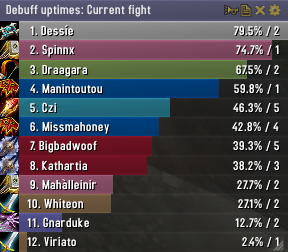
Skada Damage Meter
Skada Damage Meter
Skada is a modular damage meter for World of Warcraft with various viewing modes, segmented fights, and customizable windows. It is designed for efficiency with minimal memory and CPU impact.
"Skada" is Swedish for "Damage".
Midnight Edition (WoW 12.0+)
This version of Skada is updated for World of Warcraft: Midnight and uses Blizzard's new session-based combat systems.
Features
- Midnight Optimized: Uses Blizzard's internal session data for performance and accuracy.
- Combat Reliability: Handles modern combat data restrictions for a stable experience.
- Updated UI: Includes new presets with smooth animations, gradients, and textures.
- Dynamic Elements: Alternating row colors, highlight overlays, spark effects, and icon scaling.
- LDB Integration: Compatible with Data Broker displays such as Titan Panel, ChocolateBar, and ElvUI.
- Extensible Architecture: The API allows developers to create additional plugins.
Usage
Getting Started
A default window is created upon first load. Access the configuration menu by clicking the cog icon on the window title bar or via the minimap button. Select Configure to access settings.
Multiple Windows
Skada supports multiple windows. Create new ones under the Windows section of the configuration panel. Windows can be:
- Bar: The standard customizable meter.
- Inline: A horizontal line for custom UI setups.
- Data Text: For LDB displays and minimal setups.
Navigation
- Left-Click: View more detailed information.
- Right-Click: Return to the previous view.
- Mousewheel: Scroll through lists.
- Tooltips: Hover over bars to see additional context and shortcut keys (e.g., Shift-click for targets).
Themes
Manage window designs with the built-in Theme Engine. You can import and export themes by using theme strings.
Versions
- Midnight (Default): For WoW 12.0+ using the Native API.
- Classic Version: The version for older WoW releases.
Support
If you find Skada helpful, consider supporting its development through GitHub Sponsors.
Links
Comments


-

zarnivoop Owner
-
View User Profile
-
Send Message
Posted Apr 7, 2025There's an issue with at least the most recent two versions, they're packaged with an extra "lib" folder that's prefixed with the XML/HTML comment open bracket "<!--". It has one of the libraries that are in the main, but with some changes; this causes the battle.net app to not be able to verify WoW's files and it marks the game as needing an update that it can't complete because it says it can't mark a file for writing. Might be a unique problem for running on Linux, I'm not sure, but the folder definitely doesn't belong there.
Addon versions 1.10.1 and 1.10.2 are affected; 1.9.9 is not; I didn't check 1.10.0. Would just remove the folder but I'm not sure if it's somehow being used or if the changes in it are needed.
ETA: just verified, any folder (and probably any file) in the file structure with that character sequence will cause battle.net to be unable to verify the game files. The version where this change happened is 1.10.0.
-
View User Profile
-
Send Message
Posted Apr 7, 2025In reply to laurelraven: Cheers, had not noticed. Fixed in 1.10.3.
-
View User Profile
-
Send Message
Posted Apr 5, 2025Sometimes i get this error when i lfg
1x [ADDON_ACTION_BLOCKED] AddOn 'Skada' tried to call the protected function 'UNKNOWN()'.
[string "@!BugGrabber/BugGrabber.lua"]:485: in function <!BugGrabber/BugGrabber.lua:485>
[string "=[C]"]: ?
[string "=[C]"]: in function `Search'
[string "@Blizzard_GroupFinder_VanillaStyle/Blizzard_LFGVanilla_Browse.lua"]:250: in function `LFGBrowse_DoSearch'
[string "@Blizzard_GroupFinder_VanillaStyle/Blizzard_LFGVanilla_Browse.lua"]:189: in function `SearchActiveEntry'
[string "@Blizzard_GroupFinder_VanillaStyle/Blizzard_LFGVanilla_ParentFrame.lua"]:95: in function `LFGParentFrame_SearchActiveEntry'
[string "@Blizzard_GroupFinder_VanillaStyle/Blizzard_LFGVanilla_Listing.lua"]:77: in function <...pFinder_VanillaStyle/Blizzard_LFGVanilla_Listing.lua:54>
Locals:
_ = Frame {
}
event = "ADDON_ACTION_BLOCKED"
events = <table> {
}
-
View User Profile
-
Send Message
Posted Apr 3, 2025Damage data fails to display in the chat window. Please fix this.
-
View User Profile
-
Send Message
Posted Apr 2, 2025Now the Name on the bars not shown, when i switch to "tight to left" only a few "..."
-
View User Profile
-
Send Message
Posted Apr 2, 2025"Left to right" The position of the number is incorrect.
-
View User Profile
-
Send Message
Posted Apr 1, 2025New update. Now the bar text is in right position when i switch to scroll the bars from right to left.
But when i switch the Bar text to class color, the dps color is only white.
-
View User Profile
-
Send Message
Posted Mar 31, 2025Can you add please an option to change white current dps color to class color?
-
View User Profile
-
Send Message
Posted Apr 1, 2025In reply to GreyFoxGer: This is fixed in 1.10.2.
-
View User Profile
-
Send Message
Posted Mar 31, 2025I uploaded an image for you to see the overlap of text. This is with elvui embed in right chat frame. Please fix this. https://ibb.co/GvKz347c
-
View User Profile
-
Send Message
Posted Mar 31, 2025In reply to mariuscostache3: Is this with the default ElvUI settings?
-
View User Profile
-
Send Message
Posted Apr 1, 2025In reply to mariuscostache3: This should be fixed in 1.10.2. Column widths now take into account the font size used.
-
View User Profile
-
Send Message
Posted Mar 28, 2025Nothing major but in delve instances Brann's (companion) damaging abilities displayed under your character. FYI.
-
View User Profile
-
Send Message
Posted Mar 27, 2025Yes, the numbers, percent, dps are overlapping. Please fix.
-
View User Profile
-
Send Message
Posted Mar 30, 2025In reply to mariuscostache3: Fixed in 1.10.1.
-
View User Profile
-
Send Message
Posted Mar 30, 2025In reply to zarnivoop: it's better, but in some configurations it's still happening. Can we have a column spacing option or maybe some kind of syntax editor with spacers for the infos shown in the bars please?
Btw thank you for the hard work 🙏
-
View User Profile
-
Send Message
Posted Mar 26, 2025The "Hide when solo" option hasn't worked for a long time.
I was hoping the latest update would fix it, but no.
I always have to go into Config, untick the box, then tick it again to make it go away... until next time.
-
View User Profile
-
Send Message
Posted Mar 26, 2025heyy !! the numbers, percent, dps anda dmg is overlaping, how can i fix it? TY
-
View User Profile
-
Send Message
Posted Mar 25, 2025Getting below error, I was inspecting the data after a myhtic dungeon run. It seem there is a "GTFO alerts" data in skada but it was empty, I guess it couldn't be updated. I could disable it if there is an option for it.
7x Skada/Skada.lua:2502: attempt to index local 'datasetItem' (a string value)
[Skada/Skada.lua]:2502: in function 'FormatValueText'
[GTFO/GTFO_Skada.lua]:95: in function 'Update'
[Skada/Skada.lua]:2548: in function 'AddSubviewToTooltip'
[Skada/Skada.lua]:2601: in function 'ShowTooltip'
[Skada/BarDisplay.lua]:178: in function <Skada/BarDisplay.lua:174>
Locals:
self = <table> {
defaults = <table> {
}
windowdefaults = <table> {
}
db = <table> {
}
total = <table> {
}
classcolors = <table> {
}
baseName = "Skada"
versions = <table> {
}
char = <table> {
}
defaultModuleState = true
last = <table> {
}
options = <table> {
}
orderedModules = <table> {
}
displays = <table> {
}
resetoptions = <table> {
}
modules = <table> {
}
getsetlabel_fs = FontString {
}
enabledState = true
cleuFrame = Frame {
}
defaultModuleLibraries = <table> {
}
name = "Skada"
}
datasetItem = "5.78M"
value1 = true
bool1 = 3
value2 = true
bool2 = nil
value3 = nil
bool3 = nil
(*temporary) = "attempt to index local 'datasetItem' (a string value)"
-
View User Profile
-
Send Message
Posted Mar 30, 2025In reply to user_dsz474rbfji4nhru: This should be fixed in 1.10.1.