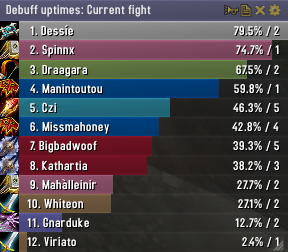
Skada Damage Meter
Skada Damage Meter
Skada is a modular damage meter for World of Warcraft with various viewing modes, segmented fights, and customizable windows. It is designed for efficiency with minimal memory and CPU impact.
"Skada" is Swedish for "Damage".
Midnight Edition (WoW 12.0+)
This version of Skada is updated for World of Warcraft: Midnight and uses Blizzard's new session-based combat systems.
Features
- Midnight Optimized: Uses Blizzard's internal session data for performance and accuracy.
- Combat Reliability: Handles modern combat data restrictions for a stable experience.
- Updated UI: Includes new presets with smooth animations, gradients, and textures.
- Dynamic Elements: Alternating row colors, highlight overlays, spark effects, and icon scaling.
- LDB Integration: Compatible with Data Broker displays such as Titan Panel, ChocolateBar, and ElvUI.
- Extensible Architecture: The API allows developers to create additional plugins.
Usage
Getting Started
A default window is created upon first load. Access the configuration menu by clicking the cog icon on the window title bar or via the minimap button. Select Configure to access settings.
Multiple Windows
Skada supports multiple windows. Create new ones under the Windows section of the configuration panel. Windows can be:
- Bar: The standard customizable meter.
- Inline: A horizontal line for custom UI setups.
- Data Text: For LDB displays and minimal setups.
Navigation
- Left-Click: View more detailed information.
- Right-Click: Return to the previous view.
- Mousewheel: Scroll through lists.
- Tooltips: Hover over bars to see additional context and shortcut keys (e.g., Shift-click for targets).
Themes
Manage window designs with the built-in Theme Engine. You can import and export themes by using theme strings.
Versions
- Midnight (Default): For WoW 12.0+ using the Native API.
- Classic Version: The version for older WoW releases.
Support
If you find Skada helpful, consider supporting its development through GitHub Sponsors.
Links
Comments


-

zarnivoop Owner
-
View User Profile
-
Send Message
Posted Jun 21, 2026On retail I cannot find Deaths, or Enemy damage taken....while on classic I can see those metrics.
Anything that I am missing here? Is it the new API from blizzard on retail? But thing is, these metrics available with details so I dont know why theyre not available with skada too?
-
View User Profile
-
Send Message
Posted May 8, 2026Why can I not size the window how I want? Every time I try to size the window it snaps to either a slightly larger or smaller size. When I am trying to scale it based on the height of another window this is annoying.
-
View User Profile
-
Send Message
Posted Mar 25, 2026Looks like this is not about to truly reborn. Legendary Skada is dead and we have to accept Details reality. Shame :(
-
View User Profile
-
Send Message
Posted Mar 25, 2026dont think this is being updated anymore, shame.
-
View User Profile
-
Send Message
Posted Mar 16, 2026I have also encountered this and agree 100%. Details works great, but it's unnecessary bloat imo.
-
View User Profile
-
Send Message
Posted Mar 16, 2026Hello! I noticed this first issue noted is listed as a defect in the issues page. I did have another question to add to this though. There used to be more number format options such as "Short" which is what I believe Tee is looking for (and I am looking for). Do you plan on adding this? For example, Short number format used to make the number values look like this:
13000 = 13K
130,000,000 = 13M
Thanks for your work on this! Please let us know if any updates in this regard.
-
View User Profile
-
Send Message
Posted Mar 13, 2026changing columns like disabling dps and percentage for damage doesn't change anything. is this a bug?
also number formats are not changing, this addon needs a lot of work
-
View User Profile
-
Send Message
Posted Mar 11, 2026Class icons and bar colors are changing in the middle of the fight for no reason.
This is actually the only issue I got encountered. Please fix. Skada is legend. Don't want to use Details :(
-
View User Profile
-
Send Message
Posted Mar 9, 2026Thanks so much for updating this for Midnight! I noticed the toggle show/hide state isnt remembered between logins so I changed line 1001 in the Skada.lua to the following. Hoping you can add this in a future release.
function Skada:ToggleWindow()
local showing = false
for i, win in ipairs(windows) do
if win:IsShown() then
showing = true
break
end
end
if showing then
for i, win in ipairs(windows) do
win:Hide()
win.db.hidden = true
end
else
for i, win in ipairs(windows) do
win.db.hidden = false
win:Show()
end
end
self:UpdateDisplay(true)
end
-
View User Profile
-
Send Message
Posted Mar 5, 2026Please add:
- Specialization icons in the Bars settings
- An option to change the size of icons in the Title bar (Buttons)
- A mouseover option for the Title bar and hides during combat,
- Rank numbers in General options only work for the main window, but not in the Tooltip, and doesn't work when clicking on player damage.
- There's no option to change the display order of columns in the main window. I'd like to see DPS, DMG, and PERCENT.
- The Tooltip also lacks the option to set the width and height or scale, or the option to change the font. It also lacks the option to enable the skill icon and information bar (like when clicking on character damage).
- The Tooltip only shows a maximum of 10 rows; this could be increased.
- Bars settings lack the option to disable the server name for other players or the option to display its shortened name
- I don't know if it's just me, but Skada doesn't display the window from the last fight, it just resets every time and shows an empty window
- when I select a saved fight segment, I don't see it, there is an empty window
- I remember that there used to be an option to save an entire segment, e.g. from a dungeon or from the entire raid
- no segment summary with the name of the completed dungeon
Update
During the fight, both windows switch to current fight mode
Solution
- add an option to permanently set the mode of the selected window in the Mode switching > Combat mode > Damage > then allow you to select the mode, e.g. Current or Total.
Another nice solution would be to put a hard limit on the display of rows in the created window.
E.g. 5 rows or 4 rows (without healer on the DPS, Damage list) - in Dungeon / M+ mode
and
e.g. 10 rows visible in Raid mode
Why so? Because in this situation it is easier to configure bars/rows in each window you create. Everything would be set perfectly, it would avoid a situation in which, for example, due to sloppiness in the configuration, I see 4.5 rows or 5.5, etc.
-
View User Profile
-
Send Message
Posted Mar 2, 2026Great to have Skada back! One minor annoyance I'm noticing is that it won't stay on "Total" damage after I select it. It always wants to go back and display "Current Fight" no matter how many times I tell it not to.
-
View User Profile
-
Send Message
Posted Feb 28, 2026appreciate continually trying to keep this addon going.... my issues...
1.color of class keeps changing for no reason. I'm paladin, so should be pink, i get hunters green sometimes then reverts back, without touching a thing.
2. Clicking reset skada, removes settings back to current fight from total
3. total (segment) doesnt stay 'saved' log out after few hours then back in, its reverted to 'current fight'
-
View User Profile
-
Send Message
Posted Feb 27, 2026Really appreciate the efforts that have gone into updating this for the Midnight changes, I'm sure it wasn't simple. I've used Skada for as long as I've had a damage meter installed and am glad it's made the jump.
There are still a few lingering issues I've encountered:
- The size of the bars don't dynamically update during combat, they all fill the entire space. Only after combat has ended are they resized based on damage contribution.
- The breakdown of damage by spell similarly doesn't show during combat, it only fills in after combat ends
- Previous segments are all empty, only the current fight and total show anything for me
- Very minor, but class icons (and colours) can occasionally get jumbled up and show beside the wrong player
-
View User Profile
-
Send Message
Posted Feb 24, 2026Hi Zarnivoop,
First, thank you for keeping this addon updated! It’s been my go-to damage meter ever since I started playing WoW and I really appreciate the continued updates.
I’m running into a UI layout issue that started recently (transitioning from the last patch of TWW to the current patch). The horizontal spacing between the data columns (%, DPS, Total) has increased significantly, which now leaves very little room for player names.
- Current Issue: [https://i.imgur.com/UlDWRpR.png] (Columns are spaced too wide)
- Desired Look: [https://media.forgecdn.net/attachments/106/633/skada-legion.png] (From the addon gallery)
Is there an existing setting to adjust the width or padding of these individual data columns? I haven't been able to find one in the current menus. Alternatively, is it possible to anchor the player names to the left of the bar and the data columns to the right (as shown in the gallery image)?
Thanks for your time and all your hard work!
Kind regards,
Sjieke Gast
-
View User Profile
-
Send Message
Posted Feb 27, 2026In reply to SjiekeGast: Yeah, it gets even worse if you reduce the width a bit more than on your screen. I see some values, but everything is mixed up and barely readable.
-
View User Profile
-
Send Message
Posted Feb 28, 2026In reply to SjiekeGast: I wish we could get the old look, It was a lot better than the current one.
-
View User Profile
-
Send Message
Posted Feb 28, 2026In reply to SjiekeGast: The columns are improved in 2.0.7. Admittedly the change to more ordered columns (from last year's revamp) has caused some issues. Perhaps I will add a toggle for reverting to the legacy format.
-
View User Profile
-
Send Message
Posted Mar 17, 2026In reply to zarnivoop: Hi, is the function to the 「Desired Look」 in the latest version?
-
View User Profile
-
Send Message
Posted Feb 22, 2026Uninstalled Details, installed Skada 2.0.4. Doesn't show any information whatsoever - just a blank window (and yes I unlocked it to see that it was expanded). I also can't get it to toggle between "Current" and "Total" (stuck on current). Uninstalled Skada 2.04, reinatalled Details (which works perfectly fine).
-
View User Profile
-
Send Message
Posted Feb 22, 2026In reply to iwawashi: This issue is fixed in 2.0.6.