Elkano's BuffBars
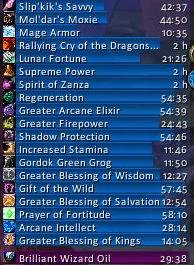
EBB provides groups of statusbar style indicators to show (de)buffs currently affecting your char or some other units (currently focus, pet and target). For the player, it can also show indicators for temporary enchants place on it's weapons.
Due to changes Blizzard made with WoW 4.x it's no longer possible to cancel buffs without the use of secure frames. Currently EBB limits canceling of buffs to out-of-fight since using SecureAuraHeader would have required a major code restructuring. This will be coming in a later version.
Version 2.x is a total recode based on the Ace2 framework which became necessary in order to support some of the longtime wanted and suggested features. It's now possible to show different groups of bars which can be configured in many ways. Each group can be assigned an individual look and filter settings. EBB can be configured via a dropdown menu which is accessible via chat (/ebb config), FuBar plugin or (for the group settings) by right clicking the groups anchor. After setting up a group, its anchor can be hidden by alt-left clicking a bar or the anchor itself in order to lock the group in place.
In order to get additional bar textures and fonts for EBB simply install SharedMedia which is available for download under http://wow.curse.com/downloads/wow-addons/details/sharedmedia.aspx
If you have bug reports or feature request, create a ticket: http://www.wowace.com/projects/elkbuffbars/create-ticket/
You can also check my thread at the WoWAce forums: http://forums.wowace.com/showthread.php?t=5290
The most recent development version of EBB is available directly from the WoWAce SVN via http://www.wowace.com/projects/elkbuffbars/files/
Comments


-

Elkano Owner
-
View User Profile
-
Send Message
Posted Sep 23, 2026Ok so, with last update to r224-alpha i can now see only the elkano debuff frame which seems to be working properly (i haven't yet tested it into instanced environment)
But the elkanos buff frame is gone; upon my first log in today i had the default blizzard buff frame, i tried disable all addons but elkano and LibSharedMedia-3.0
I used the script provided in another commend and:
"/print LibStub("AceAddon-3.0"):GetAddon("ElkBuffBars").db.profile.hidebuffframe" was not recognized as valid so it did nothing
"/script LibStub("AceAddon-3.0"):GetAddon("ElkBuffBars").db.profile.hidebuffframe = true" did nothing apparently but it was recognized as valid by game(?)
As stated by DarkLimpan below i used the "/dump LibStub("AceAddon-3.0"):GetAddon("ElkBuffBars").db.profile.hidebuffframe " and the result was:
"Dump: value=LibStub("AceAddon-3.0"):GetAddon("ElkBuffBars").db.profile.hidebuffframe[1]=true", still nothing happened, i still don't see buff frame, not the elkano's one nor the blizzard default one, either with only elkano's addon enabled nor with all my other addons..
-
View User Profile
-
Send Message
Posted Sep 24, 2026@Dhisana The /print (was likely from another addon), /dump, /script stuff was only to toggle hiding of Blizzard's default frames when using an old profile. It doesn't affect the groups themselves.
Since you're saying you are seeing the debuff group, something is likely amiss but currently hard to tell what it could be, sorry. 😢
You should have some text in chat on login telling you how your old groups are converted and in the settings, you should already be seeing a dropdown listing the new groups.
If the buff group doesn't list in there, there might be something wrong with your old settings or the converter.
-
View User Profile
-
Send Message
Posted Sep 25, 2026@Elkano I don't know what to tell you, i may be a little bit dumb; here what i see:
https://imgur.com/a/oxPnNNI
https://imgur.com/kZJ9QwX
https://imgur.com/12i1AIa
Are the option on the right supposed to be interactable with? Nothing happens when i click on those...
I downloaded the r225-alpha this morning to try again after yesterday, the r224 shows a big red faded square on the right where the options are supposed to be.. Any other clue?
I'm going to stick with the r223 for the moment
-
View User Profile
-
Send Message
Posted Sep 25, 2026@Dhisana I'm currently working on the options, that's why the red squares are gone I had earlier as placeholder content in the scroll boxes; but r225 also uses a different kind of scrollbox; and what you currently see are only section headers not filled with options, yet.
The main category has some working options though, mainly to toggle Blizzard's aura frames.
Regarding your problem, the first screenshot (chat) "solves" it:
Your buff group was set up to show both buffs and weapon enchants. Since I can no longer sort them together in the same list, I settled for groups only supporting either buffs, debuffs or enchantments. However, when converting old settings, I picked just the first supported type for the group (as I can't easily split a group into two, especially if other groups are anchored to it). And in your case, the group was turned into one for Enchantments, leaving you with none for buffs 😢
Maybe I should at least give buffs priority, enchantments is easier for the user to re-add later 🤔
-
View User Profile
-
Send Message
Posted Sep 25, 2026@Elkano ooooh interesting, i see; i don't remember when, probably when i first set it up back in the day years ago, the addon used to have 3 windows, buffs debuffs and "enchantments" for weapon enchant, shaman weapon enchant and oil and stuff so, (as far as i can remember) i removed that window and toggled on those enchantments buff in my buff group so there is where the origin of the problem might be..
Thanks for the insight, i will wait for a working update :)
-
View User Profile
-
Send Message
Posted Sep 22, 2026Hi!
Love your addon, had been using it for over 10 years. Stopped playing Wow for quite some years, now planning to play Forever, but yet trying out game in Retail.
Got the following error on some hero at Login, and the below at Opening Settings.
Only got there Errors with a new hero (few days ago created) with separate Profile. When I set back to Default stopped these errors. Rest of the hero already using Default profile not got errors.
Using V224-Alpha version.
Message: Interface/AddOns/ElkBuffBars/v3/EbbSettings.lua:34: bad argument #1 to 'ipairs' (table expected, got nil)
Time: Tue Sep 22 22:12:17 2026
Count: 1
Stack:
[Interface/AddOns/Bartender4/libs/AceAddon-3.0/AceAddon-3.0.lua]:523: in function 'EnableAddon'
[Interface/AddOns/Bartender4/libs/AceAddon-3.0/AceAddon-3.0.lua]:626: in function <...AddOns/Bartender4/libs/AceAddon-3.0/AceAddon-3.0.lua:611>
Locals:
self=<table>{
initializequeue=<table>
statuses=<table>
embeds=<table>
frame=AceAddon30Frame <AceAddon-3.0.lua:38>
addons=<table>
enablequeue=<table>
}
addon=<table>{
modules=<table>
db=<table>
defaultModuleLibraries=<table>
dataObject=<table>
baseName="ElkBuffBars"
enabledState=true
defaultModuleState=true
name="ElkBuffBars"
orderedModules=<table>
}
AceAddon=<table>{
initializequeue=<table>
statuses=<table>
embeds=<table>
frame=AceAddon30Frame <AceAddon-3.0.lua:38>
addons=<table>
enablequeue=<table>
}
Message: Interface/AddOns/ElkBuffBars/v3/EbbSettings.lua:34: bad argument #1 to 'ipairs' (table expected, got nil)
Time: Tue Sep 22 22:12:17 2026
Count: 1
Stack:
[Interface/AddOns/Bartender4/libs/AceAddon-3.0/AceAddon-3.0.lua]:523: in function 'EnableAddon'
[Interface/AddOns/Bartender4/libs/AceAddon-3.0/AceAddon-3.0.lua]:626: in function <...AddOns/Bartender4/libs/AceAddon-3.0/AceAddon-3.0.lua:611>
Locals:
self=<table>{
initializequeue=<table>
statuses=<table>
embeds=<table>
frame=AceAddon30Frame <AceAddon-3.0.lua:38>
addons=<table>
enablequeue=<table>
}
addon=<table>{
modules=<table>
db=<table>
defaultModuleLibraries=<table>
dataObject=<table>
baseName="ElkBuffBars"
enabledState=true
defaultModuleState=true
name="ElkBuffBars"
orderedModules=<table>
}
AceAddon=<table>{
initializequeue=<table>
statuses=<table>
embeds=<table>
frame=AceAddon30Frame <AceAddon-3.0.lua:38>
addons=<table>
enablequeue=<table>
}
Message: Interface/AddOns/ElkBuffBars/v3/EbbSettings.lua:34: bad argument #1 to 'ipairs' (table expected, got nil)
Time: Tue Sep 22 22:12:17 2026
Count: 1
Stack:
[Interface/AddOns/Bartender4/libs/AceAddon-3.0/AceAddon-3.0.lua]:523: in function 'EnableAddon'
[Interface/AddOns/Bartender4/libs/AceAddon-3.0/AceAddon-3.0.lua]:626: in function <...AddOns/Bartender4/libs/AceAddon-3.0/AceAddon-3.0.lua:611>
Locals:
self=<table>{
initializequeue=<table>
statuses=<table>
embeds=<table>
frame=AceAddon30Frame <AceAddon-3.0.lua:38>
addons=<table>
enablequeue=<table>
}
addon=<table>{
modules=<table>
db=<table>
defaultModuleLibraries=<table>
dataObject=<table>
baseName="ElkBuffBars"
enabledState=true
defaultModuleState=true
name="ElkBuffBars"
orderedModules=<table>
}
AceAddon=<table>{
initializequeue=<table>
statuses=<table>
embeds=<table>
frame=AceAddon30Frame <AceAddon-3.0.lua:38>
addons=<table>
enablequeue=<table>
}
-
View User Profile
-
Send Message
Posted Sep 21, 2026Version r224-alpha is giving me the following error and I don't have any buff bars, stock WoW or EBB
4x ElkBuffBars/v3/EbbSettings.lua:34: bad argument #1 to 'ipairs' (table expected, got nil)
[tail call]: ?
[C]: in function 'ipairs'
[ElkBuffBars/v3/EbbSettings.lua]:34: in function 'ApplyProfile'
[ElkBuffBars/v3/EbbSettings.lua]:21: in function 'SetDbProfile'
[ElkBuffBars/v3/ElkBuffBars.lua]:97: in function 'OnProfileEnable'
[ElkBuffBars/v3/ElkBuffBars.lua]:81: in function <ElkBuffBars/v3/ElkBuffBars.lua:80>
[C]: ?
[Ace3/AceAddon-3.0/AceAddon-3.0.lua]:66: in function <Ace3/AceAddon-3.0/AceAddon-3.0.lua:61>
[Ace3/AceAddon-3.0/AceAddon-3.0.lua]:523: in function 'EnableAddon'
[Ace3/AceAddon-3.0/AceAddon-3.0.lua]:626: in function <Ace3/AceAddon-3.0/AceAddon-3.0.lua:611>
Locals:
-
View User Profile
-
Send Message
Posted Sep 20, 2026The print command didn't work it showed type /help for command but the /script command worked thanks :).
-
View User Profile
-
Send Message
Posted Sep 20, 2026I went back to version 223 because the new version doesn't turn off wow default buff.
Hope that helps some .
-
View User Profile
-
Send Message
Posted Sep 20, 2026@Toptek r224 is now reading the old DB flag for that.
It seems like your old settings didn't have it enabled; try the following in game:
/print LibStub("AceAddon-3.0"):GetAddon("ElkBuffBars").db.profile.hidebuffframe
It will likely print false, nil or nothing... at least not true.
/script LibStub("AceAddon-3.0"):GetAddon("ElkBuffBars").db.profile.hidebuffframe = true
and reloading your interface should "fix" that for you on r224
-
View User Profile
-
Send Message
Posted Sep 20, 2026@Elkano thank you, was having the same issue and this fixed it.
-
View User Profile
-
Send Message
Posted Sep 22, 2026@Elkano Hi there, this works in terms of turning off displaying the wow default buff bars, but you can't find any information about the buffs / debuffs if you hover over them. - thanks for all your work!
-
View User Profile
-
Send Message
Posted Sep 22, 2026@Elkano
Hello there.
That /print command didn't do anything (I got the error with /help, when a chat command doesn't work, instead). So, I should now run that /script command? Will I get back my old bar layout at that point (after the /reload), or am I meant to re-do everything from scratch? I'm just asking to make sure I'm understanding this new version correctly.
-
View User Profile
-
Send Message
Posted Sep 22, 2026@DarkLimpan The /print command seems to be from one of my installed addons 😅 maybe /dump works instead
This whole thing is however only related to the default buffs not being hidden for some.
If r224 isn't already showing bars similar to your old setup, there's something else going wrong.
I'm currently intentionally not overwriting any old settings until I'm able to convert them as good as reasonably possible (some advanced filters are still missing) and have the settings UI in place to further adjust them.
But even then, some parts like the white-/blacklist data will likely be lost (as I can't turn the names into ids); and others simply because they are no longer supportable.
-
View User Profile
-
Send Message
Posted Sep 23, 2026@Elkano
I see. All I am seeing are Blizzard's default buff bars, my old EBB layout seems gone (or hidden / not working correctly).
The below chat command gave me a "empty result" in chat.
/dump LibStub("AceAddon-3.0"):GetAddon("ElkBuffBars").db.profile.hidebuffframe
I currently also have ElkExperience (v1.0.0-15) enabled, and ElkFactions (v1.0.0-46) and Elkano's ItemDB (v2.1.1-60) installed but the latter two are disabled.
-
View User Profile
-
Send Message
Posted Sep 25, 2026@Elkano
I went and used that /script from your earlier post, which seemed to indeed hide Blizzard's default buff/debuff layout, however it didn't also restore my old layout (pre-r224).
Also, this latest version, seems to only restore the location for my old layout (at least where the EBB edit mode places the drag&drop things for buffs and debuffs), but it lacks settings.
I will revert to version r223-alpha for the time being (my settings doesn't appear to have been incompatible with the newer EBB versions, so that's good).
I appreciate you trying to get this addon working properly on Retail. I will test your updates for this if & when it comes.
-
View User Profile
-
Send Message
Posted Sep 20, 2026A new alpha, r224, is live with the work I was able to do the past few weeks. Less than I hoped for, but we are getting there...
If things work as they should, you won't see much difference to the previous alpha. That is a good sign though, as it means the new intermediate format for storing sessions is working. If things seem off from before, that might indicate some bugs.
I still haven't activated persistence in order to not break existing configurations and there is still no working UI for adjusting setting. However, the framework for the latter is in, so you might already get a small peek on what to expect 😉
And since it looks like Forever will use a similar code base to 12.1, while I haven't looked into it, the new code should run there as well.
-
View User Profile
-
Send Message
Posted Sep 20, 2026Any chance for getting this working for WoW Forever?
-
View User Profile
-
Send Message
Posted Sep 10, 2026Just check my research addon. Everything I was using in the old ELKBB - works
-
View User Profile
-
Send Message
Posted Sep 8, 2026Hi Elkano,
ElkBuffBars sat on my screen for years, so when 12.1 broke it I went digging
into what exactly changed. That turned into a small addon, written together
with Claude, and I am sharing it in case any of it saves you time:
https://github.com/mixMugz/WoW-TinyBuffBars
It only does player auras as bars — no other units, no config UI, nothing close
to the scope of EBB. It is a proof that bars are still possible in 12.1, not a
replacement for anything.
What killed the old approach: AuraData fields now carry
SecretWhenUnitAuraRestricted, so in combat, encounters, M+ and PvP any
comparison against them raises. Reading auras and drawing your own bars is over.
The sanctioned replacement is CustomAuraContainer (Blizzard_AuraContainer,
always loaded). You declare aura groups and a frame template; the client decides
which aura lands in which group and fills your regions with secret values
itself.
Three things that cost me the most time:
1. There is no per-aura callback. initializeFrame runs once per created frame,
and AuraButton forbids UntrustedScriptExecution, so nothing can be attached
later. Everything per-aura has to be group membership or one of the client's
declarative bindings — AddDispelTypeTexture for colour by dispel type,
SetCancelAuraButtons for right-click cancel, and so on.
2. Splitting permanent from timed. A group's only duration filter is
maxDuration, i.e. "timed only", with no inverse. For helpful auras on the
player you can work around it with candidateFilters.excludeSpellIDs, because
CanApplyIdentityCandidateFilters short-circuits to true there. For harmful
auras on the player it returns false on purpose, so debuffs cannot be split
at all.
3. Which makes a permanent aura in a mixed block awkward: its duration is zero,
so every client-driven element reads zero and the bar renders empty. What
works is to not paint with the StatusBar at all. Drive it by ElapsedTime with
reverse fill, keep its own texture invisible, and anchor a separate coloured
texture from the bar's left edge to that fill texture's BOTTOMLEFT. A
permanent aura has zero elapsed time, so the zero-width fill sits pinned to
the right, its left edge lands on the far end, and the colour spans the whole
bar. Timed auras shrink normally. No classification, nothing to read, works
the same inside a raid.
It is all MIT — take whatever is useful, the code, the approach, or just the
notes above. No attribution needed, no strings attached. If EBB comes back, I
am first in line to install it.
Thanks for all the years of it.