Bulk Mail Inbox
Addon Support Statement
NEWS: I'm back in WoW. I'll try to update addons after catching up, especially if they are bugging out.
Addon Description
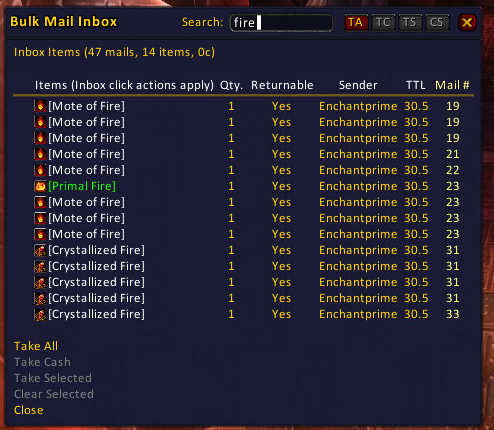
Bulk mail reception made really easy. This addon allows you to selectively pick mails to open from the inbox, open all mails with money or open all items.
Key Features
There are many bulk email openers available to choose from. However Bulk Mail Inbox has several unique features:
- Shows a dialog with all items and money in your mailbox.
- Allows you to take individual items even if they were all sent in one email.
- You can mark multiple items to take make without taking all.
- Allows easy comparision of items in the mail list with items you're currently using (just hold shift down while hovering the items).
Bulk Mail Inbox 4.0 beta
The 4.0 beta is a conversion to Ace3 and other modern libraries. In addition it has several improvements and fixes as outlined below:
- Inbox pagination and filtering.
- Clicking on a column header now sorts that header. Before clicking on any header just rotated the sorting to a new column.
- Sorting is reversed if you click on the header which currently is sorted.
- Better placement of the tooltip (now sit nexts to the frame that opened it)
- Pressing and releasing the shift key while hovering an item will now properly show/hide the comparision window.
- Fixed opening of mails is now throttled to prevent errors and as a result opening a lot of mails is now much better.
- The list of items is updated during auto opening emails.
Comments

-

DHedbor Owner
-

_ForgeUser15458 Former Author
-
View User Profile
-
Send Message
Posted Aug 16, 2026Hey, liking your addon :)
I have now the issue:
13x LUA_WARNING: BulkMail2Inbox/Libs/LibMagicUtil-1.0/LibMagicUtil-1.0/Locales/Locale-frFR.lua:1 ...ail2Inbox/Libs/LibMagicUtil-1.0/LibMagicUtil-1.0/Locales/Locale-frFR.lua:30: unfinished string near '"Filter the inbox display to items matching the term entered here.'
and for all other locale-xxXX too
-
View User Profile
-
Send Message
Posted May 29, 2026Any chance you can make the page sizes a static width instead of dynamic based on text width. When switching pages the page buttons jump around make it unnecessarily annoying to click the next button repeated, often you end up hitting the wrong button because of the page width changing. Setting a static page size width would resolve this annoyance, which is really the only major issue I have with the addon.
The bottom buttons and help text could be better distributed horizontally so they don't eat up such a significant portio nof the bottom of the window. Make use of that width, to spread the buttons and help text out linerarly, like on the header frame.
cheers on a great addon concept and implimentation, a truely unique addon.
-
View User Profile
-
Send Message
Posted Feb 1, 2026Hello,
i am having issues with this addon and its partner one Bulk Mail.
it doesn't auto populate the send mail list anymore
Alt click add items doesn't work
the options GUI doesn't open from the command or in the wow addons options.
the inbox window says open after closing the ingame mail window.
any ideas?
the faults happened on a fresh install, with only bulk mail and bulk mail inbox turned on.
-
View User Profile
-
Send Message
Posted Jan 24, 2026In TBC Anniversary, the addon is not detecting that the mail window has closed.
I looked at the code and it saw the PLAYER_INTERACTION_MANAGER_FRAME_HIDE event was behind an if statement.
in BulkMailInbox.lua
I changed this
if not _G.GetContainerItemInfo then
self:RegisterEvent('PLAYER_INTERACTION_MANAGER_FRAME_HIDE')
end
to this
if Enum and Enum.PlayerInteractionType and Enum.PlayerInteractionType.MailInfo then
self:RegisterEvent("PLAYER_INTERACTION_MANAGER_FRAME_HIDE")
end
and now the addon properly detects that the mailbox window has closed.
-
View User Profile
-
Send Message
Posted Jul 19, 2025Broke on fresh as of today's update. The Bulk Mail window no longer opens after opening the mailbox. Reverting to the previous version resolves the issue.
-
View User Profile
-
Send Message
Posted Jul 20, 2025In reply to nordika: have the same problem after update... back to old version
-
View User Profile
-
Send Message
Posted Jul 21, 2025In reply to nordika: Same issue for me, going back to version 20240814-3-g4b89b50-alpha for now, until this is sorted.
This version caused several lua errors for itself, as well as one for Skinner and one for TipTac Reborn.
-
View User Profile
-
Send Message
Posted Jul 21, 2025In reply to nordika: I found the problem. I was wondering ... the notes said this version was adding support for MoP, so it should work, and it does. Just open this file for editing BulkMail2Inbox\Libs\LibDropdown-1.0\LibDropdown-1.0\LibDropdown-1.0.lua and add letter "L" to the beggining of second line, so it is "local", not "ocal". It is a typo, it works for me now.
-
View User Profile
-
Send Message
Posted Dec 23, 2024This add-on has a conflict with TipTac Reborn. When that add-on is active, the window for Bulk Mail Inbox cannot be interacted with.
https://www.curseforge.com/wow/addons/tiptac-reborn
-
View User Profile
-
Send Message
Posted May 29, 2024Awesome addon and it's been great for getting XP threads from the mail in MoP Remix.
I have found a bug though. It appears if the thread is in slot 15 or 16 in the mail box it doesn't show on the Bulk Mail Inbox gui. I'm not sure if this is true for other items as well.
I just noticed normal mail is limited to 12 slots. Where as mail that is sent to you from blizzard from non looted items is 16 slots.
EDIT: Found the bug.
ATTACHMENTS_MAX_SEND should be changed to ATTACHMENTS_MAX_RECEIVE.
ATTACHMENTS_MAX_SEND = 12
ATTACHMENTS_MAX_RECEIVE = 16
When loot is left on corpses to be sent to your mail, it can be 16 items in 1 received mail box item. This was causing the last 4 items to be skipped.
-
View User Profile
-
Send Message
Posted Nov 14, 2022hi
since DF prepatch came out, bulk mail inbox doesnt close when you close mailbox. i have to close it manually every time.. any chance this could be fixed?
-
View User Profile
-
Send Message
Posted Sep 6, 2020Woot! Great to see this getting the update love it deserves. Have been using this since the dawn of time (or so it seems)
-
View User Profile
-
Send Message
Posted Sep 4, 2020Awesome to see you're back!
-
View User Profile
-
Send Message
Posted Sep 18, 2019Woot! TYVM!
-
View User Profile
-
Send Message
Posted May 19, 2018I may end up doing some light editing just to dust this AddOn off. Keep an eye on my repositories here:
https://github.com/spiralofhope?tab=repositories
I'm not a programmer, but I can make simple changes and update the libraries.
-
View User Profile
-
Send Message
Posted Nov 13, 2016While I try to send mail, I'm getting this error:
Date: 2016-11-13 08:31:50
ID: 1
Error occured in: Global
Count: 1
Message: ..\AddOns\BulkMail2\BulkMail.lua line 256:
Usage: GetItemInfo(itemID|"name"|"itemlink")
Debug:
[C]: ?
BulkMail2\BulkMail.lua:256:
BulkMail2\BulkMail.lua:247
BulkMail2\BulkMail.lua:385:
BulkMail2\BulkMail.lua:377
BulkMail2\BulkMail.lua:743: ?()
Ace3\AceHook-3.0\AceHook-3.0.lua:90:
Ace3\AceHook-3.0\AceHook-3.0.lua:87
Locals:
(*temporary) = nil
AddOns:
Swatter, v7.2.5688 (TasmanianThylacine)
Ace3, v
ACP, v3.4.30
AdiBags, vv1.9.4
Altoholic, vr174
AskMrRobot, v46
AucAdvanced, v7.2.5688 (TasmanianThylacine)
aucadvancedsearcherpawn, v1.5.5
AucFilterBasic, v7.2.5688 (TasmanianThylacine)
AucFilterOutlier, v7.2.5688.5459(7.2/embedded)
AucMatchUndercut, v7.2.5688.5585(7.2/embedded)
AucScanData, v7.2.5688 (TasmanianThylacine)
AucStatHistogram, v7.2.5688 (TasmanianThylacine)
AucStatiLevel, v7.2.5688 (TasmanianThylacine)
AucStatPurchased, v7.2.5688 (TasmanianThylacine)
AucStatSales, v7.2.5688.5598(7.2/embedded)
AucStatSimple, v7.2.5688 (TasmanianThylacine)
AucStatStdDev, v7.2.5688 (TasmanianThylacine)
AucStatWOWEcon, v7.2.5688.5613(7.2/embedded)
AucUtilAHWindowControl, v7.2.5688.5575(7.2/embedded)
AucUtilAppraiser, v7.2.5688.5666(7.2/embedded)
AucUtilAskPrice, v7.2.5688.5599(7.2/embedded)
AucUtilAutoMagic, v7.2.5688.5686(7.2/embedded)
AucUtilCompactUI, v7.2.5688.5629(7.2/embedded)
AucUtilEasyBuyout, v7.2.5688.5576(7.2/embedded)
AucUtilFixAH, v7.2.5688 (TasmanianThylacine)
AucUtilItemSuggest, v7.2.5688.5651(7.2/embedded)
AucUtilPriceLevel, v7.2.5688.5633(7.2/embedded)
AucUtilScanButton, v7.2.5688.5631(7.2/embedded)
AucUtilScanFinish, v7.2.5688.5588(7.2/embedded)
AucUtilScanProgress, v7.2.5688.4979(7.2/embedded)
AucUtilScanStart, v7.2.5688.5347(7.2/embedded)
AucUtilSearchUI, v7.2.5688.5672(7.2/embedded)
AucUtilSimpleAuction, v7.2.5688.5654(7.2/embedded)
AucUtilVendMarkup, v7.2.5688.4828(7.2/embedded)
Auctionator, v4.0.16
Babylonian, v5.1.DEV.332(/embedded)
BeanCounter, v7.2.5688 (TasmanianThylacine)
BulkMail2, v5.0.1
BulkMail2Inbox, v7.0.0
CallbackHandler10, v
Configator, v5.1.DEV.406(/embedded)
DataStore, vr61
DataStoreAchievements, vr44
DataStoreAgenda, vr24
DataStoreAuctions, vr46
DataStoreCharacters, vr37
DataStoreContainers, vr54
DataStoreCrafts, vr75
DataStoreCurrencies, vr33
DataStoreGarrisons, vr18
DataStoreInventory, vr47
DataStoreMails, vr47
DataStorePets, vr40
DataStoreQuests, vr39
DataStoreReputations, vr38
DataStoreSpells, vr28
DataStoreStats, vr27
DataStoreTalents, vr56
DebugLib, v5.1.DEV.337(/embedded)
Enchantrix, v7.2.5688 (TasmanianThylacine)
EnchantrixBarker, v7.2.5688 (TasmanianThylacine)
HandyNotes, vv1.4.11
HandyNotesLegionRaresTreasures, v1.01b
HandyNotesLegionTreasures, v1
HandyNotesLongForgottenHippogryph, v1
HandyNotesLorewalkers, v1
Informant, v7.2.5688 (TasmanianThylacine)
LibExtraTip, v5.12.DEV.416(/embedded)
LibGratuity30, vr$Revision: 41183 $
LibRock10, v
LibSharedMedia30, v3.0-97
LibStub, v
Pawn, v2.1.8
PawnCraftUpgradeFinder, v1.1
PetTracker, v7.1.1
PetTrackerBreeds, v7.1.1
PetTrackerConfig, v7.1.1
PetTrackerSwitcher, v7.1.1
PetTrackerUpgrades, v7.1.1
Prat30, v3.6.19
Prat30Libraries, v
Skillet, v3.14
SlideBar, v7.2.5688 (TasmanianThylacine)
Stubby, v7.2.5688 (TasmanianThylacine)
TipHelper, v5.12.DEV.405(/embedded)
BlizRuntimeLib_enUS v7.1.0.70100 <none>
(ck=bf1)
-
View User Profile
-
Send Message
Posted Aug 12, 2016Having issues with the editBox now. Every time I enter a character, the cursor goes away. Meaning I need to left-click twice, once to select all the text with the cursor at the end, and another time to clear the highlighting. That's if the UI doesn't refresh itself and make the cursor disappear again.
-
View User Profile
-
Send Message
Posted Aug 12, 2016Thanks for the fixes, Rubio9! My favorite mail addon lives again! Now that it doesn't lag so much, I finished my custom sort, which is more like the sort of old:
https://www.diffchecker.com/batum4du
is the diff.
Here's a screenie of it in action:
http://imgur.com/a/44TZJ
One difference from the old sort style. Whereas old BMI sorted itemIDs lexically, this sorts itemIDs numerically, after splitting items up by rarity.
-
View User Profile
-
Send Message
Posted Aug 6, 2016one more Legion annoyance: on full mailbox, it never stops trying to get mail.
The UI_ERROR_MESSAGE event gets an extra parameter now, and needs to throw it away.
At line 348, change:
to:
-
View User Profile
-
Send Message
Posted Jul 28, 2016BAD LAG ISSUE with full maibox --
this has a pretty simple fix, actually. Add
tooltip:Hide()
to the ShowInboxGUI() function in the 'else' branch of the "if not tooltip" test (line 974 i believe):
function mod:ShowInboxGUI()
[...]
if not tooltip then
[...]
else
tooltip:Hide() -- add THIS to stop the horrible lag
tooltip:Clear()
end
[...]