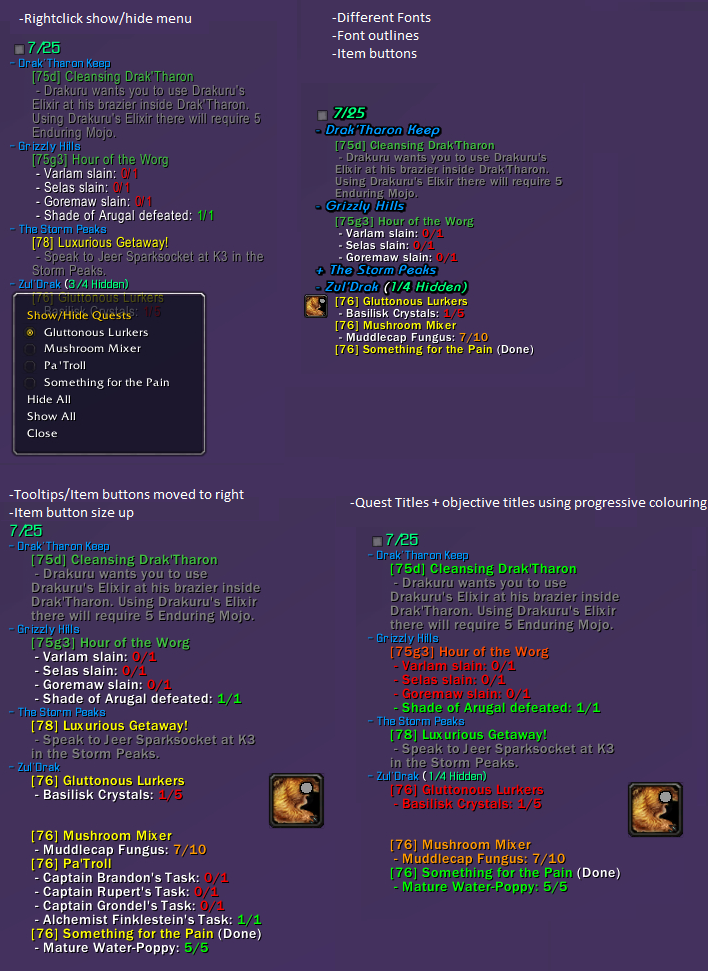
SorhaQuestLog
SorhaQuestLog is a basic Quest/Achievement addon similar to MonkeyQuest and nQuestLog.
It allows the display of quests and achievements on the screen in an configurable way.
Options panel is accessible using /sql or /sorhaquestlog
Quest Controls
Hidden Quests
- Click the square at the top of the tracker to show/hide hidden quests
- Right-click a quest to show or hide it.
Zones
- Left-click a zone to collapse/expand it
- Right-click a zone to open a menu to show/hide quests
- Alt + right-click a zone to open a menu to show/hide zones
Quests
- Left-click a quest to open quest text pane. (Alt-Left if you enable full log option)
- Alt + Left-click a quest to open quest in world map log (Left if you enable full log option)
- Control left-click a quest to set it as the active quest tracking
- Alt + Ctrl left-click a quest to abandon it. (Can disable confirm dialog in options)
Features
Core Features:
- Individual Minions for Quests, Achievements and Scenarios
- Auto Show/Hide options when entering instances, arenas, combat, pet battles, the outside world etc.
- Can hide the default blizzard quest frame
- Handles blizzards remote quests
- Borders and background for minions
- LDB Module
Quest Log Minion Features:
- Expandable/collapsible zone headers
- Auto collapsing/expanding zone headers as you change zones
- Hide Zone headers when all their quests are hidden
- Expand collapse menu available using alt-right-click on a zone
- Hide quests by right-clicking the quest or by selecting it from its zone headers right-click menu
- Hide completed objectives
- Can completely hide quest tracker when tracking no quests
- Hide or re-size item buttons
- Colour objective texts and statuses by completeness(gradual) , state(done/undone) or choose a custom colour
- Colour quest titles and level texts by level, completeness(gradual) , state(done/undone) or choose a custom colour
- Changeable fonts, font shadowing and font sizes for Zones, Quests and Objectives
- Adjustable indentation for quests and objectives
- Option to display only the quest details pane of the quest log when left-clicking a quest. (Alt left click to get the full quest log panel)
- Ctrl left-click a quest to set it as the active quest for blizzards minimap tracker, (Dugi arrow support)
- Alt + Ctrl left-click a quest to abandon it. (Can disable confirm dialog in options)
Achievement Minion Features:
- Customizable text by choosing fonts, sizes, shadowing and colours.
- Customizable textures for progress bars
- Optional progress status bars for the achievements that can have them
- Option to limit the number of tasks displayed per achievement
Notification Features:
- Customizable sounds for quest/objective complete and quest starting item picked up notifications.
- Choose custom sounds for quest completions and objective completions
- Re-direct the objective completion messages elsewhere with LibSink
Recent Changes
New since v1.4.8
- Track world quests
- Link Scenario and achievement minions to quest minion
Other Stuff >.>
Bug reporting and Suggestions
You can report bugs or suggestions using wowaces ticket system at:
http://www.wowace.com/addons/sorhaquestlog/tickets/
Localization
If you want to help localize SorhaQuestLog you can do so using the wowace localization section at:
http://www.wowace.com/addons/sorhaquestlog/localization/
Comments


-

Sorha2 Owner
-

humfras Author
-

unrealcrom96 Translator
-
View User Profile
-
Send Message
Posted Nov 30, 2014Update: After resizing the tracker the bug was gone. Turned it back to scale 1.0 and it still works as intended. Weird. :)
-
View User Profile
-
Send Message
Posted Nov 26, 2014Hey, love the addon!
One problem though, achievements like Terrific Technology (http://www.wowhead.com/achievement=9527/terrific-technology) does track correctly. It just shows like this: http://i.imgur.com/ce8vpBZ.jpg without displaying the text, only the numbers. This also happens with other achievements with similar objectives, like The Stable Master and Advanced Husbandry. Basically, any achievement with multiple objectives with a number next to each.
-
View User Profile
-
Send Message
Posted Nov 26, 2014Ah thats no fun :(
Will work on getting that fixed this weekend ^_^
-
View User Profile
-
Send Message
Posted Nov 26, 2014Thank you! Also less important question, any way to skin the addon besides changing colors? Like, I want to make the minions have sharp corners instead of rounded, etc. Is this possible? If not, no big deal.
-
View User Profile
-
Send Message
Posted Nov 26, 2014Tis sadly not an inbuilt option, however if you can add the following lines to Quests.lua at line:4277 (Just under the 'else')
local edge = LSM:Fetch("border", "Raven DoubleGray");
fraMinionAnchor.BorderFrame:SetBackdrop({bgFile = "Interface\\Tooltips\\UI-Tooltip-Background", tile = true, tileSize = 16, edgeFile = edge, edgeSize = 16, insets = {left = 5, right = 3, top = 3, bottom = 5}})
Where "Raven DoubleGray" is the name of the border texture you want, generally easy to find by checking the border dropdown etc on something like omens options ^_^
-
View User Profile
-
Send Message
Posted Nov 24, 2014After the most recent update, it looks like the quests arent updating in the questracker. Also there isnt a bar for the daily objective for apexis crystals.
-
View User Profile
-
Send Message
Posted Nov 24, 2014Does the "Interface/SorhaQuestLog/libs/LibToast-1.0" folder exist?
And/or is there any LUA errors generated?
Bar should have been displaying :(
-
View User Profile
-
Send Message
Posted Nov 24, 2014Yeah, it exists here:
..\World of Warcraft\Interface\addons\SorhaQuestLog\libs\LibToast-1.0
-
View User Profile
-
Send Message
Posted Nov 24, 2014If it doesn't generate lua errors could I get you to jump on another server or something and make a toon with only SorhaQuestLog enabled to see what happens? ^_^
-
View User Profile
-
Send Message
Posted Nov 24, 2014I decided to reset my profile, we'll see if that fixes it. i'll let you know tomorrow when i get to do the apexis dailies again.
-
View User Profile
-
Send Message
Posted Nov 25, 2014It's working, must have been an option I had checked. Good news is, i also got it looking rather nice. Love the addon, love the options :)
-
View User Profile
-
Send Message
Posted Nov 25, 2014^_^ Happy it worked out
-
View User Profile
-
Send Message
Posted Nov 23, 2014Very picky request (and it might just be something I don't know how to change)
Would it be possible to have the option of Bonus Objectives/"Fill Up The Bar Dailies" be placed at the bottom of the quest list, instead of in the list itself? Having played on the Beta, I was so used to seeing bonus objective/daily bar fill up stuff put underneath the rest of the quests that it's semi-distracting having to locate them within the rest of my quests.
Once again, silly request, but I figured I'd put that out here. ^_^
Thanks again for all you do!
-
View User Profile
-
Send Message
Posted Nov 24, 2014r140+ should always (hopefully, needs more testing) place the bonus objectives zone at the bottom ^_^
-
View User Profile
-
Send Message
Posted Nov 23, 2014v1.4.3 Out.. hopefully not buggy >.<
Added option in /sql->Quest Tracker panel for changing LDB/Quest minion header from <Quest Count>/25 to <Quest Count>/<Completed Count>
Added option in /sql->Quest Tracker->Quests Tab to sort quests within zones by Completion, Proximity, POI Tag, Level and Title
-
View User Profile
-
Send Message
Posted Nov 23, 2014Is there a way I can add sounds already in the game to the quest tracker? I don't have the files, I just want the addon to point to, say, the Ready Check sound. Is that possible?
-
View User Profile
-
Send Message
Posted Nov 23, 2014If it isn't already appearing in the dropdowns you can add it using this addon:
https://dl.dropboxusercontent.com/u/28878254/SorhaMods/MyMedia.zip
Has instructions inside, the line you want to add is likely:
LSM:Register("sound", "Ready Check", [[sound\interface\levelup2.ogg]])
Sound names can be found on wowhead like so:
http://www.wowhead.com/sound=8960/readycheck
And what your interested in is the text that pops up in a box when you click on the 'levelup2' text beneath it.
/script PlaySoundFile("ds\\sound\\interface\\levelup2.ogg")
As you can see we took the "sound\\interface\\levelup2.ogg" bit, and used that.
The double [[ ]] mean you only need 1 slash so thats why the line above has \ not \\
After that you can select them from the dropdowns and because they are in thier own 'MyMedia' addon they wont get wiped if I update SQL ^_^
-
View User Profile
-
Send Message
Posted Nov 21, 2014BUG REPORT:
Noticed that whilst doing Appexis Crystal dailies and such the alternative power bar won't register for the quest progress when using Sorha yet works when not having the addon enabled!
-
View User Profile
-
Send Message
Posted Nov 22, 2014Yeah, I'm having the same issue with the quest "Assault on the Darktide Roost" Bar wont show up, only when I disable the addon.
-
View User Profile
-
Send Message
Posted Nov 22, 2014In any case where SQL fails to display something there is an tickbox in the main options to reshow the default tracker ^_^
But should have a version up to fix that issue tonight :)