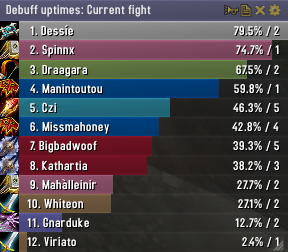
Skada Damage Meter
Skada Damage Meter
Skada is a modular damage meter for World of Warcraft with various viewing modes, segmented fights, and customizable windows. It is designed for efficiency with minimal memory and CPU impact.
"Skada" is Swedish for "Damage".
Midnight Edition (WoW 12.0+)
This version of Skada is updated for World of Warcraft: Midnight and uses Blizzard's new session-based combat systems.
Features
- Midnight Optimized: Uses Blizzard's internal session data for performance and accuracy.
- Combat Reliability: Handles modern combat data restrictions for a stable experience.
- Updated UI: Includes new presets with smooth animations, gradients, and textures.
- Dynamic Elements: Alternating row colors, highlight overlays, spark effects, and icon scaling.
- LDB Integration: Compatible with Data Broker displays such as Titan Panel, ChocolateBar, and ElvUI.
- Extensible Architecture: The API allows developers to create additional plugins.
Usage
Getting Started
A default window is created upon first load. Access the configuration menu by clicking the cog icon on the window title bar or via the minimap button. Select Configure to access settings.
Multiple Windows
Skada supports multiple windows. Create new ones under the Windows section of the configuration panel. Windows can be:
- Bar: The standard customizable meter.
- Inline: A horizontal line for custom UI setups.
- Data Text: For LDB displays and minimal setups.
Navigation
- Left-Click: View more detailed information.
- Right-Click: Return to the previous view.
- Mousewheel: Scroll through lists.
- Tooltips: Hover over bars to see additional context and shortcut keys (e.g., Shift-click for targets).
Themes
Manage window designs with the built-in Theme Engine. You can import and export themes by using theme strings.
Versions
- Midnight (Default): For WoW 12.0+ using the Native API.
- Classic Version: The version for older WoW releases.
Support
If you find Skada helpful, consider supporting its development through GitHub Sponsors.
Links
Comments


-

zarnivoop Owner
-
View User Profile
-
Send Message
Posted Aug 8, 2011With the new Title Bar, its easy to report , select mode, etc. But since the new title bar, i no longer see the little Wheel (config icon), in the upper right hand corner to allow reporting when you choose to keep the Title Bar hidden.
Is there a /slash command to pull this up? Currently i have to /skada config, enable the title bar, then i have access to the reporting options.
-
View User Profile
-
Send Message
Posted Aug 9, 2011-
View User Profile
-
Send Message
Posted Aug 8, 2011-
View User Profile
-
Send Message
Posted Aug 8, 2011-
View User Profile
-
Send Message
Posted Aug 9, 2011-
View User Profile
-
Send Message
Posted Aug 8, 2011Aadsfasdfasdf!
-
View User Profile
-
Send Message
Posted Aug 9, 2011-
View User Profile
-
Send Message
Posted Aug 8, 2011Given that I had them surrounded by other UI elements, this makes me exceedingly unhappy at the change.
Is there a fix I just haven't found yet?
-
View User Profile
-
Send Message
Posted Aug 8, 2011-
View User Profile
-
Send Message
Posted Aug 8, 2011There is no option to set max. bars shown, therefore I'm not able to fit it like this again: http://s.wowinterface.com/preview/pvw52264.jpg
(2 frames, aggro and dmg/heal)
What's the point of redesigning the layout(options)?
-
View User Profile
-
Send Message
Posted Aug 8, 2011-
View User Profile
-
Send Message
Posted Aug 8, 2011Having to drag the window corner around and *guess* how many rows it works out to be is not a replacement.
-
View User Profile
-
Send Message
Posted Aug 8, 2011Going to use v1.2-34 until a better release
-
View User Profile
-
Send Message
Posted Aug 8, 2011ID: 1
Error occured in: Global
Count: 1
Message: ..\AddOns\Skada\Skada.lua line 1458:
attempt to index field 'char' (a nil value)
Debug:
[C]: ?
Skada\Skada.lua:1458: OnEnter()
...ace\AddOns\Skada\lib\LibDBIcon-1.0\LibDBIcon-1.0.lua:81:
...ace\AddOns\Skada\lib\LibDBIcon-1.0\LibDBIcon-1.0.lua:72
AddOns: enough
Clicked nothing related to Skada, just popped out of nowhere.
-
View User Profile
-
Send Message
Posted Aug 8, 2011ID: 1
Error occured in: Global
Count: 1
Message: ..\AddOns\Skada\BarDisplay.lua line 39:
attempt to call method 'ModeMenu' (a nil value)
Debug:
[C]: ModeMenu()
Skada\BarDisplay.lua:39:
Skada\BarDisplay.lua:39
AddOns: Lots
-
View User Profile
-
Send Message
Posted Aug 8, 2011-
View User Profile
-
Send Message
Posted Aug 7, 2011Any reason why your Absorbs module records widely innacurate information in regards to Paladin bubbles via Illuminated Healing Mastery?
I'm seeing variances in numbers of over 1 million effective healing difference between your mod and World of Logs on my Pally.
In game the meters attribute the vast majority of the shields to me, and not my Pally healing partner. Yet on World of Logs its properly attributed to the right healer. You can tell because my total healing for spells that generate IH has a maximum limit of 13-15% of my total depending on my equipped Mastery Gear and in-game the percent sometimes exceeds 20-30%.
-
View User Profile
-
Send Message
Posted Aug 7, 2011Ya, it was the "Total" that gave the error.
No errors at all with r338, everything is working great.
-
View User Profile
-
Send Message
Posted Aug 7, 2011Will you add in some kind of profile support, such as a default setting that all new characters will have? I liked the older behavior where I could set up my Skada window on one toon, and have all the settings apply to other characters without having to change profiles.
Also, I find that I have to keep on resetting the background and border options. They do not save. I set the border to "none", and the background to total transparency, and the settings neither save, nor carry over between reloadui.
-
View User Profile
-
Send Message
Posted Aug 7, 2011@angrysteel
2x Skada\Skada-r336.lua:704 attempt to index local "pvpinfo" (a nil value)
1 return of GetZonePVPInfo() is a String not a Table
http://www.wowwiki.com/API_IsInInstance
5x SkadaDamage-r336\Damage-Damage.lua:315 attempt to index local "player" (a nil value)
you hover over the "total" right?
fix:
bardisplay.lua
l 125
but you get an error if you shift click on total