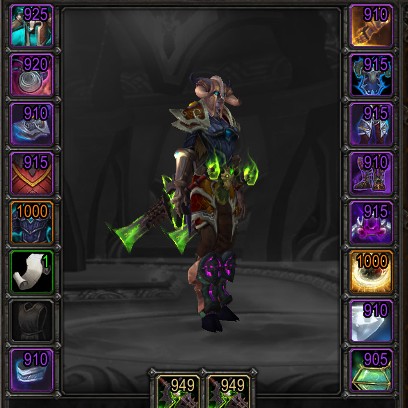
Simple Item Levels
Show item levels on:
- The character panel
- The inspect panel
- Loot windows
- The equipment-picker flyout
- Weapons, armor, and artifact relics in bags (built in, bagnon, baggins, inventorian)
- Tooltips (in classic)
I'm open to adding them in more places.
Also shows:
- An upgrade arrow on items in your bags which you can use whose item level is higher than whatever you currently have equipped.
- A soulbound indicator, so you can see whether something is soulbound, bind-on-equip, or warbound-until-equipped
- Missing enchants and gems
Simple configuration
For a summary of settings:
/simpleilvl
To toggle a place to display item levels:
/simpleilvl [type]
…where type is bags, character, or inspect.
To disable the upgrade arrow:
/simpleilvl upgrades
To change whether the text is colored by item quality or just left white:
/simpleilvl color
Comments

-

Kemayo Owner
-
View User Profile
-
Send Message
Posted Oct 5, 20262x SimpleItemLevel/addon.lua:522: attempt to perform arithmetic on local 'level' (a nil value)
[SimpleItemLevel/addon.lua]:522: in function <SimpleItemLevel/addon.lua:518>
[C]: in function 'xpcall'
[Blizzard_ObjectAPI/Mainline/ContinuableContainer.lua]:83: in function 'CheckIfSatisfied'
[Blizzard_ObjectAPI/Mainline/ContinuableContainer.lua]:33: in function <...Blizzard_ObjectAPI/Mainline/ContinuableContainer.lua:31>
[C]: in function 'xpcall'
[Blizzard_ObjectAPI/Mainline/AsyncCallbackSystem.lua]:76: in function 'FireCallbacks'
[Blizzard_ObjectAPI/Mainline/AsyncCallbackSystem.lua]:35: in function <.../Blizzard_ObjectAPI/Mainline/AsyncCallbackSystem.lua:31>
[C]: ?
[C]: in function 'accessor'
[Blizzard_ObjectAPI/Mainline/AsyncCallbackSystem.lua]:52: in function 'AddCallback'
[Blizzard_ObjectAPI/Mainline/AsyncCallbackSystem.lua]:60: in function <.../Blizzard_ObjectAPI/Mainline/AsyncCallbackSystem.lua:58>
[tail call]: ?
[tail call]: ?
[Blizzard_ObjectAPI/Mainline/ContinuableContainer.lua]:41: in function 'AddContinuable'
[SimpleItemLevel/addon.lua]:480: in function <SimpleItemLevel/addon.lua:459>
[SimpleItemLevel/addon.lua]:651: in function <SimpleItemLevel/addon.lua:644>
[C]: in function 'InspectPaperDollFrame_UpdateButtons'
[Blizzard_InspectUI/Mainline/InspectPaperDollFrame.lua]:20: in function <...lizzard_InspectUI/Mainline/InspectPaperDollFrame.lua:8>
Locals:
totalLevel=1297
(for state)=<table>{
1=<table>
2=<table>
3=<table>
5=<table>
6=<table>
7=<table>
8=<table>
9=<table>
10=<table>
11=<table>
12=<table>
13=<table>
14=<table>
15=<table>
16=<table>
17=<table>
}
(for control)=6
slotID=6
item=<table>{
itemID=159301
}
level=nil
(*temporary)=<table>{
itemID=159301
}
(*temporary)=nil
(*temporary)="attempt to perform arithmetic on local 'level' (a nil value)"
items=<table>{
1=<table>
2=<table>
3=<table>
5=<table>
6=<table>
7=<table>
8=<table>
9=<table>
10=<table>
11=<table>
12=<table>
13=<table>
14=<table>
15=<table>
16=<table>
17=<table>
}
unit="party1"
fontstring=FontString <addon.lua:646>
numSlots=16
-
View User Profile
-
Send Message
Posted Oct 5, 2026In reply to juicybox1:
I think that'd be incomplete data availability when inspecting someone really soon after the client loaded. I can put in a check to stop it from erroring, but the effect will be that the average level doesn't show until the data actually arrives.
-
View User Profile
-
Send Message
Posted Sep 27, 2026When I click to view another player's items, that Lua error appears.
Message: Interface/AddOns/SimpleItemLevel/addon.lua:614: hooksecurefunc(): InspectPaperDollFrame_UpdateButtons is not a function
Time: Sun Sep 27 17:55:06 2026
Count: 1
Stack:
[tail call]: ?
[tail call]: ?
[C]: in function 'securecallfunction'
[Interface/AddOns/Blizzard_Menu/Menu.lua]:934: in function 'Pick'
[Interface/AddOns/Blizzard_Menu/MenuTemplates.lua]:137: in function <Interface/AddOns/Blizzard_Menu/MenuTemplates.lua:131>
Locals:
(*temporary)="LeftButton"
(*temporary)=false
---------------------------
Message: Interface/AddOns/SimpleItemLevel/addon.lua:600: attempt to call a nil value
Time: Sun Sep 27 17:55:07 2026
Count: 1
Stack:
[Interface/AddOns/SimpleItemLevel/addon.lua]:600: in function <Interface/AddOns/SimpleItemLevel/addon.lua:593>
Locals:
self=Frame <addon.lua:591>{
elapsed=0
}
elapsed=0.007000
(*temporary)=nil
(*temporary)="attempt to call a nil value"
-
View User Profile
-
Send Message
Posted Sep 27, 2026In reply to modest_boyd1317673:
This is in the Forever beta?
-
View User Profile
-
Send Message
Posted Sep 25, 2026Hi there, been using this addon since season 2 midnight and I'm loving the simplicity! Is there an option to show profession items ilvl (in bags and equipped)?
-
View User Profile
-
Send Message
Posted Sep 27, 2026In reply to keyalsa5:
Right now, the "show on anything else" checkbox in the options would do it, though only in bags. That said, I think that these should be folded into the existing equippable items filter, so I'll get that done...
-
View User Profile
-
Send Message
Posted Aug 29, 2026Hi in Mop We have the follow issue:
235x SimpleItemLevel/addon.lua:526: attempt to compare number with table
[SimpleItemLevel/addon.lua]:526: in function <SimpleItemLevel/addon.lua:524>
[SimpleItemLevel/addon.lua]:541: in function <SimpleItemLevel/addon.lua:538>
[C]: in function 'SetItemButtonQuality'
[Blizzard_FrameXML/EquipmentFlyout.lua]:466: in function 'EquipmentFlyout_DisplayButton'
[Blizzard_FrameXML/EquipmentFlyout.lua]:311: in function <Blizzard_FrameXML/EquipmentFlyout.lua:238>
[C]: in function 'EquipmentFlyout_UpdateItems'
[Blizzard_FrameXML/EquipmentFlyout.lua]:227: in function 'EquipmentFlyout_Show'
[Blizzard_FrameXML/EquipmentFlyout.lua]:628: in function <Blizzard_FrameXML/EquipmentFlyout.lua:620>
Locals:
button=EquipmentFlyoutFrameButton3 <EquipmentFlyout.lua:62>{
IconOverlay=Texture <ItemButtonTemplate.xml:49>
showMatchHighlight=true
icon=EquipmentFlyoutFrameButton3IconTexture <ItemButtonTemplate.xml:18>
count=1
location=3146004
id=14
UpgradeIcon=Texture <EquipmentFlyout.xml:12>
cooldown=EquipmentFlyoutFrameButton3Cooldown <EquipmentFlyout.xml:8>
NormalTexture=EquipmentFlyoutFrameButton3NormalTexture <ItemButtonTemplate.xml:70>
PushedTexture=Texture <ItemButtonTemplate.xml:76>
HighlightTexture=Texture <ItemButtonTemplate.xml:77>
IconOverlay2=Texture <ItemButtonTemplate.xml:57>
ItemContextOverlay=Texture <ItemButtonTemplate.xml:38>
IconBorder=Texture <ItemButtonTemplate.xml:41>
searchOverlay=EquipmentFlyoutFrameButton3SearchOverlay <ItemButtonTemplate.xml:33>
Stock=EquipmentFlyoutFrameButton3Stock <ItemButtonTemplate.xml:26>
Count=EquipmentFlyoutFrameButton3Count <ItemButtonTemplate.xml:21>
}
quality=<table>
(*temporary)=1
(*temporary)=nil
(*temporary)=nil
(*temporary)=nil
(*temporary)=nil
(*temporary)="attempt to compare number with table"
-
View User Profile
-
Send Message
Posted Aug 29, 2026In reply to andreslopez0411:
Fixed in v69. It would only happen when you used the equipment flyouts on the character frame, fortunately. (Turns out Blizzard calls the SetItemBorderQuality function with the wrong arguments itself there.)
-
View User Profile
-
Send Message
Posted Jul 5, 2026Not sure if i'm overlooking it but anyway to get colored item borders on my own+others character panels?
-
View User Profile
-
Send Message
Posted Aug 22, 2026In reply to duckyfuzz:
There wasn't, but v68 has just added it.
-
View User Profile
-
Send Message
Posted May 6, 2026Is there any other font and options for font size ?
-
View User Profile
-
Send Message
Posted Aug 22, 2026In reply to user_yyn7yeh6aq15dj60:
There are -- check the options, there's an "Appearance" section.
-
View User Profile
-
Send Message
Posted May 1, 2026Hello,
may I ask if this addon can cause the inspect function to bug somehow ? I noticed it’s not working anymore as intended lately (like getting blank slots or window suddenly closing). Thank you.
-
View User Profile
-
Send Message
Posted May 18, 2026i can confirm its sometimes bugged and a /reload is needed then to work again
-
View User Profile
-
Send Message
Posted Apr 10, 2026Please add “Titan Reforged Classic” to the supported Flavors for this addon, as it is fully compatible with Titan Reforged Classic. This will allow me to fix the version mismatch error in the CurseForge app.
-
View User Profile
-
Send Message
Posted Mar 22, 2026since you're still keeping this up to date, in tbc you can only enchant your rings if you are an enchanter ;)
-
View User Profile
-
Send Message
Posted Mar 23, 2026In reply to catbeef: Can enchanters not enchant things in the trade window anymore? Used to be you could open a trade window and put your stuff in the bottom item slot and the other player could enchant it through the trade window. I don't play TBC so I don't know if that's possible anymore.
-
View User Profile
-
Send Message
Posted Mar 23, 2026In reply to derzy: all good! i think ring enchants were expanded beyond being an enchanter perk much later on.. maybe warlords of draenor even? but for tbc at least, yeah they are enchanter only here :)
-
View User Profile
-
Send Message
Posted Mar 22, 2026I think there's something happening with the integration with Baganator. With these settings https://postimg.cc/PCx2mPQ1 (ilevel only for equipment and pets, uncommon+), I'm still getting ilevels for grey/white equippables and misc items like food/pots/reagents/etc. https://postimg.cc/G4q6CWqR
I inquired with plusmouse and he says the integration display is handled in silvl, not bgr. Is there a different setting I need to apply in silvl or bgr to not mark these?
-
View User Profile
-
Send Message
Posted Mar 22, 2026In reply to derzy:
So it isn't. I'll get an update out that fixes that.