Shadowed Unit Frames
SUF focuses on a simple configuration while maintaining the flexibility that most users will care about, preventing unnecessary bloating of the addon that sacrifices performance. While you aren't going to be able to set the health bar to be exactly 3.14 pixels outside of the unit frames, you can change options you actually care about such as bar height, ordering, frame height and so on. To speed up configuration, you can configure multiple units at the same time through the global configuration. For example, if you want to set the height of the Player, Target, Focus and Party frames to 50 then the height of Target's Target, Target's Target of Target, Focus Target to 30 you can easily do this by changing two options instead of having to do it seven times.
However, should you need a little bit of extra configuration do not despair! An advanced option is included that will unlock additional configuration giving finer control over the configuration.
Shadowed Unit Frames in Midnight
Due to the strict limitations on addons introduced by Blizzard in Midnight, SUF will not be updated at this time.
Shadowed Unit Frames in WoW Classic
There is in-development Beta versions available for WoW Classic!
Note that WoW Classic does not provide all the information that you might be used to:
- There is no Focus Frame
- Information about the HP of enemies is not available, and they'll show as 100 HP
- Cast Bars for anyone but the player himself are not available
- Debuffs have no duration information
Some of this data can be restored with additional libraries/addons, but it'll always be guesswork and potentially inaccurate. Shadowed Unit Frames comes bundled with LibClassicDurations for debuff durations. Mob HP can be provided by Real Mob Health, which you need to install manually.
Note on copying your layout from Retail to Classic:
In general you cannot copy your layout between the two versions, since they are quite different, and doing so will result in certain elements exclusive to one version (like Pet Happiness on Classic) not always working properly. There are some provisions in the code that makes copying from Retail to Classic mostly work, use at your own risk - however, never copy a Layout from Classic to Retail, this will absolutely result in the Class-specific power bars and other elements not available on Classic to cease to function.
Slash commands: /shadoweduf (/suf)
Anchoring
Are you driven crazy by your party frames not aligning up exactly with your player frames, even if it's only half a pixel off? The anchoring system will let you solve all alignment issues, by allowing you to anchor a frame to another and set a simple offset from the frame it is anchored to, or by manually setting the X/Y position of the frame.
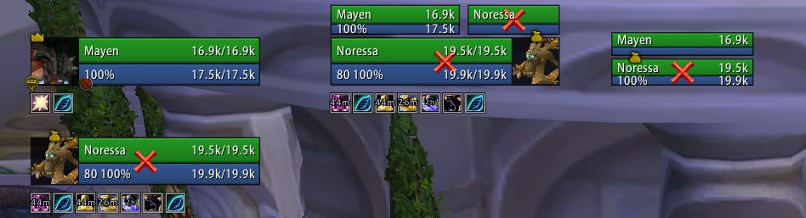
Using the screen shot as an example, if you drag the player frame the other frames will move with the player frame preserving the alignment and spacing. Each frame can still be manually positioned wherever you want, but this gives you a way of easily anchoring and moving frames around without having to use a ruler.
Zone configuration (Disabling options/units by zone type)
Units and modules can be enabled or disabled based on the type of zone you are in. For example, if you want to see party targets and party pets while you are in an arena but nowhere else then you can use the visibility options to enable it only while inside an arena. Modules can also be disabled by zone type, if you want to see party auras while in a raid instance but nowhere else you can disable the module in raid instances only.
Profiles do not have to be swapped and it is all automatic.
Units
Supports unit frames are as follows:
Player: Player, Pet, Pet Target
General: Target, Target of Target, Target of Target of Target, Focus, Focus Target
Party: Party, Party Pets, Party Targets, Party ToT
Raid: Raid, Raid Pet, Main Tank, Main Tank Target, Main Assist, Main Assist Target, Boss, Boss Target, Boss ToT, Main Assist ToT, Main Tank ToT
Arena: Arena, Arena Target, Arena Pets, Arena ToT
Battleground: Battleground, Battleground Target, Battleground Target
Features
- Tags: Includes a simple tagging system that can be customized in virtually any way using Lua, even if something isn't included by default odds are you can make the tags
- Incoming Heals: Supports the Blizzard Events for incoming heal data, no external libraries needed
- Auras: Can be set to only show auras you casted, or can cast on others. Can enlarge auras that you casted, and hide the cooldown ring on the timers of auras you didn't cast as well to make it more obvious which ones you casted and which ones you didn't
- Aura Timers: You will need a mod such as OmniCC to show timers on buffs and debuffs
- Aura Indicators: Display colored squares or icons for certain auras on any unit
- Fader: Fades frames when out of combat and inactive (100% mana/no target)
- Class Power (Eclipse, Holy Power, etc): Supports all of the class power features from Eclipse to Burning Embers.
- Highlighting: Border highlighting of frames based on mousing over them, curable debuffs, aggro or you are targeting/focusing them
- Range Checking: Fades frames out that are out of range of you
- Exportable Layouts: If you have a layout, or your friend has a layout you want to try out you can export/import SUF layouts by going to /suf -> Layout Manager
- Profiles: You can change from any profile to another one without reloading your UI, should you want to use a completely different layout based on zone you can easily switch profiles without hassle
Pretty much all the general unit frame settings are in, health bars, cast bars, power bars, portraits, indicators and so on.
Modules
Basic module support is included, should you be interested in building a module see the documentation on github for more information.
Feedback
For feature requests and bug reports, please continue to use the Ticket tracker. Feel free to ask on the thread first, if you're unsure what to do!
Comments


-

Shadowed103 Owner
-

nevcairiel Maintainer
-
View User Profile
-
Send Message
Posted Jan 23, 2026In reply to selph_eu: Fixed every single one of my errors, thank you so much! PLEASE GIVE THIS PERSON CONTRIBUTOR STATUS SO IT'S MAINTAINED IN CURSE! <3
-
View User Profile
-
Send Message
Posted Jan 23, 2026In reply to selph_eu: really thanks a lot bro, very thanks
-
View User Profile
-
Send Message
Posted Jan 23, 2026In reply to selph_eu:
Thanks a lot for fixing the Midnight version of SUF, just used this version and im not getting any errors. Only thing that seems that doesnt work is the range check of Party/Raid frames. They are not fading away.
-
View User Profile
-
Send Message
Posted Jan 23, 2026In reply to selph_eu: Thank you, this is amazing. I did notice that for empowered casts like from Evoker that the cast bars weren't showing at all (if I was targeting an Evoker, not as an Evoker myself).
-
View User Profile
-
Send Message
Posted Jan 23, 2026In reply to selph_eu: Tags are still not working for me (such as target perhp, curmaxhp, curhp, dechp, maxhp, etc.) says 0 and "Dead" as status. All cast bars are turned off, do I need to do anything else specific to make the addon function properly?
-
View User Profile
-
Send Message
Posted Jan 24, 2026In reply to selph_eu:
Hi there -- THANK YOU for doing this. I have not been able to find anything even remotely close to SUF in terms of configuration or look. Two issues I'm having:
(1) I am not seeing my player's health bar change colors based on percentage. The options are enabled but the health bar just remains the same color regardless of %. I know this is doable in Midnight because there are other addons that work and have this functionality (for example HealthBarColor does this). I'm not getting any Lua errors when my health goes down and I have these options enabled, it just never changes color.
(2) Tooltips on various buffs and debuffs are not working on the target frame. I've played around with various aura filtering settings and visibility settings, and nothing seems to fully fix the issue. I'm not getting any lua errors, the tooltips are just not showing up for certain buffs or debuffs, and I'm not sure exactly why.
Thank you for doing this, the community really appreciates you!
-
View User Profile
-
Send Message
Posted Jan 24, 2026In reply to frmgx:
Tooltips should be working now. I'll take a look at healthbar coloring later tonight (disabled the functionnality in the first build to get the addon working as soon as possible).
-
View User Profile
-
Send Message
Posted Jan 24, 2026In reply to selph_eu: Not All Heroes Wear Capes. You are awesome tyvm for sharing.
-
View User Profile
-
Send Message
Posted Jan 24, 2026In reply to selph_eu: Thanks a lot for this update! only have a question, with not more OMNICC, how can disable any timer to debuf for target ¿
-
View User Profile
-
Send Message
Posted Jan 22, 2026Here is my Retail version also two things that currently do not work non-healers range check for party members currently does not fade when oor and tooltips for debuffs on target but the icons do display as long as you do /suf then unit configuration->Target->debuffs->filters and check Show any other auras it's kind of a all or nothing deal atm.
** Updated Fixed color picker, DK Runes, Portraits (no longer error but lost some functionality), Cast bars on target and party members will show the spell being cast but no timer yet. **
**Update 1/23/2026 Fixed error in totems and loop when entering a vehicle. So I ran LFR, delve and dungeon real quick and looked good with my settings so unless I see any errors pop up that will be it for my release most likely I may try and get cast bars to work but I don't use. ** V7 - https://mega.nz/file/FU1TUTQL#A8OBPjtZVEKTbyxwpzNCxBmalEls5LVyDkYp0RSFn4c
-
View User Profile
-
Send Message
Posted Jan 22, 2026In reply to Xinux_vg:
Thank you very much!!!!!! I was needing this you are amazing!!
-
View User Profile
-
Send Message
Posted Jan 22, 2026In reply to Xinux_vg: You can change "dechp" to just `return string.format("%.1f%%", UnitHealthPercent(unit, true, CurveConstants.ScaleTo100))`; it works with secret values.
-
View User Profile
-
Send Message
Posted Jan 22, 2026In reply to GraysonCarlyle: I'll add that to my next release. Thank you
-
View User Profile
-
Send Message
Posted Jan 23, 2026In reply to Xinux_vg: many thanks for this! btw can you create a fork on github? it will live better than mega link and it will be easy to update...
-
View User Profile
-
Send Message
Posted Jan 22, 2026My working version for retails :
https://selph.fr/suf-midnight.zip
Update 23/01/26 - 14h00 UTC+1 :
Portraits and castbars fixed.
Update 23/01/26 - 17h00 UTC+1 :
Some tags are fixed (perhp, curmaxhp, curhp, dechp, maxhp, etc)
Update 24/01/26 - 3h25 UTC+1 :
Added timers to cast bars for other players and NPCs (thanks Xinux_vg).
Switched to AbbreviateNumbers instead of AbbreviateLargeNumbers for curmaxhp (thanks Ciarenni).
Fixed the class color settings in SUF.
Disabled range checks in raids/dungeons to fix the errors. We can't use them in combat anymore, so I think the feature's dead for the time being.
Corrected the incoming heal/absorb bars so they properly follow the overflow slider again.
Update 24/01/26 - 17h35 UTC+1 :
Refined the range check logic to restore partial functionality (thanks Xinux_vg).
Fixed a "script ran too long" error coming from the config file.
DK runes are now working properly.
Aura tooltips are now showing up correctly.
Update 25/01/26 - 3h36 UTC+1 :
Started adding temporary protection for tags that don't work with secret values to prevent errors while we wait to see which restrictions Blizzard lifts next.
Empowered casts are now showing up on the cast bar.
Health bar % coloring for you, your group, and the raid is back on the menu (thanks Xinux_vg :D).
Update 25/01/26 - 21h34 UTC+1 :
Temporarily disabled frame highlights for dispellable debuffs to prevent errors (a workaround is planned for a later update).
Added buff and debuff coloring by type.
You can now style buff/debuff timers in the General tab, thanks to Xinus_vg. (I'll refine this and add per-module menus once I'm feeling better, I'm currently sick ;_;).
28/01/26 - 03h07 UTC+1 :
Fixed several bugs related to cast tracking and range checking on secondary targets (target of target, pet target, focus target, etc.).
Fixed tracking of non-interruptible casts.
-
View User Profile
-
Send Message
Posted Jan 22, 2026In reply to selph_eu: You are an absolute legend!! Hopefully the dev realises this is possible and can use what you did to get it officially supported in Curse again. I LOVE YOU!!!!
Definitely getting a lot of LUA errors, even after changing stuff like HP values which cause it, but I dont even really care at this point, just glad to have my old hud back@
-
View User Profile
-
Send Message
Posted Jan 22, 2026In reply to YazzPott: Don't hesitate to DM me the errors you get.
-
View User Profile
-
Send Message
Posted Jan 22, 2026In reply to selph_eu: Yeah, it's working, though I did notice that the shortened versions of health and stuff aren't shortened, and the percentages say ??, but other than that it seems to be working. I do believe the percentage and shortened numbers can be fixed though.
-
View User Profile
-
Send Message
Posted Jan 22, 2026In reply to NoShotz_: I actually fixed the health/power percentages myself, so it is definitely possible, not sure how to fix the abbreviation of large numbers though.
-
View User Profile
-
Send Message
Posted Jan 22, 2026In reply to selph_eu: Thank you so much... it works perfectly ! Do you know a "trick" to hide the Blizzard casting bar ?