Shadowed Unit Frames
SUF focuses on a simple configuration while maintaining the flexibility that most users will care about, preventing unnecessary bloating of the addon that sacrifices performance. While you aren't going to be able to set the health bar to be exactly 3.14 pixels outside of the unit frames, you can change options you actually care about such as bar height, ordering, frame height and so on. To speed up configuration, you can configure multiple units at the same time through the global configuration. For example, if you want to set the height of the Player, Target, Focus and Party frames to 50 then the height of Target's Target, Target's Target of Target, Focus Target to 30 you can easily do this by changing two options instead of having to do it seven times.
However, should you need a little bit of extra configuration do not despair! An advanced option is included that will unlock additional configuration giving finer control over the configuration.
Shadowed Unit Frames in Midnight
Due to the strict limitations on addons introduced by Blizzard in Midnight, SUF will not be updated at this time.
Shadowed Unit Frames in WoW Classic
There is in-development Beta versions available for WoW Classic!
Note that WoW Classic does not provide all the information that you might be used to:
- There is no Focus Frame
- Information about the HP of enemies is not available, and they'll show as 100 HP
- Cast Bars for anyone but the player himself are not available
- Debuffs have no duration information
Some of this data can be restored with additional libraries/addons, but it'll always be guesswork and potentially inaccurate. Shadowed Unit Frames comes bundled with LibClassicDurations for debuff durations. Mob HP can be provided by Real Mob Health, which you need to install manually.
Note on copying your layout from Retail to Classic:
In general you cannot copy your layout between the two versions, since they are quite different, and doing so will result in certain elements exclusive to one version (like Pet Happiness on Classic) not always working properly. There are some provisions in the code that makes copying from Retail to Classic mostly work, use at your own risk - however, never copy a Layout from Classic to Retail, this will absolutely result in the Class-specific power bars and other elements not available on Classic to cease to function.
Slash commands: /shadoweduf (/suf)
Anchoring
Are you driven crazy by your party frames not aligning up exactly with your player frames, even if it's only half a pixel off? The anchoring system will let you solve all alignment issues, by allowing you to anchor a frame to another and set a simple offset from the frame it is anchored to, or by manually setting the X/Y position of the frame.
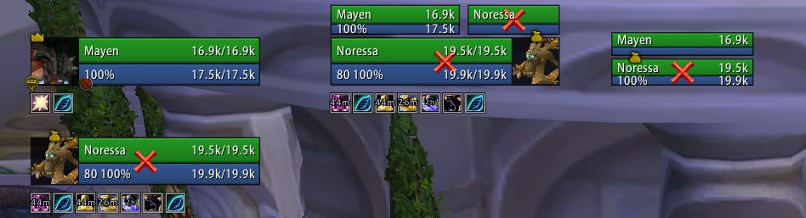
Using the screen shot as an example, if you drag the player frame the other frames will move with the player frame preserving the alignment and spacing. Each frame can still be manually positioned wherever you want, but this gives you a way of easily anchoring and moving frames around without having to use a ruler.
Zone configuration (Disabling options/units by zone type)
Units and modules can be enabled or disabled based on the type of zone you are in. For example, if you want to see party targets and party pets while you are in an arena but nowhere else then you can use the visibility options to enable it only while inside an arena. Modules can also be disabled by zone type, if you want to see party auras while in a raid instance but nowhere else you can disable the module in raid instances only.
Profiles do not have to be swapped and it is all automatic.
Units
Supports unit frames are as follows:
Player: Player, Pet, Pet Target
General: Target, Target of Target, Target of Target of Target, Focus, Focus Target
Party: Party, Party Pets, Party Targets, Party ToT
Raid: Raid, Raid Pet, Main Tank, Main Tank Target, Main Assist, Main Assist Target, Boss, Boss Target, Boss ToT, Main Assist ToT, Main Tank ToT
Arena: Arena, Arena Target, Arena Pets, Arena ToT
Battleground: Battleground, Battleground Target, Battleground Target
Features
- Tags: Includes a simple tagging system that can be customized in virtually any way using Lua, even if something isn't included by default odds are you can make the tags
- Incoming Heals: Supports the Blizzard Events for incoming heal data, no external libraries needed
- Auras: Can be set to only show auras you casted, or can cast on others. Can enlarge auras that you casted, and hide the cooldown ring on the timers of auras you didn't cast as well to make it more obvious which ones you casted and which ones you didn't
- Aura Timers: You will need a mod such as OmniCC to show timers on buffs and debuffs
- Aura Indicators: Display colored squares or icons for certain auras on any unit
- Fader: Fades frames when out of combat and inactive (100% mana/no target)
- Class Power (Eclipse, Holy Power, etc): Supports all of the class power features from Eclipse to Burning Embers.
- Highlighting: Border highlighting of frames based on mousing over them, curable debuffs, aggro or you are targeting/focusing them
- Range Checking: Fades frames out that are out of range of you
- Exportable Layouts: If you have a layout, or your friend has a layout you want to try out you can export/import SUF layouts by going to /suf -> Layout Manager
- Profiles: You can change from any profile to another one without reloading your UI, should you want to use a completely different layout based on zone you can easily switch profiles without hassle
Pretty much all the general unit frame settings are in, health bars, cast bars, power bars, portraits, indicators and so on.
Modules
Basic module support is included, should you be interested in building a module see the documentation on github for more information.
Feedback
For feature requests and bug reports, please continue to use the Ticket tracker. Feel free to ask on the thread first, if you're unsure what to do!
Comments


-

Shadowed103 Owner
-

nevcairiel Maintainer
-
View User Profile
-
Send Message
Posted Jan 15, 2026so many things are broken even in the 'fixed' version kain posted. Debuffs on raid frames stay persistently even after expiring or being dispelled. etc. its a shamble... can you fix it properly please... seriously
-
View User Profile
-
Send Message
Posted Jan 15, 2026Please fix it for Unniversary TBC it helps me a lot!
-
View User Profile
-
Send Message
Posted Jan 14, 2026Will this be officially supported in Midnight? I know there are a lot of changes, but I've been using this addon FOREVER at this point and I would sincerely like to continue to do so into the future.
-
View User Profile
-
Send Message
Posted Jan 14, 2026So not able to type in the commands when I do it won't allow me to hit enter.
-
View User Profile
-
Send Message
Posted Jan 14, 2026In reply to TheOnlyBurden: same here
-
View User Profile
-
Send Message
Posted Jan 14, 2026Hello there, just downloaded v2 of your TBC update, THANK YOU!!!! it works amazingly except for one issue. No matter what I do, it will not hide the blizzard cast bar. Any advice?
-
View User Profile
-
Send Message
Posted Jan 14, 2026In reply to usniff: Hey I figured it out for me. In game, go to addons and at the top choose load out of date addons. This got mine working and /suf worked and everything
-
View User Profile
-
Send Message
Posted Jan 14, 2026copy this in the shadow.lua. the menu will open yea it pops a error massage but it work for Kain_Mercers version
Line 897 - 911
local loaded, reason
if C_AddOns and C_AddOns.LoadAddOn then
loaded, reason = C_AddOns.LoadAddOn("ShadowedUF_Options")
else
loaded, reason = LoadAddOn("ShadowedUF_Options")
end
if not ShadowUF.Config then
DEFAULT_CHAT_FRAME:AddMessage(string.format(
L["Failed to load ShadowedUF_Options, cannot open configuration. Error returned: %s"],
reason and _G["ADDON_" .. reason] or ""
))
return
end
-
View User Profile
-
Send Message
Posted Jan 14, 2026THank you for all you do, any chance this will work with prepatch/TBC? The cleanest and best frames....- Firstjuan -Nightslayer
-
View User Profile
-
Send Message
Posted Jan 14, 2026In reply to gotmilk0112: yep this
-
View User Profile
-
Send Message
Posted Jan 14, 2026In reply to gotmilk0112:
Changing the line on 897 in ShadowedUnitFrames.lua to the following fixed this for me (adding "C_AddOns." in front of "LoadAddons"):
local loaded, reason = C_AddOns.LoadAddOn("ShadowedUF_Options")
-
View User Profile
-
Send Message
Posted Jan 14, 2026In reply to grimsoldier: Unfortunately still not working for me. I downloaded the files and replaced the existing ones in my addons folder (line 897 already had the added code) and it shows up in WoW as an addon but doesn't work. /suf also doesn't do anything
-
View User Profile
-
Send Message
Posted Jan 14, 2026For those looking - this is not simply a TBC issue. Shadowed Unit Frames also needs to be updated to support Midnight, which TBC Anniversary is based on. So it's gunna start breaking in Retail too unless it gets fixed.
-
View User Profile
-
Send Message
Posted Jan 14, 2026In reply to yttriumtyclief: I read in the comments below that the 'fan' that was maintaining this addon up until this point has refused to continue doing so to make it compatible with midnight, and so.. It sounds like the author of this addon has buggered off and doesn't care anymore - therefore this addon has just died permanently.
-
View User Profile
-
Send Message
Posted Jan 14, 2026Hello, are we going to get a TBC version for 20th anniversary???? You can't surely expect everyone to change to a different unit frame UI addon because you can't be bothered updating it, right?
-
View User Profile
-
Send Message
Posted Jan 15, 2026In reply to user_eqo5w472pl0quan8: seriously? xD "cant be bothered updating it"
-
View User Profile
-
Send Message
Posted Jan 14, 2026If you could make a version that works for TBC Anniversary I would love you forever. Hope your 2026 is going well
-
View User Profile
-
Send Message
Posted Jan 6, 2026Is there a version of this that works on the Classic PTR (for TBC)?
-
View User Profile
-
Send Message
Posted Dec 31, 2025Thanks for this nice addon,
Is it possible to get an square 2D portrait? really would like to see that. I have turned off all background colors etc then you see the portrait has edged of corners
Greetings Mafklapper
-
View User Profile
-
Send Message
Posted Dec 23, 2025Let us know if you are updating or if anyone is. Much appreciated. This breaks in 1 month.