
Prat 3.0
In loving memory of Jon Akthar (Sylvanaar)
Hello WoW community, I'm LuciferCatnip, Sylvanaar was my coworker and my mentor. It goes without saying that Jon was an amazingly talented individual. He always seemed to know everything… but he once said to me "It's not about knowing the answers, it's about asking the right questions", he always challenged me to ask me the right questions until I would arrive at the answer on my own terms. Jon was also a champion of the open source movement, and so with special thanks to Gil from Curseforge as well as Sylvanaar's family, there's no better way to honor Sylvanaar's legacy than to keep his project going strong in the community.
If you'd like to help maintain Prat, please reach out to MysticalOS or LuciferCatnip directly. Thank you so much.
About
Prat-3.0 is a chat enhancement addon for World of Warcraft.
It is made up of 30+ smaller "modules" which each provide additional functionality, and can be enabled or disabled individually.
In game, type /prat for a menu. Or use the icon on one of the many data broker hosts.
Prat has just about every feature you can think of, and then some. Really. When I get some more time, I'll try and put together a full list (Even I have lost count)
(Thanks to Dreamsight for this partial list)
- Sync your chat settings across your account (Beta)
- Machine learning powered spam filter (Beta)
- Change arrows, buttons, mouse scroll for chat scroll, scroll speed
- you can add player color per channel, color per level, color per class
- timestamps (styled)
- Whether to show timestamp (what format the timestamp should be in)
- Whether to show players level
- You can select the option for channel "stickys" (last channel you used you auto use when hitting enter, that sort of thing – or last thing someone said)
- Change the looks of the chat's editbox - as well as where it appears (you can even undock it and move it to where you'd like it to be)
- Chat fading, fading delay
- You can change the font to a list of fonts, add an outline to it, monochrome it (if you don’t mind messing with files a bit you could probably even add other fonts to that list)
- Change the chat frame/chat box appearance
- Keep chat history between game sessions
- Set channel abbreviations
- Set brackets and color(or something instead of brackets)round player/lvl
- Alt invite option (press keyboard “alt” button and click on the player’s name to auto inv them)
- Raid icon
- Invite links - click them to invite the person
- URL copying
- Full chat copying + copy button
- Click timestamp to copy line
- Configurable alerts when your name or other word is mentioned
- Enables tell target /tt which whispers your target
- Alias options - make macros into short commands
- See names of players Alt characters
- Change chat sounds (incoming and outgoing as well as per channel)
- Achievements info and grats
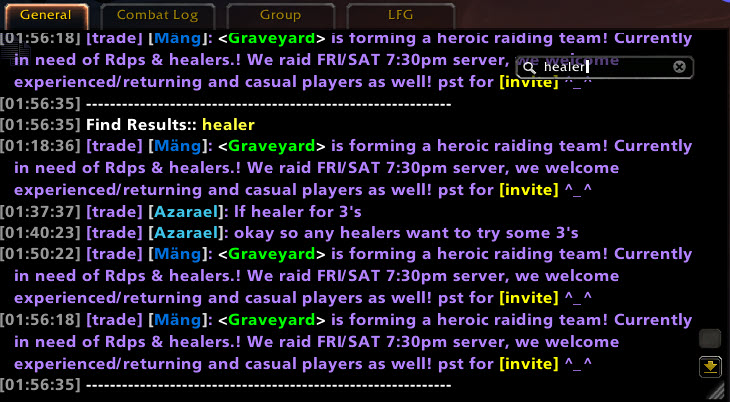
- Full chat search and search box
- Customizable filters for advanced users
- Show item icon next to item links and player class icon next to player names
- Icon-only options for newcomers chat
- Optional flashing or font color change for chat tabs when a new message comes in.
You can enable/disable all Prat modules - don't have to have the ones you don't use running
While trying to reduce resource utilization, it is also important to note that some people prefer the features, and don't care that an addon uses 500k more.
Comments

-

QTartemis Owner
-

humfras Former Author
-

lucifercatnip Author
-

MrFIXlT Former Author
-

MysticalOS Author
-

pompachomp Former Author
-

SunnySunflow Translator
-

sylvanaar Former Author
-
View User Profile
-
Send Message
Posted Feb 20, 2026Got an issue where if i create a new chat window it get's removed if i relog. Using ElvUI but with Prat as chat addon. Don't understand which addon interact with which. Anyone got a clue what's going on here?
-
View User Profile
-
Send Message
Posted Feb 18, 2026I don't know how it is in other instanced areas (raids or dungeons), but when I'm in PvP BGs, I no longer receive notifications about incoming Bnet whispers from friends as long as I'm in the BG. Outside of the BG, everything is as usual. Is this due to the AddOn or Blizzard?
-
View User Profile
-
Send Message
Posted Feb 22, 2026In reply to aerobanned: This should be fixed in 3.9.88
-
View User Profile
-
Send Message
Posted Feb 18, 202615x bad argument #1 to '?' (Usage: local result = Ambiguate(fullName, context). Secret values are only allowed during untainted execution for this argument.)
[Blizzard_ChatFrameBase/Shared/ChatFrameUtil.lua]:997: in function 'GetDecoratedSenderName'
[Blizzard_ChatFrameBase/Mainline/ChatFrameOverrides.lua]:299: in function 'MessageEventHandler'
[Blizzard_ChatFrameBase/Shared/ChatFrame.lua]:14: in function 'OnEvent'
[Blizzard_ChatFrameBase/Mainline/FloatingChatFrame.lua]:127: in function <...lizzard_ChatFrameBase/Mainline/FloatingChatFrame.lua:126>
I think this LUA ERROR is from prat, maybe have a look!
-
View User Profile
-
Send Message
Posted Feb 22, 2026In reply to Vasheron94: This should be fixed in 3.9.88
-
View User Profile
-
Send Message
Posted Feb 17, 20261 channel was ticked, but Prat showed nothing typed after I pressed Enter.
Only after turning the addon off did I see what I typed.
-
View User Profile
-
Send Message
Posted Feb 13, 2026just got this error today https://imgur.com/a/31zxZol
-
View User Profile
-
Send Message
Posted Feb 17, 2026In reply to user_k0rwjzkqev1bj5jm: I am also getting this error
-
View User Profile
-
Send Message
Posted Feb 11, 2026Hey, I have a question.
I want to enable a sound notification when I receive a Blizzard whisper or a private message. It’s working for me, but when I installed the addon for my friend, he doesn’t get any sound notification.
Do you know what the problem could be?
-
View User Profile
-
Send Message
Posted Feb 8, 2026I install Prat 3.0, log into the game, and instantly — without touching anything — get a message saying the addon was blocked for trying to perform a Blizzard-only protected action, right on login. Then a flood of Lua errors starts pouring in, and the UI behaves like this addon was never meant to be run in a live game at all. So here's a straightforward question: Did you actually run your own addon in WoW, or not? How exactly are users supposed to "help test fixes" when the addon cannot even be tested because it taints and gets blocked immediately? This isn't some rare edge case — this is basic login behavior. At the same time, you're pushing 2–3 updates per day, and it's still breaking the Blizzard UI. How is that even possible? Are you writing the code yourself, or just feeding it to Copilot/AI and shipping whatever comes out without testing it in the actual client? If this is alpha, say it's alpha. If this is a release, it's embarrassing. Given this history and user base, the addon shouldn't be in a state where you can install it, and it should be immediately blocked. Right now, Prat 3.0 doesn't feel like an update — it feels like a raw, untested chunk of code that eats the UI the moment the game loads.
-
View User Profile
-
Send Message
Posted Feb 9, 2026In reply to blackbladedoom: I am not, nor have I from any recent releases, been having any of the issues you are stating, nor anyone else I know using the addon. I get it, these errors from the API changes are problematic and frustrating, but attacking an addon developer for what seems, in my opinion, to be an unfortunate fringe case, seems a bit harsh. Tell us which version of the game you're trying to use it on, temporarily remove your saved variables to see if it is something messed up in your old setup, and tell us if you tried it with no other addons enabled. Side note- Blizzard base UI addons that come stock with the game are ALSO broken by their own changes. It's a whole mess, but I do hope you can find out what is exactly causing your lua errors, might be a module that needs to be fixed.
-
View User Profile
-
Send Message
Posted Feb 22, 2026In reply to blackbladedoom: To answer this question. I write the code myself, no AI is involved. Blizzard is constantly pushing out updates and changes that break the vast featureset that Prat offers.
I daily run Prat myself, so when I see issues, they usually get resolved pretty fast. As Goddess_Suicune pointed out, you were the first person to raise an issue like this. I would initially try ruling out other addons as the cause than instantly jumping on to blame Prat (Even blizzards warnings of who's to blame isn't accurate to which addon actually causes the issues).
If you get further issues, it's best to provide them on the github issue tracker, along with whatever errors you are actually seeing, as this gets them resolved faster.
-
View User Profile
-
Send Message
Posted Feb 7, 2026Greeting , I am having Lua error while Prat enable
It happen in Mythic+/ Raid / BG battle ONLY
Heres' the messenge
999x bad argument #1 to '?' (Usage: local result = Ambiguate(fullName, context). Secret values are only allowed during untainted execution for this argument.)
[Blizzard_ChatFrameBase/Shared/ChatFrameUtil.lua]:997: in function 'GetDecoratedSenderName'
[Blizzard_ChatFrameBase/Mainline/ChatFrameOverrides.lua]:299: in function <...izzard_ChatFrameBase/Mainline/ChatFrameOverrides.lua:268>;
[tail call]: ?
[tail call]: ?
[Blizzard_ChatFrameBase/Shared/ChatFrame.lua]:14: in function 'OnEvent'
[Blizzard_ChatFrameBase/Mainline/FloatingChatFrame.lua]:127: in function <...lizzard_ChatFrameBase/Mainline/FloatingChatFrame.lua:126>;
Locals:
event = "CHAT_MSG_CHANNEL"
text = <no value>;
senderName = <no value>;
languageName = ""
channelName = "4. 尋求組隊"
playerName2 = <no value>;
specialFlags = ""
zoneChannelID = 26
channelIndex = 4
channelBaseName = "尋求組隊"
languageID = 0
lineID = 212
senderGUID = <no value>;
bnSenderID = <no value>;
isMobile = false
chatType = "CHANNEL4"
chatTypeInfo = <table>; {
colorNameByClass = true
r = 1
id = 73
g = 1
flashTab = false
ignoreChatTypeProcessing = false
sticky = 1
flashTabOnGeneral = false
b = 1
}
decoratedPlayerName = <no value>;
FYI
I am using ElvUI v.15.02
Please ingore the non-english channel tag ,I am playing in TW server
-
View User Profile
-
Send Message
Posted Feb 3, 2026Hi there !
Seems like there's a conflict between prat and TRP3 addon, when both are enabled, this is what happens with server names : [XXX-Azuremyst-Azuremyst] with first server name being class colored and second one being colored same as the channel. Any way to fix this ?
ps : doesn't seem to happen when displaying an rp name
Thanks !
-
View User Profile
-
Send Message
Posted Feb 1, 2026Getting an error in battlegrounds when getting honor
Message: bad argument #1 to '?' (Usage: local result = Ambiguate(fullName, context). Secret values are only allowed during untainted execution for this argument.)
Time: Sun Feb 1 11:25:33 2026
Count: 2
Stack:
[Interface/AddOns/Blizzard_ChatFrameBase/Shared/ChatFrameUtil.lua]:997: in function 'GetDecoratedSenderName'
[Interface/AddOns/Blizzard_ChatFrameBase/Mainline/ChatFrameOverrides.lua]:299: in function <...izzard_ChatFrameBase/Mainline/ChatFrameOverrides.lua:268>
[tail call]: ?
[tail call]: ?
[Interface/AddOns/Blizzard_ChatFrameBase/Shared/ChatFrame.lua]:14: in function 'OnEvent'
[Interface/AddOns/Blizzard_ChatFrameBase/Mainline/FloatingChatFrame.lua]:127: in function <...lizzard_ChatFrameBase/Mainline/FloatingChatFrame.lua:126>
Locals:
event = "CHAT_MSG_COMBAT_HONOR_GAIN"
text = <no value>
senderName = <no value>
languageName = ""
channelName = ""
playerName2 = <no value>
specialFlags = ""
zoneChannelID = 0
channelIndex = 0
channelBaseName = ""
languageID = 0
lineID = 1873
senderGUID = nil
bnSenderID = <no value>
isMobile = false
chatType = "COMBAT_HONOR_GAIN"
chatTypeInfo = <table> {
colorNameByClass = false
r = 0.878431
id = 35
g = 0.792157
flashTab = false
ignoreChatTypeProcessing = false
sticky = 0
flashTabOnGeneral = false
b = 0.039216
}
decoratedPlayerName = <no value>
-
View User Profile
-
Send Message
Posted Jan 31, 2026After last update Prat's input field doesn't fade for some reason.
Fix it, please :)
-
View User Profile
-
Send Message
Posted Jan 30, 2026Any chance to get an update that will either give an option to suppress Chinese characters on US servers or reduce their font size so it doesn't distort the chat messages?
-
View User Profile
-
Send Message
Posted Jan 28, 2026Hey, so I was just wondering... is there a way for me to increase the size of the edit box text? I've looked and I can't seem to find an option for it?
-
View User Profile
-
Send Message
Posted Jan 27, 2026There is an action that is blocked and PRAT prevents you from chatting if you are I combat, very inconveient when trying to explain something and you cant even open the chat window
-
View User Profile
-
Send Message
Posted Jan 27, 2026In reply to neo_fire_fly: i have the same problem