
Prat 3.0
In loving memory of Jon Akthar (Sylvanaar)
Hello WoW community, I'm LuciferCatnip, Sylvanaar was my coworker and my mentor. It goes without saying that Jon was an amazingly talented individual. He always seemed to know everything… but he once said to me "It's not about knowing the answers, it's about asking the right questions", he always challenged me to ask me the right questions until I would arrive at the answer on my own terms. Jon was also a champion of the open source movement, and so with special thanks to Gil from Curseforge as well as Sylvanaar's family, there's no better way to honor Sylvanaar's legacy than to keep his project going strong in the community.
If you'd like to help maintain Prat, please reach out to MysticalOS or LuciferCatnip directly. Thank you so much.
About
Prat-3.0 is a chat enhancement addon for World of Warcraft.
It is made up of 30+ smaller "modules" which each provide additional functionality, and can be enabled or disabled individually.
In game, type /prat for a menu. Or use the icon on one of the many data broker hosts.
Prat has just about every feature you can think of, and then some. Really. When I get some more time, I'll try and put together a full list (Even I have lost count)
(Thanks to Dreamsight for this partial list)
- Sync your chat settings across your account (Beta)
- Machine learning powered spam filter (Beta)
- Change arrows, buttons, mouse scroll for chat scroll, scroll speed
- you can add player color per channel, color per level, color per class
- timestamps (styled)
- Whether to show timestamp (what format the timestamp should be in)
- Whether to show players level
- You can select the option for channel "stickys" (last channel you used you auto use when hitting enter, that sort of thing – or last thing someone said)
- Change the looks of the chat's editbox - as well as where it appears (you can even undock it and move it to where you'd like it to be)
- Chat fading, fading delay
- You can change the font to a list of fonts, add an outline to it, monochrome it (if you don’t mind messing with files a bit you could probably even add other fonts to that list)
- Change the chat frame/chat box appearance
- Keep chat history between game sessions
- Set channel abbreviations
- Set brackets and color(or something instead of brackets)round player/lvl
- Alt invite option (press keyboard “alt” button and click on the player’s name to auto inv them)
- Raid icon
- Invite links - click them to invite the person
- URL copying
- Full chat copying + copy button
- Click timestamp to copy line
- Configurable alerts when your name or other word is mentioned
- Enables tell target /tt which whispers your target
- Alias options - make macros into short commands
- See names of players Alt characters
- Change chat sounds (incoming and outgoing as well as per channel)
- Achievements info and grats
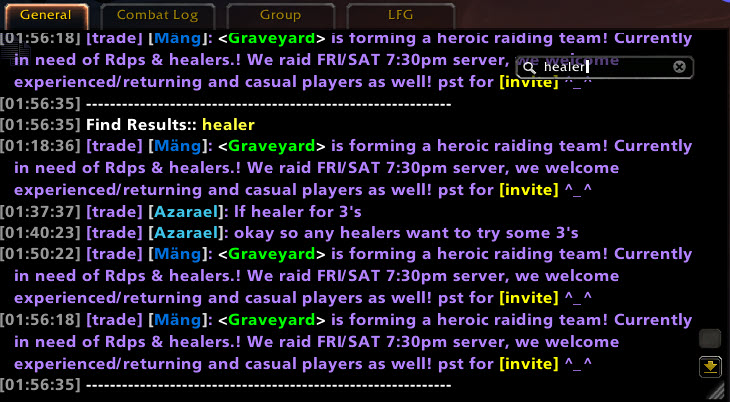
- Full chat search and search box
- Customizable filters for advanced users
- Show item icon next to item links and player class icon next to player names
- Icon-only options for newcomers chat
- Optional flashing or font color change for chat tabs when a new message comes in.
You can enable/disable all Prat modules - don't have to have the ones you don't use running
While trying to reduce resource utilization, it is also important to note that some people prefer the features, and don't care that an addon uses 500k more.
Comments

-

QTartemis Owner
-

humfras Former Author
-

lucifercatnip Author
-

MrFIXlT Former Author
-

MysticalOS Author
-

pompachomp Former Author
-

SunnySunflow Translator
-

sylvanaar Former Author
-
View User Profile
-
Send Message
Posted May 26, 2018In reply to Fizzlemizz:
-
View User Profile
-
Send Message
Posted May 26, 2018Getting this error after latest update..
Date: 2018-05-26 13:15:52
ID: 1
Error occured in: Global
Count: 1
Message: ..\AddOns\Prat-3.0\addon\locales.lua line 70:
Locale key module_name is not provided.
Debug:
Prat-3.0\addon\addon.lua:245:
Prat-3.0\addon\addon.lua:199
(tail call): ?
[C]: ?
[string "safecall Dispatcher[1]"]:9:
[string "safecall Dispatcher[1]"]:5
(tail call): ?
...\AddOns\DataStore\libs\AceAddon-3.0\AceAddon-3.0.lua:529: InitializeAddon()
...\AddOns\DataStore\libs\AceAddon-3.0\AceAddon-3.0.lua:644:
...\AddOns\DataStore\libs\AceAddon-3.0\AceAddon-3.0.lua:636
Locals:
None
AddOns:
Swatter, v7.3.1 (<%codename%>)
Altoholic, vr183
Archy, v7.3.2.1
Atlas, vv1.43.06
AtlasArena, vv1.07.01
AtlasBattlegrounds, vv1.43.00
AtlasBurningCrusade, vv1.43.00
AtlasCataclysm, vv1.43.00
AtlasClassicWoW, vv1.43.00
AtlasClassOrderHalls, vv1.43.00
AtlasDungeonLocs, vv1.43.00
AtlasLegion, vv1.43.03
AtlasMistsofPandaria, vv1.43.00
AtlasOutdoorRaids, vv1.43.00
AtlasScenarios, vv1.43.01
AtlasTransportation, vv1.43.01
AtlasWarlordsofDraenor, vv1.43.00
AtlasWorldEvents, vv3.23
AtlasWrathoftheLichKing, vv1.43.01
AtlasLoot, vv8.07.13
AtlasLootBurningCrusade, vv8.07.13
AtlasLootCataclysm, vv8.07.13
AtlasLootClassic, vv8.07.13
AtlasLootLegion, vv8.07.13
AtlasLootMistsofPandaria, vv8.07.13
AtlasLootWarlordsofDraenor, vv8.07.13
AtlasLootWrathoftheLichKing, vv8.07.13
AtlasMajorCitiesEnhanced, vv1.15
Auctionator, v4.0.19
Babylonian, v5.1.DEV.332(/embedded)
Bartender4, v4.7.10
Bones, v0.4
Clique, vv70300-1.0.0
Configator, v5.1.DEV.431(/embedded)
DataStore, vr64
DataStoreAchievements, vr46
DataStoreAgenda, vr26
DataStoreAuctions, vr49
DataStoreCharacters, vr41
DataStoreContainers, vr57
DataStoreCrafts, vr78
DataStoreCurrencies, vr36
DataStoreGarrisons, vr22
DataStoreInventory, vr51
DataStoreMails, vr50
DataStorePets, vr43
DataStoreQuests, vr43
DataStoreReputations, vr41
DataStoreSpells, vr31
DataStoreStats, vr30
DataStoreTalents, vr60
DBMCore, v7.3.30
DBMCountPackHoTS, v1.3
DBMCountPackOverwatch, v1.2
DBMDefaultSkin, v
DBMLDB, v
DBMNightholdDBH, v
DBMSpellTimers, v
DBMStatusBarTimers, v
FBBroker, v1.33e
FishingBuddy, v1.8.4.9
GarrisonCommanderBroker, v2.18.5 1.1.0
Gatherer, v7.3.1
GatherMate2, v1.41
GatherMateSharing, vv1.10
GTFO, v4.45.3
GupPet, v7.1.5.03
HandyNotes, vv1.4.15
HandyNotesArgus, vv0.08
HandyNotesBrokenShore, vv1.24
HandyNotesDraenorTreasures, v1.20a
HandyNotesDungeonLocations, v1.28
HandyNotesLegionClassOrderHalls, vv1.26
HandyNotesLegionInstanceWorldQuests, vv1.12
HandyNotesLegionMagePortals, v1.1
HandyNotesLegionRaresTreasures, v1.01b
HandyNotesLegionTreasures, v1
HandyNotesLongForgottenHippogryph, v1
HandyNotesPandariaTreasures, v1.06
HandyNotesPetDailies, v
HandyNotesSpecialNPCsEtc, v1.1.1-Beta
HandyNotesSuramarLeylines, v1
HandyNotesSuramarShalAranTelemancy, vv1.16
HandyNotesSuramarTelemancy, v1
HandyNotesTimelessIsleRareElites, v2.32
HandyNotesTimelessIsleChests, v1.18
HandyNotesTimelessTreasures, v1.0.7
HandyNotesTravelGuide, vv1.9.2
LUI, v3.9.16
NPCScan, v7.3.5.12
Omen, v3.1.12
oRA3, vv7.3.13
Outfitter, v5.19.1
PassLoot, v4.4
PassLootItemScales, v1.1
Pawn, v2.2.18
Postal, vv3.5.9
Prat30, vr1128
Prat30Libraries, v
SlideBar, v7.3.1 (<%codename%>)
TomTom, vv70300-1.0.0
BlizRuntimeLib_enUS v7.3.5.70300 <none>
(ck=b37)
-
View User Profile
-
Send Message
Posted May 26, 2018In reply to Forge_User_09306568:
1x Prat-3.0-r1128 \addon\locales.lua:70: Locale key module_name is not provided.
Prat-3.0-r1128 \addon\addon.lua:245: in function <Prat-3.0\addon\addon.lua:199>
(tail call): ?
[C]: ?
[string "safecall Dispatcher[1]"]:9: in function <[string "safecall Dispatcher[1]"]:5>
(tail call): ?
...ceBigWigs\Libs\AceAddon-3.0\AceAddon-3.0-12.lua:529: in function `InitializeAddon'
...ceBigWigs\Libs\AceAddon-3.0\AceAddon-3.0-12.lua:644: in function <...ceBigWigs\Libs\AceAddon-3.0\AceAddon-3.0.lua:636>
Locals:
nil
-
View User Profile
-
Send Message
Posted May 26, 2018In reply to Xindan:
Locale key module_name is not provided.
Debug:
Prat-3.0\addon\modules.lua:336: LoadModules()
Prat-3.0\addon\addon.lua:245:
Prat-3.0\addon\addon.lua:199
(tail call): ?
[C]: ?
[string "safecall Dispatcher[1]"]:9:
[string "safecall Dispatcher[1]"]:5
(tail call): ?
Ace3\AceAddon-3.0\AceAddon-3.0.lua:529: InitializeAddon()
Ace3\AceAddon-3.0\AceAddon-3.0.lua:644:
Ace3\AceAddon-3.0\AceAddon-3.0.lua:636
-
View User Profile
-
Send Message
Posted May 26, 2018In reply to Forge_User_09306568:
-
View User Profile
-
Send Message
Posted May 27, 2018In reply to sylvanaar:
-
View User Profile
-
Send Message
Posted May 25, 2018Achievements module is ready to localize if anyone wants to volunteer, you can access the localization tool from the project page. I plan to enable it by default - what do you guys think - otherwise nobody will know about it.
-
View User Profile
-
Send Message
Posted May 16, 2018Does anyone else gets this bug since new the last update? My chat looks like this after 10 sec of UI finished loading , |Hchannel:RAID , what the hell ?
https://imgur.com/a/8lpVP2h
-
View User Profile
-
Send Message
Posted May 16, 2018In reply to Shaterhand:
-
View User Profile
-
Send Message
Posted May 17, 2018In reply to Shaterhand:
-
View User Profile
-
Send Message
Posted May 17, 2018In reply to sylvanaar:
-
View User Profile
-
Send Message
Posted May 17, 2018In reply to Forge_User_18982159:
-
View User Profile
-
Send Message
Posted May 14, 2018FYI, if you have a guild with 1000 members you should just probably not use the color names everywhere option (at least in raids) until I can address its performance.
-
View User Profile
-
Send Message
Posted May 14, 2018need grats button work on whispered achievement too
-
View User Profile
-
Send Message
Posted May 14, 2018In reply to temp123456:
-
View User Profile
-
Send Message
Posted May 14, 2018In reply to temp123456:
-
View User Profile
-
Send Message
Posted May 15, 2018In reply to sylvanaar:
-
View User Profile
-
Send Message
Posted May 15, 2018In reply to temp123456:
-
View User Profile
-
Send Message
Posted May 13, 2018Released all pending changes.
The new achievements module is a work in progress, right now it has 2 features which are slightly underdeveloped. It will show if you completed the achievement already, and there is a link you can click next to the achievement that lets you say "grats". Kinda underwhelming, but I didn't have too much time to work on it - maybe it will inspire some feature ideas from you guys.
EDIT: I spruced it up with some random messages which change based on whether or not you have the achievement. It is very cheesy - but, it was fun to code.
-
View User Profile
-
Send Message
Posted May 7, 2018I have a problem with Prat 3.0, when i swap my spec, the box edit change his position. Video of explication here:
what i can do? greetings.