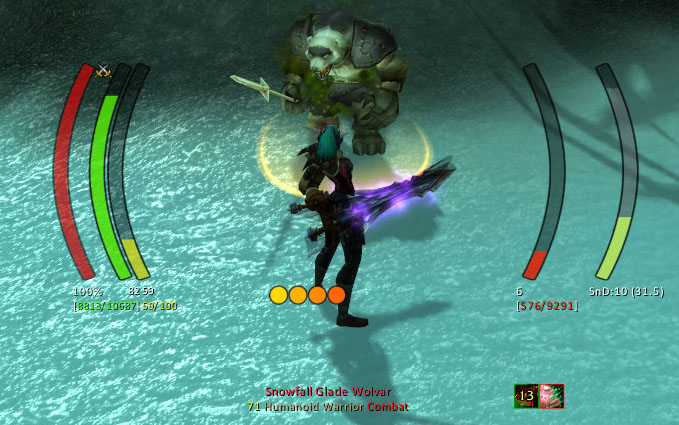
IceHUD
IceHUD is a highly configurable and customizable HUD addon in the spirit of DHUD, MetaHUD, and others designed to keep your focus in the center of the screen where your character is.
What it is
- Player and target health and mana bars, casting and mirror bars, pet health and mana bars, druid mana bar in forms, extensive target info, ToT display, and much more
Short feature list
- Lots of different bar shapes and patterns to make the HUD look like you want
- Class-specific modules such as combo point counters, Slice'n'dice timers, druid mana trackers, Eclipse bar, Holy Power monitoring, Warlock shard tracking, and more
- Target-of-target bars, Crowd Control timers, Range Finders, Threat meters, and plenty of other helpful modules
- Lots of DogTag-supported strings for extreme customizability (with the option to completely disable DogTag support for those that dislike the CPU toll that it takes)
- Cast lag indicator (optional)
- Alpha settings for in combat, target selected, etc.
- Fully customizable bars and counters capable of tracking buff/debuff applications on any unit, spell/ability cooldowns, and the health/mana of any unit you specify. The custom health/mana bars will even work with crazy unit specifications like "focustargettargetfocustarget" if you want!
- Highly configurable (can totally re-arrange all bars, change text display, etc.)
Slash commands
- /icehud - opens the configuration UI to tweak any setting
- /icehudCL - command-line access to tweak IceHUD settings (for use with macros, etc.)
A Note on WoW Midnight
The 12.0 patch, for the Midnight expansion, made significant, sweeping changes to how addons work in the game. As a result, many features previously available are no longer allowed by the game. If IceHUD is no longer doing something it used to do, the most likely reason is that it's not possible (or much more difficult) in the new patch. Feel free to create a GitHub issue for any errors you find; it's expected that there will be some errors for a while due to the extent of changes required.
If you have any custom DogTags using Fractional*:Short, they will no longer work in Midnight - use something like [[HP:Short] '/' [MaxHP:Short]] instead. Many other enemy-HP-or-buff-dependent features, such as Low Threshold flashing or in-combat buff/debuff tracking, are no longer allowed by the game.
See the wiki page for an exhaustive list of Midnight/12.0 changes.
Frequently Asked Questions
-
How do I hide the default Blizzard player, target unit frames and party unit frames? Type /icehud, expand the "Module Settings" section, click "Player Health" or "Target Health," and check "Hide Blizzard Frame" and/or "Hide Blizzard Party Frame". (NOTE: before version 1.3.7, the player/target unitframes were hidden by default. Follow the same steps to enable them if desired)
-
How do I turn off click-targeting and menus on the player bar? Type /icehud, expand the "Module Settings" section, click "Player Health," un-check "Allow click-targeting." Note that as of v1.3, there is now an option to allow click-targeting out of combat, but turn it off while in combat.
-
How do I hide the HUD or change its transparency based on combat, targeting, etc.? Type /icehud, check the "Transparency Settings" section. Nearly any combination of states should be available for tweaking.
-
Even if the rest of the HUD is transparent, the health percentages seem to show up. Why? Type /icehud, expand the "Module Settings" section, expand "Player Health," click "Text Settings," look for options about keeping the lower/upper text blocks alpha locked. If the text is alpha locked, it will not drop below 100%, otherwise it respects its bar's transparency setting. Player Health/Mana, Target Health/Mana, and pet bars should all have these options.
-
Is there any way to see combo points for Rogues and Druids or sunder applications for Warriors? Yes, check the "Combo Points" and "Sunders" modules in the /icehud configuration panel. (Note that these modules may not show up if you're not of the appropriate class to see them. They should be present for their respective classes, however.)
-
What's this thing at the top of the player's cast bar and threat bar? It's darker than the rest of the bar. (and may be colored red) That's the Cast Lag Indicator (or the aggro-pull warning for the Threat bar) that shows you when you can start casting a new spell and still be able to finish the current one (based on your lag to the server). You can disable this in the Player Cast Bar settings under the /icehud configuration screen.
-
Is there a bar that shows breath underwater and if so, how can I adjust it? Yes, this is called the MirrorBarHandler in the module settings portion of the /icehud configuration. It's called that because it mirrors casting bar behavior, displays more than just breathing (fatigue is one example), and that's what Blizzard calls it. It can be moved/adjusted/resized/etc. as with any other module.
-
There's a long green bar that sometimes shows up below everything else. What is it? That would be the TargetOfTarget module. That module is available for people who don't want the full ToT health/mana bars, but do want some sort of ToT representation on the screen. It's configurable through the /icehud module settings.
-
IceHUD needs a bar or counter for buff/debuff X! Good news: as of v1.5, you can create as many bars and counters for any buffs or debuffs you want! Type /icehud, select one of the custom module types in the drop-down at the top of the settings page, and press the Create button. This will create a custom module and automatically select it in the list. It is highly recommend that you rename the bar as soon as possible to avoid any confusion later.
-
How do I turn off the resting/combat/PvP/etc. icons on the player or target? Type /icehud, expand Module Settings, expand PlayerHealth (or TargetHealth for targets), click Icon Settings. You can control every aspect of the icons there including location, visibility, draw order, etc.
-
How do I turn off buffs/debuffs on the player's or target's bar? Type /icehud, expand Module Settings, expand PlayerInfo (or TargetInfo for targets), select Buff Settings or Debuff Settings, and un-check "show buffs" (or "show debuffs").
-
How do I turn off these big huge bars that pulse whenever one of my abilities procs? This isn't IceHUD - it's Blizzard's Spell Alerts they added in 4.0.1. Interface options => Combat => "Spell Alert Opacity" to turn them off or search for a mod to tweak their positioning/size/etc.
-
I don't like where some of the bars are placed. How do I put the health/mana on the left/right? Type /icehud, expand Module Settings, expand whatever module you want to move (e.g. PlayerHealth, PlayerMana), and adjust the "Side" and "Offset" settings. "Side" controls whether it's on the left or the right and "Offset" controls how far from center it is.
-
Which module displays Monk Chi power? Prior to v1.11.2, this module was called HarmonyPower. Harmony was the original name for Chi back when 5.0 was in beta, so I used Blizzard's name for it while I was developing for Cataclysm. IceHUD v1.11.2 changed this module to be called Chi.
-
How do I add commas/periods into big numbers like health? If you have DogTags enabled, you can open the Text Settings for the module in question and add SeparateDigits() around the tag you're trying to split up. To display Health/MaxHealth with commas, use: [(SeparateDigits(HP):HPColor "/" SeparateDigits(MaxHP):HPColor):Bracket]. To use periods instead of commas, use: [(SeparateDigits(HP, "."):HPColor "/" SeparateDigits(MaxHP, "."):HPColor):Bracket]. Use the /dog help menu to build your own similar tags for Mana, etc.
-
The countdown timers on buffs and debuffs completely obscure the icon. How do I disable or adjust the text? IceHUD is not responsible for this countdown text and cannot control it. The 6.0 patch added an option in the game client to display counts on top of cooldowns. Look at the Action Bars menu under the game's Interface options. You can turn the text on or off there. Mods like OmniCC or CooldownCount will generally give you the same feature but allow you to control when, where, and how the text shows up.
-
When I rotate some modules 90 degrees, such as the castbar, the bar appears to wiggle up and down as it fills or empties. How do I fix this? This is a side effect of the animation API that I'm co-opting to force a rotation without having to provide duplicates of every bar texture in the mod. Any bar moving sufficiently quickly and updating rapidly will cause this. IceHUD is intended to be a vertically-oriented mod, so the rotation feature is there for people who are willing to accept the side effects that come with it. My suggestion is to use one of the many horizontally-oriented bar mods out there if you're wanting horizontal bars. Quartz is a good castbar replacement that you can use and disable IceHUD's built-in castbar, for example.
-
How do I get rid of the bars that showed up beneath the player in the 7.0 patch? Blizzard added a "Personal Resource Display" feature in the 7.0 game client. You can disable it in the Game options -> Interface -> Names -> Personal Resource Display.
-
Why is there no target castbar for Classic? The Classic game client doesn't offer a reliable way to show castbars for anyone except the player. You can install the LibClassicCasterino addon to enable support, but it's a best guess and not at all accurate.
-
Why do buff/debuff timers not work in Classic? The Classic game client doesn't provide this information to addons because it wasn't a feature when the game first released. You can install the LibClassicDurations addon to enable support, but it's a best guess and not at all accurate.
See here for a user-created guide to creating new IceHUD textures.
Comments


-

Parnic Owner
-
View User Profile
-
Send Message
Posted Sep 14, 20264x [ADDON_ACTION_BLOCKED] AddOn 'IceHUD' tried to call the protected function 'UNKNOWN()'.
[!BugGrabber/BugGrabber.lua]:554: in function '?'
[!BugGrabber/BugGrabber.lua]:538: in function <!BugGrabber/BugGrabber.lua:538>
[C]: ?
[C]: in function 'SendChatMessage'
[Misspelled/Misspelled.lua]:450: in function <Misspelled/Misspelled.lua:433>
[tail call]: ?
[Blizzard_ChatFrameBase/Shared/ChatFrameEditBox.lua]:309: in function 'SendText'
[Blizzard_ChatFrameBase/Shared/ChatFrameEditBox.lua]:409: in function <...s/Blizzard_ChatFrameBase/Shared/ChatFrameEditBox.lua:405>
[C]: ?
Locals:
self=<table>
event="ADDON_ACTION_BLOCKED"
addonName="IceHUD"
addonFunc="UNKNOWN()"
name="IceHUD"
badAddons=<table>{
IceHUD=true
}
L=<table>{
NO_DISPLAY_2="|cffffff00The standard display is called BugSack, and can probably be found on the same site where you found !BugGrabber.|r"
ERROR_DETECTED="%s |cffffff00captured, click the link for more information.|r"
BUGGRABBER_STOPPED="|cffffff00There are too many errors in your UI. As a result, your game experience may be degraded. Disable or update the failing addons if you don't want to see this message again.|r"
USAGE="|cffffff00Usage: /buggrabber <1-%d>.|r"
STOP_NAG="|cffffff00!BugGrabber will not nag about missing a display addon again until next patch.|r"
NO_DISPLAY_STOP="|cffffff00If you don't want to be reminded about this again, run /stopnag.|r"
NO_DISPLAY_1="|cffffff00You seem to be running !BugGrabber with no display addon to go along with it. Although a slash command is provided for accessing error reports, a display can help you manage these errors in a more convenient way.|r"
ERROR_UNABLE="|cffffff00!BugGrabber is unable to retrieve errors from other players by itself. Please install BugSack or a similar display addon that might give you this functionality.|r"
ADDON_CALL_PROTECTED="[%s] AddOn '%s' tried to call the protected function '%s'."
}
-
View User Profile
-
Send Message
Posted Sep 14, 2026@juicybox1 I'm not sure why the game has chosen to blame IceHUD in that case. The culprit looks to me like an addon called Misspelled that you have installed, from this error message:
[C]: in function 'SendChatMessage'
[Misspelled/Misspelled.lua]:450: in function <Misspelled/Misspelled.lua:433>
The rest of the blamed code is either Blizzard's UI itself or BugGrabber that picked up the error, nothing else in that list involves IceHUD.
If you're seeing multiple addons being blamed, it may all actually boil down to Misspelled, based on what you've provided here. Try disabling that one and seeing if all of this stops.
-
View User Profile
-
Send Message
Posted Sep 14, 2026@Parnic Yeah i realized that last night and have disabled it. going to try a key later and see what happens.
-
View User Profile
-
Send Message
Posted Sep 13, 2026seems like there is an issue with a lot of addons bricking chat, icehud is one of them.
-
View User Profile
-
Send Message
Posted Sep 5, 2026-- https://ibb.co/Y7GGcr19 -- I can't see the combat buffs and debuffs with transparency at 100%; I can barely make them out. The health and power bars work fine if I adjust the transparency, I didn't have this problem before the latest WoW patch -- https://ibb.co/B58mVZQt -- If I use this option, the transparency works fine, but I'd like 100% transparency only in combat, like I was used to before the last WoW patch, Please help. Aside from this inconvenience... if possible, I would like to have the option to see only the buffs with less than 1 minute remaining (and only my own buffs, although that option is already available).
-
View User Profile
-
Send Message
Posted Sep 6, 2026@cucote To my knowledge, it's not possible for addons to filter by buffs with less than 1 minute available - 12.0 added all kinds of restrictions to make inspecting data like that impossible.
-
View User Profile
-
Send Message
Posted Sep 6, 2026@Parnic And is it possible to have 100% transparency of buffs and debuffs only in combat? As far as I know, I didn't have that problem before.
-
View User Profile
-
Send Message
Posted Sep 6, 2026@cucote working on it.
-
View User Profile
-
Send Message
Posted Sep 6, 2026@Parnic May God repay you... you deserve a donation, bro
-
View User Profile
-
Send Message
Posted Sep 2, 2026The player info debuffs aren't working properly and keep moving around. The configuration mode isn't working correctly either; for example, it doesn't display the debuffs.
-
View User Profile
-
Send Message
Posted Sep 2, 2026@user_h9e6czp2oju7n52k which version of the game? Can you show me your config for that module? Any other errors showing up when you play the game?
-
View User Profile
-
Send Message
Posted Sep 3, 2026@Parnic I have the latest version of IceHUD and WoW
-
View User Profile
-
Send Message
Posted Sep 3, 2026@Parnic (This is a minor detail and not a bug, as I mentioned in my previous comment) but it's a little annoying that the buffs and debuffs have a black background when the time clock hand rotates over the buff and debuff icons.
-
View User Profile
-
Send Message
Posted Sep 3, 2026@user_h9e6czp2oju7n52k retail, vanilla classic, burning crusade anniversary, Mists classic?
-
View User Profile
-
Send Message
Posted Sep 3, 2026@user_h9e6czp2oju7n52k a screenshot would be immensely helpful, please. I'm struggling to understand the issues being reported.
-
View User Profile
-
Send Message
Posted Sep 3, 2026@Parnic The player-info debuffs aren't working properly. I leave them in one spot on the screen, but when I have two or more debuffs, they move horizontally to another part of the monitor. When I activate the addon's configuration mode, it doesn't show the player-info debuffs. I don't know how to send a screenshot :(
-
View User Profile
-
Send Message
Posted Sep 3, 2026@user_h9e6czp2oju7n52k upload it to imgur or any other sharing service and then give a link. Is this in the retail game or one of the three Classic variants?
-
View User Profile
-
Send Message
Posted Sep 3, 2026@Parnic https://ibb.co/vv49KTPJ -- https://ibb.co/DgrxKFgH -- Debuff number 1 is shifted to the right compared to the first screenshot I sent; the new debuffs appear to the left of the first one, but number 1 moves from its fixed position, and there is no sort by expiation and the debuffs are programmed to go to the left of the first one.
-
View User Profile
-
Send Message
Posted Sep 4, 2026@cucote I made a bunch of changes around Info modules in v1.17.25 to try and address this. Cooldown wipes should be translucent now, buffs/debuffs should grow in the configured direction, and Configuration Mode should show you where they're being placed for diagnostics.
-
View User Profile
-
Send Message
Posted Sep 4, 2026@Parnic muy bien muchas gracias, voy a probar mi addon favorito :)