IceHUD
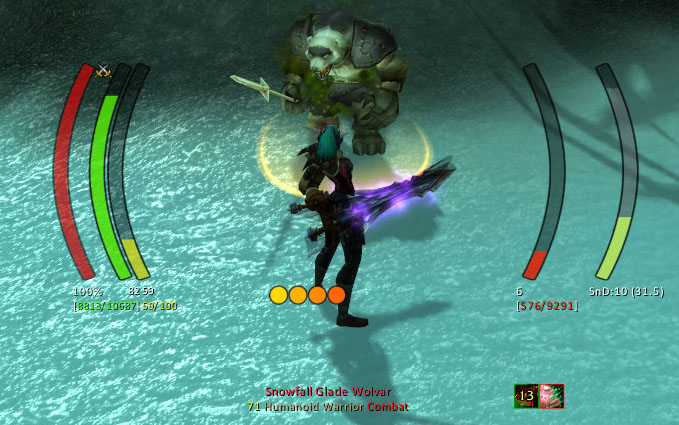
IceHUD is a highly configurable and customizable HUD addon in the spirit of DHUD, MetaHUD, and others designed to keep your focus in the center of the screen where your character is.
What it is
- Player and target health and mana bars, casting and mirror bars, pet health and mana bars, druid mana bar in forms, extensive target info, ToT display, and much more
Short feature list
- Lots of different bar shapes and patterns to make the HUD look like you want
- Class-specific modules such as combo point counters, Slice'n'dice timers, druid mana trackers, Eclipse bar, Holy Power monitoring, Warlock shard tracking, and more
- Target-of-target bars, Crowd Control timers, Range Finders, Threat meters, and plenty of other helpful modules
- Lots of DogTag-supported strings for extreme customizability (with the option to completely disable DogTag support for those that dislike the CPU toll that it takes)
- Cast lag indicator (optional)
- Alpha settings for in combat, target selected, etc.
- Fully customizable bars and counters capable of tracking buff/debuff applications on any unit, spell/ability cooldowns, and the health/mana of any unit you specify. The custom health/mana bars will even work with crazy unit specifications like "focustargettargetfocustarget" if you want!
- Highly configurable (can totally re-arrange all bars, change text display, etc.)
Slash commands
- /icehud - opens the configuration UI to tweak any setting
- /icehudCL - command-line access to tweak IceHUD settings (for use with macros, etc.)
A Note on WoW Midnight
The 12.0 patch, for the Midnight expansion, made significant, sweeping changes to how addons work in the game. As a result, many features previously available are no longer allowed by the game. If IceHUD is no longer doing something it used to do, the most likely reason is that it's not possible (or much more difficult) in the new patch. Feel free to create a GitHub issue for any errors you find; it's expected that there will be some errors for a while due to the extent of changes required.
If you have any custom DogTags using Fractional*:Short, they will no longer work in Midnight - use something like [[HP:Short] '/' [MaxHP:Short]] instead. Many other enemy-HP-or-buff-dependent features, such as Low Threshold flashing or in-combat buff/debuff tracking, are no longer allowed by the game.
See the wiki page for an exhaustive list of Midnight/12.0 changes.
Frequently Asked Questions
-
How do I hide the default Blizzard player, target unit frames and party unit frames? Type /icehud, expand the "Module Settings" section, click "Player Health" or "Target Health," and check "Hide Blizzard Frame" and/or "Hide Blizzard Party Frame". (NOTE: before version 1.3.7, the player/target unitframes were hidden by default. Follow the same steps to enable them if desired)
-
How do I turn off click-targeting and menus on the player bar? Type /icehud, expand the "Module Settings" section, click "Player Health," un-check "Allow click-targeting." Note that as of v1.3, there is now an option to allow click-targeting out of combat, but turn it off while in combat.
-
How do I hide the HUD or change its transparency based on combat, targeting, etc.? Type /icehud, check the "Transparency Settings" section. Nearly any combination of states should be available for tweaking.
-
Even if the rest of the HUD is transparent, the health percentages seem to show up. Why? Type /icehud, expand the "Module Settings" section, expand "Player Health," click "Text Settings," look for options about keeping the lower/upper text blocks alpha locked. If the text is alpha locked, it will not drop below 100%, otherwise it respects its bar's transparency setting. Player Health/Mana, Target Health/Mana, and pet bars should all have these options.
-
Is there any way to see combo points for Rogues and Druids or sunder applications for Warriors? Yes, check the "Combo Points" and "Sunders" modules in the /icehud configuration panel. (Note that these modules may not show up if you're not of the appropriate class to see them. They should be present for their respective classes, however.)
-
What's this thing at the top of the player's cast bar and threat bar? It's darker than the rest of the bar. (and may be colored red) That's the Cast Lag Indicator (or the aggro-pull warning for the Threat bar) that shows you when you can start casting a new spell and still be able to finish the current one (based on your lag to the server). You can disable this in the Player Cast Bar settings under the /icehud configuration screen.
-
Is there a bar that shows breath underwater and if so, how can I adjust it? Yes, this is called the MirrorBarHandler in the module settings portion of the /icehud configuration. It's called that because it mirrors casting bar behavior, displays more than just breathing (fatigue is one example), and that's what Blizzard calls it. It can be moved/adjusted/resized/etc. as with any other module.
-
There's a long green bar that sometimes shows up below everything else. What is it? That would be the TargetOfTarget module. That module is available for people who don't want the full ToT health/mana bars, but do want some sort of ToT representation on the screen. It's configurable through the /icehud module settings.
-
IceHUD needs a bar or counter for buff/debuff X! Good news: as of v1.5, you can create as many bars and counters for any buffs or debuffs you want! Type /icehud, select one of the custom module types in the drop-down at the top of the settings page, and press the Create button. This will create a custom module and automatically select it in the list. It is highly recommend that you rename the bar as soon as possible to avoid any confusion later.
-
How do I turn off the resting/combat/PvP/etc. icons on the player or target? Type /icehud, expand Module Settings, expand PlayerHealth (or TargetHealth for targets), click Icon Settings. You can control every aspect of the icons there including location, visibility, draw order, etc.
-
How do I turn off buffs/debuffs on the player's or target's bar? Type /icehud, expand Module Settings, expand PlayerInfo (or TargetInfo for targets), select Buff Settings or Debuff Settings, and un-check "show buffs" (or "show debuffs").
-
How do I turn off these big huge bars that pulse whenever one of my abilities procs? This isn't IceHUD - it's Blizzard's Spell Alerts they added in 4.0.1. Interface options => Combat => "Spell Alert Opacity" to turn them off or search for a mod to tweak their positioning/size/etc.
-
I don't like where some of the bars are placed. How do I put the health/mana on the left/right? Type /icehud, expand Module Settings, expand whatever module you want to move (e.g. PlayerHealth, PlayerMana), and adjust the "Side" and "Offset" settings. "Side" controls whether it's on the left or the right and "Offset" controls how far from center it is.
-
Which module displays Monk Chi power? Prior to v1.11.2, this module was called HarmonyPower. Harmony was the original name for Chi back when 5.0 was in beta, so I used Blizzard's name for it while I was developing for Cataclysm. IceHUD v1.11.2 changed this module to be called Chi.
-
How do I add commas/periods into big numbers like health? If you have DogTags enabled, you can open the Text Settings for the module in question and add SeparateDigits() around the tag you're trying to split up. To display Health/MaxHealth with commas, use: [(SeparateDigits(HP):HPColor "/" SeparateDigits(MaxHP):HPColor):Bracket]. To use periods instead of commas, use: [(SeparateDigits(HP, "."):HPColor "/" SeparateDigits(MaxHP, "."):HPColor):Bracket]. Use the /dog help menu to build your own similar tags for Mana, etc.
-
The countdown timers on buffs and debuffs completely obscure the icon. How do I disable or adjust the text? IceHUD is not responsible for this countdown text and cannot control it. The 6.0 patch added an option in the game client to display counts on top of cooldowns. Look at the Action Bars menu under the game's Interface options. You can turn the text on or off there. Mods like OmniCC or CooldownCount will generally give you the same feature but allow you to control when, where, and how the text shows up.
-
When I rotate some modules 90 degrees, such as the castbar, the bar appears to wiggle up and down as it fills or empties. How do I fix this? This is a side effect of the animation API that I'm co-opting to force a rotation without having to provide duplicates of every bar texture in the mod. Any bar moving sufficiently quickly and updating rapidly will cause this. IceHUD is intended to be a vertically-oriented mod, so the rotation feature is there for people who are willing to accept the side effects that come with it. My suggestion is to use one of the many horizontally-oriented bar mods out there if you're wanting horizontal bars. Quartz is a good castbar replacement that you can use and disable IceHUD's built-in castbar, for example.
-
How do I get rid of the bars that showed up beneath the player in the 7.0 patch? Blizzard added a "Personal Resource Display" feature in the 7.0 game client. You can disable it in the Game options -> Interface -> Names -> Personal Resource Display.
-
Why is there no target castbar for Classic? The Classic game client doesn't offer a reliable way to show castbars for anyone except the player. You can install the LibClassicCasterino addon to enable support, but it's a best guess and not at all accurate.
-
Why do buff/debuff timers not work in Classic? The Classic game client doesn't provide this information to addons because it wasn't a feature when the game first released. You can install the LibClassicDurations addon to enable support, but it's a best guess and not at all accurate.
See here for a user-created guide to creating new IceHUD textures.
Comments


-

Parnic Owner
-
View User Profile
-
Send Message
Posted Feb 15, 2026In reply to Parnic: If you can make the points curve like the bar does that would be perfect!
Pre-12.0 it was put together using weakauras.
-
View User Profile
-
Send Message
Posted Feb 15, 2026In reply to Felixphaeton: the main problem is that the bar texture can be literally any shape, so there's no way to really provide something that can fit to all chosen bars. I will think about this. Maybe individual point placement would be best.
-
View User Profile
-
Send Message
Posted Feb 19, 2026In reply to Felixphaeton: how's this?
The same feature will be present on all modules that use this same internal system (Chi, Vigor, Holy Power, Arcane Charges, Warlock Shards, etc.)
-
View User Profile
-
Send Message
Posted Feb 22, 2026In reply to Parnic: You're amazing, thank you!
-
View User Profile
-
Send Message
Posted Feb 14, 2026The PlayerInfo Mouse Over For Target area appears to be a transparent section which will highlight when you move your mouse over it, allowing you to see a tooltip of yourself, as well as right click options for actions such as leaving a group. Currently, its position is locked in conjunction with player buffs/debuffs (meaning you can only move it dependent on those). Is there a way to move this area independent of player buffs/debuffs? I would like to move this area's vertical position independent of the player buff/debuffs, but it appears that I can't. Thank you in advance.
-
View User Profile
-
Send Message
Posted Feb 14, 2026In reply to iwawashi: expand the module's options and there will be an area to configure buffs and debuffs separately. There you can change their anchor point or give them an offset from the info section.
-
View User Profile
-
Send Message
Posted Feb 13, 2026A rather odd bug appeared, and not easily replicable.
The SliceAndDice bar will appear, randomly. I assume it's the SnD bar, since the only way to make it go away is to Enable the SnD bar, and then un-enable it again. Turning off any other bar doesn't affect it; only the SnD bar.
Weird!
-
View User Profile
-
Send Message
Posted Feb 13, 2026In reply to weltallica: what version of the game is this happening on? And do you have any bug-catching addons installed like Bugsack?
-
View User Profile
-
Send Message
Posted Feb 12, 2026Hello,
I haven't been able to hide the player health bar since the add on has been moved to TBC anniversary even if I untick the Bar Visible box.
It works for Player Mana though.
Thanks for the addon. I really love it. :)
-
View User Profile
-
Send Message
Posted Feb 12, 2026In reply to krakookaz83722: can you describe a bit more about what you're trying to do? The bar is still showing when you ask it to hide? If you don't want the bar showing at all, you can disable the entire module. Are you sure it's the Health bar that's still showing and not another bar in the same position?
-
View User Profile
-
Send Message
Posted Feb 13, 2026In reply to Parnic: I'm using IceHUD only for the Player Health text and icons and Player Mana text.
So all I want to see are those numbers without bars. If I disabled the Palyer Health module, I won't see the text nor the icons.
Yes it's the health bar that I see but only when my health is below 100%. At full health the bar is hidden but as soon as I take 1 damage the bar appears.
To be noted that the mana bar is completely hidden (I only see the numbers which is what I want) regardless of the mana percentage.
If I recall correctly, I had the same "bug/behavior" years back and then it was ok again (meaning I could completely hide the bar and still see the numbers and icons)
I hope I could express myself more clearly.
Thanks for your time, I really appreciate it
-
View User Profile
-
Send Message
Posted Feb 13, 2026In reply to krakookaz83722: thanks for the extra details. This is an interesting use case for the mod I hadn't considered. I'm sure the 12.0 rewrite broke this again. I'll get a fix out for it soon
-
View User Profile
-
Send Message
Posted Feb 14, 2026In reply to krakookaz83722: hmm, I'm not able to reproduce this problem. When I untick the Bar and Background Visible options on PlayerHealth and then engage a tank training dummy in Dornogal that damages me, the bar stays hidden.
Can you send your SavedVariables\IceHUD.lua file to [email protected] so I can take a look with your exact settings?
-
View User Profile
-
Send Message
Posted Feb 11, 20262x ...IceHUD/libs/LibDogTag-Unit-3.0/Categories/Status.lua:95: attempt to perform boolean test on a secret boolean value (tainted by 'IceHUD')
[IceHUD/libs/LibDogTag-Unit-3.0/Categories/Status.lua]:95: in function 'func'
[IceHUD/libs/LibDogTag-3.0-20260207050313/Events.lua]:301: in function <IceHUD/libs/LibDogTag-3.0/Events.lua:294>
Locals:
event = "GROUP_ROSTER_UPDATE"
prefix = "party"
min = 0
max = 5
(for state) = <table> {
player = "Player-578-09515C16"
party3 = "Player-3682-0B6C8BDA"
party1 = "Player-1403-0AB2F69D"
party4 = "Player-1084-0AD74912"
party2 = "Player-1084-0AA17E80"
}
(for control) = "player"
unit = "player"
guid = "Player-578-09515C16"
(*temporary) = <no value>
(*temporary) = "player"
(*temporary) = <no value>
(*temporary) = "attempt to perform boolean test on a secret boolean value (tainted by 'IceHUD')"
iterateGroupMembers__t = <table> {
player = "Player-578-09515C16"
party3 = "Player-3682-0B6C8BDA"
party1 = "Player-1403-0AB2F69D"
party4 = "Player-1084-0AD74912"
party2 = "Player-1084-0AA17E80"
}
tmp = <table> {
Player-578-09515C16 = true
}
offlineTimes = <table> {
}
afkTimes = <table> {
}
deadTimes = <table> {
}
-
View User Profile
-
Send Message
Posted Feb 11, 2026In reply to SanTM: looks the same as comment #7712302. Thanks for the report, we'll get this fixed over on the LibDogTag addon.
-
View User Profile
-
Send Message
Posted Feb 11, 2026Is it possible to hide the player absorb bar if it is at 0?
-
View User Profile
-
Send Message
Posted Feb 11, 2026In reply to SanTM: that bar should follow the visibility for the other bars when it's empty, you're out of combat, and have no target. If other bars are showing, it will too. I haven't found a way to fully hide it because the values it needs to read to know when to hide are secret, and attempting to inspect secret values throws an error. If I find a way to do it with the api available by the 12.0 client I will get it added.
-
View User Profile
-
Send Message
Posted Feb 11, 2026When Galvin's UnitBars got disabled by Midnight, I used IceHUD to replicate it:
https://i.imgur.com/dNcjn6T.png
Unfortunately, the HP bars (player & target) are still slightly see-through, despite setting the transparancy alpha to 100%.
-
View User Profile
-
Send Message
Posted Feb 11, 2026In reply to weltallica: that looks pretty opaque to me but I will double check the math
-
View User Profile
-
Send Message
Posted Feb 11, 2026In reply to weltallica: can you either share an image of your settings or send your SavedVariables\IceHUD.lua file to [email protected]? I attempted to setup the same thing as you and I'm not seeing any transparency on the RivetBar texture.
https://i.imgur.com/DCz7EDi.png