Elkano's BuffBars
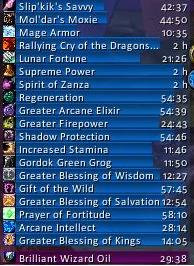
EBB provides groups of (mainly) statusbar style indicators to show (de)buffs currently affecting your char or some other units (focus, pet and target). For the player, it can also show indicators for temporary enchants placed on their weapons.
For over 20 years, EBB has been a mainstay for both long-term and returning players (at least some) and reports of its death have been greatly exaggerated.
Two-in-One Download
For Classic WoW, the addon uses its older 2.x code base, for Mainline WoW (Retail and Forever) it is now based on Blizzard's AuraContainer; all in the same download file.
2.x based on UnitAura
Version 2.x was a total recode, initially based on the Ace2 framework, later ported to Ace3, which became necessary in order to support some of the longtime wanted and suggested features. It has served well for ~19 years (since June '07) and made it possible to show different groups of bars which can be configured in many ways. Each group can be assigned an individual look and filter settings. After setting up a group, its anchor can be hidden by alt-left clicking a bar or the anchor itself in order to lock the group in place.
Due to changes Blizzard made with WoW 4.x it's no longer possible to cancel buffs without the use of secure frames.
EBB v2 thus limits cancelling of buffs to out-of-fight since using SecureAuraHeader would have required a major code restructuring.
This will be coming in a later version.
3.x based on AuraContainer
This is once again a complete artisanal rewrite, which became necessary due to Blizzard making auras secret in combat. This also gave me the push to include some features I already wanted but never included before. And you can cancel buffs in combat again.
Layouts can now be shared between groups, support multi-line/-column alignments, and give you way more options than before. But it can also just look the same as it used to.
What did suffer from the change of underlying technology are some of the filter options, as Blizzard has intentionally broken those.
And I haven't added localization to v3, yet. So most texts are in English besides a few strings reused from the game client.
Settings
The settings can be accessed via chat (/ebb), LDB icon, or simply via the game settings.
Other Infos
In order to get additional bar textures and fonts for EBB simply install e.g. SharedMedia which is available for download under https://www.curseforge.com/wow/addons/sharedmedia
If you have bug reports or feature request, create a ticket: https://www.curseforge.com/wow/addons/elkbuffbars/issues
Comments


-

Elkano Owner
-
View User Profile
-
Send Message
Posted Nov 15, 2010-
View User Profile
-
Send Message
Posted Nov 14, 2010The frame doesn't appear on initial load, but only after reloading my UI through /reloadui.
-
View User Profile
-
Send Message
Posted Nov 14, 2010-
View User Profile
-
Send Message
Posted Nov 13, 2010-
View User Profile
-
Send Message
Posted Nov 9, 2010-
View User Profile
-
Send Message
Posted Nov 10, 2010-
View User Profile
-
Send Message
Posted Nov 10, 2010latest alpha/beta shouldn't be doing anything wrt tracking anymore.
-
View User Profile
-
Send Message
Posted Nov 11, 2010-
View User Profile
-
Send Message
Posted Nov 12, 2010Yes, that one is gone since with being able to track multiple things at once there is no need anymore to show what exactly you are tracking.
So you will have to access it via the minimap button or eg some LDB addon.
-
View User Profile
-
Send Message
Posted Nov 8, 2010-
View User Profile
-
Send Message
Posted Nov 6, 2010i turned off all my add ons and tried agin
this is what popped up
Message: Interface\AddOns\ElkBuffBars\ElkBuffBars.lua:751: attempt to call upvalue 'GetTrackingTexture' (a nil value)
Time: 11/06/10 19:25:56
Count: 1
Stack: ...ddOns\ElkBuffBars\libs\AceAddon-2.0\AceAddon-2.0.lua:1055: in function `ManualEnable'
...ddOns\ElkBuffBars\libs\AceAddon-2.0\AceAddon-2.0.lua:983: in function <...ddOns\ElkBuffBars\libs\AceAddon-2.0\AceAddon-2.0.lua:976>
[C]: ?
...ddOns\ElkBuffBars\libs\AceEvent-2.0\AceEvent-2.0.lua:260: in function `TriggerEvent'
...ddOns\ElkBuffBars\libs\AceEvent-2.0\AceEvent-2.0.lua:910: in function <...ddOns\ElkBuffBars\libs\AceEvent-2.0\AceEvent-2.0.lua:903>
Locals: <none>
-
View User Profile
-
Send Message
Posted Nov 7, 2010-
View User Profile
-
Send Message
Posted Nov 6, 2010-
View User Profile
-
Send Message
Posted Nov 4, 2010Just started using your buff mod in 4.0.1 and, honestly, I'm really loving it -- I've been using CT Buff Mod for quite some time and started looking around after the whole secure aura headers fiasco came into play for a mod that was fully featured, didn't look like crap, and still let me cancel buffs. I went through a lot of alternatives before I finally found EBB.
If I could suggest an additional option, though, could we get the ability to remove the border from the aura icons and stretch the icon out to the width/height that the border was? Some other mods do this and I feel that it is a much cleaner look, depending on how small/large you scale your bars.
-
View User Profile
-
Send Message
Posted Nov 3, 2010-
View User Profile
-
Send Message
Posted Nov 2, 2010Message: Interface\AddOns\ElkBuffBars\ElkBuffBars.lua:751: attempt to call upvalue 'GetTrackingTexture' (a nil value)
Time: 11/02/10 18:55:43
Count: 1
Stack: ...ddOns\ElkBuffBars\libs\AceAddon-2.0\AceAddon-2.0.lua:1055: in function `ManualEnable'
...ddOns\ElkBuffBars\libs\AceAddon-2.0\AceAddon-2.0.lua:552: in function <...ddOns\ElkBuffBars\libs\AceAddon-2.0\AceAddon-2.0.lua:545>
...ddOns\ElkBuffBars\libs\AceAddon-2.0\AceAddon-2.0.lua:674: in function `InitializeAddon'
...ddOns\ElkBuffBars\libs\AceAddon-2.0\AceAddon-2.0.lua:541: in function <...ddOns\ElkBuffBars\libs\AceAddon-2.0\AceAddon-2.0.lua:518>
[C]: ?
...ddOns\ElkBuffBars\libs\AceEvent-2.0\AceEvent-2.0.lua:298: in function `TriggerEvent'
...ddOns\ElkBuffBars\libs\AceEvent-2.0\AceEvent-2.0.lua:910: in function <...ddOns\ElkBuffBars\libs\AceEvent-2.0\AceEvent-2.0.lua:903>
Locals: <none>
-
View User Profile
-
Send Message
Posted Nov 2, 2010If you can't move it then okay... at least it works now, so thank you for that!
-
View User Profile
-
Send Message
Posted Nov 2, 2010Just to give you a visual example and a general idea of my setup for better understanding:
[Group1] [G2] [Group3]\
[Group4]/
Group1 - Self buffs (Racials, trinket procs, class cooldowns) Icons/time only
Group2 - Timeless buffs - Icons only
Group3 - All other buffs - Icons/time only
Group4 - Debuffs - Name/Icon/Time
Presently G3/G4 are anchored together. This generally works out as G3 typically is the longest; however, at times G3 is not and G4 overlaps with G1 and G2. I was hopeful that it would be possible to anchor G1+G2+G3 together to form a cluster and then anchor G4 vertically to it. This way G4 would begin after the longest group and in this case hopefully in the same spot as G3.
If this is possible I would be grateful to know how. If it is not possible would you please be willing to consider it in a future release? Thanks and thank you for the work on this addon.
-
View User Profile
-
Send Message
Posted Nov 2, 2010-
View User Profile
-
Send Message
Posted Nov 1, 2010I always have a specific buffgroup just to show if encounter relevant buffs/debuffs are active on me (plague on prof/LK etc.), but have to update the filter on each and every char of mine seperately (and of course that is only possible right after I "saw" it on that specific char).
Another use would be for arena specific debuffs and debuffs in general.
Something like "shared" buff group filters would be a great help.
Ideal would be if they appeared as "special" where "whitelist" and "blacklist are located. You'd create them with a unique name, select them for groups on chars where you want to use them and any change on one char would show up on all of them.
(A backup copy would be great though.)