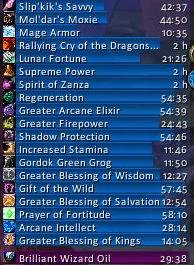
Elkano's BuffBars
EBB provides groups of statusbar style indicators to show (de)buffs currently affecting your char or some other units (currently focus, pet and target). For the player, it can also show indicators for temporary enchants place on it's weapons.
Due to changes Blizzard made with WoW 4.x it's no longer possible to cancel buffs without the use of secure frames. Currently EBB limits canceling of buffs to out-of-fight since using SecureAuraHeader would have required a major code restructuring. This will be coming in a later version.
Version 2.x is a total recode based on the Ace2 framework which became necessary in order to support some of the longtime wanted and suggested features. It's now possible to show different groups of bars which can be configured in many ways. Each group can be assigned an individual look and filter settings. EBB can be configured via a dropdown menu which is accessible via chat (/ebb config), FuBar plugin or (for the group settings) by right clicking the groups anchor. After setting up a group, its anchor can be hidden by alt-left clicking a bar or the anchor itself in order to lock the group in place.
In order to get additional bar textures and fonts for EBB simply install SharedMedia which is available for download under http://wow.curse.com/downloads/wow-addons/details/sharedmedia.aspx
If you have bug reports or feature request, create a ticket: http://www.wowace.com/projects/elkbuffbars/create-ticket/
You can also check my thread at the WoWAce forums: http://forums.wowace.com/showthread.php?t=5290
The most recent development version of EBB is available directly from the WoWAce SVN via http://www.wowace.com/projects/elkbuffbars/files/
Comments


-

Elkano Owner
-
View User Profile
-
Send Message
Posted Aug 8, 2016Hello, I've got a question for you. I often switch between windowed and fullscreen mode in wow, which causes the groups to change their location due to change in resolution. The only solution I've found is to create two profiles, one for windowed and one for fullscreen. I was wandering if there's something else I can do to make it easier. I had a similar issue with bartender, but since it offers the option to set different anchor points (I.e bottom, bottomleft etc.) I was able to fix it. Is there a similar functionality in your addon? If not, would you consider adding it? Thank you.
-
View User Profile
-
Send Message
Posted Aug 4, 2016Hi, I can't see any of the tooltips for my buffs. Is there a way to fix this? Debuffs are fine. Thanks :)
-
View User Profile
-
Send Message
Posted Aug 4, 2016They are both handled by pretty much the same code and both are working fine for me.
Only idea I have would be that something is blocking the mouse from interacting with your buff group. So check if you disabled the mouse for that group or, using /framestack , if some other invisible frame is blocking.
-
View User Profile
-
Send Message
Posted Aug 6, 2016Ah, yes, I had an invisible frame on top of it, thanks so much! :)
-
View User Profile
-
Send Message
Posted Aug 3, 2016Is there a way just to display the Roll the Bones buffs for Rogue and then to have the bar hide when out of combat?
-
View User Profile
-
Send Message
Posted Aug 4, 2016There is currently no condition implemented based on combat status, so unless the buff fades on its own after combat, there isn't atm.
-
View User Profile
-
Send Message
Posted Jul 25, 2016Question! Is there a way to make the buffs and debuffs growth to the left and right? I have the bars turned off and just use the icons, so I would love to see the same growth type as what Blizz currently does, but with yours. I like the fact that I can move them where I need them, change the transparency, fonts, etc, but still like just the icons and horizontal growth. I'm just not sure if I'm blind and not seeing the option or if it isn't there. Thanks!
-
View User Profile
-
Send Message
Posted Jul 26, 2016With the current EBB v2 code base, sadly there is not.
-
View User Profile
-
Send Message
Posted Jul 20, 20162.5.0 - r188 is out as beta, let me know if you find any remaining bugs.
-
View User Profile
-
Send Message
Posted Jul 20, 2016Cheers for updating your AddOn !!!!
This Lua-error i still get:
2x ElkBuffBars\ElkBuffBars-r185.lua:388: attempt to index global 'ConsolidatedBuffs' (a nil value)
ElkBuffBars\ElkBuffBars-r185.lua:388: in function `HandleFrame_Blizzard_BuffFrame'
ElkBuffBars\ElkBuffBars-r185.lua:377: in function `PLAYER_ENTERING_WORLD'
ElkBuffBars\ElkBuffBars-r185.lua:327: in function <ElkBuffBars\ElkBuffBars.lua:296>
(tail call): ?
[C]: ?
[string "safecall Dispatcher[1]"]:9: in function <[string "safecall Dispatcher[1]"]:5>
(tail call): ?
...ceBigWigs\Libs\AceAddon-3.0\AceAddon-3.0-12.lua:558: in function `EnableAddon'
...ceBigWigs\Libs\AceAddon-3.0\AceAddon-3.0-12.lua:651: in function <...ceBigWigs\Libs\AceAddon-3.0\AceAddon-3.0.lua:636>
[C]: in function `LoadAddOn'
FrameXML\UIParent.lua:391: in function `UIParentLoadAddOn'
FrameXML\UIParent.lua:414: in function `CombatLog_LoadUI'
FrameXML\UIParent.lua:995: in function <FrameXML\UIParent.lua:891>
Locals:
nil
-
View User Profile
-
Send Message
Posted Jul 20, 2016A YUUUGE Thank you! ;)
-
View User Profile
-
Send Message
Posted Jul 21, 2016Working like a charm, no more errors, thank you for quick update.
-
View User Profile
-
Send Message
Posted Jul 21, 2016I'm getting something similar:
Date: 2016-07-21 20:43:39
ID: 1
Error occured in: Global
Count: 1
Message: ..\AddOns\ElkBuffBars\ElkBuffBars.lua line 388:
attempt to index global 'ConsolidatedBuffs' (a nil value)
Debug:
ElkBuffBars\ElkBuffBars.lua:388: HandleFrame_Blizzard_BuffFrame()
ElkBuffBars\ElkBuffBars.lua:377: PLAYER_ENTERING_WORLD()
ElkBuffBars\ElkBuffBars.lua:327:
ElkBuffBars\ElkBuffBars.lua:296
(tail call): ?
[C]: ?
[string "safecall Dispatcher[1]"]:9:
[string "safecall Dispatcher[1]"]:5
(tail call): ?
...ddOns\ElkBuffBars\libs\AceAddon-3.0\AceAddon-3.0.lua:558: EnableAddon()
...ddOns\ElkBuffBars\libs\AceAddon-3.0\AceAddon-3.0.lua:651:
...ddOns\ElkBuffBars\libs\AceAddon-3.0\AceAddon-3.0.lua:636
[C]: LoadAddOn()
..\FrameXML\UIParent.lua:391: UIParentLoadAddOn()
..\FrameXML\UIParent.lua:482: TimeManager_LoadUI()
..\FrameXML\UIParent.lua:993:
..\FrameXML\UIParent.lua:891
Locals:
None
AddOns:
Swatter, v5.21f.5579 (SanctimoniousSwamprat)
ElkBuffBars, v2.4.2-185
BlizRuntimeLib_enUS v7.0.3.70000 <none>
(ck=73)
-
View User Profile
-
Send Message
Posted Jul 20, 2016Will you be updating this for legion? I've used this mod since it came out and i'd feel lost without it!! Please do!
-
View User Profile
-
Send Message
Posted Jul 20, 2016Even though I have been hardly playing lately, I have no intention to drop support.
So YES, I will be updating.
-
View User Profile
-
Send Message
Posted Jul 20, 2016Cheers! <3
-
View User Profile
-
Send Message
Posted Jul 20, 2016Thanks!
-
View User Profile
-
Send Message
Posted Jul 20, 2016Thank you for continuing support! This is the best mod I've found for buffs hands down and have been using it for years.
-
View User Profile
-
Send Message
Posted Jul 20, 2016awesome
-
View User Profile
-
Send Message
Posted Jul 20, 2016sweet Thanks Elkano for all your hard work and keeping this addon alive.. LOVE it.
Do have 1 question. is there away to set up a bar for mob/boss that will show only removable buffs/debuffs/enrage ?