
EavesDrop

🛑 EavesDrop will NOT work in Midnight!!!
Given the heavy-handed restrictions imposed on AddOns, the building blocks needed by this addon have been completely removed from the retail version of the game. Therefore it is not possible to update it for Midnight. Thanks for using the AddOn for the past 10 years!
In the unlikely event that Ion Hazzikostas restores access to live detailed combat info, I will attempt to revive it again, but given the mind-blowing reason (combat advantage) they have used to nuke addon access to player's own cooldowns and combat logs, I am not holding my breath!
This is my attempt to keep Grayhoof's addon alive!
The goal is to make this work under latest game version (currently 11.x). Please report any issues or bugs on the project's Github page.
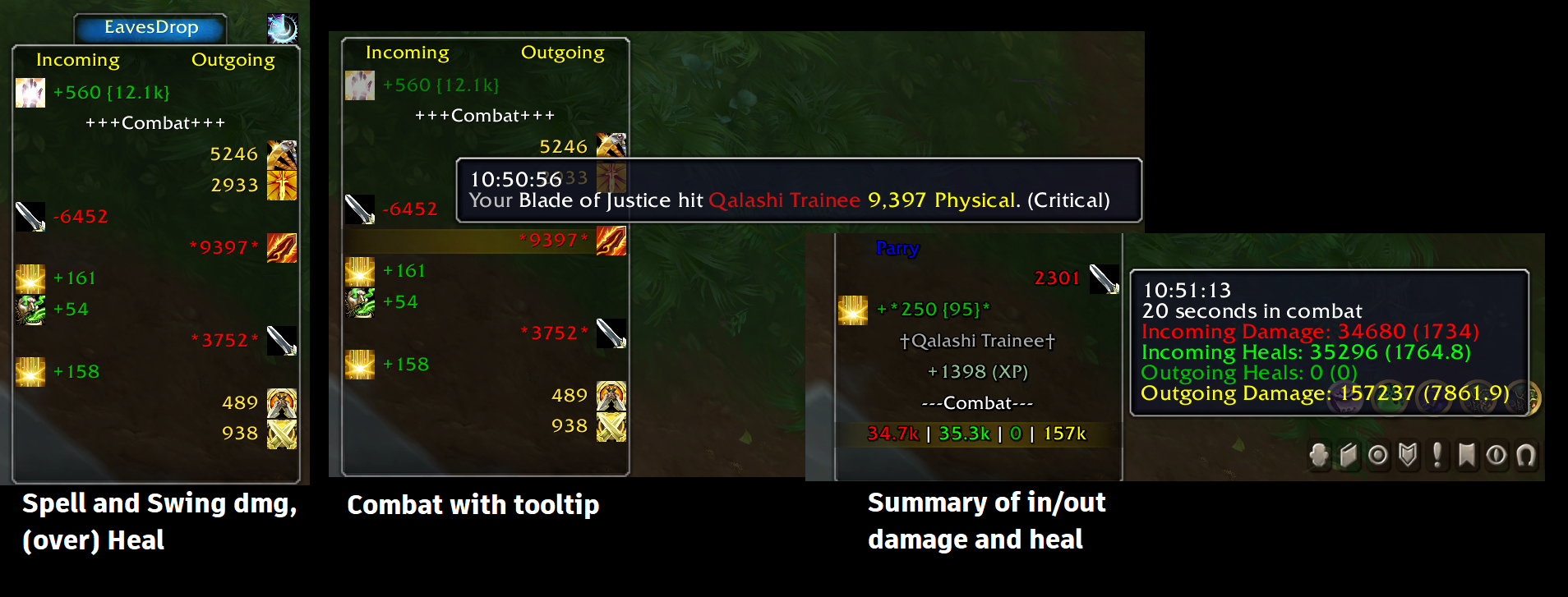
What does it do?
A simple combat log that shows events (such as damage, heal, buff/debuff…), using icons and colors to make it easy to find important information by a quick skim. It separates incoming events (left side) from outgoing events (right side) from misc. events (middle).
What all can it show?
- Your hits, spells, misses, heals, etc…
- Incoming damage, spells, heals, buffs, debuffs, etc…
- Power gain
- Honor, Reputation, Skill, and Experience gain
- Mob/People you have slain
- Combat start/stop
- Timestamps and details in tooltip
- Highest hit stat tracking for both incoming and outgoing skills.
- Combat Summaries
Additionally, it keeps track of each spell's maximum normal and critical hits!
Usage
All events related to player will be shown in 3 columns. After each combat, a summary of incoming and outgoing heals and damage will be displayed.
- Shift+scroll up/down will show the top/bottom of events.
- Ctrl+scroll up/down will take you to the next/previous combat.
- Shift+Click will copy the highlighted event to the chat edit box
- Click the "sun clock" icon, to open history of highest values of all events, divided into healing and damage.
To customize the events (buff, debuffs, colors, values, …), open the options window by right-click on the EavesDrop tab or entering slash command: /ed.
You can adjust the minimum damage/healing values in the options windows under Misc tab.
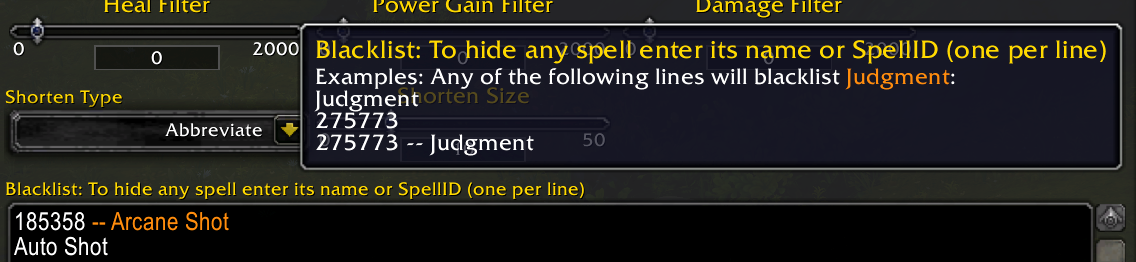
You can also completely exclude spells under the same tab. Enter the unwanted spell names or IDs in the Blacklist box, one spell per line. Any of the following lines will exclude Judgment:
Judgment
20271
Installation
Using addon managers
Install wago.iop app or CurseForge and search for EavesDrop in the apps to install the addon.
Manual Installation
Download the EavesDrop.zip file from either wago.io or github.com. Then follow these instructions:
- Go into your WoW installation folder (e.g.
C:\Program Files (x86)\World of Warcraft\_retail_). - Go into the
Interfacesub-folder. - Go into the
AddOnssub-folder (if you don't have one, create it). - Copy/Extract this addon's folder into the
AddOnsfolder. - Make sure the folder name is
EavesDrop.
Verification
The following folder paths will exist within your WoW Install directory:
Interface\AddOns\EavesDrop
Interface\AddOns\EavesDrop\libs
Interface\AddOns\EavesDrop\locals
Look for the following (wrong) files as evidence of common mistakes:
* If you have `Interface\AddOns\EavesDrop.toc` then you've extracted the zip file's contents without its folder structure, or copied the contents without the parent folder.
* If you have `Interface\AddOns\EavesDrop\EavesDrop\EavesDrop.toc` then you've extracted the zip file into a folder an extra level deep. Move the files and any sub-folders up one level and remove the extra folder.
* If you have `Interface\AddOns\EavesDrop-2.8` or similar, you need to rename it to `EavesDrop`.
For more detailed instructions see wowinterface's FAQ.
Credits: Some of the code to update Eavesdrop from 7.x to 8.0 is done by domzae, upon which I added required changes from BFA, SL, DF and TWW. If you feel you have contributed to this code base and you should get credited, please contact me.
Comments

-

Picpok Owner
-

realAhoora Author
-
View User Profile
-
Send Message
Posted Oct 29, 2008I do not know if it is a seperate issue with this addon or somehow related to the dropdown issue that Blizzard UI is having atm .. just a thought? (explained more here http://forums.wowace.com/showthread.php?p=243165&#post243165)
-
View User Profile
-
Send Message
Posted Oct 28, 2008-
View User Profile
-
Send Message
Posted Oct 25, 2008-
View User Profile
-
Send Message
Posted Oct 31, 2008[SPELL_POWER_HAPPINESS] = HAPPINESS,
basically change HAPPINESS_POINTS to just HAPPINESS.
-
View User Profile
-
Send Message
Posted Oct 24, 2008-
View User Profile
-
Send Message
Posted Oct 24, 2008ID: 100
Error occured in: Global
Count: 18
Message: ..\AddOns\EavesDrop\EavesDrop.lua line 590:
bad argument #3 to 'string_format' (string expected, got nil)
Debug:
(tail call): ?
(tail call): ?
[C]: ?
EavesDrop\EavesDrop.lua:590: ?()
...Bar\libs\CallbackHandler-1.0\CallbackHandler-1.0.lua:146:
...Bar\libs\CallbackHandler-1.0\CallbackHandler-1.0.lua:146
[string "safecall Dispatcher[14]"]:4:
[string "safecall Dispatcher[14]"]:4
[C]: ?
[string "safecall Dispatcher[14]"]:13: ?()
...Bar\libs\CallbackHandler-1.0\CallbackHandler-1.0.lua:91: Fire()
...ace\AddOns\Bagnon\libs\AceEvent-3.0\AceEvent-3.0.lua:70:
...ace\AddOns\Bagnon\libs\AceEvent-3.0\AceEvent-3.0.lua:69
AddOns:
Swatter, v5.1.3662 (SnaggleTooth)
AdvancedTradeSkillWindow, v
Atlas, v1.12.2
AtlasBattlegrounds, v1.12.2
AtlasDungeonLocs, v1.12.2
AtlasFlightPaths, v1.12.2
AtlasOutdoorRaids, v1.12.2
AtlasLoot, v5.01.02
AtlasLootFu, v1.2
AucAdvanced, v5.1.3662 (SnaggleTooth)
AucStatHistogram, v5.1.3662 (SnaggleTooth)
AucStatStdDev, v5.1.3662 (SnaggleTooth)
AucUtilAppraiser, v5.1.3662.2530
AucUtilScanButton, v5.1.3662.2530
AucUtilScanProgress, v5.1.3662.2530
AutoBar, vv3.00.02.05 beta
Babylonian, v5.1.DEV.130
Bagnon, v1.6.6
BagnonForever, v1.1.1
BagnonTooltips, v
BigWigs, v2.0
BigWigsExtras, v2.0
BigWigsPlugins, v2.0
BigWigsSunwell, v2.0
Cartographer, v2.0
CartographerBattlegrounds, v2.0
CartographerFoglight, v2.0
CartographerGroupColors, v2.0
CartographerGuildPositions, v2.0
CartographerInstanceLoot, v2.0
CartographerInstanceMaps, v2.0
CartographerInstanceNotes, v2.0
CartographerLookNFeel, v2.0
CartographerNotes, v2.0
CartographerPOI, v2.0
CartographerProfessions, v2.0
CartographerWaypoints, v2.0
CartographerZoneInfo, v2.0
ClearFont2, v2.4
Configator, v5.1.DEV.130
CowTip, v
cyCircled, v0.5
cyCircledChococat, v1.0
cyCircledCross, v1.0
cyCircledGoldOrbs, v1.0
cyCircledHelloween, v1.0
cyCircledHKitty, v1.0
cyCircledOnyx, v2.4.0.0
cyCircledPanda, v1.0
cyCircledPirates, v1.0
cyCircledPooh, v1.0
cyCircledsimpleSphere, v1.0
cyCircledsimpleSquare, v1.0
cyCircledSmurfs, v1.0
cyCircledVol, v1.0
cyCircledVolGold, v2.4.0.0
cyCircledVolM, v2.3.0.0
DebugLib, v5.1.DEV.130
EavesDrop, v2.1
ElkBuffBars, v2.1
EnhTooltip, v5.1.3662 (SnaggleTooth)
Examiner, v08.10.16
FDAlert, v1.1
Fizzle, v20400-1
FreeMe, v4.1
FuBar, v
FuBarAddonSpamFu, v1.0.0
FuBarAlarmClockFu, v1.1.0
FuBarAmmoFu, v2.0
FuBarBagFu, v2.0
FuBarClockFu, v3.0
FuBarDebugFu, v1.1 $Revision: 40913 $
FuBarDurabilityFu, v2.0
FuBarEmoteFu2, v0.1.5
FuBarLocationFu, v3.0
FuBarMailFu, v2.0
FuBarMoneyFu, vv1.2
FuBarPerformanceFu, v2.0
FuBarReloadUI, v2.0.0
FuBarVolumeFu, v2.0.$Revision: 55081 $
FuTextures, v2.0
Grid, v1.30000.2008101801
GridStatusAFK, v0.2
GridStatusReadyCheck, v1.0
Incubator, v2.00
InFlight, v3.0.002
InFlightLoad, v3.0.002
Informant, v5.1.3662 (SnaggleTooth)
ItemRack, v
kgPanels, v1.12
MinimapButtonFrame, v2.0a
MobHealth, v3.3
MoveAnything, v
NoDuel, v1.0
Nurfed, v
NurfedOptions, v
Omen, v3.0
OmniCC, v2.2.3
oRA2, v2.0.$Revision: 612 $
PitBull, v
Postal, v3.0.1
PowerAuras, v2.5.8b
Prat30, v3.0 (Beta Version)
Prat30HighCPUUsageModules, v
Prat30Libraries, v
Quartz, v1.0
QuartzBuff, v1.0
QuartzFlight, v1.0
QuartzGCD, v1.0
QuartzInterrupt, v1.0
QuartzLatency, v1.0
QuartzMirror, v1.0
QuartzPlayer, v1.0
QuartzRange, v1.0
QuartzSwing, v1.0
QuartzTimer, v1.0
QuartzTradeskill, v1.0
QuestHelper, v0.63
RatingBuster, v
Recount, v
sct, v6.2
sctd, v3.1
ShutUp, v1.0
SimpleMD, v3.0
Skinner, vb1.9056.4
SorrenTimers, v2.5.4
SpamSentry, v20081016
Squeenix, v
Stubby, v5.1.3662 (SnaggleTooth)
SunnArt, v2.12
SunnArtPack5, v1.0
SWStats, v3.0.0
TrinketMenu, v
XLoot, v0.9
(ck=c84)
-
View User Profile
-
Send Message
Posted Oct 23, 2008-
View User Profile
-
Send Message
Posted Oct 20, 2008-
View User Profile
-
Send Message
Posted Oct 17, 2008-
View User Profile
-
Send Message
Posted Oct 16, 2008-
View User Profile
-
Send Message
Posted Sep 4, 2008My EavesDrop only appears when i am grouped, how can i make it appear when i am solo (mine used to but hasn't latly) any help PLEASE!!!
Edit: been messing around with i more since i posted seems to be something with "eePanels2" that hides it unless grouped....
Edit2: Figured it out it was a "eePanels2" script that Aton's UI uses
-
View User Profile
-
Send Message
Posted Jul 3, 2008Reporting into the chat (shift click or whatever) does not work with characers with names like "Fyür".
I cant do reports into chat on my warrior with that name.
Kylli works just fine.
-
View User Profile
-
Send Message
Posted Jun 22, 2008My EavesDrop only appear when i'm in party, how can i enable it when i'm soloing??? i dont find any options for this. please help.
thanks
-
View User Profile
-
Send Message
Posted May 16, 2008I <3 this addon.
-
View User Profile
-
Send Message
Posted May 11, 2008Any idea how to fix this error so i can link my Damage and heals?
http://i187.photobucket.com/albums/x236/Cyrada/WoWScrnShot_051108_160228.jpg
-
View User Profile
-
Send Message
Posted Mar 17, 2008Hey is there anyway to get this in a tab window like beside the general tab? it would help with space.
-
View User Profile
-
Send Message
Posted Nov 13, 2007ctrl-left click on the arrow will scroll all the way down. and u can also hold down ctrl and it should scrol faster with the mousewheel. And yes a timer update would be nice , i was having some issues with the time where a boss would hit 4 times in .3 sec.
-
View User Profile
-
Send Message
Posted Nov 2, 2007Hey is there anyway to get this in a tab window like beside the general tab? it would help with space
-
View User Profile
-
Send Message
Posted Sep 27, 2007As long as we're making improvement suggestions, Ive got a couple.
First, when the combat is very short (5 seconds or so), the combat summary lists a ridiculuous number like 5.4500000000005 seconds. If this could be truncated to 2 decimal points, I think that would satisfy even the most hard core stat freaks.
Secondly, along the same lines, a lot of the time the combat timer is just odd. The last combat I had said -8909.9399999999 seconds in combat. (That's Negative 8.9k seconds) Not sure whats going on there, but something is clearly not right there. (If it helps, im 1 hour later than my server time)... Any ideas on this?
-
View User Profile
-
Send Message
Posted Sep 6, 2007Would it be possible to add a "skip to bottom" button so we don't have to mousewheel all the way back down to the current events when we scroll up?
Also, would it be possible to condense "spammy" spells such as Cannibalize, First Aid, etc.