dG Killshot
dG Killshot
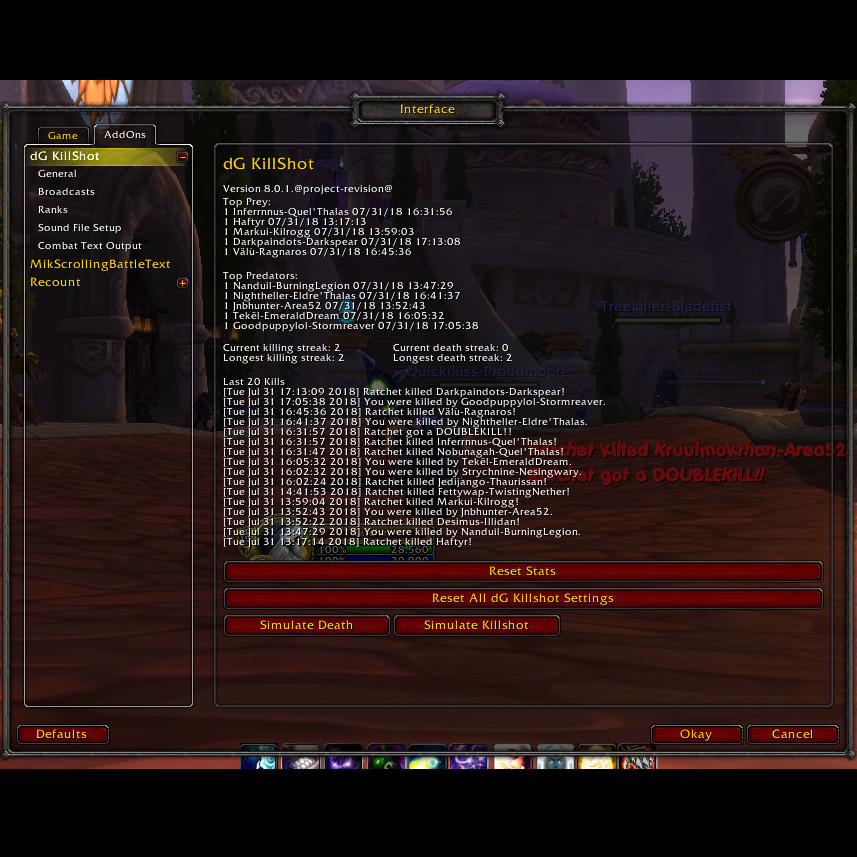
Plays Unreal Tournament style sounds when you get a Killshot! It keeps count of your streaks working well with War Mode. It also tracks how many times you have killed or been killed by each player. Guild, raid and party communications are built in so it notifies others with that also have the mod that you got the kill-shot. It does this by playing the Unreal Tournament sounds. ("Ownage!", "Killing Spree!", "Dominating!", "Unstoppable!", "Godlike!", and "Wicked Sick!")
Use /dgks to quickly open to GUI. Or navigate to it through the built-in Blizzard game menu.
Sound Notifications: Plays Unreal Tournament, DoTA, Mortal Kombat, or custom sounds when you get a kill-shot.
Statistics: Records who you have killed and who has killed you.
Execute: Plays sound when target hits a configurable life threshold.
Screenshots: Takes a screenshot on kills, multi-kills, streaks, or deaths.
Emotes: Does a built-in and/or custom emote on killshots.
Text Notifications: Many output options including scrolling text mods, chat windows, emotes, etc.
Synchronized Communication: With all other mod users in your group, raid, guild or BG.
Streaks: Plays different sounds depending on the length of your killing streak.
Multi-kills: Different notifications for streaks of kills in a short period of time.
Easy Configuration: GUI integrated into the Blizzard add-on interface.
Logging: Kills and deaths are logged and displayed in the GUI.
Very Customizable: Add custom .mp3 or .ogg files.
Notes:
The Interface setting under Combat "Scrolling Text for Self" must be enabled for the floating text to work.
If you have any trouble please hit the Reset all dG Killshot Data button.
If sounds are too quiet try different Sound Channel settings.
Special thanks to the following users for ideas, suggestions, and general help with this mod: zwarmapapa, solidus0079, Blackbeard666, Daisylawlz, Valiard, hatecrew_88 and everyone who has given feedback.
Other mods I have released:
Comments


-

linman0x90 Owner
-
View User Profile
-
Send Message
Posted Oct 26, 2010Preferably in a .wav format. And if you have the female or sexy versions that would be great also.
Is this a quake sound or a UT sound originally? Or even MK?
-
View User Profile
-
Send Message
Posted Oct 26, 2010Preferably in a .wav format. And if you have the female or sexy versions that would be great also.
Is this a quake sound or a UT sound originally? Or even MK?
-
View User Profile
-
Send Message
Posted Oct 27, 2010Well i send you the sound to your mail BTW its only female "sexy" voice
Grettings
-
View User Profile
-
Send Message
Posted Oct 28, 2010You will have to check "Play prepare sound when entering battlegrounds" option. Since this will not be enabled by default.
-
View User Profile
-
Send Message
Posted Oct 29, 2010-
View User Profile
-
Send Message
Posted Oct 18, 2010Pre-4.0 addon sounds played off the master volume. Blizzard changed this so they play off the sound effects volume. Meaning they are the same volume as everything else and tend to blend in.
Blizzard has acknowledged the issue (blue post) and will fix it soon.
http://forums.worldofwarcraft.com/thread.html?topicId=27191405530&sid=1&pageNo=2
-
View User Profile
-
Send Message
Posted Oct 17, 2010My kills are being counted and the sound seems okay when it goes off.
Date: 2010-10-17 13:49:19
ID: 1
Error occured in: Global
Count: 1
Message: [string "PlaySoundFile("Interface\\Addons\\dgks\\sounds\\ownage.ogg"] line 1:
unfinished string near '<eof>'
Debug:
[C]: ?
[C]: RunScript()
..\FrameXML\ChatFrame.lua:2020: value()
..\FrameXML\ChatFrame.lua:4127: ChatEdit_ParseText()
..\FrameXML\ChatFrame.lua:3717: ChatEdit_SendText()
..\FrameXML\ChatFrame.lua:3755: ChatEdit_OnEnterPressed()
[string "*:OnEnterPressed"]:1:
[string "*:OnEnterPressed"]:1
-
View User Profile
-
Send Message
Posted Oct 18, 2010Try playing a blizzard sound:
/script PlaySoundFile("Sound\\Music\\ZoneMusic\\DMF_L70ETC01.mp3")
Then a dgks sound:
/script PlaySoundFile("Interface\\Addons\\dgks\\sounds\\ownage.ogg")
If the volume is about the same on both files its a World of Warcraft/computer setting that we need to figure out. If the Blizzard sound file is louder there maybe an issue with my dgks .ogg files. So far I cannot replicate this issue on my 3 machines so an help replicating this would be great.
-
View User Profile
-
Send Message
Posted Oct 18, 2010Just editing the sound files tab in game will make the changes.
If you adjust gain (volume) on a compressed format like .ogg or .mp3 you will lose sound quality quickly. If you actually want to do this go download 3.3.5.x and use the .wav fails and convert them. They will convert with much better sound quality.
I would suggest that no one actually modifies the sound files to adjust the volume. I will find a solution over the next few days.
-
View User Profile
-
Send Message
Posted Oct 17, 2010http://www.aaafunbounce.biz/sounds.zip
I amplified the decibels by +12. However, these are MP3's and my OGG converter is FUBAR, therefore you'll need to modify the dgks.lua too. Simply replace all instances of ".ogg" to ".mp3" Finally, in options (type /gdks in game) make sure your sound files have ".mp3" extension rather than the current ".ogg".
On a side note, to those who are having issues with kill count, this may be a bliz bug too. Notice how sometimes in BG's your name isn't anywhere. In fact, the score board isn't even showing your BG at all! Yeah... gg.
-
View User Profile
-
Send Message
Posted Oct 18, 2010-
View User Profile
-
Send Message
Posted Oct 20, 2010-
View User Profile
-
Send Message
Posted Oct 16, 2010-
View User Profile
-
Send Message
Posted Oct 16, 2010-
View User Profile
-
Send Message
Posted Oct 16, 2010-
View User Profile
-
Send Message
Posted Oct 16, 2010/script PlaySoundFile("Sound\\Music\\ZoneMusic\\DMF_L70ETC01.mp3")
How is the volume on that?
-
View User Profile
-
Send Message
Posted Oct 15, 2010-
View User Profile
-
Send Message
Posted Oct 15, 2010-
View User Profile
-
Send Message
Posted Oct 15, 2010-
View User Profile
-
Send Message
Posted Oct 14, 2010