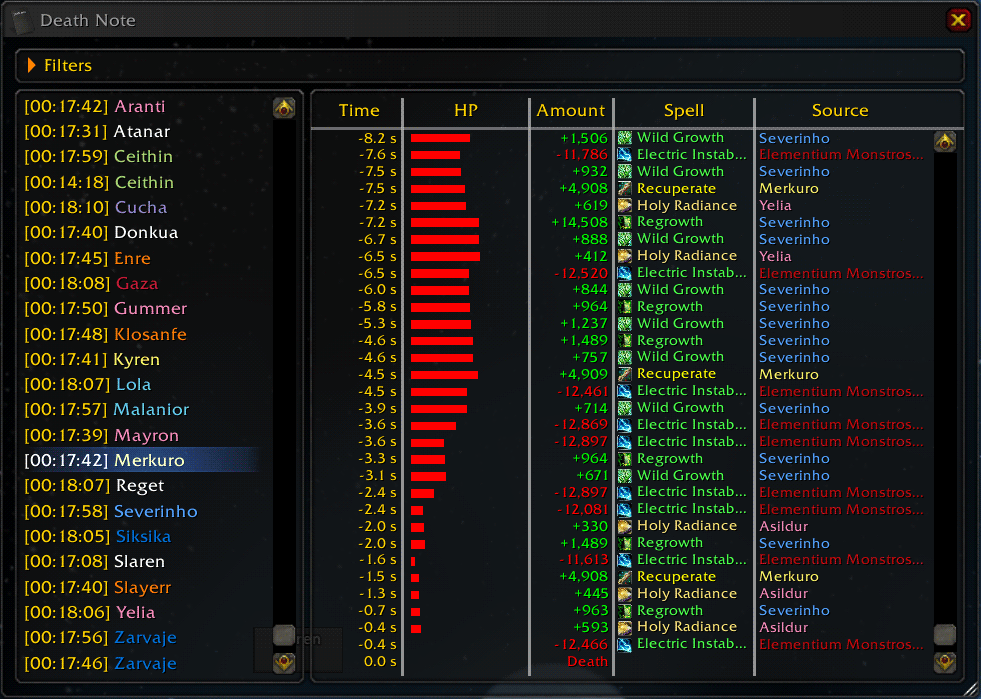
Death Note
Death analysis tool.
Death Note records the events preceding a death and presents them to you in a comprehensible manner. If you have used Acheron before, this addon has been inspired by it.
How to use
- Check the data capture options in the interface panel and make sure that you are comfortable with the default settings.
- To view the recorded deaths, use the option in the right-click menu of a unit frame. Or, if you have a LDB display, you can also open the Death Note frame from there.
Not so obvious stuff you can do:
- Right-Click on the list of deaths to change the ordering.
- Drag a column separator to move it.
- Click on a time or health column to change its display format.
- Click on a spell or source to highlight all occurrences of that spell or source.
- Control+Click on a spell or source to add that spell or source to the list of filters (removing all the lines with that spell or source).
- Right-Click on a line to send a report to a chat channel starting from that line.
- Shift+Click on a column to paste its contents to the chat edit box.
- Control+Mouse wheel to change the frame scale.
Chat commands:
- /dn or undefined_/deathnote_ - opens main window
- /dn reset - wipes all data
Bugs and feature requests
Please use the ticket tracker at WowAce to report bugs and make feature requests.
Remember that the purpose of combat log analysis tools is to help you understand what happened, not to find someone to blame
Comments


-

MrFIXlT Owner
-

StoleWaterTotem Former Author
-
View User Profile
-
Send Message
Posted Feb 24, 2014It has been disabled by default because of the taint issues it causes. It can be reenabled back in the options.
-
View User Profile
-
Send Message
Posted Feb 27, 2014when can we expect update?
-
View User Profile
-
Send Message
Posted Feb 27, 2014If you don't care about the taint you can enable it in the options. If something isn't working file a bug report and I'll look into it.
-
View User Profile
-
Send Message
Posted Jan 21, 2014I submitted a ticket for this, but in the meantime, if you want to fix the set focus taint, you can open DeathNote\UI.lua, go to line 948 and remove the entire line. It looks like this:
tinsert(UnitPopupMenus[v], #UnitPopupMenus[v], "SHOW_DEATH_NOTE")That will remove the entry from the unit dropdowns.
-
View User Profile
-
Send Message
Posted Nov 15, 2013I get a Blizzard blocked a function box with disable/ignore, and when I downloaded buggrabber, I got the same error as SignOfDoom.
I've noticed it only happens after I open the death note log, close it, and then I change zones, whether I died in a raid or ported from org to shrine, if i get a loading screen, then I get the disable/ignore option. I can then reload ui and it won't error again, until I open the log again.
-
View User Profile
-
Send Message
Posted Nov 18, 2013I get this too. Death Note worked perfectly before this started happening. Don't know what the cause is either. Please check this! I love this freaking great addon.
-
View User Profile
-
Send Message
Posted Nov 5, 2013Please fix the taint issues introduced with patch 5.4.1. Getting errors every time I zone after dying now.
-
View User Profile
-
Send Message
Posted Nov 4, 2013^This one^
-
View User Profile
-
Send Message
Posted Oct 27, 2013it took me forver to figure this out but i hunted it down and death note will not let me Focus a target. "<addon xxxx> has been blocked from an action only available to the Blizzard UI.
You can disable this addon and reload the UI." (options: disable / ignore)"
I thought it was dbm since xxxx = dbm then when thats disabled xxxx is another name etc.. after i disabled deathnote i can focus again.
Right now im using /focus as an alternative but can you please fix this!!!!
-
View User Profile
-
Send Message
Posted Oct 10, 2013Works fine, thanks.
How do I change where the "Show Death Note" appear in the dropdown menu (rightlick a unitframe). I'd prefer to have it above "Leave party" and not below)
Disabling the option is also an alternative since /dn works just fine.
-
View User Profile
-
Send Message
Posted Sep 22, 2013update please for new patch
-
View User Profile
-
Send Message
Posted Sep 22, 2013Can you specify what's not working in the new patch ? Thanks.
-
View User Profile
-
Send Message
Posted May 19, 2013Im still having problems with setting focus and this addon any others got the same problem?
-
View User Profile
-
Send Message
Posted Aug 26, 2013Having the same issue. Cannot set focus at all. Will experiment a bit more, but at the moment cannot use Death Note because of it.
-
View User Profile
-
Send Message
Posted May 4, 2013Hi. A request;
Would love to see the Death report announces compressed and shortened down, just like it is when you right-click a specific line to report.
The format of the damage-source text that is. 124200 into 124k, etc.
-
View User Profile
-
Send Message
Posted May 8, 2013Not going to be adding any new features to it for now, but it would be much more likely that I will remember about it the next time I get to work on this addon if you open a ticket about it.
-
View User Profile
-
Send Message
Posted May 8, 2013Will do. Thanks!
-
View User Profile
-
Send Message
Posted Mar 24, 2013Is it possible to have a slash command to turn this off/on? I ask as sometimes in LFR I cant lagged on so want to reduce addon use. Deathnote records a lot of data I find useful in real raids so I dont want to reduce wants recorded.
Its a great addon that I have used for years now, great job :)
-
View User Profile
-
Send Message
Posted Mar 21, 2013I believe this addon is broken for output to guild and officer chat. The lines in output.lua function "chatmessage" don't include any logic for Guild or Officer chat currently, so the addon gives no errors and no output despite working properly aside from that.
-
View User Profile
-
Send Message
Posted Dec 21, 2012The issues reported by Lockslap and Voidlyn should be fixed in v1.5, let me know if you find any other problems.