Whoops, it looks like the website that was hosting the demo video shut down some time in the last 10 years!
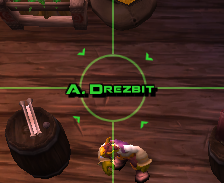
Basically it just draws a set of crosshairs on your target's nameplate to make them easier to keep track of on-screen; there aren't any settings, but I'm always open to suggestions
In reply to semlar: Thanks for the reply! I've tried it, and I like it, but my aging eyes still lose the crosshairs in chaotic situations, like raids. The option to make them wider so they stand out more against 20 different spell effects would be awesome!
If you're up for editing the addon file it's not too hard to adjust the size by changing a couple values:
1) Open the addon folder, it's under `World of Warcraft\_retail_\Interface\AddOns\Crosshairs` (where "World of Warcraft" is wherever you have WoW installed)
2) Open `Crosshairs.lua` in a text editor like Notepad
3) Change line 12 from `f:SetSize(64, 64)` to something like `f:SetSize(100, 100)` to make the targeting circle 100px instead of 64px
4) Save the file and type `/reload` in-game to see your changes
There are also some settings on the first few lines of the file that control the transparency:
`local alpha = 0.5` makes the circle 50% transparent, `local alpha = 1` makes it fully opaque.
`local lineAlpha = 0.2` controls the transparency of the lines that go across the screen.
Words cannot state how much I missed this addon since prepatch/midnight broke it, thanks for updating this I have been losing so many targets and felt like a turkey with my head cut off. Seems to work great so far, thanks again good sir or maam. Of all my addons that broke from these changes, I think I missed this one the most. <3
This is a great addon and greatly improved my battleground play but unfortunately its stopped working. Does anyone know a way to fix it other than re-installing which I have done several times?
I recently came across this addon and think it's a great idea for those even me, who are quick or sometimes inaccurate with the TAB key for targeting. I did see the video here. I did see that it's red for enemy, yellow for neutral, and green for friendly (if nameplates are on). I think finding a friendly NPC in a quest this will help but turning on player stuff shows ALL friendly players health bars with class colours. I don't want that. So I can't see this on any friendly NPCs. I could turn it on for a bit to find them using "/tar (name)" Is this the same for targeting critters? Didn't try yet. I would like: some options please. This addon does not appear in the Interface addons list for any options. I'd like some customizing. Your video was very bold but in game it's very faint. More dynamic target circle, perhaps bolder. The option to choose thickness and boldness / brightness of the crosshair lines. Just enough to see better but not get in the way. This with QuestPlates is a GREAT mix!
It should be fixed now; I had to remove the transition animation that the targeting reticle made between nameplates when you switched targets because Blizzard removed the ability for an addon to get the position of nameplates in 8.2.
Rollback Post to RevisionRollBack
To post a comment, please login or register a new account.


-
View User Profile
-
Send Message
Posted Aug 22, 2026Is this going to be updated for season 2 Midnight
-
View User Profile
-
Send Message
Posted Feb 21, 2026Is this addon customizable at all? Your demo video is a dead link.
-
View User Profile
-
Send Message
Posted Feb 22, 2026In reply to Ski2k2000:
Whoops, it looks like the website that was hosting the demo video shut down some time in the last 10 years!
Basically it just draws a set of crosshairs on your target's nameplate to make them easier to keep track of on-screen; there aren't any settings, but I'm always open to suggestions
-
View User Profile
-
Send Message
Posted Feb 24, 2026In reply to semlar: Thanks for the reply! I've tried it, and I like it, but my aging eyes still lose the crosshairs in chaotic situations, like raids. The option to make them wider so they stand out more against 20 different spell effects would be awesome!
-
View User Profile
-
Send Message
Posted Feb 24, 2026In reply to Ski2k2000:
If you're up for editing the addon file it's not too hard to adjust the size by changing a couple values:
1) Open the addon folder, it's under `World of Warcraft\_retail_\Interface\AddOns\Crosshairs` (where "World of Warcraft" is wherever you have WoW installed)
2) Open `Crosshairs.lua` in a text editor like Notepad
3) Change line 12 from `f:SetSize(64, 64)` to something like `f:SetSize(100, 100)` to make the targeting circle 100px instead of 64px
4) Save the file and type `/reload` in-game to see your changes
There are also some settings on the first few lines of the file that control the transparency:
`local alpha = 0.5` makes the circle 50% transparent, `local alpha = 1` makes it fully opaque.
`local lineAlpha = 0.2` controls the transparency of the lines that go across the screen.
-
View User Profile
-
Send Message
Posted Feb 24, 2026In reply to semlar: Thank you for the tips! I'll give it a try, cuz I really like the addon and wanna keep using it.
Update: Your suggestions were exactly what I was looking for! Super easy to do, if anyone else wants to try it.
Thanks again
-
View User Profile
-
Send Message
Posted Feb 1, 2026Words cannot state how much I missed this addon since prepatch/midnight broke it, thanks for updating this I have been losing so many targets and felt like a turkey with my head cut off. Seems to work great so far, thanks again good sir or maam. Of all my addons that broke from these changes, I think I missed this one the most. <3
-
View User Profile
-
Send Message
Posted Dec 1, 2024-
View User Profile
-
Send Message
Posted Dec 1, 2024-
View User Profile
-
Send Message
Posted Dec 1, 2024please built up for wow clasic please
-
View User Profile
-
Send Message
Posted Aug 6, 2021Can we get some options menu? change the size of the recital maybe?
-
View User Profile
-
Send Message
Posted Jul 23, 2021This is a great addon and greatly improved my battleground play but unfortunately its stopped working. Does anyone know a way to fix it other than re-installing which I have done several times?
-
View User Profile
-
Send Message
Posted Feb 8, 2021Please update.
-
View User Profile
-
Send Message
Posted Feb 7, 2021I recently came across this addon and think it's a great idea for those even me, who are quick or sometimes inaccurate with the TAB key for targeting. I did see the video here. I did see that it's red for enemy, yellow for neutral, and green for friendly (if nameplates are on). I think finding a friendly NPC in a quest this will help but turning on player stuff shows ALL friendly players health bars with class colours. I don't want that. So I can't see this on any friendly NPCs. I could turn it on for a bit to find them using "/tar (name)" Is this the same for targeting critters? Didn't try yet. I would like: some options please. This addon does not appear in the Interface addons list for any options. I'd like some customizing. Your video was very bold but in game it's very faint. More dynamic target circle, perhaps bolder. The option to choose thickness and boldness / brightness of the crosshair lines. Just enough to see better but not get in the way. This with QuestPlates is a GREAT mix!
-
View User Profile
-
Send Message
Posted Aug 16, 2019for ppl wanna use in classic wow:
use v8.0.0.3b version can have target change animate.
-
View User Profile
-
Send Message
Posted Oct 2, 2020In reply to ekrid1107:
I love this addon but not sure why it works on 1 toon and not another on the same pc and same account. Any ideas?
-
View User Profile
-
Send Message
Posted Oct 12, 2020In reply to ekrid1107:
that version doesnt seem to do anythin g in classic
ok it seems to only work in combat, and it targets the top of the nameplate
-
View User Profile
-
Send Message
Posted Jun 29, 2019By the way,@semlar, can you give us an option to display nothing but the round green circle at target?
I made a modification here to acomplish that, but it would be awsome if that was an option in the original code :)
-
View User Profile
-
Send Message
Posted Jun 28, 2019error happens after 82 release, on game load
-
View User Profile
-
Send Message
Posted Jun 28, 2019In reply to yammyblack:
It should be fixed now; I had to remove the transition animation that the targeting reticle made between nameplates when you switched targets because Blizzard removed the ability for an addon to get the position of nameplates in 8.2.