ClassTimer
Deprecation Notice: If possible, please use WeakAuras instead, this addon is no longer maintained
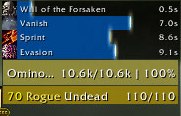
This is an addon to create timers for your own buffs and debuffs.
General
player bars on left, target in middle, focus on right, all can be moved
To track CC Effects you must set the CCed mob as your focus if its not your target.
Only icons and time can be shown if you don't want bars.
The text can be customized in the options by using, "%s for spell name", "%a for applications", "%u for unit name eg target or player", "%n for mob name"
This mod is set up with AceLocale so anyone who wants to add other locals feel free :)
If you want other textures for the bars, get the AddOn SharedMedia.
Note: When adding values in the files, double parentheses are necessary on the last item in a table because it contains all the values from the function call and we only want the first one.
Options
/classtimer or the LDB Launcher
Credits
Must give Nymbia credits as he is a legend!
Comments


-

Stanzilla Owner
-

_ForgeUser119416 Author
-
_ForgeUser1257722 Tester
-
View User Profile
-
Send Message
Posted Nov 1, 2022Doesnt work, update pls
-
View User Profile
-
Send Message
Posted Oct 31, 2022It works (thank you LeahWolf) but I was left with an error that I finally traced to this addon.
Message: AceEvent30Frame:RegisterEvent(): AceEvent30Frame:RegisterEvent(): Attempt to register unknown event "PLAYER_PET_CHANGED"
If you are having this issue then updatie line 342 and 361 of Classtimer.lua
Old:
Line 342: Self:RegisterEvent('PLAYER_PET_CHANGED')
Line 361: function ClassTimer:PLAYER_PET_CHANGED()
New:
Line 342: self:RegisterEvent('UNIT_PET')
Line 361: function ClassTimer:UNIT_PET()
Thanks to Palonblade, issue 113.
-
View User Profile
-
Send Message
Posted Dec 26, 2022In reply to ZalidTheBur:
this really needs to be applied to the main release
-
View User Profile
-
Send Message
Posted Oct 28, 2022None of the suggested fixes actually fix the addon. Typing /classtimer doesn't even load the menu anymore, and I can't load it with Escape > Options > Addons either. Changing DIALOG to OVERLAY only allows me to see the buffs and debuffs I'm already tracking. Without the ability to load the menu, I can't add or remove buffs and debuffs. It's stuck in its current state until there's a complete fix.
-
View User Profile
-
Send Message
Posted Oct 29, 2022In reply to savipalooza:
Thats a problem on your end, its working perfectly on mine.
Try exit game and completely remove addon and redownload then change line 120 again before starting wow
-
View User Profile
-
Send Message
Posted Nov 1, 2022In reply to kopidruid:
Nothing in any of these comments worked for me. I reinstalled the addon, installed different versions, changed a word in a line, etc. When I type /classtimer and hit Enter, it acts as if I'm not pressing Enter. I can pull up TellMeWhen with /tmw, and I can enter text in chat, but I just can't enter /classtimer. The addon is bricked.
-
View User Profile
-
Send Message
Posted Oct 31, 2022In reply to savipalooza:
Hopfully you got it working as it definetly does work with the fix from LeahWolf.
FYI I removed the old install and reinstalled 2.4.90001.1 and then applied the fix.
-
View User Profile
-
Send Message
Posted Nov 16, 2022In reply to savipalooza:
Seeing that the addon uses Ace3, I checked their changelog, and found out what had broken our beloved ClassTimer:
"In 10.0.0.45687, the Tab functionality was re-designed, requiring us to keep a local copy if we want identical behavior to continue to be available in the future."
So what I did is I just copied the latest release of Ace3 to the Libs directory.
Since then, it works fine.
-
View User Profile
-
Send Message
Posted Nov 16, 2022In reply to jaurin:
I have been trying this fix for a couple of hours, and I haven't been able to be successful.
Did you simply copy-and-paste the full entirety of the latest Ace3 addon directly into Classtimer's "LIbs" folder?
Also, were you using an unedited version of Classtimer, or had you already applied the "DIALOG" to "OVERLAY" fix?
-
View User Profile
-
Send Message
Posted Nov 17, 2022In reply to LeahWolf:
Yes, I applied the fix, and copied the whole Ace3 addon into the folder.
-
View User Profile
-
Send Message
Posted Nov 17, 2022In reply to jaurin:
Thank you!
To help other people, the full solution for me was as follows:
1.) Uninstall Classtimer, and reinstall using the "ClassTimer-2.4.90001.1.zip" file. If you are using a different version, it appears to often fail.
2.) Within the "ClassTimer" folder, open the "ClassTimer.lua" file, and change the word "DIALOG" to "OVERLAY" on line 120. Save and close the file.
3.) Within the "ClassTimer" folder, navigate to the "Libs" folder, and delete all folders/files contained within.
4.) Download the latest archive of "Ace3". Currently, that is "Ace3-r1297-alpha.zip".
5.) Extract all of the contents into ClassTimer's "Libs" folder. There should now be 16 folders and 10 files inside the "Libs" folder.
However, I still can't get the addon to load for an Evoker character. I will check the again errors soon and see what needs to be edited for a solution.
-
View User Profile
-
Send Message
Posted Oct 28, 2022-
View User Profile
-
Send Message
Posted Oct 26, 2022I am another user who is extremely fond of this addon, and feel pretty much powerless without it.
I wish I could contribute meaningful information to lead to a fix, but I receive no LUA errors at all when I load my client. The addon appears to load properly via the "/classtimer" command, and settings and spells can be configured as normal. All of my past settings are still saved, too. However, no timer bars appear when I cast a spell (like Shadow Word: Pain) on an enemy, or a heal (like Renew) on a friendly player.
-
View User Profile
-
Send Message
Posted Oct 26, 2022In reply to LeahWolf:
To make it work in the Dragonflight patch make the following adjustment in ClassTimer.lua:
Line 120: Change 'DIALOG' to 'OVERLAY'
-
View User Profile
-
Send Message
Posted Oct 26, 2022In reply to opiath:
This works great, thank you so much!
-
View User Profile
-
Send Message
Posted Oct 26, 2022In reply to opiath:
You've just saved my life. Thank you
-
View User Profile
-
Send Message
Posted Oct 27, 2022In reply to opiath:
ABSOLUTE LEGEND ! I can play wow again now
-
View User Profile
-
Send Message
Posted Nov 10, 2022In reply to opiath:
/kiss
-
View User Profile
-
Send Message
Posted Nov 10, 2022In reply to opiath:
/kiss
-
View User Profile
-
Send Message
Posted Nov 10, 2022In reply to opiath:
/kiss