Breakables
Description
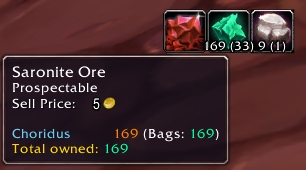
Displays a bar on screen that allows quick access to enchanting, jewelcrafting, and inscription professions by presenting a Disenchant/Prospect/Mill button and all of the breakable items you have for that profession next to it. Also displays a bar for any locked junkboxes in your inventory if you're a Rogue. This allows one-click access for breaking down items instead of finding the item in your bag, clicking the appropriate profession/skill button, and clicking the item for each and every item you want to break. For prospecting and milling, you will see the number of items you have alongside the number of times you can break it. In the prospecting screenshot next to the addon name on this page, the player has 169 total Saronite Ore in his bags which will allow for 33 total prospects.
Note
In 10.0, Blizzard completely changed how Prospecting and Milling works, so this addon can only help with Lockpicking and Disenchanting. If a method is added for addons to once again programmatically Prospect or Mill, Breakables will be updated to support it.
Usage
By default, if you have the appropriate profession and items in your inventory, a bar will appear with the profession ability followed by any items that are eligible for breaking. You can hold shift to drag the bar around if you want to move it. Clicking the profession button will activate that ability (disenchant/prospect/mill) and clicking an item will break it. You don't have to click the profession button first as simply clicking the item will automatically break it down. Right-clicking a breakable button will add that item to the ignore list so it won't show up again. The ignore list can be managed from the configuration panel.
Configuration
Typing /brk will open the configuration settings (or you can get to it from Blizzard's Interface options) which consist of:
- Hide if no breakables: this will control whether you see the profession button or not when nothing breakable is detected
- Max number to display: this controls the highest number of items that you will see next to your profession button. If this is 5 but you have 10 breakable items in your bags, you will only see 5 at a time.
- Show soulbound items: aimed at enchanters, this controls whether or not you will see items that are soulbound as breakable items or not.
Known issues
- If you have more than 5 of a breakable item but split into stacks all smaller than 5, the game will say you do not have enough items to break. The default UI now has a built-in button to compress stacks that should solve this issue.
- If you know Mass Milling for a specific type of herb, the current alpha will try to use this ability and fail. I am in the process of leveling a scribe up high enough to debug this problem.
Comments


-

Parnic Owner
-
View User Profile
-
Send Message
Posted Oct 24, 2026Before the most recent update of this addon, I was getting hundreds of lua errors, and had to shut it down. After this addon's most recent update, the lua errors have gone away, but now I'm unable to see the button anywhere. I tried to reset button placement, but no-go. I'm playing Midnight v12.1.70575
Edit: I've also tried un-checking the "hide if no breakables" option in the settings menu
-
View User Profile
-
Send Message
Posted Oct 24, 2026@pishiver78 I will take a look
-
View User Profile
-
Send Message
Posted Oct 24, 2026@pishiver78 I'm not sure what to tell you; it seems to be working for me. Any other details about what's going on? What happens if Breakables is the only addon enabled? Have you checked the options in the mod about showing soulbound items and such?
-
View User Profile
-
Send Message
Posted Oct 25, 2026@Parnic I got it working with my enchanter after disabling all other addons...sort of. The main button popped up, but none of the green gear would display next to it. Prospecting and milling are both expectedly broken still, right?
-
View User Profile
-
Send Message
Posted Oct 25, 2026@pishiver78 I didn't think they were broken.
-
View User Profile
-
Send Message
Posted Oct 20, 2026Hi there team!! could you please update this amazing addon =) it is not working with the latest patch :( thanks in advance
-
View User Profile
-
Send Message
Posted Oct 20, 2026@gabitafm the latest patch of which version of the game? Which version of Breakables are you using? Are you seeing any errors or is it just not showing on screen?
-
View User Profile
-
Send Message
Posted Mar 6, 2026any update?
-
View User Profile
-
Send Message
Posted Mar 6, 2026In reply to ambreikas: update for what? Is it not working for you?
-
View User Profile
-
Send Message
Posted Mar 6, 2026In reply to Parnic: no ;( i have alot of item to disenchant, but show only a few
-
View User Profile
-
Send Message
Posted Mar 6, 2026In reply to ambreikas: Have you checked the options for the addon? Warbound and Soulbound items are hidden by default, for example, but you can expose them if you want.
-
View User Profile
-
Send Message
Posted Mar 6, 2026In reply to Parnic: i have checked all the "show" option :( nothing change
-
View User Profile
-
Send Message
Posted Mar 6, 2026In reply to ambreikas: can you show an example screenshot of an item you're expecting to show up that isn't? Note that Curse comments tends to error out after a few levels of replies, so you may need to either reply to a comment higher up the chain or just email [email protected] and we can work it out there.
-
View User Profile
-
Send Message
Posted Mar 7, 2026In reply to Parnic: send it
-
View User Profile
-
Send Message
Posted Aug 8, 2025Absolutely love this addon.
As a suggestion, would it be possible to create keybinds or macros which will "break" the first item in the interface?
For me it would be easier if I can just click a button on my keyboard than having to click the specific space on the screen.
To clarify: I'm using this addon in MoP classic.
-
View User Profile
-
Send Message
Posted Aug 8, 2025In reply to ganunbrar: a key bind is probably possible, but I haven't done anything like that before. I accept code contributions if you find a way to do it!
-
View User Profile
-
Send Message
Posted Jul 17, 2025Is there a way to exclude "Warbound until Equipped"? I was thinking of a check box that is used for Tabards.
-
View User Profile
-
Send Message
Posted Jul 19, 2025In reply to Nickyjean01: There's already a checkbox to hide tabards. Does that do what you want?
-
View User Profile
-
Send Message
Posted Aug 6, 2025In reply to Parnic: Sorry I didn't reply right away.
yes, a check box to remove warbound items.
-
View User Profile
-
Send Message
Posted Aug 8, 2025In reply to Nickyjean01: I'm having trouble finding a way to ask the game if an item is warbound, but I will keep looking