Bazooka
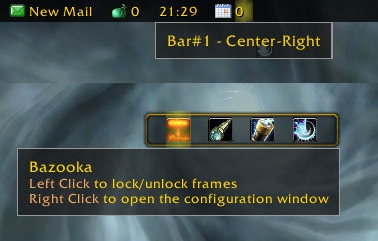
Bazooka is a Data Broker Display similar in functionality and looks to FuBar.
Feature highlights
- Top/Bottom alignment or free moving of bars.
- Left-click drag moves, alt-right-click drag resizes the bar (unless the frames are locked).
- Drag-and-drop plugin placement with highlighted drop positions.
- Configurable background / font / icon size.
- The usual options for data broker displays (show text/icon/label, optionally show title in place of label if it's missing).
- Support of iconCoords and icon[RGB] (TomTom arrow, for example).
- Left / Center-Left / Center / Center-Right / Right placement position for plugins within bars, allowing easy layout of plugins. Plugins placed in the Center area are centered as a bunch.
- Optional auto-fade while in combat / out of combat.
- Optionally disable mouse / tooltips.
- Optional simple tooltips (just show title if Alt is held while moving the mouse pointer over the plugin).
- Optional highlight on mouseover for the active plugin.
- Load-on-demand configuration options, small memory footprint for "standard" operation.
- Bulk mode configuration that allows configuring multiple bars/plugins easily.
- Restrict plugin text width
- Disable minimap icons
- Tooltip scale override
- Support for OnMouseWheel, OnReceiveDrag and OnDoubleClick script handlers for plugins
- Optionally override plugin defined text colors
Usage
Getting started
- Create new bars from the main options window
- Drag plugins to desired location
- Drag plugins off bars to disable them
- Dragging bars while holding Alt will change their attached/detached state. Otherwise top/bottom bars will snap back to top or bottom depending on where you drop them.
Using the bulk configuration (standard method)
- Uncheck Auto-apply.
- Check the bars/plugins you want the settings to apply to.
- Check Apply next to the settings you want to change, and set them to the value you need.
- Click Apply at the bottom of the options. The changes you selected will be applied to all selected bars/plugins at this point.
Using the bulk configuration (auto-apply method)
- Check Auto-apply.
- Check the bars/plugins you want the settings to apply to.
- Change the settings (or click the Apply text next to them if their current value is the one you want). The changes will be applied immediately to all selected bars/plugins.
Slash commands
/bazooka- Open configuration.
/bazooka locked- Toggle locked/unlocked state.
/bazooka hidebars- Make the bars hidden. If no bar numbers are specified, then it works on the marked bars (see bar options).
/bazooka showbars- Make the bars visible. If no bar numbers are specified, then it works on the marked bars (see bar options).
/bazooka togglebars- Toggle hidden/visible state of bars. If no bar numbers are specified, then it works on the marked bars (see bar options).
Obtaining plugins
You can find Data Broker plugins at these places:
- Data Broker plugins on Curse
- Data Broker plugins on WowAce
- Data Broker plugins on WoWInterface
- Tekkub's list
Options
Comments


-

mitchnull Owner
-
View User Profile
-
Send Message
Posted Jan 21, 2026like the guy below me, opening of settings doesnt work and get that error.
-
View User Profile
-
Send Message
Posted Jan 21, 2026Using 3.3.4 on pre-patch 12.0 (live), trying to open the settings using the chat command results in an error you can go to options>addons>bazooka and edit from there:
3x ...ddOns/Blizzard_Settings_Shared/Blizzard_Settings.lua:144: bad argument #1 to 'OpenSettingsPanel' (outside of expected range -2147483648 to 2147483647 - Usage: C_SettingsUtil.OpenSettingsPanel([openToCategoryID, scrollToElementName]))
[Blizzard_Settings_Shared/Blizzard_Settings.lua]:144: in function 'OpenToCategory'
[Bazooka_Options/Options.lua]:103: in function 'openConfigDialog'
[Bazooka/Bazooka.lua]:2732: in function '?'
[Blizzard_ChatFrameBase/Shared/ChatFrameEditBox.lua]:259: in function 'ParseText'
[Blizzard_ChatFrameBase/Shared/ChatFrameEditBox.lua]:284: in function 'SendText'
[Blizzard_ChatFrameBase/Shared/ChatFrameEditBox.lua]:407: in function <...s/Blizzard_ChatFrameBase/Shared/ChatFrameEditBox.lua:403>
Locals:
categoryID = "Bazooka"
scrollToElementName = nil
-
View User Profile
-
Send Message
Posted Jan 22, 2026In reply to Grymm:
Will look into this when I get some time
-
View User Profile
-
Send Message
Posted Jan 16, 2026Will this addon continue to work in Midnight?
-
View User Profile
-
Send Message
Posted Jan 20, 2026In reply to Mencc: I am sure a Midnight update is not too far away, until then you can update the .toc file with "## Interface: 120000, 120001" and that will get it loading again for you. Thus far it seems to be error free.
-
View User Profile
-
Send Message
Posted Jan 21, 2026In reply to Tealc_1899: Great, thanks :)
-
View User Profile
-
Send Message
Posted Oct 7, 2025Getting an error as of 11.2.5 release:
28x Bazooka/Bazooka.lua:2063: hooksecurefunc(): OrderHall_CheckCommandBar is not a function
[Bazooka/libs/Ace3/AceAddon-3.0-13/AceAddon-3.0.lua]:494: in function 'InitializeAddon'
[Bazooka/libs/Ace3/AceAddon-3.0-13/AceAddon-3.0.lua]:619: in function <...dOns/Bazooka/libs/Ace3/AceAddon-3.0/AceAddon-3.0.lua:611>
Locals:
self = <table> {
initializequeue = <table> {
}
statuses = <table> {
}
embeds = <table> {
}
frame = AceAddon30Frame {
}
addons = <table> {
}
enablequeue = <table> {
}
}
addon = <table> {
attachedBars = <table> {
}
AttachNames = <table> {
}
barOpts = Frame {
}
defaultModuleState = false
AreaNames = <table> {
}
numBars = 0
bottomBottom = -1
opts = Frame {
}
pluginOpts = Frame {
}
enabledState = true
profiles = Frame {
}
Plugin = <table> {
}
AppName = "Bazooka"
bottomTop = 0
bulkConfigOpts = Frame {
}
db = <table> {
}
baseName = "Bazooka"
plugins = <table> {
}
defaultModuleLibraries = <table> {
}
topBottom = 0
ldbs = <table> {
}
topTop = 1
version = "Bazooka-v3.2.2"
orderedModules = <table> {
}
TopAnchor = Bazooka_TopAnchor {
}
Defaults = <table> {
}
optionsLoaded = true
BottomAnchor = Bazooka_BottomAnchor {
}
modules = <table> {
}
name = "Bazooka"
bars = <table> {
}
Bar = <table> {
}
}
-
View User Profile
-
Send Message
Posted Oct 8, 2025Tentative fix, have not noticed anything breaking from it and it removes the error (the OrderHall_CheckCommandBar function got removed):
Open Bazooka.lua, delete lines 2062-2072, save file. (First line "if IsMainLine then", last line the *second* to last "end" in a set of five.)
-
View User Profile
-
Send Message
Posted Oct 13, 2025In reply to gaviin1242:
I've dropped the order-hall related functionality in v3.3.2, the issue should be "fixed".
-
View User Profile
-
Send Message
Posted Aug 3, 2025Is there an option to not have plugins enable by default? Or a way to bulk disable?
-
View User Profile
-
Send Message
Posted Oct 13, 2025In reply to normalsteakdinner:
The is a bulk-configuration mode.
-
View User Profile
-
Send Message
Posted Jul 31, 2025when will mop update be completed
-
View User Profile
-
Send Message
Posted Jul 6, 2025Temp fix if you're on MoP Classic until author pushes an update.
line 49... or find local _G = _G and out comment the whole "Local isClassic =" function and do this instead
local _G = _G
local IsClassic = (_G.WOW_PROJECT_ID ~= _G.WOW_PROJECT_MAINLINE)
--local IsClassic = false
-- or (_G.WOW_PROJECT_ID == _G.WOW_PROJECT_CLASSIC)
-- or (_G.WOW_PROJECT_ID == _G.WOW_PROJECT_BURNING_CRUSADE_CLASSIC)
-- or (_G.WOW_PROJECT_ID == _G.WOW_PROJECT_WRATH_CLASSIC)
-- or (_G.WOW_PROJECT_ID == _G.WOW_PROJECT_CATACLYSM_CLASSIC)
This will basically say that if it isn't retail, it's classic - and should throw that error on start
-
View User Profile
-
Send Message
Posted Jul 10, 2025In reply to MrBramwell:
Thanks. I've updated the code to check for IsMainline instead.
-
View User Profile
-
Send Message
Posted Jun 20, 2025This is the error I get any time I mouse over bazooka: Message: PingPin:GetPoint(): Action[FrameMeasurement] failed because[Can't measure restricted regions]: attempted from: PingPin:GetPoint().
Lua Taint: Bazooka
Time: Fri Jun 20 15:50:50 2025
Count: 22
Stack:
[Interface/AddOns/Bazooka/Bazooka.lua]:1614: in function <Interface/AddOns/Bazooka/Bazooka.lua:1607>
[tail call]: ?
[tail call]: ?
[tail call]: ?
[tail call]: ?
[tail call]: ?
[tail call]: ?
[tail call]: ?
[tail call]: ?
[tail call]: ?
[tail call]: ?
[tail call]: ?
...[tail call]: ?
[tail call]: ?
[tail call]: ?
[tail call]: ?
[tail call]: ?
[tail call]: ?
[tail call]: ?
[tail call]: ?
[Interface/AddOns/Bazooka/Bazooka.lua]:1544: in function 'showTip'
[Interface/AddOns/Bazooka/Bazooka.lua]:1389: in function <Interface/AddOns/Bazooka/Bazooka.lua:1380>
Locals:
self = <table> {
origWidth = 125.125549
icon = BazookaPluginIcon_Gold {
}
text = BazookaPluginText_Gold {
}
dataobj = <table> {
}
suffixColorHex = "ff00d100"
title = "Gold"
bar = <table> {
}
fontSize = 10
label = "Gold"
iconSize = 13
labelColorHex = "ffe5e5e5"
hl = BazookaHL_Gold {
}
iconTextSpacing = 3
name = "Gold"
db = <table> {
}
frame = BazookaPlugin_Gold {
}
area = "center"
opts = <table> {
}
}
frame = PingPin {
}
-
View User Profile
-
Send Message
Posted Apr 13, 202516x [ADDON_ACTION_BLOCKED] AddOn 'Bazooka' tried to call the protected function 'Frame:SetPassThroughButtons()'.
[!BugGrabber/BugGrabber.lua]:485: in function <!BugGrabber/BugGrabber.lua:485>
[C]: in function 'SetPassThroughButtons'
[Blizzard_MapCanvas/MapCanvas_DataProviderBase.lua]:280: in function 'CheckMouseButtonPassthrough'
[Blizzard_MapCanvas/Blizzard_MapCanvas.lua]:302: in function 'AcquirePin'
[WorldQuestTracker/WorldQuestTracker_Core.lua]:1274: in function 'ShowLine'
[WorldQuestTracker/WorldQuestTracker_Core.lua]:1388: in function <WorldQuestTracker/WorldQuestTracker_Core.lua:1369>
Locals:
_ = Frame {
}
event = "ADDON_ACTION_BLOCKED"
events = <table> {
}
-
View User Profile
-
Send Message
Posted Apr 20, 2025In reply to PedjaSenpai:
This is most likely an issue with one of your bazooka plugins. I don't see the issue with the latest Bazooka version (v3.1.3)
-
View User Profile
-
Send Message
Posted Apr 12, 2025Is there a Chance to update this addon?
-
View User Profile
-
Send Message
Posted Apr 20, 2025In reply to GeoRam2016:
I've just pushed an updated version (v3.1.3)
-
View User Profile
-
Send Message
Posted Sep 12, 2024hi...is there an auto hide feature i'm not finding? thanks!