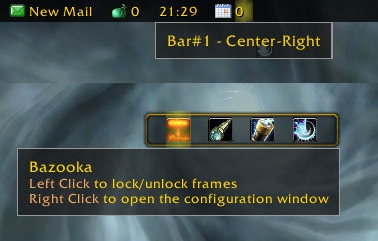
Bazooka
Bazooka is a Data Broker Display similar in functionality and looks to FuBar.
Feature highlights
- Top/Bottom alignment or free moving of bars.
- Left-click drag moves, alt-right-click drag resizes the bar (unless the frames are locked).
- Drag-and-drop plugin placement with highlighted drop positions.
- Configurable background / font / icon size.
- The usual options for data broker displays (show text/icon/label, optionally show title in place of label if it's missing).
- Support of iconCoords and icon[RGB] (TomTom arrow, for example).
- Left / Center-Left / Center / Center-Right / Right placement position for plugins within bars, allowing easy layout of plugins. Plugins placed in the Center area are centered as a bunch.
- Optional auto-fade while in combat / out of combat.
- Optionally disable mouse / tooltips.
- Optional simple tooltips (just show title if Alt is held while moving the mouse pointer over the plugin).
- Optional highlight on mouseover for the active plugin.
- Load-on-demand configuration options, small memory footprint for "standard" operation.
- Bulk mode configuration that allows configuring multiple bars/plugins easily.
- Restrict plugin text width
- Disable minimap icons
- Tooltip scale override
- Support for OnMouseWheel, OnReceiveDrag and OnDoubleClick script handlers for plugins
- Optionally override plugin defined text colors
Usage
Getting started
- Create new bars from the main options window
- Drag plugins to desired location
- Drag plugins off bars to disable them
- Dragging bars while holding Alt will change their attached/detached state. Otherwise top/bottom bars will snap back to top or bottom depending on where you drop them.
Using the bulk configuration (standard method)
- Uncheck Auto-apply.
- Check the bars/plugins you want the settings to apply to.
- Check Apply next to the settings you want to change, and set them to the value you need.
- Click Apply at the bottom of the options. The changes you selected will be applied to all selected bars/plugins at this point.
Using the bulk configuration (auto-apply method)
- Check Auto-apply.
- Check the bars/plugins you want the settings to apply to.
- Change the settings (or click the Apply text next to them if their current value is the one you want). The changes will be applied immediately to all selected bars/plugins.
Slash commands
/bazooka- Open configuration.
/bazooka locked- Toggle locked/unlocked state.
/bazooka hidebars- Make the bars hidden. If no bar numbers are specified, then it works on the marked bars (see bar options).
/bazooka showbars- Make the bars visible. If no bar numbers are specified, then it works on the marked bars (see bar options).
/bazooka togglebars- Toggle hidden/visible state of bars. If no bar numbers are specified, then it works on the marked bars (see bar options).
Obtaining plugins
You can find Data Broker plugins at these places:
- Data Broker plugins on Curse
- Data Broker plugins on WowAce
- Data Broker plugins on WoWInterface
- Tekkub's list
Options
Comments


-

mitchnull Owner
-
View User Profile
-
Send Message
Posted Jul 19, 2018In reply to mitch0:
-
View User Profile
-
Send Message
Posted Jul 23, 2018In reply to mitch0:
-
View User Profile
-
Send Message
Posted Jul 18, 2018Plzzzzzzzz update for 8.0...pretty please!? I need this addon!!
-
View User Profile
-
Send Message
Posted Jul 18, 2018Any chance for update to 8.0?
-
View User Profile
-
Send Message
Posted May 15, 2018Anyone know how to remove bars... as in I have added several without knowing what I was doing, and cannot find any way to delete them!
-
View User Profile
-
Send Message
Posted May 15, 2018In reply to airtoad:
-
View User Profile
-
Send Message
Posted Feb 20, 2018Having a weird issue with a bunch of plug-ins available on one toon and missing on others.
-
View User Profile
-
Send Message
Posted Feb 19, 2018Hey Mitch sorry to bother you. Any chance you could take a look at http://www.wowinterface.com/downloads/info24547-SUIShortBar.html and see why Bazooka is making the action bar shift to the left? It only happens when player login fires. I turned off adjust frames no fix. I had to modify it some to make it stand alone from the main SUI suite and can provide a download for you to look at if needed.
Any help is appreciated.
-
View User Profile
-
Send Message
Posted Sep 9, 2017hello mitch0, hello everyone!
Love Bazooka, have used it trouble-free for a long time now, but I have a problem that has me stumped.
I am currently only using one Bazooka bar at the top of my screen, with Broker: XP Bar attached to the bottom of it. No matter what I seem to do, the default frames will not stay Jostled out from under it. If I check the 'Adjust Frames' box in Bazooka config, the frames move for a few seconds, they they un-Jostle right back up on top of the Bazooka bar/Broker XP Bar.
Broker: XP Bar has a separate checkbox option to Jostle the default frames, same behavior occurs. I just tried using Twitch client to remove Bazooka completely (along with Settings) and it didn't fix the problem.
Anyone have any ideas?
thanks
bkp57
-
View User Profile
-
Send Message
Posted Sep 9, 2017Can you try it without the Broker XP bar? Maybe the two addons step on each others feet...
-
View User Profile
-
Send Message
Posted Sep 9, 2017your suggestion worked... once... on one character for a couple minutes. I put Broker XP Bar back and things worked fine until I logged out and onto another character (I use a Default profile for everyone I play, no separate profiles).
I created a second empty Bazooka bar and attached it to the first one (BOTTOM) with Broker XP Bar turned off. Same behavior... my buff frame and character portrait end up jostling down for a second, then moving back up under the Bazooka bar (strata doesn't make a difference).
I temporarily switched to Titan Panel (ugh) and it does not exhibit the same behavior.
Bazooka and Broker XP Bar do appear to be having a fight, I'm just not sure who's starting it :)
thanks mitch0 for anything you can do
bkp57
-
View User Profile
-
Send Message
Posted Sep 10, 2017Try disabling the "Adjust frames" option in Bazooka, maybe your Broker XP Bar will do the right thing on its own.
If that doesn't work, you can try attaching the broker XP bar to the top bar, then create another Bazooka bar attached to the top, and make it invisible... That's a bit of a hack, but right now I don't have time to investigate the issue further. I'll open a ticket about it though, and will try to fix the issue when I'll have more time.
-
View User Profile
-
Send Message
Posted Sep 10, 2017I don't mind a bit of a hack :) and I respect your time issues... thanks mitch0
bkp57
-
View User Profile
-
Send Message
Posted Sep 7, 2017I love this addon and am waiting on an update for the latest patch (7.3). is there any news of when an update will be released?
-
View User Profile
-
Send Message
Posted Sep 9, 2017Tagged a new release. Hope it works :)
-
View User Profile
-
Send Message
Posted Aug 17, 2017I've been using this addon since several weeks now instead of titan panel for it's lower memory usage, but i've been bothered for some time by the ordre hall bar which mostly doesn't want to show up, i often have to do a /reload while in the order hall for the bar to show up
-
View User Profile
-
Send Message
Posted Aug 18, 2017Hi,
Do you have the "Hide Order Hall Command Bar" option turned off?
-
View User Profile
-
Send Message
Posted Aug 7, 2017Hi, great addon! However, I notice it pushes the chat box down, so that I need to reset the chat positions every time I run WoW. Is there an option to not move the chat box down?
-
View User Profile
-
Send Message
Posted Aug 12, 2017Hello,
Try turning off the "Adjust frames" option.
cheers,
mitch
-
View User Profile
-
Send Message
Posted Jul 12, 2017I am new to Bazooka, and was drawn to it specifically because of the potential to have on-demand bars that don't need to be part of the UI until actually needed. I've set up six bars, five of which are Marked and only one which is always visible. All the bars use the High strata - Medium doesn't cut it - and I'm using a single profile for all characters. I'm on the verge of being fully excited with the result! There's a problem, though.
Upon initial login to any character, and I think certain other events, the brokers and launchers in the Marked bars are all clickable and respond to mouseovers even though they are completely hidden, and because of the strata they invisibly overlay almost everything. I am forced to explicitly unhide and re-hide them before they begin behaving as expected. I am terrible at remembering things like that, and it's a severe annoyance.