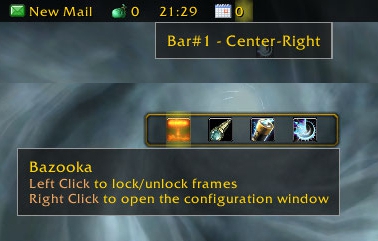
Bazooka
Bazooka is a Data Broker Display similar in functionality and looks to FuBar.
Feature highlights
- Top/Bottom alignment or free moving of bars.
- Left-click drag moves, alt-right-click drag resizes the bar (unless the frames are locked).
- Drag-and-drop plugin placement with highlighted drop positions.
- Configurable background / font / icon size.
- The usual options for data broker displays (show text/icon/label, optionally show title in place of label if it's missing).
- Support of iconCoords and icon[RGB] (TomTom arrow, for example).
- Left / Center-Left / Center / Center-Right / Right placement position for plugins within bars, allowing easy layout of plugins. Plugins placed in the Center area are centered as a bunch.
- Optional auto-fade while in combat / out of combat.
- Optionally disable mouse / tooltips.
- Optional simple tooltips (just show title if Alt is held while moving the mouse pointer over the plugin).
- Optional highlight on mouseover for the active plugin.
- Load-on-demand configuration options, small memory footprint for "standard" operation.
- Bulk mode configuration that allows configuring multiple bars/plugins easily.
- Restrict plugin text width
- Disable minimap icons
- Tooltip scale override
- Support for OnMouseWheel, OnReceiveDrag and OnDoubleClick script handlers for plugins
- Optionally override plugin defined text colors
Usage
Getting started
- Create new bars from the main options window
- Drag plugins to desired location
- Drag plugins off bars to disable them
- Dragging bars while holding Alt will change their attached/detached state. Otherwise top/bottom bars will snap back to top or bottom depending on where you drop them.
Using the bulk configuration (standard method)
- Uncheck Auto-apply.
- Check the bars/plugins you want the settings to apply to.
- Check Apply next to the settings you want to change, and set them to the value you need.
- Click Apply at the bottom of the options. The changes you selected will be applied to all selected bars/plugins at this point.
Using the bulk configuration (auto-apply method)
- Check Auto-apply.
- Check the bars/plugins you want the settings to apply to.
- Change the settings (or click the Apply text next to them if their current value is the one you want). The changes will be applied immediately to all selected bars/plugins.
Slash commands
/bazooka- Open configuration.
/bazooka locked- Toggle locked/unlocked state.
/bazooka hidebars- Make the bars hidden. If no bar numbers are specified, then it works on the marked bars (see bar options).
/bazooka showbars- Make the bars visible. If no bar numbers are specified, then it works on the marked bars (see bar options).
/bazooka togglebars- Toggle hidden/visible state of bars. If no bar numbers are specified, then it works on the marked bars (see bar options).
Obtaining plugins
You can find Data Broker plugins at these places:
- Data Broker plugins on Curse
- Data Broker plugins on WowAce
- Data Broker plugins on WoWInterface
- Tekkub's list
Options
Comments


-

mitchnull Owner
-
View User Profile
-
Send Message
Posted Apr 11, 2017tyvm
-
View User Profile
-
Send Message
Posted Jan 20, 2017When combined with Leatrix Plus, the minimap is not pushed down. I'm guessing you use the zone name bar at the top of the minimap as an anchor of sorts? Leatrix removes that, so the minimap ends up being partly covered by the broker bar.
-
View User Profile
-
Send Message
Posted Jan 21, 2017Bazooka is using LibJostle to move the blizzard frames, try raising the issue there (or move the minimap manually, if possible).
-
View User Profile
-
Send Message
Posted Dec 6, 2016I have come across a few addons that I use, e.g. Flaskcheck & GuildLottery, where their buttons remain at the Minimap location and don't get added to the Bazooka bar. Is there a way to force them, or how can these be incorporated?
-
View User Profile
-
Send Message
Posted Dec 7, 2016I've looked at the Flaskcheck addon, and it doesn't seem to be an LDB addon at all, it probably handles the minimap icon for itself. Try asking the author to modify the addon to use LDB (https://www.wowace.com/projects/libdatabroker-1-1).
-
View User Profile
-
Send Message
Posted Nov 6, 2016Tried version 2.7.2 but Bazooka bars still disapear after a pet battle :(
-
View User Profile
-
Send Message
Posted Nov 7, 2016It is normal that the bars disappear during the pet battle, but they should come back after the pet battle ends...
-
View User Profile
-
Send Message
Posted Nov 7, 2016Yes, normal during battle, but most of the time they don't come back after the fight is over :(
-
View User Profile
-
Send Message
Posted Nov 2, 2016Addon is broken. Any chance of a 7.1 update?
-
View User Profile
-
Send Message
Posted Nov 5, 2016Is it truly broken or just did not load due to the TOC being out of date?
Have you tried enabling out-of-date addons?
(I'll post an updated version as soon as I have some time to check it)
-
View User Profile
-
Send Message
Posted Oct 5, 2016Getting this issue with just bazooka and cashflow enabled.(bug grabber and bug sack obviously are as well)
41x integer overflow attempting to store 1.#QNAN
[C]: in function `format'
Broker_Cashflow\Broker_Cashflow.lua:152: in function `FormatGold'
Broker_Cashflow\Broker_Cashflow.lua:533: in function `setCurrencyColumn'
Broker_Cashflow\Broker_Cashflow.lua:494: in function `addNewCurrencySection'
Broker_Cashflow\Broker_Cashflow.lua:445: in function `drawTooltip'
Broker_Cashflow\Broker_Cashflow.lua:591: in function `OnEnter'
Bazooka\Bazooka-v2.7.1.lua:1576: in function `showTip'
Bazooka\Bazooka-v2.7.1.lua:1381: in function <Bazooka\Bazooka.lua:1372>
Locals:
(*temporary) = "|cff%s%d|r|cff%sg|r |cff%s%02d|r|cff%ss|r |cff%s%02d|r|cff%sc|r"
(*temporary) = "ffffff"
(*temporary) = 1.#QNAN
(*temporary) = "ffd700"
(*temporary) = "ffffff"
(*temporary) = 1.#QNAN
(*temporary) = "c7c7cf"
(*temporary) = "ffffff"
(*temporary) = 1.#QNAN
(*temporary) = "eda55f"
-
View User Profile
-
Send Message
Posted Oct 6, 2016I'm pretty sure that's a Broker_Cashflow issue. (division by zero or something like that).
-
View User Profile
-
Send Message
Posted Sep 30, 2016I have a very minor issue, and probably user error, but whenever I load up WoW, my bazooka bar moves to the bottom, even when I've set it to stay at the top. It's incredibly annoying to have to move it back up every time I load the game or have to /rl.
I thought Locked told it to stay, well you know, LOCKED. is there an "apply" button I have to locate somewhere to tell it to stay in place? AddOns are confusing :/
-
View User Profile
-
Send Message
Posted Oct 1, 2016Hello,
Sounds like the game cannot write out the SavedVariables. Make sure you have correct permissions for the files. (Unfortunately I don't have a wow install handy, don't know where exactly these files are located).
You may try to remove the file containing the Bazooka settings (you'll have to reconfigure everything related to Bazooka then).
-
View User Profile
-
Send Message
Posted Sep 4, 2016Message: ADDON_ACTION_BLOCKED: Bazooka tried to call the protected function '<unnamed>:Hide()'.
Time: 09/04/16 15:35:02
Count: 10
Stack: [string "safecall Dispatcher[3]"]:4: in function <[string "safecall Dispatcher[3]"]:4>
[C]: ?
[string "safecall Dispatcher[3]"]:13: in function `?'
...tem\libs\CallbackHandler-1.0\CallbackHandler-1.0.lua:92: in function `Fire'
...dOns\Bazooka\libs\Ace3\AceEvent-3.0\AceEvent-3.0.lua:120: in function <...dOns\Bazooka\libs\Ace3\AceEvent-3.0\AceEvent-3.0.lua:119>
[C]: in function `Hide'
Interface\FrameXML\WorldMapActionButton.lua:58: in function `Clear'
Interface\FrameXML\WorldMapActionButton.lua:67: in function `Refresh'
Interface\FrameXML\WorldMapActionButton.lua:19: in function `SetMapAreaID'
Interface\FrameXML\WorldMapFrame.lua:1140: in function `WorldMapFrame_Update'
Interface\FrameXML\WorldMapFrame.lua:2869: in function `WorldMapFrame_UpdateMap'
Interface\FrameXML\WorldMapFrame.lua:408: in function <Interface\FrameXML\WorldMapFrame.lua:394>
...
[C]: in function `Show'
Interface\FrameXML\UIParent.lua:2336: in function `SetUIPanel'
Interface\FrameXML\UIParent.lua:2138: in function `ShowUIPanel'
Interface\FrameXML\UIParent.lua:2048: in function <Interface\FrameXML\UIParent.lua:2044>
[C]: in function `SetAttribute'
Interface\FrameXML\UIParent.lua:2830: in function `ShowUIPanel'
Interface\FrameXML\UIParent.lua:2814: in function `ToggleFrame'
Interface\FrameXML\WorldMapFrame.lua:236: in function <Interface\FrameXML\WorldMapFrame.lua:210>
[C]: in function `ToggleWorldMap'
[string "TOGGLEWORLDMAP"]:1: in function <[string "TOGGLEWORLDMAP"]:1>
Locals: <none>
i get this error almost every time i exit combat
-
View User Profile
-
Send Message
Posted Sep 5, 2016Hello,
Most probably one of your LDB plugins is causing this issue (probably a map or quest related one). Try disabling your plugins one-by-one until you find the problematic one.
cheers,
mitch
-
View User Profile
-
Send Message
Posted Aug 30, 2016I just logged into Legion for the first time, and just went into my class order hall. And I noticed an ugly bar at the top of my screen, right where my bazooka bar resides. At first I thought it was some UI glitch or something related to Bazooka, but no. It's a normal regular feature of the game with all addons turned off.
This is really going to be an annoying thing to deal with for those of us who use LDB addons with a bar at the top. Hopefully it will become common knowledge on how to hide or disable this new default UI item that is conflicting with bazooka.
-
View User Profile
-
Send Message
Posted Aug 30, 2016-
View User Profile
-
Send Message
Posted Aug 31, 2016There's a global option in the latest release: Hide Order Hall Command Bar. Have you tried that?
-
View User Profile
-
Send Message
Posted Aug 18, 2016Is there an option so that new LDB plugins are default off?
Thank you so much for this addon! I tested it's CPU usage with all of it's competitors in raid combat and it was, BY FAR, the lowest CPU for the best set of features. This is the winner.