Bazooka
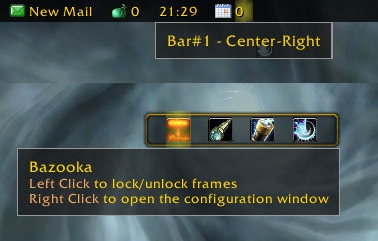
Bazooka is a Data Broker Display similar in functionality and looks to FuBar.
Feature highlights
- Top/Bottom alignment or free moving of bars.
- Left-click drag moves, alt-right-click drag resizes the bar (unless the frames are locked).
- Drag-and-drop plugin placement with highlighted drop positions.
- Configurable background / font / icon size.
- The usual options for data broker displays (show text/icon/label, optionally show title in place of label if it's missing).
- Support of iconCoords and icon[RGB] (TomTom arrow, for example).
- Left / Center-Left / Center / Center-Right / Right placement position for plugins within bars, allowing easy layout of plugins. Plugins placed in the Center area are centered as a bunch.
- Optional auto-fade while in combat / out of combat.
- Optionally disable mouse / tooltips.
- Optional simple tooltips (just show title if Alt is held while moving the mouse pointer over the plugin).
- Optional highlight on mouseover for the active plugin.
- Load-on-demand configuration options, small memory footprint for "standard" operation.
- Bulk mode configuration that allows configuring multiple bars/plugins easily.
- Restrict plugin text width
- Disable minimap icons
- Tooltip scale override
- Support for OnMouseWheel, OnReceiveDrag and OnDoubleClick script handlers for plugins
- Optionally override plugin defined text colors
Usage
Getting started
- Create new bars from the main options window
- Drag plugins to desired location
- Drag plugins off bars to disable them
- Dragging bars while holding Alt will change their attached/detached state. Otherwise top/bottom bars will snap back to top or bottom depending on where you drop them.
Using the bulk configuration (standard method)
- Uncheck Auto-apply.
- Check the bars/plugins you want the settings to apply to.
- Check Apply next to the settings you want to change, and set them to the value you need.
- Click Apply at the bottom of the options. The changes you selected will be applied to all selected bars/plugins at this point.
Using the bulk configuration (auto-apply method)
- Check Auto-apply.
- Check the bars/plugins you want the settings to apply to.
- Change the settings (or click the Apply text next to them if their current value is the one you want). The changes will be applied immediately to all selected bars/plugins.
Slash commands
/bazooka- Open configuration.
/bazooka locked- Toggle locked/unlocked state.
/bazooka hidebars- Make the bars hidden. If no bar numbers are specified, then it works on the marked bars (see bar options).
/bazooka showbars- Make the bars visible. If no bar numbers are specified, then it works on the marked bars (see bar options).
/bazooka togglebars- Toggle hidden/visible state of bars. If no bar numbers are specified, then it works on the marked bars (see bar options).
Obtaining plugins
You can find Data Broker plugins at these places:
- Data Broker plugins on Curse
- Data Broker plugins on WowAce
- Data Broker plugins on WoWInterface
- Tekkub's list
Options
Comments


-

mitchnull Owner
-
View User Profile
-
Send Message
Posted Nov 16, 2010One thing that always pissed me off about fubar was the accidental right click on the bar opening a giant window in the middle of my screen, that cost me several lost arena matches over time. Bazooka truly locks itself in combat.
-
View User Profile
-
Send Message
Posted Nov 9, 2010-
View User Profile
-
Send Message
Posted Nov 16, 2010-
View User Profile
-
Send Message
Posted Nov 2, 2010now in bazooka it seems that there is the smallest space at the top and where the addon starts that it doesnt count to be as "moused over."
is this bazooka or am i just configuring something wrong somewhere else?
-
View User Profile
-
Send Message
Posted Nov 2, 2010Most probably you have a 1 pixel gap at the top of your screen. This happens at some resolutions/ui scales. There's a "Tweak anchor positions" section at the bottom of the bar options. Try setting the Top anchor tweak to 1 (this will move the top frame up a bit, hopefully filling the gap).
hope this helps,
cheers,
mitch
-
View User Profile
-
Send Message
Posted Oct 29, 2010thank you so much for the TT scaling !!!
-
View User Profile
-
Send Message
Posted Oct 28, 2010Hope you can make it out. http://img255.imageshack.us/img255/3240/bazookae.jpg Check the bottom - middle. Between Grid and Name Toggle. You will see the overlap after I sign off and back on.
Here is what it looks like when I "set it so its ok". There is no overlap. http://img840.imageshack.us/img840/7729/bazooka2.jpg
Thanks for your help
-
View User Profile
-
Send Message
Posted Oct 28, 20101) no tiling: the hight is set to the bars hight and the width is set to the bars width (looks really ugly)
2) tiling: hight and width are set to a user defined vale between 16 and 256, graphic is then repeated until the bars width is reached (assumes that the graphic has an aspect ratio of 1:1)
Would it be possible to add a third option so that the hight is set to the bars hight (maybe a user defined hight, because the theme I would use has a transparent area which I would not use as bar background), recalculate the width so that the aspect ratio won't change and repeat the resulting graphic for the rest of the bar?
-
View User Profile
-
Send Message
Posted Oct 30, 2010I'm going to rewamp the backdrop/border settings soon, I'll see what I can do to make this possible. Could you send me a link to that background image you try to set up?
cheers,
mitch
-
View User Profile
-
Send Message
Posted Oct 30, 2010-
View User Profile
-
Send Message
Posted Oct 28, 2010Hi,
The plugins placed on the left grow to the right, the ones placed in the center-left grow left, but there's no check between the two areas, so overlapping can happen if you have too many plugins placed there. What exactly do you mean by "set it so its ok"? And how does it change when you relog? Some screenshots would help a bit :)
cheers,
mitch
-
View User Profile
-
Send Message
Posted Oct 28, 2010-
View User Profile
-
Send Message
Posted Oct 28, 20101. I cannot get the background to work at all, its either there or not there.
2. Anyone know a similar addon that works with Bazooka to LocationFu or PerformanceFu?
3. TY!!
-
View User Profile
-
Send Message
Posted Oct 28, 2010couple of ideas for common problems:
- not all backgrounds can be colored (for example the blizzard dialog is always black), blizzard tooltip is usually OK
- the default color is black, that means that the brighntess slider is at the bottom, so if you change the color in that color picker circle, it'll stay black. drag the brightness up a bit.
2) there is Broker_Location on wowinterface, TomTom also has some location plugin and there's Torhal's TravelAgent on curse. Try Broker_SysMon as a PerformanceFu replacement.
3) you're welcome :)
cheers,
mitch
-
View User Profile
-
Send Message
Posted Oct 28, 2010I will check those 2 out, ty
-
View User Profile
-
Send Message
Posted Oct 27, 2010On my bottom bar (#2) the plugins for left and left center overlap each other where they come together. I set it so its ok and sign off and come back on and they are back overlapped. The bar is locked. Thanks for your time.
-
View User Profile
-
Send Message
Posted Oct 27, 2010-
View User Profile
-
Send Message
Posted Oct 27, 2010It's working! Thx very much
-
View User Profile
-
Send Message
Posted Oct 27, 2010cheers,
mitch
-
View User Profile
-
Send Message
Posted Oct 27, 2010