
Bartender4
Bartender4 is a full ActionBar replacement mod. It provides you with all the features needed to fully customization most aspects of your action and related bars.
Bartender4 in Midnight: As of version 4.16.5, Midnight support is in preview - it'll be worked on until release, of course.
Major Changes since Dragonflight / 10.0
- Hold-to-cast is not currently available for addons
- Action Bars have been slightly re-arranged in Bartender4 for Dragonflight and beyond
- Bar 1-8 now reflect Blizzard Bars 1-8 (these are old 1, 3-6, and the 3 new bars)
- The old bars 7-10 are now called "Class Bar 1-4" (Shapeshifting, Stances, etc)
- The old bar 2 is now called Bonus Action Bar
Features
- Support for all Action Bars and all related bars
- 10 Action Bars (13 in Dragonflight & War Within!)
- Stance Bar
- Pet Bar
- Bag Bar
- Micro Menu
- XP/Reputation Bar
- All Bars are fully customizable (Scale, Alpha, Fade-Out settings, ...)
- Very flexible and customizable Show/Hide driver based on Macro Conditions
- Additional Layout and Paging settings for Action Bars
- Page all bars based on Stance or Modifier
- Possess Bar support
- Custom State driver support with Macro Conditions
- Options to hide specific elements of the buttons (Macro Text, HotKey, more could be added on demand)
- StickyFrames support
- Masque/ButtonFacade support!
- Easy Hotkey Binding using KeyBound
- Options to control the hiding of the default blizzard artwork (you might still want that to be displayed..)
FAQ
Q: I cannot move/drag my skills on my bars?
A: Hold Shift to move skills safely. You can also unlock your bars in the Bartender4 options, but using Shift is safer and recommended.
Q: How do i access the Configuration?
A: You can open the configuration with the Slash Commands (/bt or /bartender) or through the Bartender4 LDB plugin.
Q: Where are my keybindings? And how do i bind new keys?
A: Bartender4 buttons should automatically inherit keybindings from the Blizzard bars. For new keybindings, you can use KeyBound to re-bind your keys. You can access KeyBound by its slash command (/kb) or through the button in the BT4 config. Hover a button, press key → voila!
Q: Can I skin the buttons beyond the built-in options?
A: Bartender4 allows skinning through Masque! After installing both Bartender4 and Masque, you can customize the BT4 appearance in the Masque options.
Q: How do i disable the snapping of the bars?
A: Currently, you can temporarily override the snapping by holding down the Shift Key while moving your bars, or uncheck the option in the popup when your bars are unlocked.
Feature Requests/Bug Tracker
Please submit Bugs and/or Feature Requests using the Ticket System on the WoWAce Project page or in the Bartender4 Forum Thread. Please provide as many information as possible, including your client language, the exact version you are running, how to reproduce any errors, and a stack trace, if applicable.
Links
WoWAce Project: Bartender4 on WoWAce
Custom State Header: Info page on WoWAce
Comments

-

nevcairiel Owner
-
View User Profile
-
Send Message
Posted Oct 28, 2022In reply to Maryblood:
Forced? Its just a setting. Toggle it if you like it the other way.
-
View User Profile
-
Send Message
Posted Oct 30, 2022In reply to nevcairiel:
Until i updated this morning, when you opened Bartender4 next to the lock button, everytime i unchecked Button Lock and relogged, when i logged back in it would be checked again.
Not sure if the most recent update fixed it.
Love the addon regardless, always preferred it over ELVUI or other bar addons.
<3
-
View User Profile
-
Send Message
Posted Oct 28, 2022In reply to nevcairiel:
Thanks, of course :) !
-
View User Profile
-
Send Message
Posted Oct 28, 2022Hello, what is the reason for my bars Scale going down to 0.8 and the padding going up to 7.5 in the Dragonflight pre-patch? I had my bars scale set to 1 for all of them, and the padding at 6, were they adjusted due to the blizzard default sizes changing? My WotLK Scale is still 1, and Padding 6.
With my scale being down to 0.8, even though nothing has changed visually for my bar size, the keybind numbers and letters are now TINY on my bars. Any way I can fix that? Thank you.
-
View User Profile
-
Send Message
Posted Oct 28, 2022In reply to somatics23:
As you assumed, the reason is that Blizzard changed the size of the buttons, and I didn't want everyone to have to re-do their UI, so Bartender compensates and shrinks them back to their old size.
Options to control the font used for the text elements will be added soon, hopefully over the weekend.
-
View User Profile
-
Send Message
Posted Oct 28, 2022In State Configuration, Custum Conditionals, bar 11 and 12 seem to be reserved for vehiecles, they both have an [Exit] action in the last slot that can't be removed.
This is a problem because using the drop down and picking "Page 13 (Bar 6)" or "Page 14 (Bar 7)" seem to be showing the two "reserved" action bars, when i click the "Copy Conditionals" button they show up as 11 and 12 respectivly. So i get action bars with a reserved slot.
I fixed it by adding 2 to the bar number in the custom condition, but it would be neat if i did not need to use custom conditionals for simple stuff like this. This also makes them use the same bar as they refere to in the game options, when playing with no addons. (i've also added 2 to "Page 15 (Bar 8)" as it uses 13 which is bar 6)
-
View User Profile
-
Send Message
Posted Oct 28, 2022In reply to denzildk:
Good find, thanks. I'll fix this for the next update later today. Having a gap in the available bars where 11 and 12 are reserved is a bit awkward.
Interestingly you seem to actually be able to use 11 now, while 12 is reserved for shaman totems. Vehicles have moved to 16 to 18. Its all pretty wild.
-
View User Profile
-
Send Message
Posted Oct 28, 2022Can you add share profile/preset thing?
-
View User Profile
-
Send Message
Posted Oct 27, 2022Did recent wow update broke action bar cds? Like there is a square above every button now.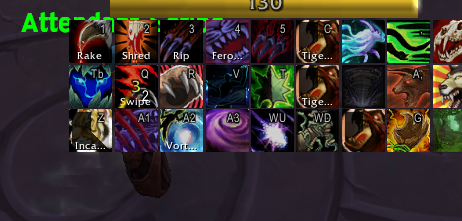
EDIT: SHould be something related to zoom function btw Zoom vs no zoom.
-
View User Profile
-
Send Message
Posted Oct 28, 2022In reply to dolby24j:
This will be fixed in the next update.
-
View User Profile
-
Send Message
Posted Oct 27, 2022I've got a problem with my Rogue poisons button, also any button that toggles a list of portals/teleports. It just isn't clickable at all, in any bar, not showing the options inside this button. It only happens with Bartender4, if I deactivate the addon it works normally with default Ui.
-
View User Profile
-
Send Message
Posted Oct 27, 2022In reply to psychoo00o:
same. my hunter and rogue are broken now cause of this stupid code error
-
View User Profile
-
Send Message
Posted Oct 28, 2022In reply to psychoo00o:
same with the hunters call pet button. doesnt function at all.
-
View User Profile
-
Send Message
Posted Oct 27, 2022Is there a way to force bars into a shared or a group show/hide/mouseover state? I used to hide my action bars all of the time (in an addon not be named that is no longer being updated for DF) showing them only in a mouseover state. I'd like for the group of bars to show up upon mousing over any of the grouped bars, not just the individual bar I'm mousing over. Is this possible in Bartender, or would you consider adding this feature?
-
View User Profile
-
Send Message
Posted Oct 27, 2022Can we fix the Malygos EoE buttons not working at all in WOTLK classic. It's really frustrating having to click the abilities.
-
View User Profile
-
Send Message
Posted Oct 28, 2022In reply to Rammster1:
Make sure you actually have your keybindings on Bar 1, and Bar 1 is setup to handle vehicles/possessing. Those are the keybindings its going to copy to the vehicle bar.
Or you can disable the Vehicle UI, which should also work. As long as your main bar is setup to handle vehicles/possessing.
-
View User Profile
-
Send Message
Posted Oct 27, 2022Hi, ur lasted version -> Crash Macro mouseover in frame raid !
-
View User Profile
-
Send Message
Posted Oct 27, 2022Question for anyone. Updating my BM talents, included Binding Shot and when I applied changes, the binding shot icon landed on one of my bars but all of my other 8 bars' icons, completely full and configured with hotkeys, completely disappeared with only binding shot remaining.... I've tinkered and absolutely cannot see anything to fix it... my other toons on this account are fine. Any thoughts?? Edit: Bars are still all configured the way I had them but all of the icons disappeared.
-
View User Profile
-
Send Message
Posted Oct 27, 2022Another bug with latest version - voiced dialogue windows (when NPC is talking, and a pop up appears on your screen) seem to be BELOW bartender hotbars. So you cant read them if they appear near your hotbars.
-
View User Profile
-
Send Message
Posted Oct 27, 2022In reply to ThirteenEra:
That is now a window you can move in Edit Mode - it's named Talking Head. It's not specifically Bartender's fault that it starts out behind bars - this even happens if you have a fully default UI.