Baggins
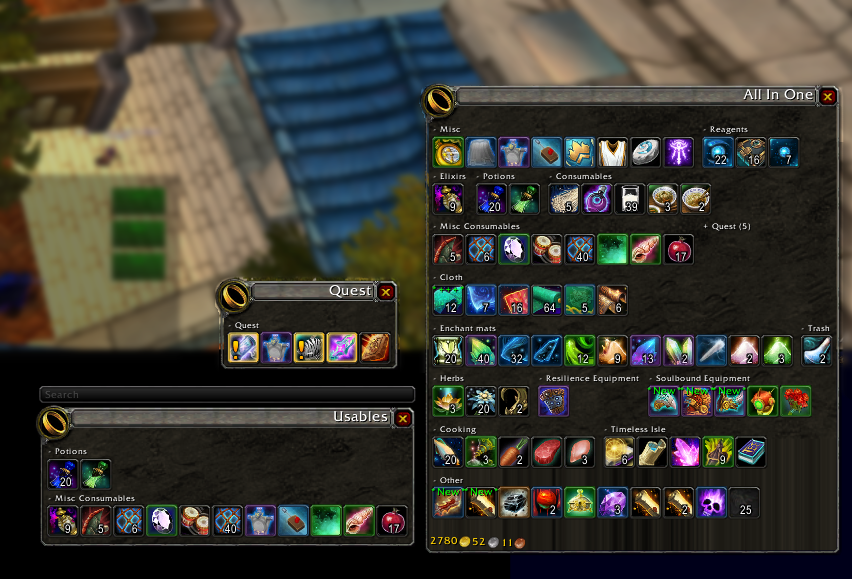
Inventory Management with virtual view divided into sections.
Now with baggins you can not only separate your bags into virtual view of your inventory but organize the items in your virtual view by item type! Bag options with endless possibilities. Add/remove/create categories, change skin of the view baggins does it all! Customize your bags to show items exactly how you like! No more looking for items and not being able to find them, look and know exactly where they should be!
For example one bag with profession items, one bag with gear, and so much more! You can even make your own categories!
You can use the minimap icon or /baggins to open the options window.
Comments

-

Doadin Owner
-

Forge_User_96189362 Author
-

wolfcon Contributor
-
View User Profile
-
Send Message
Posted Oct 16, 2014Great addon. Even after installing Ace3, baggins will not open when clicking on the default bag.
-
View User Profile
-
Send Message
Posted Oct 16, 2014Does the keybind "Interface Panel -> Open all Bags" work?
-
View User Profile
-
Send Message
Posted Oct 17, 2014I have Interface > Addons > Baggins set to Override Default Bags, but clicking on the backpack (F12) does not open baggins.
Clicking B has the same results, does not open Baggins.
-
View User Profile
-
Send Message
Posted Oct 17, 2014Have same problem :(
Have installed ACE3 from curse site and have r467 of Baggins installed.
Please advise, really like using Baggins and has been my bag addon since 2008.
-
View User Profile
-
Send Message
Posted Oct 17, 2014Just to clear this up, you're both clicking you backpack using the mouse? What happens you you press the "B" key? My baggins does not show when I actually click the backpack bag. Is this what you'd like to happen? I've rebound F12, so I'll have to make a lvl 1 to try that.
On a side note, the Ace3 install is no longer required with the newest release "r467", as the update to Ace3 has been included in Baggins. I'd advise anyone who did install Ace3 to now remove it.
-
View User Profile
-
Send Message
Posted Oct 17, 2014All done, patch has been submitted on wowace.
-
View User Profile
-
Send Message
Posted Oct 18, 2014Waiting patiently. Still not available after 18 hours =(
-
View User Profile
-
Send Message
Posted Oct 16, 2014Doesn't work with Reagent Bank. Any plans to add support for that?
-
View User Profile
-
Send Message
Posted Oct 16, 2014I have parts of the Reagent Bank working now. Still a few issues to sort out before its functional for everyone.
Update: most issues resolved, still testing.
Update 2: basically done, cleaning up patch and submitting tomorrow.
-
View User Profile
-
Send Message
Posted Oct 19, 2014http://www.wowace.com/addons/baggins/files/
Get the alpha.
-
View User Profile
-
Send Message
Posted Oct 15, 2014@mikk
THANK YOU!!
-
View User Profile
-
Send Message
Posted Oct 15, 2014@atholbro
atholbro: Thanks, you beat me to finding what caused that. It's included and released now.
-
View User Profile
-
Send Message
Posted Oct 15, 2014Following patch fixes the blue border:
diff -rupN old/Baggins/Baggins.lua new/Baggins/Baggins.lua
--- old/Baggins/Baggins.lua Wed Sep 11 21:34:54 2013
+++ new/Baggins/Baggins.lua Wed Oct 15 15:24:04 2014
@@ -2191,6 +2191,9 @@ do
frame:SetScript("OnEnter",BagginsItemButton_OnEnter)
frame:SetScript("PreClick",BagginsItemButton_PreClick)
frame.UpdateTooltip = BagginsItemButton_UpdateTooltip
+
+ frame.BattlepayItemTexture:Hide()
+
--frame:SetScript("OnUpdate",BagginsItemButton_OnUpdate)
if self.currentSkin then
self.currentSkin:SkinItem(frame)
-
View User Profile
-
Send Message
Posted Oct 15, 2014Atholbro, thanks for the fix! You rock. How do I apply this patch? This looks like a script that I need to run. Where do I run it from. Sorry but I am a bit unfamiluar witht he process. Normally when I see people posts these fixes they say "find this code and replace it with this code in this file". Could you help me out? Thanks again!
-
View User Profile
-
Send Message
Posted Oct 15, 2014Updated my post with easier to follow instructions.
-
View User Profile
-
Send Message
Posted Oct 15, 2014Thanks again. Just to statisfy my curiotsity, how do you apply a diff?
-
View User Profile
-
Send Message
Posted Oct 15, 2014Fix worked great! Thank you so much. I didn't want to have to use bagnon.
-
View User Profile
-
Send Message
Posted Oct 15, 2014If you're on a Mac it's simple, open terminal and use the "patch" command. On Windows you need software to help. Google "How do I apply a diff patch on Windows" and look at the first Stack Overflow answer.
-
View User Profile
-
Send Message
Posted Oct 15, 2014Ace3 and blue border updates are now part of r467.
-
View User Profile
-
Send Message
Posted Oct 15, 2014This is by far the best inventory/bag program out there. Could someone please direct the rest of us mere non programming mortals a link to where we can download a useable version, or the lines of code we need to update??? Thank you so much in advance!!!!