Baggins
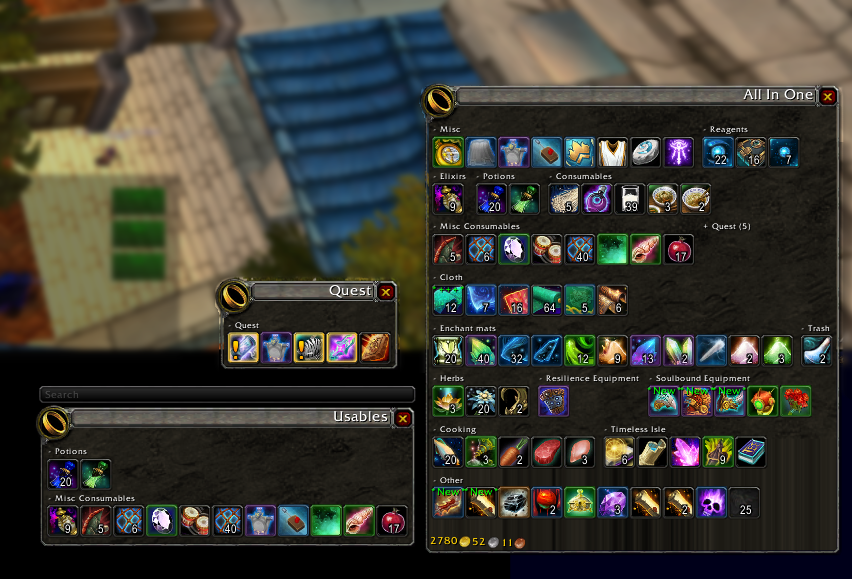
Inventory Management with virtual view divided into sections.
Now with baggins you can not only separate your bags into virtual view of your inventory but organize the items in your virtual view by item type! Bag options with endless possibilities. Add/remove/create categories, change skin of the view baggins does it all! Customize your bags to show items exactly how you like! No more looking for items and not being able to find them, look and know exactly where they should be!
For example one bag with profession items, one bag with gear, and so much more! You can even make your own categories!
You can use the minimap icon or /baggins to open the options window.
Comments

-

Doadin Owner
-

Forge_User_96189362 Author
-

wolfcon Contributor
-
View User Profile
-
Send Message
Posted Oct 14, 2014As of patch 6.0.2 All items seem to have a blue glow to them. even when I use the item quality glow feature there is still this blue tinge that makes it difficult to tell what color quality they actually are.
-
View User Profile
-
Send Message
Posted Oct 14, 2014Anyone else having an issue with all items in the bags having a blue border? Even when I turn on baggins glow feature for item quality there is still this blue tinge there that makes it hard to distinguish the colors.
-
View User Profile
-
Send Message
Posted Oct 14, 2014Yes, it's apparently a somewhat common problem with all of other bag mods. Would that someone could identify the issue in the code so that those of us still using Baggins could update accordingly.
-
View User Profile
-
Send Message
Posted Jul 18, 2014This addon used to have stack-split feature. What happened to it? And will it ever return?
-
View User Profile
-
Send Message
Posted Mar 14, 2014May I ask what happend to the splitt-functionality in Baggins? Meaning in the alt+right-click menu of an item.
-
View User Profile
-
Send Message
Posted Oct 9, 2013Need screen shots please and thank you!
-
View User Profile
-
Send Message
Posted May 24, 2014Ive got the same problem, cant access the full list, just the three "...", anyone have a workaround/fix?
-
View User Profile
-
Send Message
Posted Sep 21, 2014When you hover over the white ... just roll the mouse wheel up or down to get the rest of the list.
-
View User Profile
-
Send Message
Posted Oct 9, 2013When selecting an item to change its category list, the pop-up menu appears, but when I navigate to 'add to' or 'exclude from', the category list only shows the first dozen or so entries, and then "..." at the bottom of the list. The "..." entry can be highlighted or even clicked, but nothing happens. The list is sorted, so it gets down to "New" or "Other", and then displays nothing after that (such as "Trinkets" or "Toys").
I assume there's a way to expand that "..." entry, or to change the max number of options in the list?
-
View User Profile
-
Send Message
Posted Nov 9, 2014I'm having this issue. Using the scroll wheel doesn't work as it used to for me, even when doing it while hovering over the ellipsis, as was recommended to the poster I quoted. As a workaround, I've made a change to the number of rows mine displays, but I'm just wondering if I'm doing something wrong, or missing a step or something now.
Any help is appreciated, nearly as much as the mod itself is appreciated. :)
-
View User Profile
-
Send Message
Posted Sep 24, 2013is there a way to display tokens? Baggins Tokens is totally out of date.
-
View User Profile
-
Send Message
Posted Sep 12, 2013The glowing-bug is fixed in v2.0.2. Thanks for the hint
-
View User Profile
-
Send Message
Posted Sep 11, 2013Thank you very much for the update!
-
View User Profile
-
Send Message
Posted Sep 11, 2013Yeah, my bad, didn't dawn on me some people were using the alpha build. For any non-technical people showing up here and reading this, the fix should go directly below the following line in Baggins.lua:
So, you can just search for that in your favorite text editor of choice (Notepad, TextPad, TextEdit, etc) and paste the code in my previous post directly after the line I just called out above.
You should end up with that section of code looking like this:
Cheers!
Edit: Looks like the latest build has a fix for the blue glow integrated, so my post and the fix above is unnecessary.
-
View User Profile
-
Send Message
Posted Sep 11, 2013The line Pyrelight called out in Baggins.lua is on 2176 if you're using alpha r458. Thanks for posting the fix!
-
View User Profile
-
Send Message
Posted Sep 11, 2013Quick fix for the new blue texture glow in 5.4 (apparently related to items being "new" or some such), on line 2167 of Baggins.lua in the Baggins:CreateItemButton method:
This is pretty much borrowed from ArkInventory as that addon had fixed this issue before I decided to tackle it since it was bothering me. Cheers!
-
View User Profile
-
Send Message
Posted Sep 10, 2013Anyone having issues with baggins showing a weird white item border highlight on top of the normal highlighting?
I can't for the life of me figure out what it is, and it only seems to be occuring in baggins.
-
View User Profile
-
Send Message
Posted Sep 10, 2013Yeah, i'm seeing the same thing. I'm not sure what it is either.
-
View User Profile
-
Send Message
Posted Sep 10, 2013yep, same blueish white border on all items
-
View User Profile
-
Send Message
Posted Sep 10, 2013Ya. Same thing. Driving me nuts. I hope it gets fixed soon or I am switching to Baggon.