Baggins
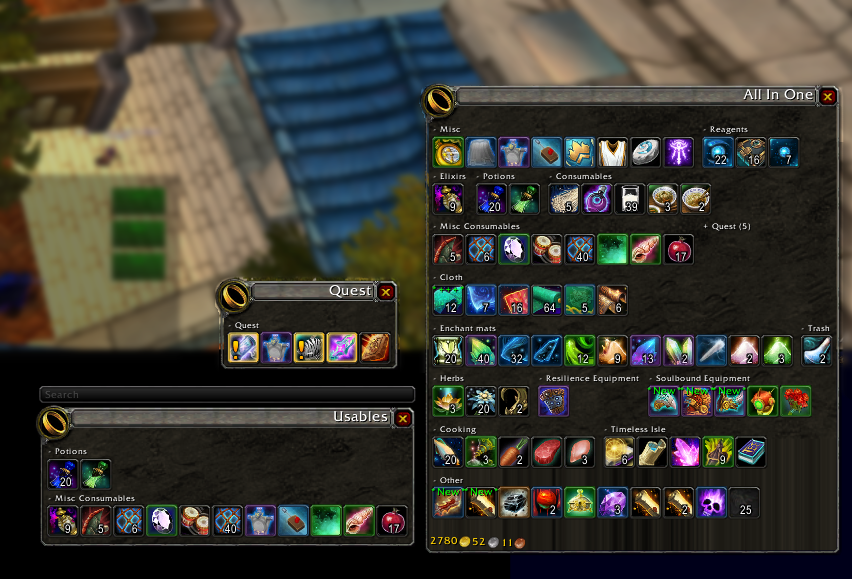
Inventory Management with virtual view divided into sections.
Now with baggins you can not only separate your bags into virtual view of your inventory but organize the items in your virtual view by item type! Bag options with endless possibilities. Add/remove/create categories, change skin of the view baggins does it all! Customize your bags to show items exactly how you like! No more looking for items and not being able to find them, look and know exactly where they should be!
For example one bag with profession items, one bag with gear, and so much more! You can even make your own categories!
You can use the minimap icon or /baggins to open the options window.
Comments

-

Doadin Owner
-

Forge_User_96189362 Author
-

wolfcon Contributor
-
View User Profile
-
Send Message
Posted Sep 23, 2025In reply to Dunamite: nothing in the changes from v5.7.4 to v5.7.5 would cause this, what is the last version you had that ddint cause this?
-
View User Profile
-
Send Message
Posted May 8, 2025there is still some lag, stutter "or bug" when open the Baggins addon everything is fine, letting it opened. but when opening the Character Screen (default hotkey c) it drops frames. Lets say max FPS is 120, it stutters for 1-2 seconds and drops to 112-114.
Can you fix this please? also AddonProfiler is showing lag spikes when doing this.
-
View User Profile
-
Send Message
Posted Sep 17, 2024First, let me say I love this add-on for the sorting ability alone. I do have an issue or two and a request.
Issue #1: Custom categories don't always work and items end up in "Other" until told to force refresh. I especially have this issue with my 'Teleportation' category I created using Tooltips.
Issue #2: Running the current version, Alt-B doesn't seem to open the default bags anymore. I have to disable the add-on to get to the default bags.
Feature request: Can you add an option to NOT use the add-on for bank related items? Between not knowing where the add-on stashed something and my OCD, I'd rather not use the add-on for my bank and only for my backpack(s).
Thanks!
-
View User Profile
-
Send Message
Posted Aug 25, 2024I am getting this error when trying to take something out of my bank and it prevents me from taking it out.
Message: bad argument #4 to '?' (Usage: C_Container.UseContainerItem(containerIndex, slotIndex [, unitToken, bankType, reagentBankOpen]))
Time: Sun Aug 25 10:52:39 2024
Count: 1bb
Stack: bad argument #4 to '?' (Usage: C_Container.UseContainerItem(containerIndex, slotIndex [, unitToken, bankType, reagentBankOpen]))
[string "=[C]"]: ?
[string "@Interface/AddOns/Baggins/Baggins.lua"]:2463: in function <Interface/AddOns/Baggins/Baggins.lua:2460>
Locals: (*temporary) = "bad argument #4 to '?' (Usage: C_Container.UseContainerItem(containerIndex, slotIndex [, unitToken, bankType, reagentBankOpen]))"
-
View User Profile
-
Send Message
Posted Aug 17, 2024Ever since the most recent update Baggins doesnt open anymore! Anyone else having this issue?
-
View User Profile
-
Send Message
Posted Aug 2, 2024Thanks for keeping this add-on going.
Since 11.0 was released I'm having the problem on Equipment Sets for other toons showing up in my bags when there is common loot (ie when on my mage I will be seeing the equipment set for my shadow priest, etc.). This is happening whenever there is common gear between two sets. Am I missing a new setting to get rid of this, or is there a workaround?
-
View User Profile
-
Send Message
Posted Aug 1, 2024Since the last patch Baggins will not open
There are no errors when attempting to open it, just nothing happens at all.
Going into the config and performing a manual "Force Full Refresh" resolves the issue until I relog or reloadui.
Unsure if related but I do get a baggins-search error on login (as a few people have mentioned below):
1x Baggins/Baggins-Search.lua:271: attempt to index field '?' (a nil value)
[string "@Baggins/Baggins-Search.lua"]:271: in function `UpdateEditBoxPosition'
[string "@Baggins/Baggins-Search.lua"]:295: in function `handler'
[string "@Baggins/Baggins.lua"]:197: in function `FireSignal'
[string "@Baggins/Baggins.lua"]:822: in function `Baggins_RefreshBags'
[string "@Baggins/Baggins-Skins.lua"]:78: in function `EnableSkin'
[string "@Baggins/Baggins.lua"]:556: in function <Baggins/Baggins.lua:497>
[string "=[C]"]: ?
[string "@Ace3/AceAddon-3.0-13/AceAddon-3.0.lua"]:66: in function <Ace3/AceAddon-3.0/AceAddon-3.0.lua:61>
[string "@Ace3/AceAddon-3.0-13/AceAddon-3.0.lua"]:523: in function `EnableAddon'
[string "@Ace3/AceAddon-3.0-13/AceAddon-3.0.lua"]:626: in function <Ace3/AceAddon-3.0/AceAddon-3.0.lua:611>
[string "=[C]"]: ?
[string "=[C]"]: in function `LoadAddOn'
...
[string "@Blizzard_ExpansionLandingPage/Blizzard_DragonflightLandingPage.lua"]:103: in function `SetUpMajorFactionList'
[string "@Blizzard_ExpansionLandingPage/Blizzard_DragonflightLandingPage.lua"]:96: in function `RefreshMajorFactionList'
[string "@Blizzard_ExpansionLandingPage/Blizzard_DragonflightLandingPage.lua"]:91: in function `RefreshOverlay'
[string "@Blizzard_ExpansionLandingPage/Blizzard_DragonflightLandingPage.lua"]:83: in function <...sionLandingPage/Blizzard_DragonflightLandingPage.lua:79>
[string "=[C]"]: ?
[string "=[C]"]: ?
[string "=[C]"]: in function `CreateFrame'
[string "@Blizzard_ExpansionLandingPage/Blizzard_DragonflightLandingPage.lua"]:49: in function `CreateOverlay'
[string "@Blizzard_ExpansionLandingPage/Blizzard_ExpansionLandingPage.lua"]:78: in function `RefreshExpansionOverlay'
[string "@Blizzard_ExpansionLandingPage/Blizzard_ExpansionLandingPage.lua"]:37: in function <...pansionLandingPage/Blizzard_ExpansionLandingPage.lua:35>
Locals:
self = <table> {
}
initialcorner = "TOPRIGHT"
lastBag = nil
(*temporary) = nil
(*temporary) = nil
(*temporary) = FontString {
}
(*temporary) = -8
(*temporary) = 0
(*temporary) = "attempt to index field '?' (a nil value)"
Baggins = <table> {
cannotDetachTooltip = true
modules = <table> {
}
defaultcategories = <table> {
}
defaultModuleState = true
minSpareItemButtons = 10
doInitialBankUpdate = true
hasIcon = "Interface\Icons\INV_Jewelry_Ring_03"
editOpts = <table> {
}
ptsetsdirty = false
obj = <table> {
}
hooks = <table> {
}
currentSkin = <table> {
}
itemcounts = <table> {
}
independentProfile = true
sectionOrderDirty = true
doInitialUpdate = true
OnMenuRequest = <table> {
}
opts = <table> {
}
db = <table> {
}
colors = <table> {
}
baseName = "Baggins"
enabledState = true
clickableTooltip = true
hideWithoutStandby = true
bagframes = <table> {
}
defaultModuleLibraries = <table> {
}
name = "Baggins"
orderedModules = <table> {
}
}
BagginsSearch_EditBox = EditBox {
PixelSnapDisabled = true
Center = Texture {
}
RightEdge = Texture {
}
backdropInfo = <table> {
}
BottomEdge = Texture {
}
BottomLeftCorner = Texture {
}
BottomRightCorner = Texture {
}
TopEdge = Texture {
}
TopRightCorner = Texture {
}
TopLeftCorner = Texture {
}
LeftEdge = Texture {
}
}
-
View User Profile
-
Send Message
Posted Jul 22, 2024Hi. Every version *after* July 2nd's 5.3.3 gives me errors similar to below.
------
Message: Interface/AddOns/Baggins/Baggins-Search.lua:313: attempt to index field '?' (a nil value)
Time: Mon Jul 22 13:59:22 2024
Count: 9
Stack: Interface/AddOns/Baggins/Baggins-Search.lua:313: attempt to index field '?' (a nil value)
[string "=(tail call)"]: ?
[string "=[C]"]: ?
[string "@Interface/AddOns/Baggins/Baggins-Search.lua"]:313: in function `handler'
[string "@Interface/AddOns/Baggins/Baggins.lua"]:196: in function `FireSignal'
[string "@Interface/AddOns/Baggins/Baggins.lua"]:4053: in function `CloseBag'
[string "@Interface/AddOns/Baggins/Baggins.lua"]:4065: in function <Interface/AddOns/Baggins/Baggins.lua:4063>
[string "=(tail call)"]: ?
[string "@Interface/AddOns/Blizzard_UIParentPanelManager/Mainline/UIParentPanelManager.lua"]:993: in function <...ParentPanelManager/Mainline/UIParentPanelManager.lua:992>
[string "=[C]"]: in function `securecall'
[string "@Interface/AddOns/Blizzard_UIParent/Mainline/UIParent.lua"]:2815: in function `ToggleGameMenu'
[string "TOGGLEGAMEMENU"]:1: in function <[string "TOGGLEGAMEMENU"]:1>
Locals: (*temporary) = "down"
(*temporary) = <function> defined =[C]:-1
-
View User Profile
-
Send Message
Posted Jun 17, 2024Is there a way to unlock the frrame/s to move them where i want? rather than just the 4 anchor points?
-
View User Profile
-
Send Message
Posted Jul 1, 2024In reply to usul420: if you open the options and go to layout and under layout type select manual you can drag bag windows where ever you want.
-
View User Profile
-
Send Message
Posted May 27, 2024This addon doesn't work for classic SOD? I get lots of errors and bags doesnt open.
-
View User Profile
-
Send Message
Posted Nov 23, 2023Is there a way to freely drag and place items into categories/sections without needing to create rules?
-
View User Profile
-
Send Message
Posted Jul 1, 2024In reply to silly_ardinghelli93:
sorry for this super late responce but you can at least on windows, idk what it would be for mac, ctrl + right click an item and select add to category. Though this is specific to that item not an item type, not sure how usful it would be for what you want to do.
-
View User Profile
-
Send Message
Posted Sep 18, 2023Is there a way in retail to "sort" or "clean up" bags? It doesn't seem to take advantage of my reagent bag. I have to turn Elvui bags back on, sort, then disable it.
-
View User Profile
-
Send Message
Posted Jul 1, 2024In reply to ThaPchild: sorry for the really late responce I have now added a option to the minimap menu to run the blizzard sort whch does add items to the reagent bag. Working on better support for reagent bag in the future.
-
View User Profile
-
Send Message
Posted Aug 26, 2023Great addon! Love the vision of it. Only have one issue. The last slot in the "Other" bag in the "other" section keep just saying "k32". How do I get rid of it?
-
View User Profile
-
Send Message
Posted Feb 26, 2023Hey, I got two issues.
1) When I try to open the bags in combat, it doesn't open "it freezes screen for a second then refuse to open"
2) I got all category "No duplicate" but the "New!" category whenever I receive something new, it will also be shown in its own category. I would love if I can make this condition........ If something is in the new category, don't show it in its own category until its deemed Not-new...if that make any sense, i.e. I just don't want items to be shown twice.
Thanks.
-
View User Profile
-
Send Message
Posted Jan 19, 2023For Wrath Classic - v4.7.9-wrath = bags aren't showing the majority of my items, and the search bar is white and looks bugged. I've been going through old versions to see if one works, but so anything 4.7 doesn't seem to work properly.
-
View User Profile
-
Send Message
Posted Jan 19, 2023In reply to ThaPchild:
I am experiencing the same issue. This appears to be identical to a bug from roughly 4-6 weeks ago that was patched. Each category only displays one item and one item only.
https://imgur.com/a/e3PVosC
-
View User Profile
-
Send Message
Posted Jan 19, 2023In reply to KIMBLE_SLYCE:
Yep, sounds like the exact same issue as I'm having Kimble.