ArkInventory
ArkInventory (for The War Within)
:boom: Please ensure you are using the latest alpha version if you have the War Within client.
ArkInventory (for Retail, Classic, and Cataclysm)
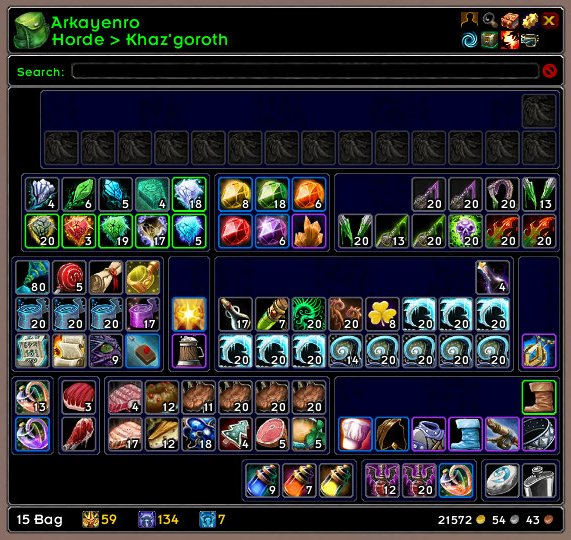
ArkInventory's display windows are built from "virtual bars", you assign categories to bars so that items in that category are displayed on the specific bars you want. There is no limit to the number of bars you can have inside a window but obviously you only have so much screen real estate before it becomes "too many".
ArkInventory uses several methods to assign a default category to an item such as what professions you have, tooltip scanning, basic type/subtype and PeriodicTable. You then assign those categories to a virtual bar.
You can also over-ride the default category by creating a rule that matches either a single or multiple items.
Overview:
- user configurable window width and height
- separate keybindings for each location for easy viewing
- assign items to a category of your choice (overrides the default assignment)
- assign categories to the bar of your choice
- unlimited number of bars (there are practical limits though before your screen becomes full)
- sort each bar differently if required
- user configurable bars per row
- sell junk items automatically or manually (delete available via a keybinding or right clicking when at a vendor)
- random pet and mount summons. can also assign a group of them to select from
Key Bindings:
- Press ESCAPE to bring up the blizzard menu
- click on Key Bindings
- scroll down to AddOns > ArkInventory
- bind the keys you want to use
Need Help?
:memo: Wiki
:memo: Frequently Asked Questions
:memo: Sorting
:memo: Rules
:memo: If you are having an issue the first step is to disable all other mods and test with only ArkInventory loaded
:memo: If the issue is still there, please check for an existing issue and create a new issue if required.
:memo: If the issue is gone, re-enable your other mods one by one until the issue comes back, then note the last mod you enabled in your issue as well as notifying the author of the other mod
See ChangeHistory.md for changes to the latest version. See VersionHistory.md for all previous changes.
:boom: The NoLib variant
it seems quite a few people are somehow getting the NoLib variant from their download client when they didn't specifically ask for it, instead of the full variant, and its causing issues as they don't have the required libraries installed separately. Please ensure you are downloading the full. if you see nolib in the filename then its the wrong variant, unless you are actually installing all of the required libraries separately as well. If you have to you can manually download the full variant from CurseForge, WoWInterface, or Wago.
:boom: Junk Sell getting blocked
While auto-destroy remains blocked, From 30960 onwards you can setup a Key Binding to manually sell and destroy your items. Note that blizzard require one keypress per item deletion, so if you have multiple items that need to be deleted you will need to press the Key Binding multiple times. A message will be output if you have remaining items that can still be deleted.
:warning: Ensure you have backup copies of your saved variables file
Sometimes you cannot revert back to a previous version without a backup, especially alpha or beta versions, so before upgrading please make sure you have made a backup of your saved variables file
Your saved variables file is normally located at ...\World of Warcraft\_client_\WTF\Account\yourwowaccountname\SavedVariables\ArkInventory.lua
It is your responsibility to ensure you have adequate backups of your saved variables file. You dont have to do them frequently, just after you've made major changes to your config is probably fine for most people, but you should get into the habit of making backups because when it does corrupt you wont have to reconfigure everything from scratch.
If you have your download client set to automatically download alpha/beta versions you should definitely have backups.
A simple way to back up the saved variables file is to just do a copy and paste then rename the new file (using the version number of ArkInventory or the date is a good idea), eg ArkInventory-30900.lua, or ArkInventory-20191228.lua
Comments

-

Arkayenro Owner
-
View User Profile
-
Send Message
Posted Oct 29, 2014Yep...I'm having the same issue. This morning's patch broke it all to hell.
-
View User Profile
-
Send Message
Posted Oct 29, 2014This mornings update broke the addon.
"Failsafe kicked in - aborting arkinventory translations due to an error of some sort"
Prior to this it was working fine except the search function was highlighting additional things that did not match the search. Now my game bags load (ugh) and the arkinventory mount hotkey does not work!
-
View User Profile
-
Send Message
Posted Oct 30, 2014delete the addons\arkinventory folder and then re-install arkinventory, see if that helps
if you happen to use the no-libs version from curse please ensure you have the 4 libraries listed in the version history file installed as standalone libraries or it will barf
-
View User Profile
-
Send Message
Posted Oct 28, 2014Hey, one question. I have a lot of lags recently. I first thought it was caused by wow-pro (which I installed for leveling yet another alt), but I deinstalled it and those lag spikes (sometimes over 2 seconds or 4-5 times 0.5 seconds in quick succession) did not disappear.
so I installed addonusage to monitor the .... addon usage, I guess. and as it turns out, even when idling, ArkInventory uses nearly 11mb and up to 35% (!) of CPU. mostly at around .... 15-20%, but even this I think is a bit too high for a bag addon - especially when idling in town and not even having the bag open at all.
does this memury and cup usage sound normal for you? or is that too high and somethings wrong there?
I do not have any lua errors or anything, it just.... feels too much for a bag addon.
-
View User Profile
-
Send Message
Posted Oct 28, 2014memory i never care about because youd have other bigger issues if your system didnt have enough ram to run wow.
with all arkinventory windows closed, in the addon usage mod click on reset, and then update, arkinventory will show 0%
now open the bag window in ai then recheck the usage, it should be about 95%
close the bag and refresh the usage, still using 95%
reset the usage and refresh, arkinventory back to 0%
cpu monitoring is not what you think, its not real-time like the windows task manager. its a percentage of the total amount of cpu allocated to running mods since the recording was started
so if all you do is sit in town looking at your bags then arkinventory is going to have used the most cpu overall, go raiding and arkinventory wont use anything (unless you get some loot or use a flask), all your raid mods will be using 95% cpu
unless youre actually having an issue dont bother with mod usage stats.
-
View User Profile
-
Send Message
Posted Oct 27, 2014This is a great addon that has made my WoW life easier for a number of years.
With the new patch and addition of the reagent tab for the bank, my bank bag (with all of my sorting) extends beyond the full length of the game window. Any suggestions on how to reduce this, extend the width of the window instead of the length, or anything like that?
-
View User Profile
-
Send Message
Posted Oct 27, 2014in the config, change the height (so it scrolls) or the width and possibly the number of bars per row
-
View User Profile
-
Send Message
Posted Oct 26, 2014I don't know if it's already been reported but everytime I login or zone all my selections for the pets completely change up. Ones that I had ignored are now selected, others that were selected are now ignored. So when I click it rather than staying with the ones I've selected it typically pulls out something I have ignored. And there's no mass "reset" on it either.
-
View User Profile
-
Send Message
Posted Oct 28, 2014blizzard changed the pet identifers and the old index value i use currently keeps changing, the next version should fix it but it means having to wipe everyones selections
-
View User Profile
-
Send Message
Posted Oct 26, 2014As of the 6.0.2 update, there is a problem. This addon will keep boardcasting that there are no mounts avaialble in the area as long as you are under level 20. That can actually get very annoying for the first 19 levels. Anyway to turn off this message?
-
View User Profile
-
Send Message
Posted Oct 26, 2014im preusming you havent upgraded, please do (or include the version number you have)
-
View User Profile
-
Send Message
Posted Oct 26, 20141x ArkInventory\ArkInventory-3.04.14.lua:4736: script ran too long
-
View User Profile
-
Send Message
Posted Oct 26, 2014go into the config > display > workarounds and lower the in-combat yielding > items value
-
View User Profile
-
Send Message
Posted Oct 26, 20141x ArkInventory\ArkInventory-3.04.14.lua:4701: script ran too long
-
View User Profile
-
Send Message
Posted Oct 26, 2014On some, but not all of my characters the AI broker display shows just a red ERR instead of the bag usage info. Not sure what causes this. I don't see any Lua errors popping up.
-
View User Profile
-
Send Message
Posted Oct 26, 2014It also happens if Arkinventory, Chocolate Bar and ACP are the only addons. So it looks like an AI issue to me.
-
View User Profile
-
Send Message
Posted Oct 26, 2014No, it seems to be only a display issue in the ldb component. I don't see any other unusual behaviour or lua error. Effects both of my lvl 90's, but not my other alts.
Trying to think how they are different, in regards to bags and inventory - they are the only ones with void storage and one has a tackle box and the other a cooking bag.
-
View User Profile
-
Send Message
Posted Oct 26, 2014i use chocolate bar to test the ldb components and its working ok for me, do you have any issues opening the bags/bank/etc?
-
View User Profile
-
Send Message
Posted Oct 28, 2014i think ive figured out the issue and it should be fixed next version
-
View User Profile
-
Send Message
Posted Oct 26, 2014Need restak bottom back i dont want cleanup to move stuff around in my bag's only restak item's