ArkInventory
ArkInventory (for The War Within)
:boom: Please ensure you are using the latest alpha version if you have the War Within client.
ArkInventory (for Retail, Classic, and Cataclysm)
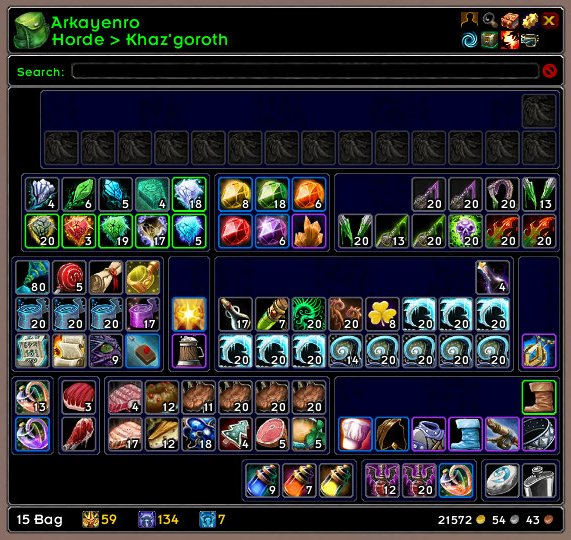
ArkInventory's display windows are built from "virtual bars", you assign categories to bars so that items in that category are displayed on the specific bars you want. There is no limit to the number of bars you can have inside a window but obviously you only have so much screen real estate before it becomes "too many".
ArkInventory uses several methods to assign a default category to an item such as what professions you have, tooltip scanning, basic type/subtype and PeriodicTable. You then assign those categories to a virtual bar.
You can also over-ride the default category by creating a rule that matches either a single or multiple items.
Overview:
- user configurable window width and height
- separate keybindings for each location for easy viewing
- assign items to a category of your choice (overrides the default assignment)
- assign categories to the bar of your choice
- unlimited number of bars (there are practical limits though before your screen becomes full)
- sort each bar differently if required
- user configurable bars per row
- sell junk items automatically or manually (delete available via a keybinding or right clicking when at a vendor)
- random pet and mount summons. can also assign a group of them to select from
Key Bindings:
- Press ESCAPE to bring up the blizzard menu
- click on Key Bindings
- scroll down to AddOns > ArkInventory
- bind the keys you want to use
Need Help?
:memo: Wiki
:memo: Frequently Asked Questions
:memo: Sorting
:memo: Rules
:memo: If you are having an issue the first step is to disable all other mods and test with only ArkInventory loaded
:memo: If the issue is still there, please check for an existing issue and create a new issue if required.
:memo: If the issue is gone, re-enable your other mods one by one until the issue comes back, then note the last mod you enabled in your issue as well as notifying the author of the other mod
See ChangeHistory.md for changes to the latest version. See VersionHistory.md for all previous changes.
:boom: The NoLib variant
it seems quite a few people are somehow getting the NoLib variant from their download client when they didn't specifically ask for it, instead of the full variant, and its causing issues as they don't have the required libraries installed separately. Please ensure you are downloading the full. if you see nolib in the filename then its the wrong variant, unless you are actually installing all of the required libraries separately as well. If you have to you can manually download the full variant from CurseForge, WoWInterface, or Wago.
:boom: Junk Sell getting blocked
While auto-destroy remains blocked, From 30960 onwards you can setup a Key Binding to manually sell and destroy your items. Note that blizzard require one keypress per item deletion, so if you have multiple items that need to be deleted you will need to press the Key Binding multiple times. A message will be output if you have remaining items that can still be deleted.
:warning: Ensure you have backup copies of your saved variables file
Sometimes you cannot revert back to a previous version without a backup, especially alpha or beta versions, so before upgrading please make sure you have made a backup of your saved variables file
Your saved variables file is normally located at ...\World of Warcraft\_client_\WTF\Account\yourwowaccountname\SavedVariables\ArkInventory.lua
It is your responsibility to ensure you have adequate backups of your saved variables file. You dont have to do them frequently, just after you've made major changes to your config is probably fine for most people, but you should get into the habit of making backups because when it does corrupt you wont have to reconfigure everything from scratch.
If you have your download client set to automatically download alpha/beta versions you should definitely have backups.
A simple way to back up the saved variables file is to just do a copy and paste then rename the new file (using the version number of ArkInventory or the date is a good idea), eg ArkInventory-30900.lua, or ArkInventory-20191228.lua
Comments

-

Arkayenro Owner
-
View User Profile
-
Send Message
Posted Jul 2, 2012I know Ark has the ability to show and sort the void storage in "offline mode" (click toggle location > click void storage), but is there a way to replace the default void storage window when I talk to the NPC?
When I talk to the ethereal, I get the default window and no sorting at all, even though everything seems to be set up right and everything is sorted in the offline mode.
Am I doing something wrong? Or is this not supported at this time?
-
View User Profile
-
Send Message
Posted Jul 1, 2012This working on beta?
-
View User Profile
-
Send Message
Posted Jul 1, 2012Tried it today, working fine for me, no errors at all. rofl
-
View User Profile
-
Send Message
Posted Jun 29, 2012Hi there, Could you tell me where the character data for this addon is stored? I looked in the WTF and didn't see anything for ArkInventory. I renamed one of my toons and now her bags are reset. >.< I'd copied her original WTF over to the new name, which worked for the other addons, but not this one.
Thanks for the wonderful add-on, been using it for years. :D Really one of those can't-play-without-it addons.
-
View User Profile
-
Send Message
Posted Jun 29, 2012the saved variable file is global, not per server, so its in
\WTF\Account\ACCOUNTNAME\SavedVariables
-
View User Profile
-
Send Message
Posted Jul 5, 2012Thank you!
-
View User Profile
-
Send Message
Posted Jun 29, 2012Hi,
I love this add-on, I just use your basic tutorial settings and it's great for me. Is there a way to just have 1 bag icon instead of the 5 default ones when opening bags?
-
View User Profile
-
Send Message
Posted Jun 29, 2012i think you mean bars? in edit mode the interface will always display as many as you have setup for bars per row, default is 5. when displaying the window normally, empty bars are hidden by default so just dont assign anything to the other bars and they wont show up.
-
View User Profile
-
Send Message
Posted Jun 30, 2012Nah I meant the bags on the bag bar. theres 5 I wanted just one since Arkinvemtory is basically like looking at one bag. No big deal just wamted to save room
-
View User Profile
-
Send Message
Posted Jul 1, 2012oh, the bag changer frame, if you dont want to see it then just hide it (click on the bag changer icon to toggle it), you only ever need it visible when youre changing bags around anyway (which isnt that often)
-
View User Profile
-
Send Message
Posted May 26, 2012good addon.
It would be very cool, if you add "Virtual Stack" function. Like in AdiBags.
-
View User Profile
-
Send Message
Posted May 25, 2012it would be really cool, and convenient, to have a button per bar (optional or something) that you could click on to move all items from said bar to/from bank and bags!
-
View User Profile
-
Send Message
Posted May 24, 2012Thats it im not using this addon any more, its reset my settings 4 times now and im sick of it. it loss's all profiles and resets to default. all that has happend was another account was played on my pc, then when i log in its screwed. setting up all the slots takes alot of time. screw this shit im looking for a better bag addon :P
-
View User Profile
-
Send Message
Posted Jun 21, 2012I have 2 accounts, use arkinventory, works fine. Your computer problem, not the addon's.
-
View User Profile
-
Send Message
Posted Jun 29, 2012if your sv's are wiped when you next come into the game then its most likely that they were corrupted some time between when you last existed the game and when you entered it now.
always make a backup of your sv after making changes to your layout, and not just for ai.
-
View User Profile
-
Send Message
Posted May 20, 2012Hi there,
that’s an addon I´ve been looking for. But it`s missing something very important. Is it possible to add the function to see the bags of your twinks from your main and also the bank off your twinks an your own bank where ever you are like it is possible with bagnon? If you could make this it`ll make your addon completely perfect :D
-
View User Profile
-
Send Message
Posted May 22, 2012This is actually already a feature! If you click on the bag icon in the top left corner, you'll see a list of your characters. From there you can open up their bags too!
You might also want to check out Altoholic. It has a TON of awesome features for people, like me, who have lots of characters. For example you can do a search for items. Also the tooltip for any item will display how many you have, and where, on each character. It will also do things like letting you know if one of your characters can use a recipe, or even if they're missing a pet or mount that you might be looking at.
-
View User Profile
-
Send Message
Posted May 18, 2012Special thx to Arkayenro,
The bags rules are WORKING on this version. I didn't try any upgrade for months because every new version didn't have the bag rule support ... I was stock with version 3.02.82.
Now I can finally enjoy playign with the last relase ...
thank you very very much.
-
View User Profile
-
Send Message
Posted May 16, 2012I've been using ArkInventory for a long time. LOVE it. I refuse to play the game without it!
Then today I log in and it looks as though the addon has -completely- reset itself back to the original settings! All of my customizations are GONE. All the hours I spent setting it up exactly the way I like to have it, GONE! I'm sooooooo unhappy right now!!
I don't know if this is some kind of weird bug or maybe my copy got corrupted. I use the same set up on every character. I've resigned myself to just starting over from scratch, and I'm going to uninstall then reinstall it. I just thought I'd mention this here just in case it is some kind of bug that might need investigating. There were no error messages. I downloaded Gryphonheart Items last night, but that's the only change I can think of. ArkInventory looked just fine after downloading the other addon last night. I've also used both addons at the same time in the past. So I doubt it's a conflict there. But hey, never know...
Thanks for making such a great addon! I'm off to begin the process of setting up my bags anew. Maybe with improvements this time since I know how to use it so much better.
-
View User Profile
-
Send Message
Posted Jun 29, 2012its been in there for a long time, you have to set the item background to not display the icon, then you can set the bag type colours to whatever you want.