AppearanceTooltip
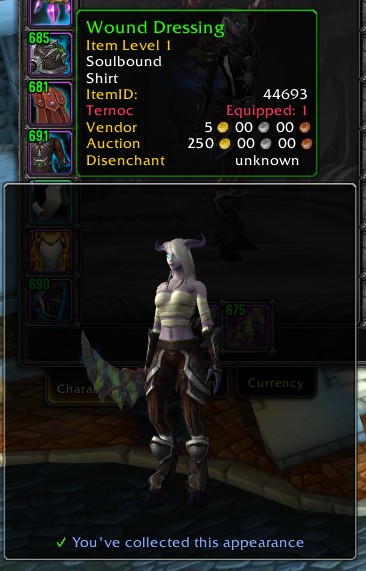
AppearanceTooltip shows you the appearance of items that you see, to help you know whether you actually want to obtain their delicious appearances for your collection. It does this by attaching a Model frame to the item tooltip, showing your character wearing the item.
It can also show an icon in various places to let you know whether you know this appearance or not. These places are:
- Bags (including various bag addons)
- Loot window
- Encounter Journal
- Merchants
The icon will be violet if you can learn the appearance on the current character, blue if you know the appearance but from a different item, and yellow if you don't know it but it's for another class.
The previews and item-icons will also appear for mounts, pets, and decor.
Set token items will show some information about what they'll turn into, and how many of those possible appearances you've collected.
Less importantly, it also improves the default UI so that the "You don't know this appearance" messages will appear on items which don't apply directly to your class! This means you'll be able to log into your Warrior, and tell that your Priest doesn't yet know this cool BoE appearance that just dropped.
It will also make alert popups appear when you learn a new appearance.
Config is in the Interface Options, or type /aptip
You can choose whether to:
- Show your character with your current outfit, or naked apart from your previewed item (how lewd)
- Zoom in on the item you're previewing
- Strategically remove some items from your character to show the previewed item (e.g. for shirts, remove your chest and tabard)
- Only show for items your current character can actually transmog to
- Spin the model / move it with the mousewheel
Addons integrated with:
- SilverDragon
- Inventorian
- Baganator (via its API, so you'll need to tell it to use it)
- Butsu
- Bagnon
- Baggins
- AdiBags - showing icons and offering a filter for unknown appearances
Comments


-

Kemayo Owner
-
View User Profile
-
Send Message
Posted Aug 2, 2016Cant seem to get the 'Zoom on worn items' to work on my undead rogue. Seems to work fine on my other characters. Just wondering if this is intended or a possible glitch?
-
View User Profile
-
Send Message
Posted Aug 2, 2016I translated it into their own language.
And now after each update I have to do it again.
You can add a separate file with the localization?
-
View User Profile
-
Send Message
Posted Aug 2, 2016I translated it into their own language.
And now after each update I have to do it again.
You can add a separate file with the localization?
-
View User Profile
-
Send Message
Posted Jul 31, 2016I get the error below when I mouse over legs or shoes. In addition, the item does not appear in the preview screen. All other addons are disabled, and it happens regardless of where the item is, and if I have the setting for zoom on or not.
Message: Interface\AddOns\AppearanceTooltip\addon.lua:296: Usage: GetItemInfoInstant(itemID|"name"|"itemlink")
Time: 07/31/16 10:04:06
Count: 18
Stack: [C]: in function `GetItemInfoInstant'
Interface\AddOns\AppearanceTooltip\addon.lua:296: in function `ShowItem'
Interface\AddOns\AppearanceTooltip\addon.lua:125: in function <Interface\AddOns\AppearanceTooltip\addon.lua:124>
[C]: ?
[C]: in function `SetBagItem'
Interface\FrameXML\ContainerFrame.lua:1107: in function `ContainerFrameItemButton_OnEnter'
[string "*:OnEnter"]:1: in function <[string "*:OnEnter"]:1>
Locals:
Message: Interface\AddOns\AppearanceTooltip\addon.lua:296: Usage: GetItemInfoInstant(itemID|"name"|"itemlink")
Time: 07/31/16 10:04:18
Count: 19
Stack: [C]: in function `GetItemInfoInstant'
Interface\AddOns\AppearanceTooltip\addon.lua:296: in function `ShowItem'
Interface\AddOns\AppearanceTooltip\addon.lua:125: in function <Interface\AddOns\AppearanceTooltip\addon.lua:124>
[C]: ?
[C]: in function `SetBagItem'
Interface\FrameXML\ContainerFrame.lua:1107: in function `ContainerFrameItemButton_OnEnter'
[string "*:OnEnter"]:1: in function <[string "*:OnEnter"]:1>
Locals:
-
View User Profile
-
Send Message
Posted Jul 31, 2016I just tested and found that un-checking "Uncover previewed item" resolved the Lua error.
-
View User Profile
-
Send Message
Posted Jul 31, 2016...is your character not wearing anything on their chest? Because I think that might do it, as I never explicitly handled that case.
-
View User Profile
-
Send Message
Posted Aug 3, 2016I'm sorry, the site didn't notify me that you replied. Yeah, my bank alt doesn't have a chest item equipped; just a shirt.
-
View User Profile
-
Send Message
Posted Jul 31, 2016Anyway, since that would *definitely* have errored out, I have a new alpha version up on Wowace which should fix it.
-
View User Profile
-
Send Message
Posted Jul 27, 2016Would be awesome to avoid the tooltip to cover the item in the bag when I'm just trying to move it...
-
View User Profile
-
Send Message
Posted Jul 28, 2016If you don't want it visible all the time, use the options to have it only show when there's a modifier key pressed.
-
View User Profile
-
Send Message
Posted Jul 27, 2016can you put an option to show the preview in the side of the item? up or down sometimes get overlaped
-
View User Profile
-
Send Message
Posted Jul 27, 2016@Kemayo Now I know why, because I want translated into Chinese, but some string could not be changed.
-
View User Profile
-
Send Message
Posted Jul 26, 2016@BNSSNB
Strange. Could you send me a screenshot (showing the config and the tooltip at the same time, ideally) and a copy of your savedvariables file for the addon? (`[WoW directory]/WTF/Account/[account name]/SavedVariables/AppearanceTooltip.lua`)
-
View User Profile
-
Send Message
Posted Jul 26, 2016Hi Great Addon! But I have a small problem, if i check "Use a different model", No matter what I choose to race, addons only displayed Gnome...><
-
View User Profile
-
Send Message
Posted Jul 25, 2016@Nolzi
Hey, thanks for noticing the folder name! I didn't realize I had that misconfigured in the repository settings.
-
View User Profile
-
Send Message
Posted Jul 25, 2016The addon doesnt save the configs.
The problem is that (from curse at least) the addons folder name is "appearancetooltip", not "AppearanceTooltip". And the code itself gets the addon name from the folder name, messing up everything.
-
View User Profile
-
Send Message
Posted Jul 25, 2016Changing the option to show an item without wearing your gear does not save between sessions.
-
View User Profile
-
Send Message
Posted Jul 25, 2016Hi, the same is happening to me. Kudos!
-
View User Profile
-
Send Message
Posted Jul 25, 2016Okay, I know what the problem is (and, importantly, why it wasn't happening to me). I'll release a new version shortly, and it should stop happening.
-
View User Profile
-
Send Message
Posted Jul 26, 2016Awesome, thanks !