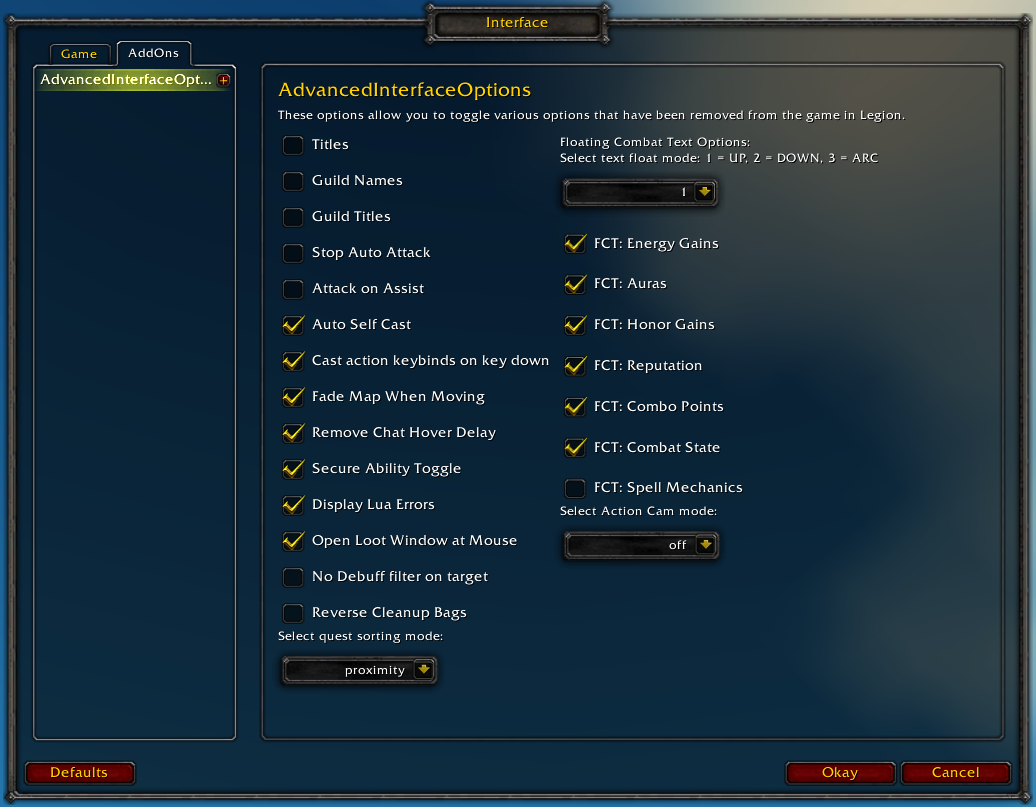
Restores access to hidden interface options and provides a way to browse every CVar setting in the game!
General
Player Titles
Guild Names
Guild Titles
Stop Auto Attack
Attack on Assist
Cast action keybinds on key down
Fade Map when Moving
Secure Ability Toggle
Display Lua Errors
No Debuff Filter on Target
Reverse Cleanup Bags
Quest sorting mode (top vs proximity)
Select Action Cam mode
Chat
Remove Chat Hover Delay
Enable Mouse Wheel Scrolling
Floating Combat Text
Float mode (up/down/arc)
Energy Gains
Auras
Honor Gains
Reputation
Combo Points
Combat State (Entering/Leaving Combat)
Spell Mechanics
Healing
Absorb (Self and Target)
Directional Scale (brings back the classic, only upwards moving text)
Low HP/Mana
Plus many other options available through the built-in CVar browser, including some that have never been exposed by Blizzard, such as "violence level" and "nameplate distance"!
Type /aio for the main menu or /cvar to open the CVar browser directly
Is there a way to disable the new trade prompt window? I went through the options and couldn't find one so I'm not sure if this is something that is controllable.
that would be lovely yeah , if you can't be sure you are gonna trade something by pushing the button ....... , this new feature reminds me too much of Windows UAC :(
anyone know how to remove the healing you are receiving from the floatingcombat text? they only thing i wanna see is my damage, procs(im warrior ie. execute,tactitican and overpower) I dont wanna see the healing im receiving, tics or dmg taken either. the only thing i have check or "1" is combat damage, combat damage all, combat state, and reactive. this is all under the category floatingcombattext.
If you want to turn off healing/damage received while still seeing the other stuff, turn this snippet into an addon with http://addon.bool.no/
for _, v in pairs({"HEAL", "HEAL_CRIT", "PERIODIC_HEAL", "PERIODIC_HEAL_CRIT", "DAMAGE", "DAMAGE_CRIT", "SPELL_DAMAGE", "SPELL_DAMAGE_CRIT"}) do COMBAT_TEXT_TYPE_INFO[v].show = false end
Any chance of adding the ability to save and load cvar profiles after reload/login or on demand? I know the game UI and sometimes other addons reset cvar settings, so having a quick way to restore multiple cvar settings would be great. I know I could make a macro, up to a point at least.
I ask because right now I want to set spellActivationOverlayOpacity lower than .5, which is the lowest you can go on the default Blizzard slider (except for completely off). But when I change the cvar, anytime I reload it resets to .5. I know this is probably just dumb Blizzard UI behavior, which is why loading custom cvar settings after login/reload might be beneficial.
cameraDistanceMaxFactor keeps resetting on characters with AIO enabled whenever you log a character with it disabled.
Set your favourite cameraDistanceMaxFactor in AIO, log out that char, log a char with AIO disabled, now log the first char again with AIO enabled, cameraDistanceMaxFactor is now back to default 1.6.
TopInset and BottomInset also randomly reset to defaults, even though advancedinterfaceoptions.lua in saved variables are set to -1, they seem to be ignored.


-
View User Profile
-
Send Message
Posted Oct 26, 2016Love the addon. For some reason editing horizontal/vertical scale of nameplates doesn't work (I tried with larger nameplates setting off and on).
-
View User Profile
-
Send Message
Posted Oct 26, 2016Can you add support for WorldTextScale
-
View User Profile
-
Send Message
Posted Jan 15, 2017Late reply, WorldTextScale should be added in the next version
-
View User Profile
-
Send Message
Posted Oct 25, 2016There is a new cvar for nameplates.
SetCVar("nameplateShowFriendlyNPCs",1)
It's annoying how many CVars there are for nameplates alone...
-
View User Profile
-
Send Message
Posted Oct 27, 2016the green friendly NPC's only show when targeted , is this a result of this new CVar ?
-
View User Profile
-
Send Message
Posted Oct 25, 2016Is there a way to disable the new trade prompt window? I went through the options and couldn't find one so I'm not sure if this is something that is controllable.
-
View User Profile
-
Send Message
Posted Oct 26, 2016that would be lovely yeah , if you can't be sure you are gonna trade something by pushing the button ....... , this new feature reminds me too much of Windows UAC :(
-
View User Profile
-
Send Message
Posted Oct 26, 2016...
-
View User Profile
-
Send Message
Posted Nov 5, 2016blizz hotfixed this out ;)
-
View User Profile
-
Send Message
Posted Oct 25, 2016Anyway to change CVar 'cameraDynamicPitchBaseFovPad' now? Editing using aio doesnt seem to work.
-
View User Profile
-
Send Message
Posted Oct 25, 2016Ow, it apparently got renamed to test_cameraDynamicPitchBaseFovPad for the reintroduced Action Cam
-
View User Profile
-
Send Message
Posted Oct 16, 2016anyone know how to remove the healing you are receiving from the floatingcombat text? they only thing i wanna see is my damage, procs(im warrior ie. execute,tactitican and overpower) I dont wanna see the healing im receiving, tics or dmg taken either. the only thing i have check or "1" is combat damage, combat damage all, combat state, and reactive. this is all under the category floatingcombattext.
TY so much guys
-
View User Profile
-
Send Message
Posted Oct 16, 2016If you want to turn off healing/damage received while still seeing the other stuff, turn this snippet into an addon with http://addon.bool.no/
for _, v in pairs({"HEAL", "HEAL_CRIT", "PERIODIC_HEAL", "PERIODIC_HEAL_CRIT", "DAMAGE", "DAMAGE_CRIT", "SPELL_DAMAGE", "SPELL_DAMAGE_CRIT"}) do COMBAT_TEXT_TYPE_INFO[v].show = false end-
View User Profile
-
Send Message
Posted Oct 17, 2016damn how do i do that?! im so lost T_T
-
View User Profile
-
Send Message
Posted Oct 17, 2016so i figured it out, created my addon with that but it's still not working =/
-
View User Profile
-
Send Message
Posted Oct 25, 2016-
View User Profile
-
Send Message
Posted Oct 11, 2016Having a problem queuing for BGs and it cites this as the issue.
Figured it's easier to show ya, so here is the picture.
-
View User Profile
-
Send Message
Posted Oct 9, 2016Any chance of adding the ability to save and load cvar profiles after reload/login or on demand? I know the game UI and sometimes other addons reset cvar settings, so having a quick way to restore multiple cvar settings would be great. I know I could make a macro, up to a point at least.
I ask because right now I want to set spellActivationOverlayOpacity lower than .5, which is the lowest you can go on the default Blizzard slider (except for completely off). But when I change the cvar, anytime I reload it resets to .5. I know this is probably just dumb Blizzard UI behavior, which is why loading custom cvar settings after login/reload might be beneficial.
Anyway, just a thought. Thanks!
-
View User Profile
-
Send Message
Posted Oct 8, 2016cameraDistanceMaxFactor keeps resetting on characters with AIO enabled whenever you log a character with it disabled.
Set your favourite cameraDistanceMaxFactor in AIO, log out that char, log a char with AIO disabled, now log the first char again with AIO enabled, cameraDistanceMaxFactor is now back to default 1.6.
TopInset and BottomInset also randomly reset to defaults, even though advancedinterfaceoptions.lua in saved variables are set to -1, they seem to be ignored.
Using latest 1.0.5-6 alpha.
-
View User Profile
-
Send Message
Posted Oct 8, 2016This is a Blizzard bug that will be fixed in patch 7.1
AIO sets and gets that cvar (without overriding it from the SavedVariables), and prevents that cvar getting clamped/reset back to 1.9
So if the addon isn't loaded on one of your other characters, this problem happens :(