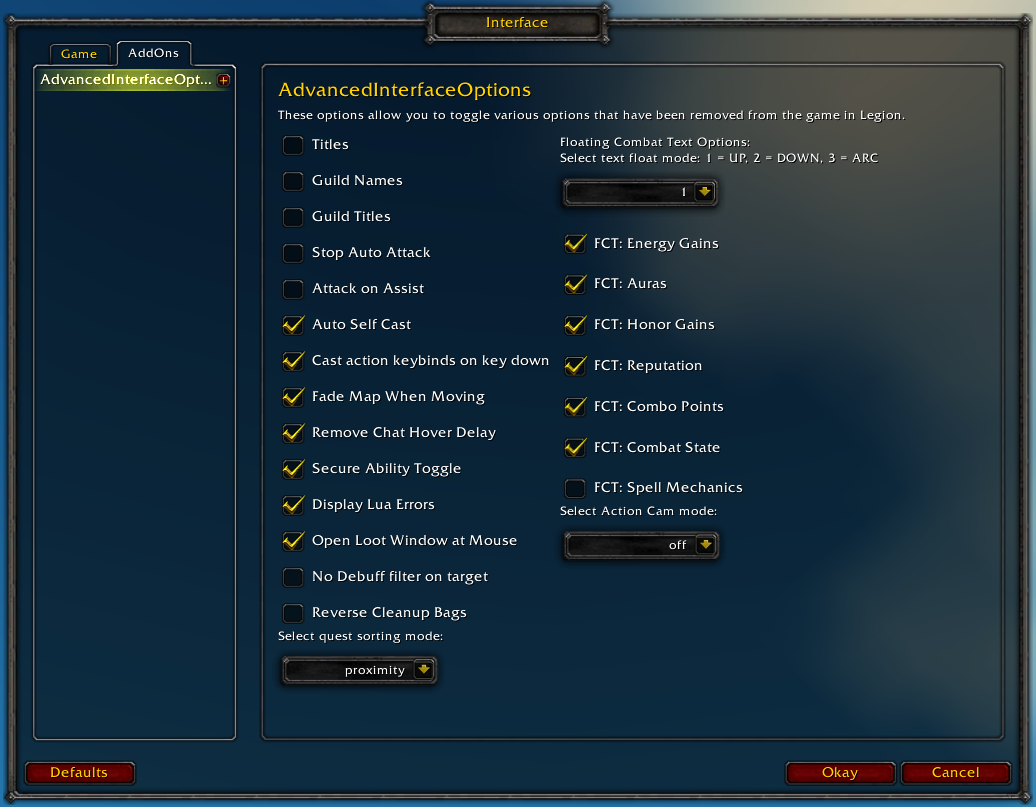
Restores access to hidden interface options and provides a way to browse every CVar setting in the game!
General
Player Titles
Guild Names
Guild Titles
Stop Auto Attack
Attack on Assist
Cast action keybinds on key down
Fade Map when Moving
Secure Ability Toggle
Display Lua Errors
No Debuff Filter on Target
Reverse Cleanup Bags
Quest sorting mode (top vs proximity)
Select Action Cam mode
Chat
Remove Chat Hover Delay
Enable Mouse Wheel Scrolling
Floating Combat Text
Float mode (up/down/arc)
Energy Gains
Auras
Honor Gains
Reputation
Combo Points
Combat State (Entering/Leaving Combat)
Spell Mechanics
Healing
Absorb (Self and Target)
Directional Scale (brings back the classic, only upwards moving text)
Low HP/Mana
Plus many other options available through the built-in CVar browser, including some that have never been exposed by Blizzard, such as "violence level" and "nameplate distance"!
Type /aio for the main menu or /cvar to open the CVar browser directly
/run for _, v in pairs({"CombatState", "LowManaHealth", "EnergyGains", "Auras", "DodgeParryMiss", "FriendlyHealers", "DamageReduction", "HonorGains", "LowManaHealth", "Reactives", "RepChanges"}) do SetCVar("floatingCombatText"..v, 1) end ReloadUI()
If you click on the "Other Downloads" tab at the top of the description on this page, and download version 1.0.4 it should actually save and reapply all of your settings when you log on.
It was reverted in the latest version because some people complained (mainly other addon others) that it didn't play nice with other addons and I haven't come up with a suitable solution for it yet.
That must also mean some other addon or compilation (maybe Tukui) keeps changing that cvar, try testing that option with only AIO enabled and see if it's saving after a restart or /reload
On another note, the "Loot to leftmost bag" option is character-specific, you'd have to set that option on each of your respective toons, or use the mentioned 1.0.4 version
Am I the only one having trouble with getting the "Cast action keybinds on key down" to work? - This feature was one of the primary reasons why I downloaded this addon but sadly I can't get it to work 0.0
This seems apparently random but sometimes when zoning i lose the use of my extra buttons on my WoW MMO gaming mouse. To restore it i have to /aio and uncheck and recheck the "detect world of warcraft gaming mouse". Would it be possible for a fix to be added to do this automatically?
Just and FYI Quest sorting mode (top vs proximity) is not working. I Have always had Proximity on. quest log dose not change order or show just what is in the area. It will show ALL quest no matter there location, if its being tracked that all quest are by default
AIO does set the trackQuestSorting cvar to "proximity", but it looks like it's a Blizzard bug, SortQuestWatches() currently (Edit) sorts them in the reverse order :s
Would it be possible to disable the floating combat text healing info on the player? Specifically, I just want to see the combat state changes, but the heals on the player toggle with it, and they're obscuring my status bar under my feet.
What I meant was that the healing received toggles with the "Scrolling Combat Text for Self". This option needs to be on to be able to toggle "Enter/Leave Combat", so you have to have both on, or neither. I'll probably just setup a WeakAura for combat changes and leave the combat text for self option off.
This normally wouldn't be an issue, but I'm an undead subtlety rogue. I get periodic heals from being in Stealth/Shadow Dance, racial proc from dealing dmg, my leech stat, plus whatever heals I get from outside sources. It's a lot of smaller numbers that the built-in combat text can't filter out.
What I meant was that the healing received toggles with the "Scrolling Combat Text for Self". This option needs to be on to be able to toggle "Enter/Leave Combat", so you have to have both on, or neither.
Sorry for misunderstanding, maybe this snippet will help, put this in a WeakAura (or addon with http://addon.bool.no/)


-
View User Profile
-
Send Message
Posted Sep 9, 2016Try this script, this should be all of them
/run for _, v in pairs({"CombatState", "LowManaHealth", "EnergyGains", "Auras", "DodgeParryMiss", "FriendlyHealers", "DamageReduction", "HonorGains", "LowManaHealth", "Reactives", "RepChanges"}) do SetCVar("floatingCombatText"..v, 1) end ReloadUI()-
View User Profile
-
Send Message
Posted Sep 6, 2016I'm just wondering if I can disable Blizzard's incoming damage and Heal numbers on the combat text. I just want to keep my damage on the target.
-
View User Profile
-
Send Message
Posted Sep 7, 2016You can disable Scrolling Combat Text for Self in the Blizzard options or AIO options
http://i.imgur.com/bfwCYol.png
-
View User Profile
-
Send Message
Posted Sep 4, 2016"Loot to leftmost bag" is not saving via game restart or realoadui.
Please help, this is super frustrating.
-
View User Profile
-
Send Message
Posted Sep 4, 2016I'm finding the same thing and this is pretty much the main reason I got the addon! Please sort this it would be absolutely amazing!
-
View User Profile
-
Send Message
Posted Sep 5, 2016If you click on the "Other Downloads" tab at the top of the description on this page, and download version 1.0.4 it should actually save and reapply all of your settings when you log on.
It was reverted in the latest version because some people complained (mainly other addon others) that it didn't play nice with other addons and I haven't come up with a suitable solution for it yet.
-
View User Profile
-
Send Message
Posted Sep 5, 2016That must also mean some other addon or compilation (maybe Tukui) keeps changing that cvar, try testing that option with only AIO enabled and see if it's saving after a restart or /reload
On another note, the "Loot to leftmost bag" option is character-specific, you'd have to set that option on each of your respective toons, or use the mentioned 1.0.4 version
-
View User Profile
-
Send Message
Posted Sep 3, 2016Am I the only one having trouble with getting the "Cast action keybinds on key down" to work? - This feature was one of the primary reasons why I downloaded this addon but sadly I can't get it to work 0.0
-
View User Profile
-
Send Message
Posted Sep 4, 2016if you use Bartender, it's in there.
-
View User Profile
-
Send Message
Posted Sep 4, 2016If you aren't using the default action bars, the setting will only have an effect if your action bar addon respects it.
-
View User Profile
-
Send Message
Posted Sep 3, 2016This seems apparently random but sometimes when zoning i lose the use of my extra buttons on my WoW MMO gaming mouse. To restore it i have to /aio and uncheck and recheck the "detect world of warcraft gaming mouse". Would it be possible for a fix to be added to do this automatically?
And thank you for a great (much needed) addon.
-
View User Profile
-
Send Message
Posted Sep 1, 2016Just and FYI Quest sorting mode (top vs proximity) is not working. I Have always had Proximity on. quest log dose not change order or show just what is in the area. It will show ALL quest no matter there location, if its being tracked that all quest are by default
-
View User Profile
-
Send Message
Posted Sep 1, 2016AIO does set the trackQuestSorting cvar to "proximity", but it looks like it's a Blizzard bug, SortQuestWatches() currently (Edit) sorts them in the reverse order :s
-
View User Profile
-
Send Message
Posted Sep 1, 2016Would it be possible to disable the floating combat text healing info on the player? Specifically, I just want to see the combat state changes, but the heals on the player toggle with it, and they're obscuring my status bar under my feet.
-
View User Profile
-
Send Message
Posted Sep 1, 2016Don't think there's a separate option/cvar for the damage/healing received on the player
Are you sure healing received is toggled with the Combat State option? It only seems to be for the "Entering/Leaving Combat" messages
There might be an addon to move COMBAT_TEXT_LOCATIONS to not obscure the status bar under your feet
-
View User Profile
-
Send Message
Posted Sep 2, 2016What I meant was that the healing received toggles with the "Scrolling Combat Text for Self". This option needs to be on to be able to toggle "Enter/Leave Combat", so you have to have both on, or neither. I'll probably just setup a WeakAura for combat changes and leave the combat text for self option off.
This normally wouldn't be an issue, but I'm an undead subtlety rogue. I get periodic heals from being in Stealth/Shadow Dance, racial proc from dealing dmg, my leech stat, plus whatever heals I get from outside sources. It's a lot of smaller numbers that the built-in combat text can't filter out.
-
View User Profile
-
Send Message
Posted Sep 2, 2016Sorry for misunderstanding, maybe this snippet will help, put this in a WeakAura (or addon with http://addon.bool.no/)
-
View User Profile
-
Send Message
Posted Aug 28, 2016cameraDistanceMaxFactor resets back to 1.9 frequently.
-
View User Profile
-
Send Message
Posted Aug 28, 2016Do you have any idea how to reproduce this?
The cameraDistanceMaxFactor cvar is not resetting for me when I log out or /reload with only AIO v1.0.5 enabled
-
View User Profile
-
Send Message
Posted Aug 27, 2016Hello,
what is the variable so I could add percentage to enemy name plates? It's not showing atm
Thank you