ArkInventory
ArkInventory (for Retail, Classic, Burning Crusade, and, Mists of Pandaria)
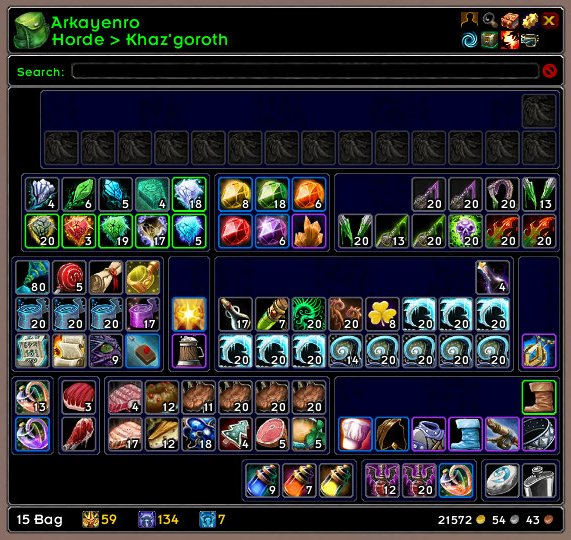
ArkInventory's display windows are built from "virtual bars", you assign categories to bars so that items in that category are displayed on the specific bars you want. There is no limit to the number of bars you can have inside a window but obviously you only have so much screen real estate before it becomes "too many".
ArkInventory uses several methods to assign a default category to an item such as what professions you have, tooltip scanning, basic type/subtype and PeriodicTable. You then assign those categories to a virtual bar.
You can also over-ride the default category by creating a rule that matches either a single or multiple items.
💥 Please ensure you check the latest alpha versions for any new releases when using an alpha, beta, or PTR client.
Overview:
- user configurable window width and height
- separate keybindings for each location for easy viewing
- assign items to a category of your choice (overrides the default assignment)
- assign categories to the bar of your choice
- unlimited number of bars (there are practical limits though before your screen becomes full)
- sort each bar differently if required
- user configurable bars per row
- sell junk items automatically or manually (delete available via a keybinding or right clicking when at a vendor)
- random pet and mount summons. can also assign a group of them to select from
Key Bindings:
- Press ESCAPE to bring up the blizzard menu
- click on Key Bindings
- scroll down to AddOns > ArkInventory
- bind the keys you want to use
Need Help?
📝 Wiki
📝 Sorting
📝 Rules
📝 If you are having an issue the first step is to disable all other mods and test with only ArkInventory loaded
📝 If the issue is still there, please check for an existing issue and create a new issue if required.
📝 If the issue is gone, re-enable your other mods one by one until the issue comes back, then note the last mod you enabled in your issue as well as notifying the author of the other mod
See ChangeHistory.md for changes to the latest version. See VersionHistory.md for all previous changes.
💥 The NoLib variant
it seems quite a few people are somehow getting the NoLib variant from their download client when they didn't specifically ask for it, instead of the full variant, and its causing issues as they don't have the required libraries installed separately. Please ensure you are downloading the full. if you see nolib in the filename then its the wrong variant, unless you are actually installing all of the required libraries separately as well. If you have to you can manually download the full variant from CurseForge, WoWInterface, or Wago.
💥 Junk Sell getting blocked
While auto-destroy remains blocked, From 30960 onwards you can setup a Key Binding to manually sell and destroy your items. Note that blizzard require one keypress per item deletion, so if you have multiple items that need to be deleted you will need to press the Key Binding multiple times. A message will be output if you have remaining items that can still be deleted.
⚠️ Ensure you have backup copies of your saved variables file
Sometimes you cannot revert back to a previous version without a backup, especially alpha or beta versions, so before upgrading please make sure you have made a backup of your saved variables file
Your saved variables file is normally located at ...\World of Warcraft\_client_\WTF\Account\yourwowaccountname\SavedVariables\ArkInventory.lua
It is your responsibility to ensure you have adequate backups of your saved variables file. You dont have to do them frequently, just after you've made major changes to your config is probably fine for most people, but you should get into the habit of making backups because when it does corrupt you wont have to reconfigure everything from scratch.
If you have your download client set to automatically download alpha/beta versions you should definitely have backups.
A simple way to back up the saved variables file is to just do a copy and paste then rename the new file (using the version number of ArkInventory or the date is a good idea), eg ArkInventory-30900.lua, or ArkInventory-20191228.lua
Comments

-

Arkayenro Owner
-
View User Profile
-
Send Message
Posted Oct 4, 2026On wow forever, if you open the bank,then any time you buy, sell, send mail, train or take a FP afterwards I am getting the following error. ReloadingUI makes it stop until you open your bank again. Disabling the addon allows you to operate the bank normally without error.
The error:
Message: .../AddOns/Blizzard_UIPanels_Game/Camelot/BankFrame.lua:43: bad argument #1 to 'FetchNumPurchasedBankTabs' (Usage: local numPurchasedBankTabs = C_Bank.FetchNumPurchasedBankTabs(bankType))
Time: Sat Oct 3 23:20:12 2026
Count: 2
Stack:
[Interface/AddOns/Blizzard_UIPanels_Game/Camelot/BankFrame.lua]:43: in function <.../AddOns/Blizzard_UIPanels_Game/Camelot/BankFrame.lua:41>
[C]: ?
[Interface/AddOns/Blizzard_SharedXMLBase/CallbackRegistry.lua]:210: in function <...e/AddOns/Blizzard_SharedXMLBase/CallbackRegistry.lua:209>
[C]: ?
[Interface/AddOns/Blizzard_SharedXMLBase/CallbackRegistry.lua]:213: in function 'TriggerEvent'
[Interface/AddOns/Blizzard_UIPanels_Game/Camelot/BankFrame.lua]:405: in function 'Refresh'
[Interface/AddOns/Blizzard_UIPanels_Game/Camelot/BankFrame.lua]:427: in function <.../AddOns/Blizzard_UIPanels_Game/Camelot/BankFrame.lua:425>
Locals:
self=BankFrame <BankFrame.xml:59>{
bought=false
currentBankPage=1
itemButtonBagPool=<table>
bankPageTabPool=<table>
accountBankTabID=2
TitleContainer=Frame <SharedUIPanelTemplates.xml:600>
LeftJumpHint=Frame <SharedUIPanelTemplates.xml:618>
TabIDToBankType=<table>
callbackRegistrantHandlers=<table>
deferredCallbacks=<table>
executingEvents=<table>
BagText=FontString <BankFrame.xml:68>
BankPanel=BankPanel <BankFrame.xml:85>
Bg=BankFrameBg <SharedUIPanelTemplates.xml:627>
BankItemSearchBox=BankItemSearchBox <BankFrameTemplates.xml:689>
NineSlice=Frame <SharedUIPanelTemplates.xml:573>
Event=<table>
FocusJumpHint=Frame <SharedUIPanelTemplates.xml:620>
RightJumpHint=Frame <SharedUIPanelTemplates.xml:619>
characterBankTabID=1
callbackTables=<table>
FrameGlow=Frame <SharedUIPanelTemplates.xml:599>
layoutType="PortraitFrameTemplate"
BagCost=FontString <BankFrame.xml:62>
PortraitContainer=Frame <SharedUIPanelTemplates.xml:574>
Background=Texture <BankFrameTemplates.xml:671>
TopTileStreaks=Texture <SharedUIPanelTemplates.xml:635>
CloseButton=BankFrameCloseButton <SharedUIPanelTemplates.xml:660>
}
bankType=nil
-
View User Profile
-
Send Message
Posted Oct 3, 2026Does Arkinventory announce paragon rewards for Midnight factions? I am still getting them for previous expansions but nothing for Midnight.
-
View User Profile
-
Send Message
Posted Oct 3, 2026@pensive_wozniak6782196 it should do, the midnight factions follow the same paragon structure as the previous ones
-
View User Profile
-
Send Message
Posted Sep 30, 2026Is there a way to have the tooltip not show hearthstones? I have plenty of chars and the list of who has one is huge.
-
View User Profile
-
Send Message
Posted Oct 2, 2026@Nerdizio yes, enable edit mode, click on the item, click on item count in that menu so it goes red/disabled
-
View User Profile
-
Send Message
Posted Sep 30, 2026I know you don't have beta access, but Forever is giving this command when your gold changes sometimes
Message: .../AddOns/Blizzard_UIPanels_Game/Camelot/BankFrame.lua:43: bad argument #1 to 'FetchNumPurchasedBankTabs' (Usage: local numPurchasedBankTabs = C_Bank.FetchNumPurchasedBankTabs(bankType))
Time: Wed Sep 30 09:45:22 2026
Count: 2
Stack:
[Interface/AddOns/Blizzard_UIPanels_Game/Camelot/BankFrame.lua]:43: in function <.../AddOns/Blizzard_UIPanels_Game/Camelot/BankFrame.lua:41> with args (self=BankFrame <BankFrame.xml:59>)
[C]: ?
[Interface/AddOns/Blizzard_SharedXMLBase/CallbackRegistry.lua]:210: in function <...e/AddOns/Blizzard_SharedXMLBase/CallbackRegistry.lua:209> with args (owner=BankFrame <BankFrame.xml:59>, func=<function> defined @Interface/AddOns/Blizzard_UIPanels_Game/Camelot/BankFrame.lua:41)
[C]: ?
[Interface/AddOns/Blizzard_SharedXMLBase/CallbackRegistry.lua]:213: in function 'TriggerEvent' with args (self=<table>, event="BankPanelMixin.ShowOrHideBagCost")
[Interface/AddOns/Blizzard_UIPanels_Game/Camelot/BankFrame.lua]:405: in function 'Refresh' with args (self=Frame <BankFrame.xml:96>)
[Interface/AddOns/Blizzard_UIPanels_Game/Camelot/BankFrame.lua]:427: in function <.../AddOns/Blizzard_UIPanels_Game/Camelot/BankFrame.lua:425> with args (self=Frame <BankFrame.xml:96>, event="PLAYER_MONEY")
Locals:
self=BankFrame <BankFrame.xml:59>{
itemButtonBagPool=<table>
bankPageTabPool=<table>
accountBankTabID=2
TitleContainer=Frame <SharedUIPanelTemplates.xml:600>
LeftJumpHint=Frame <SharedUIPanelTemplates.xml:618>
TabIDToBankType=<table>
callbackRegistrantHandlers=<table>
deferredCallbacks=<table>
executingEvents=<table>
BagText=FontString <BankFrame.xml:68>
BankPanel=BankPanel <BankFrame.xml:85>
Bg=BankFrameBg <SharedUIPanelTemplates.xml:627>
BankItemSearchBox=BankItemSearchBox <BankFrameTemplates.xml:689>
NineSlice=Frame <SharedUIPanelTemplates.xml:573>
Event=<table>
FocusJumpHint=Frame <SharedUIPanelTemplates.xml:620>
RightJumpHint=Frame <SharedUIPanelTemplates.xml:619>
characterBankTabID=1
callbackTables=<table>
FrameGlow=Frame <SharedUIPanelTemplates.xml:599>
layoutType="PortraitFrameTemplate"
BagCost=FontString <BankFrame.xml:62>
PortraitContainer=Frame <SharedUIPanelTemplates.xml:574>
Background=Texture <BankFrameTemplates.xml:671>
TopTileStreaks=Texture <SharedUIPanelTemplates.xml:635>
CloseButton=BankFrameCloseButton <SharedUIPanelTemplates.xml:660>
}
bankType=nil
-
View User Profile
-
Send Message
Posted Oct 2, 2026@The_Palleh is that with alpha 8?
-
View User Profile
-
Send Message
Posted Sep 29, 2026Hi, first, this addon has been with me since day 1!!
Now, with the controller option we get, I sadly can not use it anymore. Is there any way that this can be updated to be compatible with controller? I bet more people regret not being able to use it with this new option.
Thanks in advance and hopefully it will work with controller in the future!!
-
View User Profile
-
Send Message
Posted Sep 26, 20263.12.16 alpha 3 fixed the guild bank issue
3.12.16 alpha 4 might work with forever (i dont have a beta invite yet so cant tell for sure)
please check alpha versions for fixes you may need
any issue should be lodged via the issues link - curse does not notify me about comments or private messages
-
View User Profile
-
Send Message
Posted Sep 26, 2026@Arkayenro Someone get this guy a beta key.
-
View User Profile
-
Send Message
Posted Sep 29, 2026@Arkayenro The guild bank is still not working for me. Is there something else I should do other than install the update?
-
View User Profile
-
Send Message
Posted Sep 30, 2026@Arkayenro stored character data gets overwritten if you have multiple characters with the same first name.
-
View User Profile
-
Send Message
Posted Sep 21, 2026I second everyone below. This awesome addon is deeply needed in Forever!
-
View User Profile
-
Send Message
Posted Sep 23, 2026@Cnas you can try this https://www.curseforge.com/wow/addons/arkinventoryforever
Also, be sure to read the description for ArkInventoryForever. You'll need this original version here + ArkInventoryForever.
And Forever Beta still has a bug that prevents SavedVariables from loading properly. I therefore recommend using “WTFix.” You can find it here on Curse.
-
View User Profile
-
Send Message
Posted Sep 23, 2026@guardycmw Cool! I will try it out today or tomorrow :)
I know about the WTF issue, hopefully bliz solves it in their patch tomorrow
-
View User Profile
-
Send Message
Posted Sep 18, 2026Are there plans to develop this for WoW Forever?
-
View User Profile
-
Send Message
Posted Sep 19, 2026@Severd8 That's the question I came here to find out.
-
View User Profile
-
Send Message
Posted Sep 21, 2026@PastaMatt I sent the developer a message last week asking if he’s also working on a version for FOREVER. For now, I’ve managed to get the add-on working for myself.
If I don’t hear back from the author soon, I’ll upload my version here. I’ll probably post another update here, but you’re also welcome to follow my profile.
Important note: Although Forever currently saves the SavedVariables, it doesn’t restore them properly or load them correctly. There’s a workaround for this, which I’ll link to if needed. It wasn’t created by me.
-
View User Profile
-
Send Message
Posted Sep 21, 2026@Severd8 I sent the developer a message last week asking if he’s also working on a version for FOREVER. For now, I’ve managed to get the add-on working for myself.
If I don’t hear back from the author soon, I’ll upload my version here. I’ll probably post another update here, but you’re also welcome to follow my profile.
Important note: Although Forever currently saves the SavedVariables, it doesn’t restore them properly or load them correctly. There’s a workaround for this, which I’ll link to if needed. It wasn’t created by me.
-
View User Profile
-
Send Message
Posted Sep 18, 2026Like others I noticed the guild bank not opening so I disabled addons one by one to see which one was causing it and it was this addon. Hopefully you guys are able to eventually fix the issue. I love this addon btw and have used it for years.