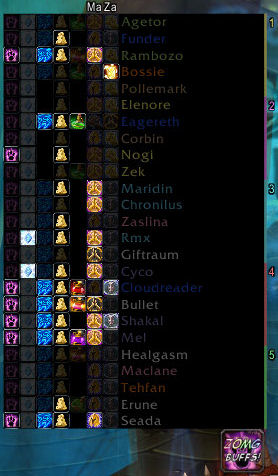
ZOMGBuffs
All in one buffing mod for all classes, overview of important raid buffs and instant access rebuff on right click.
Main Mod
- Responsible for loading class specific modules.
- Has FuBar/Minimap icon for options menu (Sorry, I just don't like Waterfall at all), and info tooltip.
- Single click minimap icon to quickly enable/disable auto-buffing.
- Raid popup list with complete buff overview (just mouseover the floating ZOMG icon).
- Highlights missing buffs for whole raid at a glance.
- Shows time remaining on your buffs on whole raid.
- Allows instant rebuff with Right-Click as assigned by seperately loaded modules, without having to muck around finding the player in the raid frames.
- Shows in-combat reminder (swirly thing around icon) if someone needs a rebuff mid-fight.
- Auto Buy reagents to defined levels.
Self Buffs
- Handles all self buffing needs including temporary weapon enchants and poisons.
- Can remind you in-combat when something needs rebuffing.
- Special cases to auto buff Crusader Aura for paladins when mounted, and aspect of cheetah for hunters in cities.
Buff Teh Raid
- Group class buffing module for raid buffs (Mana, Kings, Stamina etc).
- Allows you to define which groups you're responsible for.
- Enable or Disable buffs by clicking on the minimap tooltip for that buff.
- Selective buffing for single target raid buffs such as Thorns or Amplify/Dampen Magic.
- Unique Buff Tracking icon for Earth Shield, Fear Ward, Hand of Freedom and Hand of Sacrifice, which allows you to keep close watch on these buffs and easily recast with a click.
Common Behaviour for Buffing modules
- Manually casting a buff will be remembered (with a few exceptions which shouldn't) as the new required auto buff.
- Click the tooltip sectoin for that mod will cycle through buffs.
- Shift Clicking the tooltip section for that mod will remove it's entry from the template.
- Template save/load/conditionals.
- Simple mousewheel rebuffing in one common interface.
- Simple Right-Click rebuffing of your defined buffs for whichever module you have loaded.
- Definable pre-expiry rebuff setting.
- Options to not buff when:
- Not everyone in raid is present (definable to a % of people present).
- Not everyone in a party is present.
- You are resting.
- You are low on mana.
- You have the Spirit Tap buff (geiv mana regen!).
Thanks
As always, many thanks to our tireless raid leader for ignoring me going AFK at various points to fix some problem. And to our Paladins, without whom this mod would not have been possible without their constant downloading and re-downloading of early alphas.
Donations
While donations are not ever expected they do help, and recent donations by a kind few are one of the reasons I have returned at this time to resume work on this and other mods. Please do consider how worthwhile ZOMGBuffs is to you and help to continue it's support into the future.
PayPal: [email protected]
Comments


-

Forge_User_26050436 Owner
-
_ForgeUser451653 Maintainer
-
View User Profile
-
Send Message
Posted Aug 8, 2019Classic is Comming!
Make ZOMGBuffs great again! <3
-
View User Profile
-
Send Message
Posted Jan 11, 2014I started using BigBrother as a replacement but I haven't managed to find anything that I liked quite as much as Zomgbuffs.
Really wish that someone would find the time to fix and update it.
-
View User Profile
-
Send Message
Posted Sep 5, 2013Any replacement for this?
-
View User Profile
-
Send Message
Posted May 20, 2013Anyone know of a way to get just the portals part into it's own addon for use? It's the only part of ZOMG I can't find a good replacement for.
-
View User Profile
-
Send Message
Posted Jun 8, 2013Mage nuggets?
-
View User Profile
-
Send Message
Posted Jul 7, 2013opie hat a pretty goof one for portals
-
View User Profile
-
Send Message
Posted May 15, 2013"Raid Buff Status" is a good alternative to this addon.
-
View User Profile
-
Send Message
Posted Dec 27, 2012Since this addon is brokenish and abandonedish, I started using Smartbuff.
-
View User Profile
-
Send Message
Posted Jan 16, 2013It is indeed what you said. Not worth it anymore ;/
-
View User Profile
-
Send Message
Posted Nov 24, 2012The pala riding aura "Herz des Kreuzfahrers" is stil shown. Please remove it. The pala seals and buffs do not work.
-
View User Profile
-
Send Message
Posted Nov 7, 2012u guys releasing to support 5.0.5?
-
View User Profile
-
Send Message
Posted Oct 14, 2012Should be able to fix some problems by a simple find/replace in the .lua files,
Specifically, search for "GetNumPartyMembers" and "GetNumRaidMembers", and replace them both with "GetNumGroupMembers".
That fixed the problems that the addon was throwing for me (using the current ALPHA version).
-
View User Profile
-
Send Message
Posted Oct 14, 20124x ZOMGBuffs\ZOMGBuffs-r215.lua:3725: table index is nil ZOMGBuffs\ZOMGBuffs-r215.lua:3725: in function "OnRaidRosterUpdate" ZOMGBuffs\ZOMGBuffs-r215.lua:4139: in function "func" ZOMGBuffs\ZOMGBuffs-r215.lua:2022: in function <ZOMGBuffs\ZOMGBuffs.lua:2014>
Locals: self = <table> { UNIT_SPELLCAST_CHANNEL_START = <func> @..\ZOMGBuffs.lua:4080 RegisterModuleOptions = <func> @..\ZOMGBuffs.lua:4564 copy = <func> @..\ZOMGBuffs.lua:154 MovableNoticeWindow = <func> @..\ZOMGBuffs.lua:1709 SetIconSize = <func> @..\ZOMGBuffs.lua:1932 SecureHook = <func> @Skillet\Libs\..\AceHook-3.0.lua:339 PLAYER_UPDATE_RESTING = <func> @..\ZOMGBuffs.lua:4146 unknownUnits = <table> {} linkSpells = true defaultModulePrototype = <table> {} PLAYER_REGEN_DISABLED = <func> @..\ZOMGBuffs.lua:4050 GetSinkAce3OptionsDataTable = <func> @Archy\Libs\..\LibSink-2.0.lua:603 state = "party" SetAllBarSizes = <func> @..\ZOMGBuffs.lua:2859 UnitRank = <func> @..\ZOMGBuffs.lua:1246 SetACellSpell = <func> @..\ZOMGBuffs.lua:2385 GetFont = <func> @..\ZOMGBuffs.lua:1576 ADDON_LOADED = <func> @..\ZOMGBuffs.lua:4767 UNIT_POWER = <func> @..\ZOMGBuffs.lua:4372 RegisterMessage = <func> @Skillet\Libs\..\CallbackHandler-1.0.lua:118 UnregisterMessage = <func> @Skillet\Libs\..\CallbackHandler-1.0.lua:181 RegisterSink = <func> @Archy\Libs\..\LibSink-2.0.lua:714 UNIT_SPELLCAST_SENT = <func> @..\ZOMGBuffs.lua:3918 hooks = <table> {} AnyBlacklisted = <func> @..\ZOMGBuffs.lua:3892 db = <table> {} classIndex = <table> {} SchedCancel = <func> @..\ZOMGBuffs.lua:2069 Hook = <func> @Skillet\Libs\..\AceHook-3.0.lua:277 totalListWidth = 192 Blacklist = <func> @..\ZOMGBuffs.lua:3874 SetSort = <func> @..\ZOMGBuffs.lua:2526 InitCell = <func> @..\ZOMGBuffs.lua:3597 modules = <table> {} LinkSpell = <func> @..\ZOMGBuffs.lua:1460 PLAYER_CONTROL_GAINED = <func> @..\ZOMGBuffs.lua:4073 OnEnable = <func> @..\ZOMGBuffs.lua:4958 HexColour = <func> @..\ZOMGBuffs.lua:1600 OnTooltipUpdate = <func> @..\ZOMGBuffs.lua:4195 ColourUnitByName = <func> @..\ZOMGBuffs.lua:1611 IsInBattlegrounds = <func> @..\ZOMGBuffs.lua:4579 lastNoticeTime = 4399.267 SetBuffsList = <func> @..\ZOMGBuffs.lua:4629 zoneFlag = 4443.107 SetKeyBindings = <func> @..\ZOMGBuffs.lua:4158 manaClasses = <table> {} IsEnabled = <func> @Skillet\Libs\..\AceAddon-3.0.lua:467 IterateRoster = <func> @..\ZOMGBuffs.lua:1223 classReverse = <table> {} del = <func> @..\ZOMGBuffs.lua:121 CanCheckBuffs = <func> @..\ZOMGBuffs.lua:2149 ReagentExpired = <func> @..\ZOMGBuffs.lua:1653 ScheduleRepeating = <func> @..\ZOMGBuffs.lua:2053 PLAYER_DEAD = <func> @..\ZOMGBuffs.lua:4361 UNIT_PET = <func> @..\ZOMGBuffs.lua:4089 versionCompat = -16612 CreateBorder = <func> @..\ZOMGBuffs.lua:1955 OnClick = <functi
-
View User Profile
-
Send Message
Posted Oct 4, 2012Flask of Enhancement item ID is now 75525 , not 58149 ..you need refresh table "alchFlasks"
-
View User Profile
-
Send Message
Posted Sep 30, 2012Thanks for the replies - Sadly however, Broker_Portals does not really have the same look or feel as the Portalz part of ZomgBuffs do, which is kinda what I'm looking for. OPie was a step in the right direction, but it seems to include "too much", making the addon take up a lot more memory than it has to. Basically what I'm looking for is the same look and feel as the Portalz part of ZomgBuff, as it fits perfectly into my UI, however I've been unable to locate such a thing. If I knew any lua-coding, I would have "extracted" the Portalz module and used that (personally, not published), sadly I wouldn't even know where to start.
-
View User Profile
-
Send Message
Posted Sep 20, 2012My favorite for portals is OPie, I also use if for trade skills and quest items. It hotkey's and circles around your mouse of center of screen and works directionally so you don't even have to click, its super slick.
But oh, yeah love ZomgBuffs. Please keep working on it. Best buffing mod out there. Thx for all your hard work.
-
View User Profile
-
Send Message
Posted Sep 19, 2012@Jais
Take a look at Broker_Portals if all you want is something to handle teleports, portals, hearthstones, rings, and even cloaks. Besides being an LDB plugin, I'm fairly certain it can attach to the minimap if you don't have an LDB display addon.
-
View User Profile
-
Send Message
Posted Sep 18, 2012Hi - ZOMG works fine - except one thing - my hunter uses Aspect of the Iron Hawk - and this is not known by ZOMG - it keeps buggin me for Aspect of the Hawk ...
Anyways - I really want to say thanks for this add-on!
-
View User Profile
-
Send Message
Posted Sep 16, 2012Hi, just a curious question... Any chance the Portalz mod can be made into a separate mod? I'm currently only using this for that module, and the recent errors with the core mod seems to break the Portalz module. Please excuse me if such a branch already exist, and then kindly point me in that direction :)
-
View User Profile
-
Send Message
Posted Sep 14, 2012@HlGHLANDER
Highlander, For your second error, open up the ..\AddOns\ZOMGBuffs\ZOMGBuffs.lua file with notepad. Do a find and replace for: Find - GetNumRaidMembers Replace - GetNumGroupMembers
Then for good meaure do another find and replace for: Find - GetNumPartyMembers Replace - GetNumSubgroupMembers