73 - Multiple issues (Eivar)
* Profiles not behaving as expected when loaded on other characters
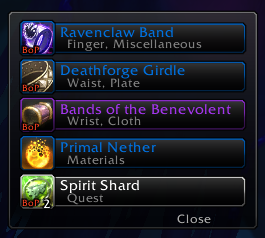
- Upon loading a profile no settings are applied until reload. This is not intended and will be changed. This also ties in to settings not applying without a /reload in general.
* Loot frame cannot be moved without looting something
- To alleviate having to turn auto-loot off, try just holding the auto-loot key as it will act as "Do not autoloot this time"
- I may add a separate, draggable anchor for the loot frame, but until then this is expected behavior (As with the old version)
* Loot frame ignores "draggable" setting
- I could not confirm this, it would not drag when I disabled "draggable"
* Loot frame resets position on log-in
- I could not confirm this either, it also saved across characters with the same profile.
* Addon errors
- I need to know what errors you are getting to do anything about them.
* May stop using due to issues
- Unfortunate, but in the end it's no skin off my back =). I am glad to work with you to improve it, however.
- It might be a good idea to remove any lingering "XLoot" addons, as well as resetting XLoot's options to start fresh.
- 10 comments
- 10 comments
Facts
- Last updated
- Feb 02, 2013
- Reported
- Feb 01, 2013
- Status
- Fixed - Developer made requested changes. QA should verify.
- Type
- Defect - A shortcoming, fault, or imperfection
- Priority
- Medium - Normal priority.
- Votes
- 0
- Reply
- #10
Xuerian Feb 02, 2013 at 22:38 UTC - 1 likeGlad we could get this fixed. Thanks for helping out, your reports were excellent =)
- Reply
- #9
Eivar Feb 02, 2013 at 20:44 UTC - 0 likes@Xuerian: Go
Thank you, thank you, thank you!
- Reply
- #8
Xuerian Feb 02, 2013 at 12:05 UTC - 0 likes@Eivar: Go
Good to hear =)
As far as fracturing (Good term, really) monitor, yeah. I'm not sure what's going on here, but I've experienced it and am keeping track of it here: http://www.wowace.com/addons/xloot/tickets/77-loot-monitor-rows-fail-to-anchor-properly-dullahan001/
Not sure what I can do about copying profiles being a little wonky. That "Profile" page is a standard AceConfigDialog pane, unfortunately.
What else does that leave us with, problem-wise?
- Reply
- #7
Eivar Feb 02, 2013 at 11:54 UTC - 0 likes@Xuerian: Go Doh! OK, I downloaded the revision and checked again.
Just a couple small issues, nothing very big at all but they might come up --
Thank you so much for such a quick fix!
- Reply
- #6
Xuerian Feb 02, 2013 at 09:47 UTC - 0 likes@Eivar: Go
Is this with z8-release? I tried to fix a lot of those issues in that.
Edit: The one thing that IS intended is the + doesn't show up because the options don't actually load until you click that or use /xloot. Saves some resources =)
Edit 2: There's also something fishy going on with your profiles. I don't have any "Master Profile", ever. And these are the always-there ones I get: http://db.tt/F6BeDLn8
Here's after creating 'Bxxx' and logging on to a different character: http://db.tt/ajN14b3m
Could you try disabling everything but XLoot* and seeing if the profiles continue to behave this way?
- Reply
- #5
Eivar Feb 02, 2013 at 09:34 UTC - 0 likesProfiles tested. Don't know if any of this is helpful but saving profiles (and copying them) appears to still be wonky:
By the way, did you receive reports that under Game Options/Interface/Addons, if you scroll down you see XLoot without the + sign, unlike other addons. If you click on XLoot it brings up the + sign, but you have to scroll back down to it again and click it to see the options. Not a big deal, just thought I'd mention it.
- Reply
- #4
Eivar Feb 02, 2013 at 08:35 UTC - 0 likesOK all my characters are now XLooted properly.
1. Somewhere between the 3rd and 4th characters, the "draggable loot frame" option began working. This may be a slight conflict with another add-on, because I have some add-ons disabled on some toons, but on the 4th character I couldn't drag it when the option box was unchecked. SO that seems to be working as intended. If I ever find out which add-on might be messing with it, I'll let you know. I have 88 add-ons in various states of enabled/disabled =/
2. The add-on "MoveAnything" =might= have an incompatibility somewhere that results in those anchors not staying put. It doesn't break anything, but it reset my anchor positions. On my 3rd character I decided to change my "MoveAnything" profile to a different one, which forced a UI reload. When I came back from that, my XLoot anchors were all over the place again even though I was using the "default" XLoot profile. I changed the XLoot profile to a different one, reloaded the UI, then changed it back to "default" and reloaded again. That fixed it, and every other character I logged onto worked just fine after that.
3. I'll test the profile updates and see how that works now.
I hope this helps!
- Reply
- #3
Xuerian Feb 02, 2013 at 02:21 UTC - 0 likesI've pushed some changes with how profile updates are handled. See if that works better for you! It shouldn't require anything arcane this time around.
- Reply
- #2
Xuerian Feb 01, 2013 at 08:51 UTC - 0 likes@Eivar: Go
I'll be sure to add a note to cleanly install it. I had hoped it would be unnecessary due to settings changes, but obviously not!
So:
- Reply
- #1
Eivar Feb 01, 2013 at 08:44 UTC - 0 likesHi hi! Had some success after uninstalling all of the old xloot and settings for them, then reinstalling the new version. I guess this has to be in huge 120-pt font for dummies like me to actually see...but since the curse updater doesn't scream it, and I don't read changelogs much, it's my bad!
Here's what I posted at Curse after reinstalling:
The good news: completely uninstalling all old xloot installations, including settings, then reinstalling the new xloot makes the login error go away. Swatter catches only 1 small error but doesn't say what it is so I can't tell you =/
Profile saves don't seem to work. Invoking a saved profile on another character, or while logging back in on that same character, moves the anchors around. However just leaving profiles set to default, if that's where the initial settings were made, works. All characters then have the proper settings when logging in.
I still had to fiddle with vanilla "auto loot" to put the loot popup where I wanted it. But once I did that the first time, and used the default profile, it stayed put for all characters. New xloot still appears to ignore the "loot frame draggable" being unchecked, though, if I click on the frame it moves around.
There's no way to lock the anchors. I like seeing them but i keep accidentally moving them around. Guess I'll wait for the next raid to figure out if they're staying where I put them before hiding them =P
At least it works so I can use it! Very happy about that.
Thanks for your hard work, I hope other people's bugs clear up very soon.