XLoot
Cleaner, more configurable loot frames for World of Warcraft







Originally created by Xuerian, who maintained it for years, and now continued by Wheelbarrel00 with his blessing. All credit for the original work is his.
XLoot is tested and in active use on retail Midnight (12.0.7) and every current Classic flavor (see below). Found a problem? Please check the issue tracker and open an issue if it is not already reported.
Supported versions
XLoot is tested and working on all current flavors:
- Retail: Midnight (12.0.7)
- Mists of Pandaria Classic (5.5.x)
- Burning Crusade Classic (2.5.6)
- Classic Era (1.15.9)
About
XLoot is a set of modules that improve looting in World of Warcraft by replacing the default loot frames with cleaner, more informative, and far more configurable ones. Use all of them or only the ones you want. Each module can be enabled or disabled like any other addon.
Modules
XLoot Frame: the loot window
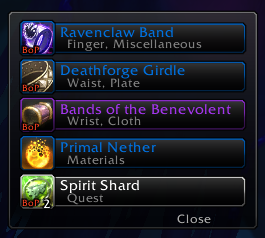
- Replaces the default Loot Frame with a compact, skinnable window showing quality borders, item level, and more.
- Rule-based auto-looting. Automatically loot only what you want:
- by category: currency, quest items, trade goods
- by rarity: everything at or above a quality you choose (e.g. greens and up)
- by gear: minimum quality and minimum item level
- by value: minimum total vendor price
- by a custom item list, or simply everything
- each rule can apply Solo, in Groups, Always, or Never
- Speedy auto-loot (new in 12.6.0). Instantly vacuum a corpse the moment its loot is available, one item per server tick and without opening the loot window. The steady pacing dodges the "looting too fast" disconnect on big AoE pulls. Off by default.
- Optionally limit it to only your filtered items (the rules above), leaving everything else in the loot window.
- Hold your auto-loot key (Shift by default) to skip it for a single corpse. It never runs under master loot.
- "New look" and "Upgrade" tags (new in 12.9.0). Mark loot rows for gear whose transmog appearance you haven't collected yet (a cyan (new look) tag) or whose item level beats what you have equipped (a green (upgrade) tag), so you never vendor or disenchant something worth keeping. Off by default.
- Link an entire loot drop to chat with one click, or have XLoot announce it automatically the moment the loot window opens (new in 12.11.0), using the same quality threshold. Each corpse is announced only once, so reopening it never repeats.
- Show each item's vendor sell price on the loot row, as plain text or as gold/silver/copper coin icons (new in 12.12.0).
- On the Classic flavors, also add the vendor sell price to item tooltips (with a full stack's value), which the base game doesn't show there (new in 12.9.0). Off by default, under /xloot → Global options. Retail shows sell price natively, so the option is hidden there.
- Extensive appearance options: colors, sizes, fonts (including an outline for item names), anchoring, and Masque skin support.
XLoot Monitor: the loot feed
- A "toaster" that pops a clean notification for each item looted, yours and/or others', similar to Guild Wars 2.
- Great for watching what's dropping at a glance, or for moving loot spam out of your chat box entirely.
- Shows item level on gear, stack counts, quality coloring, and optionally how many of an item you already own.
- Show gold from system messages (new in 12.8.0). Surface gold the game only reports as a system message, such as world-quest rewards and gold purses (Sky Racer's Purse). Off by default.
- Match your class colors (new in 12.7.0). Color rows by item quality, or switch to your own row border color and optionally extend it to coin and currency rows too.
- Hide Blizzard's default loot pop-ups so the built-in toasts don't pile up next to the Monitor.
- Right-click a row to dismiss it, and keep loot on screen as long as you like with adjustable fade times.
XLoot Toast: loot pop-up alerts (new in 12.12.0)
- A Blizzard-style pop-up toast that highlights notable loot the moment you receive it: item icon, quality-colored name, and a counting-up quantity, with a subtle glow-and-shine flourish.
- Loot several of the same item and they coalesce onto one toast with a "+N" blink, so a run of drops never buries your screen in toasts.
- Configurable to taste: a quality threshold (only toast rares and up, for example), quest items, item level, how many show at once, time on screen, spawn animation, sound, quality coloring, font, and a movable anchor with growth direction.
- Mouse behavior your way. Keep toasts fully clickable (right-click to dismiss, Shift-click to link in chat), make them click-through so they never eat a click meant for the UI behind them, or click-through until you hold Shift.
- When enabled, Toast also hides Blizzard's own duplicate loot toast (new in 12.12.2) so you see only one, and sits above other interface widgets instead of being covered by them.
- Off by default. Type /xltd to preview it. XLoot Toast shares the Monitor's loot detection, so keep the Monitor module enabled for toasts to appear.
XLoot Group: group loot rolls
- Need / Greed / Pass roll frames (plus Transmog on retail and Disenchant where the game supports it), with a countdown timer, item level, bind, and quality shown at a glance.
- See who rolled and who won (retail, new in 12.13.0). As your group rolls, the counts build up on the Need, Greed, and Transmog buttons, then the window names the winner in their class color with the winning roll type's icon, or shows Pass: All when nobody wanted it. Retail closes your own roll the instant you choose but doesn't decide the item until everyone has rolled, so the window now waits for the result, showing the current leader while it does, instead of vanishing. Off by default. The Classic flavors have always shown this. /xlgd previews it.
- Roll-frame highlight (new in 12.10.0). Recolor the roll window border to show why a drop matters at a glance: green for an item-level upgrade, blue for an appearance you haven't collected yet. Off by default.
- Per-item auto-roll (new in 12.10.0). Shift-click Need, Greed, or Pass on a roll window to save a rule for that item, and matching drops then roll for you automatically, including auto-confirming bind-on-pickup prompts. Auto-Need is behind its own opt-in, so a rule can never Need for you without your say-so. Off by default.
- Urgent roll timer (new in 12.11.0). The countdown can ramp the whole row border to red as time runs out, so a roll about to expire is easy to catch. Off by default.
- A movable anchor (/xlg) plus the usual color, size, font, and expiration options.
XLoot Master: master loot
- A configurable master-looter interface: assign loot from a clean right-click menu, with class submenus, special recipients (banker, disenchanter, self), raid rolls, and award announcements to chat.
- Fully supported on the Classic flavors (Classic Era, Burning Crusade, Mists of Pandaria), where master loot has always existed.
- Retail note: experimental and unverified. Blizzard quietly brought master loot back in patch 12.0.5, but only on Chinese (CN) realms. XLoot includes a retail master-loot interface built against Blizzard's current code, and the menu and detection are validated, but because the feature is live on CN realms only, we have no way to test the actual loot-assignment flow ourselves (none of us can log into a CN realm). So on retail it is experimental and unconfirmed. If you play on a CN realm, please let us know whether it works. Feedback either way is a huge help. Off CN it simply stays inactive.
- Open its options with /xlml.
Update notices
After an update, XLoot can show a short What's New summary of what changed. Pick how you want it under /xloot → After an update:
- Popup window. A tidy summary opens shortly after you log in.
- Chat link. A quiet, clickable link in chat you can open whenever you like.
- None. No popup and no chat message.
Skipped a few versions? The summary rolls everything you missed into one. And because every new feature ships off by default, an update never changes how your looting behaves until you choose to turn something on.
How to use
- Type /xloot (or go to Game Menu → Options → AddOns → XLoot) to configure everything.
- /xlm toggles the Monitor's anchor so you can drag the loot feed where you want it.
- /xlg toggles the Group anchor so you can position the roll frames.
- /xltd previews a few toasts so you can position the Toast anchor and try the settings.
- /xlgd previews sample roll frames so you can position the Group anchor and see the roll-results display.
- /xlml opens the Master Loot options (Classic flavors, experimental on retail CN).
- Every option has a mouseover tooltip explaining exactly what it does.
- Don't want a module? Disable XLoot Frame, Monitor, Toast, Group, or Master individually in the AddOns list, like any other addon.
Auto-loot quick start
- Open /xloot → Loot Frame → Auto-looting.
- XLoot's auto-loot rules run when its loot window opens, so leave WoW's own blanket auto-loot off if you want XLoot to do the filtering.
- Set each rule to Never / Solo / Group / Always. For gear and value, also set the minimum quality, item level, or price.
- Want it instant with no loot window? Turn on Speedy auto-loot at the top of that page. Add "Only speedy-loot filtered items" if you'd rather Speedy respect the rules above than grab everything.
Masque skins
Not all Masque skins will work without adjustment. See the comments at the top of skins.lua for how to add a tweak for a specific skin.
Support
XLoot was created and maintained for years by Xuerian, and is now maintained by Wheelbarrel00 with his blessing.
Join the community Discord for help, feedback, and update news.
If you'd like to support the project, there's a Donate button on the WoWAce page.
We welcome your feedback!

-

Xuerian Owner
-

MrFIXlT Maintainer
-

Wheelbarrel00 Maintainer